When I look at the landscape of home connectivity this year, Xfinity stands at a fascinating crossroads. On one hand, they have the most expansive cable footprint in the country, making them the default choice for millions.
On the other hand, the rise of specialized fiber networks and the maturing of home internet have put immense pressure on Comcast to innovate. They have responded with their 10G Network marketing push, which promised better reliability and lower latency.
In this guide, I am going to give an overview of Xfinity Home Internet so you can have a better experience for your online gaming, streaming, and remote work needs.
What is Xfinity Home Internet?
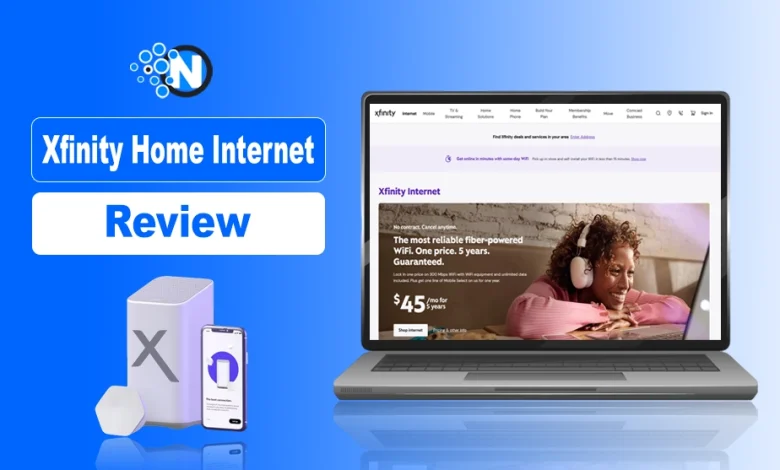
Xfinity Home Internet is a consumer broadband service provided by Comcast, the largest cable internet operator in the United States. It utilizes a fiber-coaxial network to deliver high-speed connectivity, WiFi solutions, and bundled digital services to residential customers nationwide.
In 2026, Xfinity is not just a pipe for data. It is an ecosystem that includes cybersecurity features, a massive network of public WiFi hotspots, and integration with their Xfinity Stream and mobile services.
What is the 10G Branding in Xfinity Home Internet?
The “10G” in Xfinity 10G does not mean 10th-generation cellular technology like 5G or 6G. Instead, it refers to the industry goal of delivering 10 gigabit speeds over cable networks.
While you might not actually be getting 10 Gbps at your kitchen table yet, the branding signifies that the network is built on a high-capacity foundation designed to handle the massive data demands of augmented reality and 8K streaming that are becoming more common this year.
The Hardware: xFi Gateways
The heart of the Xfinity experience is the xFi Gateway. In 2026, most new customers will receive the latest WiFi 7-enabled units, though comparing the XB10 vs XB8 shows that both deliver high-end modem and router capabilities in a single device. These devices are impressive because they combine a cable modem and a high-end router into one sleek white box.
I like that they include automated security that blocks known malicious sites at the network level. You also get access to an app that lets you pause the internet for specific smartphones and devices, which is a feature I know many parents find absolutely essential for managing screen time during dinner or homework hours.
Benefits and Drawbacks of Comcast Xfinity Home Internet
| Pros | Cons |
|---|---|
| Widely available across the United States. | Introductory pricing may increase after the promotional period. |
| Fast download speeds suitable for streaming, gaming, and remote work. | Upload speeds are generally lower than fiber internet. |
| xFi Gateway combines a modem and WiFi router with built-in security features. | Availability and pricing vary by location. |
| Access to millions of secure Xfinity WiFi hotspots nationwide. | Some plans may still have regional terms and conditions to review. |
| Flexible contract and no-contract options are available in many markets. | Fiber competitors may offer lower latency and symmetrical speeds. |
| Bundles with Xfinity Mobile and other Comcast services provide added value. | Multi-gig speeds are not available in every service area. |
Who Should Buy Comcast Xfinity Home Internet?
Xfinity Home Internet is not the perfect choice for everyone, but it works exceptionally well for certain users. Based on its speeds, nationwide availability, and bundled features, here is who will benefit the most.
Xfinity is a Good Choice If You:
- Need reliable internet for 4K streaming, online gaming, and remote work.
- Live in an area where fiber internet is unavailable.
- Want wide coverage with millions of Xfinity WiFi hotspots across the US.
- Prefer an all-in-one xFi Gateway with built-in WiFi, security, and parental controls.
- Plan to bundle internet with Xfinity Mobile or Xfinity Stream services.
- Have multiple users and smart home devices connected at the same time.
You May Want to Consider Other Options If You:
- Have access to fiber providers like Google Fiber or Verizon Fios and need faster upload speeds.
- Want completely symmetrical upload and download speeds.
- Frequently upload large files, back up data to the cloud, or stream professionally.
- Prefer providers with simpler pricing and fewer promotional rate changes.
How Much Does Xfinity Home Internet Cost?
Generally, Xfinity segments its plans into tiers like Connect, Connect More, Fast, Superfast, and Gigabit Extra. In 2026, prices typically start around $40 per month for basic speeds and can climb well over $100 for the multi-gigabit tiers.
The most important thing to watch out for is the “introductory period” versus the “standard rate,” as your bill can jump significantly after the first year or two.
And if you want full details about the subscriptions, you can go through my guide on Xfinity Internet Plans for 2026, where I have mentioned everything.
Hidden Fees and Data Caps
I want to be upfront about the extra costs that often hide in the fine print. Unless you are in a market where Xfinity has removed them to compete with fiber, data caps are still a reality for many.
Usually, you get about 1.2 terabytes of data per month. For most families, that is plenty, but if you are downloading massive 4K games or running a 24/7 security camera system, you might hit that limit.
Previously, Xfinity had an xFi Complete add-on for which you could pay $25 for unlimited data and an xFi gateway. But now both perks come along with plans. So, you don’t need it in 2026. Also, Xfinity has phased it out.
Contract vs No-Contract Options
One thing I appreciate about the current Xfinity model is the increased flexibility. You can often choose between a lower monthly rate if you sign a one-year or two-year contract, or a slightly higher rate with no commitment.
If you are a renter or someone who moves frequently, I always suggest going the no-contract route. It might cost you an extra $10 a month, but the peace of mind knowing you can cancel at any time without a massive early termination fee is worth its weight in gold.
How to Sign Up for Xfinity Home Internet?
The process of getting started with Xfinity has become incredibly streamlined over the last few years. They have moved away from the era of waiting on hold for an hour to speak with a sales representative. Today, most people can handle the entire transaction through their website or mobile app.
I find that the digital storefront is usually the best place to find the most aggressive “online only” deals that the phone agents might not even have access to.
1. Check Availability and Select a Plan
Your first step is always going to be the address check. Because Xfinity operates on a franchise model, service can vary from one block to the next.
Once you enter your address, the system will show you exactly which speed tiers are available to you. I recommend looking at your actual usage before picking the most expensive plan.
If you live alone and just stream movies, the 200 or 400 Mbps plans are more than enough. You do not need a Gigabit plan unless you have a house full of people all trying to stream and game simultaneously.
If you are involved in gaming, then my guide on the best Internet speed for gaming will be worth reading for you.
2. The Checkout Process and Credit Checks
When you move to the checkout, you will need to provide some basic personal information. Xfinity typically performs a credit check for new customers, especially if you are not opting for a prepaid plan.
If you have a lower credit score, they might ask for a small deposit or suggest their “Internet Essentials” or “Prepaid” options. Once you pass that hurdle, you will choose between a professional installation or a Getting Started Kit for a self-install.
In 2026, almost everyone should go with the self-install kit because it is faster and usually much cheaper.
Does Xfinity Offer 5G Home Internet?
Xfinity is not a 5G home internet provider in the same way that T-Mobile or Verizon are.
This is a common point of confusion because Xfinity has a mobile service that uses 5G. However, when it comes to your home connection, Xfinity relies on physical wires coming into your house. That said, they have started to integrate cellular backup into some of their higher-end residential packages.
This means if a storm knocks out your cable line, the gateway can automatically switch to a cellular signal so you stay online.
Xfinity vs 5G Home Internet Competitors
While Xfinity does not “sell” 5G home internet as its primary product, it is in direct competition with it. 5G home internet is often cheaper and easier to set up because there are no wires, but it is also much more variable.
In my testing, Xfinity cable is almost always faster and more stable than a 5G signal, which can fluctuate based on how many people are using the local cell tower. If you are a heavy user, Xfinity is the better bet. If you are a light user looking to save money, 5G might be tempting.
How Can You Cancel Xfinity Home Internet?
Life changes, and sometimes you need to part ways with your provider. Whether you are moving to an area without coverage, you found a better deal with a local fiber startup, or you have planned to switch to Google Fiber, canceling Xfinity is a process that requires a bit of strategy.
Unlike signing up, they do not always make it easy to cancel with a single click. You usually have to speak with a “retention specialist” whose entire job is to convince you to stay by offering you a lower rate or a temporary promotional upgrade.
1. Prepare for the Retention Call
- If you are committed to canceling, I recommend having your talking points ready.
- If you tell them you are moving to a country where they do not offer service, they generally process the cancellation quickly.
- And if you tell them you are switching to a competitor, be prepared for a sales pitch.
It is also vital to check if you are under contract. If you have six months left on a two-year agreement, you might be looking at an early termination fee of ten dollars for every month remaining.
Always ask them to waive this, especially if you have been a long-term loyal customer.
2. Return Your Equipment
The most important step in canceling is returning the gateway. I have seen so many people get hit with “unreturned equipment” fees that can cost over $200. However, if you have your own Xfinity-compatible router, you don’t need to return it.
You can drop off the equipment at any Xfinity Store, or, in many cases, you can bring it to a local UPS Store, where they will pack and ship it for you for free. Make sure you get a receipt with the serial number of the device on it.
Keep that receipt in a safe place for at least 6 months, just in case a mystery charge appears on your final statement.
What People Also Ask Questions About Xfinity Home Internet
How to check Xfinity internet speed at home?
You can run a real-time connection test by visiting speedtest.xfinity.com in your browser or by using the WiFi tab within the Xfinity app to test the speed specifically reaching your gateway.
Does Xfinity have 5G home internet?
Xfinity does not offer a standalone 5G fixed-wireless home internet service, but they provide NOW Internet as a low-cost cable alternative and offers 5G cellular backup for high-end plans through its mobile network.
Is Verizon home internet better than Xfinity?
Verizon Fios generally outperforms Xfinity on upload speeds and latency due to its 100% fiber network, though Xfinity typically has wider availability and more robust bundle options for TV and home security.
How do I use my Xfinity internet away from home?
You can connect to millions of secure Xfinity WiFi hotspots across the country by signing in with your Xfinity ID via the Xfinity app or by selecting the xfinitywifi network in your device settings.
How to cancel my Xfinity home internet?
To cancel your service, you must call Xfinity at 1-800-XFINITY, schedule a callback through their website, or visit a local Xfinity Store in person to speak with a representative.
What's My Anticipation About the Future?
The world of home internet in 2026 is faster and more competitive than ever, and Comcast Xfinity remains a powerhouse for a reason.
While they have their quirks, like the dreaded price hikes and data caps, their infrastructure is remarkably reliable for most American households. If you have access to the best Fiber Internet providers in the USA, I would still suggest checking that out first.
But for the majority of us, Xfinity offers a high-speed, feature-rich experience that is hard to beat. Just remember to stay on top of your promotional pricing and don’t be afraid to renegotiate your bill every year or two.