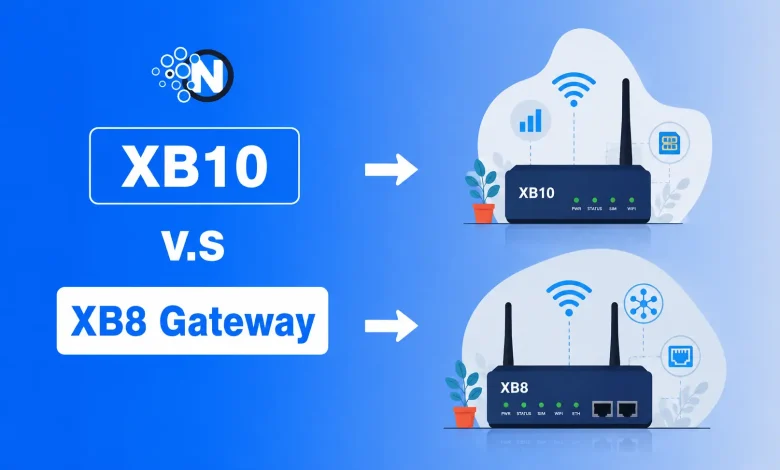
Yesterday, while updating my guide on xFi Complete, I noticed something interesting. Many Xfinity customers were no longer asking whether they should rent the gateway. They were asking which gateway they were actually getting.
Some were receiving the familiar XB8, while others had started hearing about the newer XB10. The confusion made sense because both gateways belong to the Xfinity ecosystem, yet they target different generations of broadband technology.
After reviewing Comcast’s latest announcements and rollout details, I found that the XB10 is more than a routine hardware refresh. It introduces DOCSIS 4.0 and WiFi 7, while the XB8 continues to serve as the primary gateway for millions of Xfinity customers using WiFi 6E. The catch is that the XB10 is still rolling out only in eligible markets and plans.
If you’re comparing the XB10 and XB8, this guide explains the key differences in hardware, performance, availability, and whether upgrading is actually worth it for your Xfinity internet plan.
What Is the Xfinity XB10 Gateway?
The XB10 is Xfinity’s newest Advanced Gateway, built to support the company’s next-generation broadband network. The gateway also works alongside several Xfinity features designed to improve network management, security, and connected home performance.
It also supports modern wireless security standards that help protect connected devices. Learn more about the differences between WPA2 vs WPA3 if you’re upgrading your home WiFi security.
Unlike previous gateways, it combines DOCSIS 4.0 with WiFi 7, allowing compatible customers to take advantage of symmetrical multi-gig internet speeds, lower latency, and higher device capacity. Comcast says the gateway can support up to 300 connected devices in a smart home environment.
The XB10 is designed for customers living in areas where Comcast has upgraded its network to DOCSIS 4.0. Because those upgrades are still expanding, the gateway isn’t yet available to every Xfinity subscriber.
If you’re unsure how this gateway fits into Comcast’s latest internet packages, see our guide on Xfinity Internet Plans.
What Is the Xfinity XB8 Gateway?
The XB8 Gateway remains the standard gateway for many Xfinity customers, although users who prefer owning their equipment instead of renting can choose from several Xfinity-compatible modems that work with eligible Xfinity internet plans.
It uses DOCSIS 3.1 and WiFi 6E, providing fast multi-gig performance, access to the 6 GHz wireless band, and strong coverage for homes with dozens of connected devices.
For most households, the XB8 already delivers more than enough performance for:
- 4K streaming
- Cloud gaming
- Remote work
- Smart home devices
- Video conferencing
- Large file downloads
Although it lacks DOCSIS 4.0 support, the XB8 remains one of the most capable gateways available for today’s widely deployed Xfinity network. Learn how it fits into the complete ecosystem in our comparison of xFi Gateway vs xFi Complete vs Xfinity Pro.
| Features | XB10 | XB8 |
|---|---|---|
| Release Generation | Latest | Previous Flagship |
| DOCSIS | 4.0 | 3.1 |
| WiFi Standard | WiFi 7 | WiFi 6E |
| 6 GHz Band | ✅ | ✅ |
| Symmetrical Multi-Gig Support | ✅ | Limited by network |
| Best For | X-Class customers | Most Xfinity users |
| Availability | Limited rollout | Widely available |
XB10 vs XB8 Performance: Which Gateway Is Faster?
On paper, the XB10 is the more powerful gateway because it combines DOCSIS 4.0 with WiFi 7, giving it greater bandwidth, lower latency, and improved efficiency when many devices are connected simultaneously.
Comcast positions it as the gateway for its newest symmetrical multi-gig internet service.
However, that doesn’t automatically mean every customer will experience faster internet. Your internet plan, local Xfinity network upgrades, and the devices connected to your home all play a bigger role than the gateway alone.
Your real-world speed still depends on:
- Your Xfinity internet plan
- Whether DOCSIS 4.0 is available in your neighborhood
- The devices connected to your network
- Whether your laptop or phone supports WiFi 7
For many households on current Xfinity plans, the XB8 already delivers the full speed their connection allows, making the performance difference difficult to notice in everyday use.
WiFi 7 vs WiFi 6E: Is There a Noticeable Difference?
One of the biggest reasons people compare the XB10 Gateway with the XB8 is wireless technology.
The XB8 introduced WiFi 6E, giving Xfinity customers access to the 6 GHz band for lower congestion and better wireless performance than previous WiFi generations.
The XB10 takes another step forward by adopting WiFi 7, which is designed to improve bandwidth efficiency, reduce latency, and handle a larger number of connected devices simultaneously.
It also introduces technologies such as Multi-Link Operation (MLO) that allow compatible devices to communicate across multiple frequency bands for more stable performance.
Does WiFi 7 Matter Today?
For most Xfinity customers today, probably not.
If your devices are still using WiFi 6 or WiFi 6E, upgrading to an XB10 won’t automatically increase your internet speed. To experience the full benefits, you’ll need:
- A WiFi 7-compatible phone, laptop, or PC
- An eligible Xfinity DOCSIS 4.0/X-Class service area
- A multi-gig Xfinity internet plan
Otherwise, the XB8 already delivers excellent performance for streaming, gaming, video calls, and smart home devices.
Is the XB10 included with xFi Complete?
Not automatically.
This is where many Xfinity customers get confused. Having xFi Complete doesn’t guarantee you’ll receive an XB10. The gateway you receive depends on:
- Your location
- Network availability
- Whether your neighborhood has DOCSIS 4.0/X-Class service
- Your internet plan
Even if your plan includes the latest gateway, Xfinity assigns available hardware based on inventory and network availability in your area.
Customers in eligible rollout areas may receive the XB10, while most subscribers will continue receiving the XB8 until Comcast expands deployment.
Does the XB10 Work Better with xFi Complete?
Simply having xFi Complete doesn’t make the XB10 perform better than the XB8. The add-on mainly provides benefits such as unlimited data on eligible legacy plans, gateway management, and enhanced network features.
The gateway model you receive still depends on your Xfinity plan, service address, and whether DOCSIS 4.0 has been rolled out in your area.
If you’re eligible for an XB10, pairing it with xFi Complete gives you access to Xfinity’s latest hardware and network management tools, but customers in areas where the XB10 isn’t available will continue using the XB8 with the same xFi experience.
Should You Upgrade from XB8 to XB10?
Upgrade if you:
- Live in a DOCSIS 4.0/X-Class market.
- Subscribe to a multi-gig Xfinity plan.
- Own WiFi 7 devices.
- Frequently transfer large files or need faster upload speeds.
Keep the XB8 if:
- You have a 300 Mbps–2 Gbps plan.
- Your devices don’t support WiFi 7.
- Your area hasn’t received DOCSIS 4.0 upgrades.
- Your current gateway performs reliably.
For many households, the XB8 remains more than capable, and upgrading solely for WiFi 7 won’t deliver meaningful day-to-day improvements.
Pros and Cons
XB10
| Pros | Cons |
|---|---|
| Latest WiFi 7 technology | Limited availability |
| DOCSIS 4.0 ready | Requires eligible network upgrades |
| Better future-proofing | WiFi 7 benefits depend on compatible devices |
| Improved capacity for large smart homes | |
| Designed for symmetrical multi-gig service |
XB8
| XB8 Pros | XB8 Cons |
|---|---|
| Widely available | No DOCSIS 4.0 |
| Excellent WiFi 6E performance | Slower upload capabilities compared with future X-Class deployments |
| Reliable for gaming and streaming | |
| Supports multi-gig internet plans |
Common Questions About the XB10 and XB8 Gateway
Is XB10 better than XB8?
Yes, from a technology perspective. The XB10 supports DOCSIS 4.0 and WiFi 7, while the XB8 uses DOCSIS 3.1 and WiFi 6E. However, the practical benefits depend on whether your plan, devices, and location support those newer technologies.
Does the XB10 support WiFi 7?
Yes. The XB10 is Xfinity’s first gateway built with WiFi 7 and DOCSIS 4.0.
Can I request an XB10 from Xfinity?
You can ask, but availability depends on your market and whether your address is eligible for DOCSIS 4.0/X-Class service. Many customers will continue receiving the XB8 until rollout expands.
Is the XB8 still worth getting?
Absolutely. The XB8 remains one of Xfinity’s best gateways for current internet plans and offers excellent performance for most homes.
Which gateway is best for smart homes?
If your home has dozens of connected devices and you have access to DOCSIS 4.0 service, the XB10 is the stronger long-term option. Otherwise, the XB8 is still an excellent choice.
How Can You Get the Xfinity XB10 Gateway?
You can’t request a specific gateway model when signing up for Xfinity Internet. Gateway availability depends on your service address, internet plan, and whether Comcast has upgraded your area to DOCSIS 4.0 (X-Class). If your location is eligible, Xfinity may provide the XB10 during a new installation or when replacing an older gateway.
Which Xfinity Gateway Should You Choose?
After comparing both gateways and reviewing Xfinity’s latest rollout, I’d choose the XB10 only if it’s available at my address and my internet plan can actually benefit from DOCSIS 4.0 and WiFi 7. Otherwise, I’d confidently stick with the XB8 because it already delivers excellent performance for streaming, gaming, remote work, and connected smart home devices.
The XB10 is Xfinity’s most advanced gateway to date, but that doesn’t automatically make it the best choice for every household. If DOCSIS 4.0 and WiFi 7 are available in your area, upgrading to the XB10 can help you get the most from Xfinity’s next-generation network.
Otherwise, the XB8 remains a powerful and reliable gateway that already delivers excellent performance for streaming, gaming, remote work, and connected smart home devices. In the end, the right choice depends on your internet plan, local network availability, and whether your devices are ready to benefit from the latest wireless technology.