Xfinity Gateway vs Third-Party Router: Pros and Cons for Home

Most of us just want reliable Home Internet that reaches every corner of the house without breaking the bank or requiring a degree in computer science. And Xfinity has done this quite incredibly.
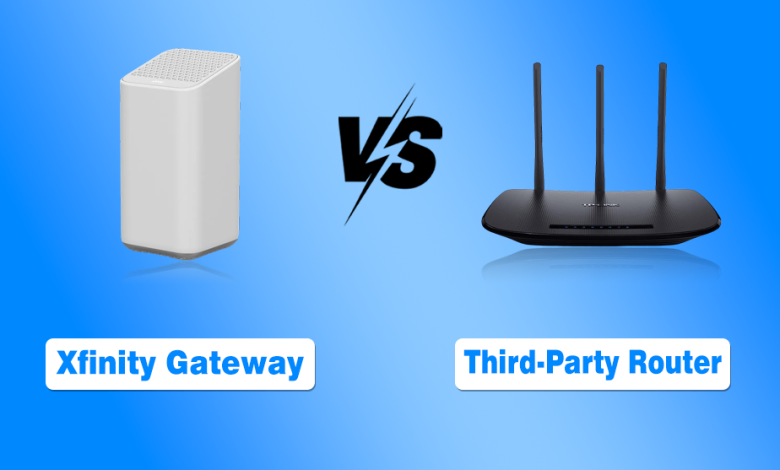
But the primary confusion occurs when it comes to deciding between the Xfinity Gateway and a third-party router. Both have their own specific perks and cons as well. So, choosing the right equipment is really challenging.
In this guide, I have provided a complete, detailed comparison of the Xfinity gateway vs. a third-party router to let you figure out which setup actually makes sense for your specific lifestyle and budget.
Xfinity Gateway vs Third-Party Router: Complete Comparison
Now, I am comparing the Xfinity Gateway vs. a third-party router across 10 critical factors that will help you see exactly where each device shines and where it might fall short of your expectations for Xfinity Home Internet.
1. Monthly Equipment Costs
This factor focuses on whether you prefer a small recurring monthly fee or a larger upfront investment to own your equipment outright.
- Xfinity Gateway: Xfinity currently lists its Gateway rental at $15 per month, although equipment costs can vary by plan or promotion.
- Third-Party Router: You pay a one-time purchase price at a retailer, which can range from fifty dollars to several hundred dollars, depending on the performance level you choose.
Winner: Third-Party Router
2. Ease of Installation
Setting up the internet should be a quick process, and this factor looks at how much effort is required to get your devices online.
- Xfinity Gateway: The activation process is streamlined through the Xfinity app, which guides you through getting the Gateway online. During setup, the status light can also help you understand what the device is doing, particularly if your Xfinity router is blinking white instead of reaching its normal online state.
- Third-Party Router: You must manually connect the router to one of the xFi Compatible Modems and then navigate the web interface to set up your network.
Winner: Xfinity Gateway
If you want complete details on how to set up Xfinity Home Internet, I have already created a comprehensive guide.
3. Long-Term Maintenance
Technology eventually breaks or becomes outdated, so this factor considers who is responsible for fixing or replacing the unit when things go wrong.
- Xfinity Gateway: If the device fails or becomes obsolete, Xfinity will typically swap it out for a newer model at no extra cost to you beyond your rental fee. Thus, you can activate a new modem for Xfinity Home Internet.
- Third-Party Router: You are responsible for all troubleshooting, and if the hardware fails after the warranty period expires, you must spend money to buy a new one yourself.
Winner: Xfinity Gateway
4. Technical Support Availability
When your WiFi stops working at midnight, you need to know who is going to help you get back online without a headache.
- Xfinity Gateway: Xfinity can run diagnostics and troubleshoot its Gateway when connection problems occur. This integrated support is particularly useful when the Xfinity router is blinking orange and struggling to establish a normal connection.
- Third-Party Router: Xfinity support can only see the signal reaching your modem, and they cannot help you configure or troubleshoot any issues happening inside your private router.
Winner: Xfinity Gateway
5. Advanced Customization Features
Power users often want to tweak every setting from VPN integration to specific port forwarding, and this factor measures that level of freedom.
- Xfinity Gateway: The settings are simplified for the average user, which means you have limited control over advanced networking protocols or deep-level security configurations.
- Third-Party Router: You get full access to the firmware when you find the best router for Xfinity, which allows you to install custom software or set up complex home lab environments.
Winner: Third-Party Router
6. Coverage and Mesh Expandability
Getting a signal into the basement or a far bedroom is essential for large homes, and this factor looks at how easily you can expand.
- Xfinity Gateway: You can purchase xFi Pods, which are proprietary mesh extenders designed to work seamlessly with the gateway to eliminate dead zones in your house.
- Third-Party Router: You have the freedom to buy a dedicated mesh system from brands like Eero or Orbi, which often provide superior range and faster satellite speeds.
Winner: Third-Party Router
7. Integrated Smart Home Security
Cybersecurity is a growing concern for families, and this factor compares the built-in protections against hackers and malicious websites.
- Xfinity Gateway: It comes with xFi Advanced Security, which automatically blocks known threats at the gateway level before they ever reach your phones or computers.
- Third-Party Router: Many high-end routers offer security suites, but they often require an additional monthly subscription fee to keep the threat database updated and active.
Winner: Xfinity Gateway
8. Wi-Fi Standards and Speed
Internet speed also depends on your hardware. The FCC notes that modems, Wi-Fi routers, connected devices, and in-home conditions can affect broadband performance.
- Xfinity Gateway: The latest models support WiFi 7 and are built to handle the highest Xfinity Internet Plans without bottlenecking your connection.
- Third-Party Router: While you can buy Wi-Fi 6E routers, they are often very expensive, and the mid-range models might only support older Wi-Fi 6 standards.
Winner: Xfinity Gateway
9. App Experience and Management
Most of us manage our networks through our phones now, so the quality of the mobile application is a major factor in daily use.
- Xfinity Gateway: While you can contact Xfinity customer service, the Xfinity app is a centralized hub where you can pay your bill, pause Wi-Fi for kids, or check your data usage.
- Third-Party Router: You will have to use one app for your router and a separate Xfinity app for your billing, which creates a fragmented experience for the user.
Winner: Xfinity Gateway
10. Connection Stability and Technology
The type of Internet you use will dictate how your hardware performs, and this factor looks at how well the equipment handles modern signals.
- Xfinity Gateway: This hardware is specifically tuned for Comcast cable infrastructure, ensuring that your Xfinity Home Internet speed remains consistent during peak hours.
- Third-Party Router: While highly versatile, a third-party router might require frequent firmware updates to maintain compatibility with changes in the service provider’s network.
Winner: Xfinity Gateway
11. Market Comparison
If you are looking to choose the best internet for your home, you might consider how Xfinity hardware stacks up against other massive providers.
- Xfinity Gateway: This device holds its own even when compared to high-end equipment from the best Fiber Internet Providers in the USA.
- Third-Party Router: Having your own router allows you to switch between different providers like Google Fiber without needing to learn new hardware.
Winner: Third-Party Router
12. Understanding Throughput
Performance is everything, and this factor looks at how the hardware manages your overall Internet speed when multiple people are online.
- Xfinity Gateway: It uses intelligent band steering to move your devices between 2.4GHz and 5GHz frequencies automatically to reduce congestion.
- Third-Party Router: Many top-tier routers allow you to manually assign devices to specific bands, which gives you more control over your bandwidth allocation.
Winner: Third-Party Router
My Opinion on Xfinity Gateway vs. Third-Party Routers for Xfinity Home Internet
My honest recommendation is that most people should actually stick with the Xfinity Gateway for the convenience and integrated support it offers to the average household.
While enthusiasts might love the control of their own gear, the Xfinity Gateway is surprisingly capable for modern streaming and gaming needs, especially when you look at the Xfinity features available today.
- The Xfinity Gateway is best for users who want a simple plug-and-play experience with 24/7 technical support.
- A Third-Party Router is best for tech-savvy users who want to save money on monthly rental fees over time.
People Also Ask
Will I save money every month if I buy my own equipment?
You will typically save between $14 and $15 per month on your bill by eliminating the equipment rental fee.
Does Xfinity provide technical support for my third-party router?
Xfinity can only troubleshoot the internet signal reaching your home and cannot provide support for the internal settings or hardware of a third-party router.
Do I need a separate modem if I buy a third-party router?
Yes, you must either buy a compatible standalone modem or a 2-in-1 cable modem router combo to connect to the Xfinity network.