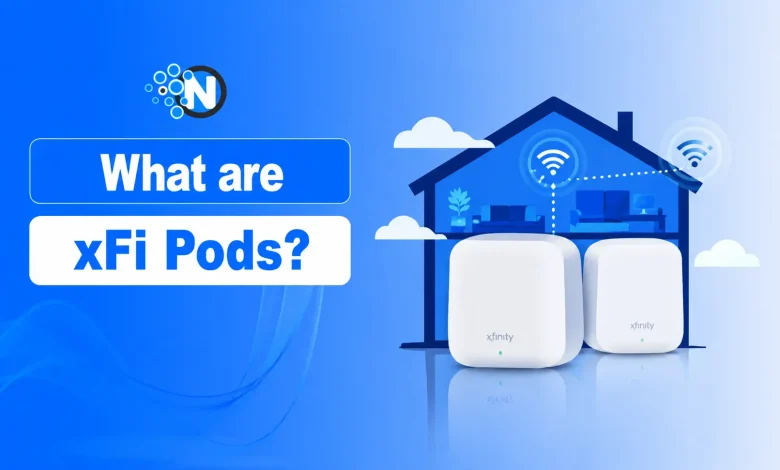
xFi Pods are Xfinity’s mesh WiFi extenders for improving wireless coverage and reducing dead zones around the home. Xfinity’s internet service now markets the current devices as Xfinity WiFi Extenders, while older customers and searches may still refer to them as xFi Pods or WiFi Boost Pods.
They work with a compatible Xfinity Gateway to create a single mesh network. If your internet plan is already fast enough but the signal becomes weak upstairs, in a basement, or in rooms farther from the gateway, an Xfinity WiFi Extender can improve coverage and connection stability. It does not increase the speed of your internet plan.
For larger or multi-story homes with genuine WiFi dead zones, these extenders can be useful. If your gateway already provides reliable coverage throughout your home, however, adding one is unlikely to provide much benefit.
How Do xFi Pods Work?
xFi Pods use mesh networking technology to expand WiFi coverage without requiring users to manually switch between different wireless networks.
Once plugged into suitable locations around the home, each Pod communicates with the Xfinity Gateway and nearby Pods to create a unified wireless network. As you move around your house, your phone, laptop, gaming console, or smart TV automatically connects to the strongest signal available.
This seamless handoff is one of the biggest differences between mesh WiFi systems and older wireless extenders.
The entire network is managed through the Xfinity app, where users can monitor connected devices, view network performance, and receive automatic firmware updates without additional configuration. The wireless capabilities available across the network also depend on the gateway and the WiFi standard supported by your Xfinity equipment.
Because xFi Pods work alongside compatible Xfinity gateways, the overall experience also depends on the hardware installed in your home. If you’re unsure whether you have the latest gateway, see NogenTech’s comparison of XB10 vs XB8 Gateway.
How Much Do xFi Pods Cost?
Xfinity currently lists one WiFi Extender for $119 and two for $199 for eligible customers with a compatible Xfinity Gateway. Availability can vary by area, and some eligible Xfinity Pro or WiFi Boost Guarantee customers may receive extenders when Xfinity’s network assessment recommends them.
Before buying one, confirm that weak WiFi coverage is actually the problem. If your gateway already provides a reliable signal throughout your home, additional mesh hardware may offer little benefit.
Are xFi Pods Included with xFi Complete?
Not always. If you are an Xfinity Internet legacy user and have subscribed to xFi Complete, it doesn’t automatically mean you’ll receive xFi Pods. Xfinity typically recommends or provides them only after determining that your home has WiFi coverage issues that can’t be resolved by the gateway alone.
Whether you’re eligible depends on factors such as:
- Your home’s layout and size
- WiFi performance assessment
- Your Xfinity equipment
- Current promotions and program availability
For many households, the gateway provides enough coverage without additional hardware. Others may benefit from one or more Pods to eliminate dead zones.
How to Set Up and Connect xFi Pods
Setting up xFi Pods is handled through the Xfinity app and requires a compatible, active Xfinity Gateway. Before starting, place the Pod in an open wall outlet where it can still receive a reliable signal from the gateway rather than directly inside the WiFi dead zone.
To connect an xFi Pod:
- Open the Xfinity app and sign in to your account.
- Plug your xFi Pod into a wall outlet halfway between your gateway and the weak WiFi area.
- In the app, tap Account (or WiFi) and select Add xFi Pod.
- Follow the on-screen instructions to pair the Pod with your xFi Gateway.
- Wait for the app to confirm the Pod is connected and optimized.
- Repeat the process for any additional Pods if needed.
Once connected, the Pod becomes part of the same home WiFi network as your Xfinity Gateway. You do not need to create a separate WiFi name or manually switch networks when moving between rooms.
xFi Pods vs Traditional WiFi Extenders
Many people assume xFi Pods work like standard WiFi extenders, but the two technologies solve wireless coverage differently.
| Feature | xFi Pods | Traditional WiFi Extender |
| Network Type | Mesh WiFi | Signal Repeater |
| Roaming | Automatic | Often Manual |
| Network Name | Single SSID | Separate SSID (in many cases) |
| Management | Xfinity App | Manufacturer App |
| Best For | Whole-home coverage | Single weak area |
| Integration | Xfinity Gateway | Works with various routers |
For homes with multiple dead zones or dozens of connected devices, xFi Pods can provide a smoother experience because they maintain one continuous WiFi network instead of repeating the signal from a single location.
Traditional WiFi extenders can still be useful for smaller homes, but they often require manual network switching and may not provide the same level of roaming performance.
Pros and Cons of xFi Pods
| Pros | Cons |
| Eliminates WiFi dead zones | Doesn’t increase the internet plan speed |
| Creates a seamless mesh network | Works best within the Xfinity ecosystem |
| Automatic roaming between rooms | May not benefit small homes |
| Easy setup through the Xfinity app | Availability may depend on eligibility |
| Ideal for larger homes with many connected devices | Additional hardware isn’t necessary for every user |
Do xFi Pods Actually Improve WiFi Coverage?
Yes, but only when poor WiFi coverage is the real problem.
One of the biggest misconceptions is that xFi Pods increase internet speed. They don’t. Instead, they extend your existing WiFi signal into areas where the gateway alone struggles to provide a reliable connection.
If your current plan already provides enough bandwidth, for example, a 300 Mbps connection that’s fast enough for most households, but certain rooms still experience weak signals, xFi Pods can noticeably improve stability because the issue is coverage rather than speed.
xFi Pods can be particularly useful in the following situations:
| Scenario | Can xFi Pods Help? |
|---|---|
| Weak signal upstairs | Yes, if the Pod has a good connection to the gateway |
| Basement dead zones | Often, depending on placement |
| Larger homes | Useful for extending coverage |
| Smart home devices | Can improve connection stability |
| Video calls | Can reduce WiFi-related interruptions |
| 4K streaming | Can help when weak WiFi is causing buffering |
| Online gaming | May improve wireless stability |
| Increasing plan speed | No |
In other words, xFi Pods improve where your WiFi reaches, not how fast your internet plan is.
What to Do If Your xFi Pods Won't Connect
If an xFi Pod does not connect during setup, first check that your Xfinity Gateway is online and that the Pod is plugged directly into a working wall outlet. Moving the Pod closer to the gateway during initial setup can also help if the wireless signal is too weak.
You can also reopen the Xfinity app and check whether the Pod appears in your network devices. If you recently replaced or upgraded your gateway, the Pod may need to be connected again to the new equipment.
If the problem continues, follow the troubleshooting or reset instructions shown in the Xfinity app or Xfinity support resources for your specific Pod model. Avoid repeatedly resetting equipment before checking whether the Pod and gateway are compatible.
Frequently Asked Questions
How Many xFi Pods Do I Need?
The number of xFi Pods you need depends on your home’s size, layout, gateway placement, and existing WiFi coverage.
Can xFi Pods Replace a Mesh WiFi System?
For many Xfinity customers, yes. However, users who need advanced controls or wider coverage may prefer a dedicated third-party mesh WiFi system.
How Do I Reset an xFi Pod?
If an xFi Pod stops connecting, first check its status in the Xfinity app and confirm that the gateway is online. If a reset or reactivation is required, follow the instructions provided in the app or Xfinity’s support documentation for your specific Pod model.
Are xFi Pods Worth it? Final Thoughts
xFi Pods are worth it for Xfinity customers who have WiFi dead zones despite having sufficient internet speed.
If your WiFi problems are caused by poor coverage rather than slow internet speeds, xFi Pods are one of the most convenient solutions available for Xfinity customers. Their seamless integration with the Xfinity app, automatic optimization, and mesh networking make them easier to manage than many traditional WiFi extenders.
For homes that already have consistent WiFi coverage, upgrading the gateway or reviewing your current Xfinity Home Internet plan may provide greater value than adding another mesh device.