Can You Get Comcast Business Internet at Home? Is It Worth It?
It can work at a residential address, but the extra cost only makes sense if you actually need business-level features.

Yes, Comcast Business Internet can be available at residential addresses, especially for home offices and home-based businesses. Your address still has to qualify for Business service, so residential Xfinity availability doesn’t automatically guarantee it.
Some customers report getting Comcast Business at home without being asked for a business license, but Comcast’s supplied documentation doesn’t establish that as a universal policy. Confirm the requirements when checking your address.
The main reason to choose it over Xfinity home internet isn’t simply speed. Comcast Business adds options such as static IPs, business security, backup connectivity, and business-focused support.
How Does Comcast Business Internet Work at Home?
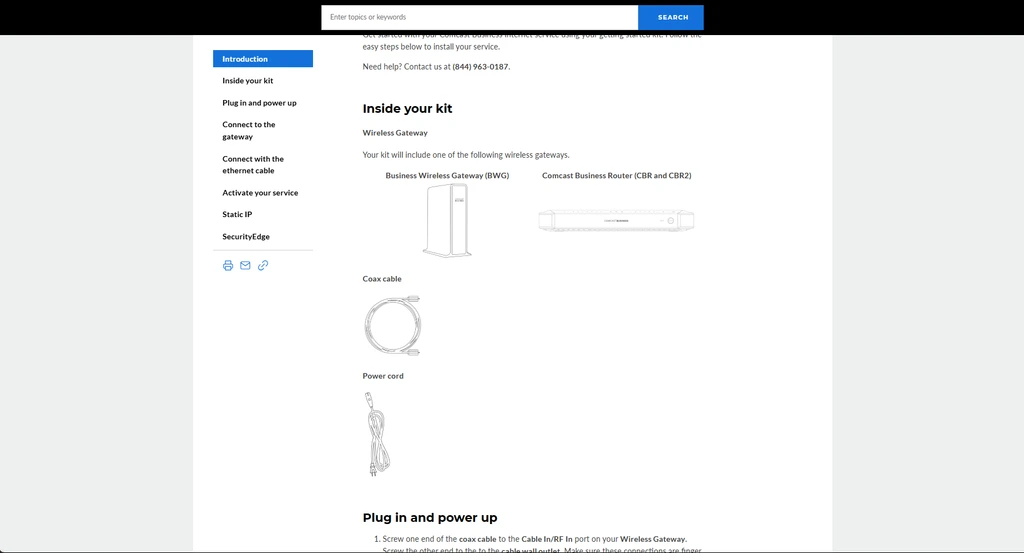
Once Comcast approves your address, installation works much like cable internet. A Business Wireless Gateway (BWG) or Comcast Business Router (CBR/CBR2) connects through coax, while your devices connect through WiFi or Ethernet.
Business Internet doesn’t necessarily mean Comcast installs a separate network at your home. In a Reddit discussion about Comcast Business vs. residential service, users described Business DOCSIS as running on the same infrastructure, with the main differences being the service features and support around it.

The difference is mainly the business plan, features, equipment, and support around that connection.
For eligible self-installs, Comcast provides a Getting Started Kit. Connect the Gateway to coax and power, wait for it to come online, and then use the WiFi credentials printed on the equipment or connect through Ethernet.
Comcast Business Internet Plans and Pricing
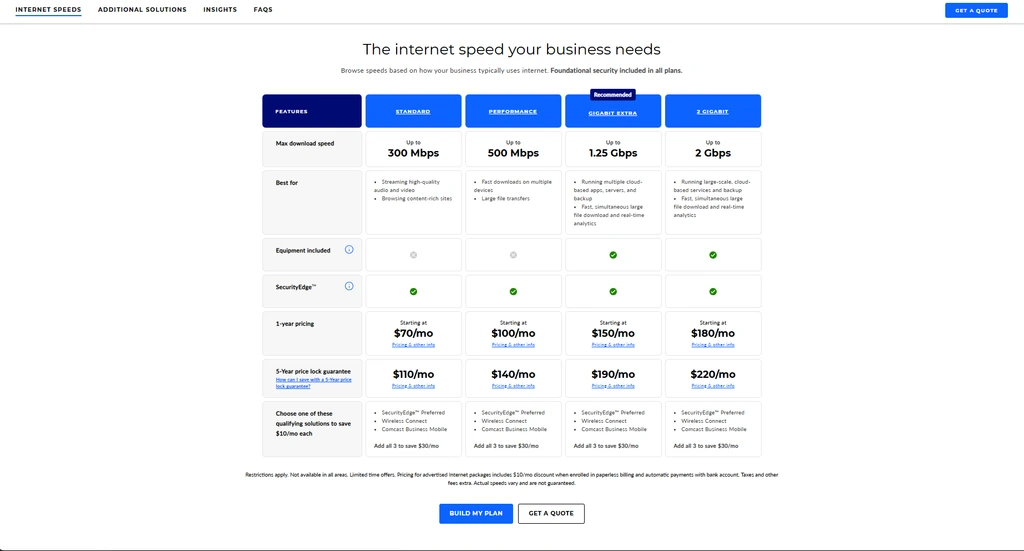
The current Comcast Business internet plans in the supplied research range from 300 Mbps to 2 Gbps.
| Plan | Download Speed | Starting Price* |
| Standard | Up to 300 Mbps | $70/mo |
| Performance | Up to 500 Mbps | $100/mo |
| Gigabit Extra | Up to 1.25 Gbps | $150/mo |
| 2 Gigabit | Up to 2 Gbps | $180/mo |
These are starting prices rather than guaranteed rates. CableTV.com’s Comcast Business review lists plans from $70 to $180 per month and notes that offers and availability can vary by location. Taxes, billing discounts, and service-agreement terms can also affect the final cost.
Don’t compare Comcast Business and Xfinity on Mbps alone. Check the final price available at your address and whether you’ll actually use the additional business features.
Comcast Business vs. Xfinity Home Internet
Xfinity Home Internet is built for residential use. Comcast Business is designed around businesses and adds networking and support options that most households don’t require.
| Feature | Comcast Business | Xfinity Home Internet |
| Best for | Businesses and advanced home offices | Regular household use |
| Static IP | Available with qualifying service | Not a standard residential feature |
| Security | Business security options | Residential security features |
| Backup connectivity | Available | No equivalent standard Business backup service |
| Data caps | No data caps | Depends on service/market |
| Support | Business-focused | Residential |
| Contracts | May apply | Depends on offer |
| Cost | Generally higher | Usually cheaper for home use |
For basic streaming, gaming, video calls, browsing, and remote work, Xfinity will usually be the more practical choice. Comcast Business becomes more useful when your home connection supports business-critical systems.
What Do You Get with Comcast Business at Home?
One important feature is static IP availability. A consistent public IP can be useful for certain VPNs, remote-access systems, servers, and security configurations. Comcast lists static IPs with qualifying Business Internet packages.
Comcast Business also offers SecurityEdge and backup-connectivity options for businesses that need additional network protection or a way to stay connected when the primary connection fails.
Another advantage is no data caps, according to Comcast. That can matter for businesses doing frequent cloud backups, large file transfers, or other data-heavy work.
However, don’t assume Business Internet automatically means a faster or more reliable physical connection. Community experiences are mixed, and Business and residential cable service can share Comcast’s underlying infrastructure.
Is Comcast Business Internet at Home Worth It?
It depends on how costly an internet problem would be for your work. If an outage is only an inconvenience, residential Xfinity is likely the better value. If downtime can interrupt client work, payments, or other business operations, paying more for Business service can make sense.
Before signing up, compare the actual quote for your address, including equipment, installation, optional services, and contract terms, not just the advertised monthly price.
The simple rule: pay for Business Internet when your connection is business-critical, not just because you work from home.