You’ve probably used dozens of SaaS applications today without even realizing they’re SaaS.
Over the years, I’ve published dozens of articles on Software as a Service (SaaS), covering topics like Micro SaaS, SaaS business models, software development, cloud computing, AI-powered software, and managed services.
Other than that, the global SaaS market is expected to surpass $250 billion and could reach $1.25 trillion by 2034, with nearly 95% of organizations already relying on SaaS software for critical operations.
During my research, I realized that most resources explain only one aspect of SaaS instead of the complete ecosystem. That’s why I created this guide.
Here you will explore:
- What SaaS is and how it works
- Why businesses are rapidly adopting cloud-based software
- Different types of SaaS, pricing models, and real-world examples
- The benefits, challenges, and SaaS security best practices
- How Artificial Intelligence is shaping the future of SaaS
Whether you’re an online business owner, entrepreneur, developer, or simply exploring the SaaS meaning, this will bring everything together in one place.
- Software as a Service (SaaS) is a cloud-based software delivery model where applications are accessed over the internet instead of being installed locally.
- Businesses subscribe to SaaS applications on a monthly or annual basis, eliminating the need for expensive licenses and manual updates.
- Popular SaaS examples include Google Workspace, Microsoft 365, Salesforce, Slack, Shopify, Canva, and Zoom.
- SaaS offers advantages like lower costs, scalability, automatic updates, remote accessibility, and easier collaboration.
- Common challenges include data privacy, internet dependency, vendor lock-in, and compliance requirements.
- Modern AI-powered SaaS platforms are transforming industries through automation, predictive analytics, and intelligent workflows.
What Is SaaS and What Does It Include?
Software as a Service (SaaS) is a cloud-based software delivery model in which applications are centrally hosted by a provider and delivered to users over the internet on a subscription basis.
A typical SaaS solution includes:
- Cloud hosting
- Subscription-based pricing
- Automatic updates
- Built-in security and backups
- Multi-device access
- Centralized data management
This model enables businesses to deploy software faster while reducing infrastructure and maintenance costs. Users typically pay a monthly or annual subscription, while the provider manages the infrastructure, security, updates, and maintenance.
This makes software easier to deploy, scale, and maintain without requiring businesses to invest in expensive hardware or dedicated IT infrastructure.
Some of the most popular examples include Google Workspace, UltraViewer, Microsoft 365, Salesforce, Slack, Shopify, Canva, and Zoom.
Why and When Did SaaS Become Popular?
Software as a Service (SaaS) gained mainstream adoption in the early 2000s as cloud computing, broadband internet, and subscription-based software became more practical.
Its growth accelerated during the 2010s, making SaaS the dominant software delivery model used by businesses today.
While the concept of delivering software over networks dates back to the 1960s, modern SaaS began with Salesforce in 1999, which introduced a cloud-based CRM platform accessible through a web browser.
Its rapid adoption was driven by:
- Widespread broadband internet access
- Reliable cloud platforms like Amazon Web Services (AWS), Microsoft Azure, and Google Cloud
- The shift from perpetual software licenses to subscription-based pricing
- Growing demand for remote work tools and cloud collaboration
Today, SaaS applications power productivity, communication, finance, eCommerce, customer management, and AI-powered business software, making Software as a Service the standard for modern organizations.
Different Types of SaaS Categories Along with Real-Life Examples
Software as a Service (SaaS) can be categorized into Horizontal SaaS, Vertical SaaS, Enterprise SaaS, Consumer SaaS, and Micro SaaS based on their target audience, industry focus, and business model.
While every SaaS application follows the same cloud-based delivery model, they serve different users and business needs.
What Does Horizontal SaaS Look Like in Practice?
Horizontal SaaS provides solutions that can be used across multiple industries and business functions. Popular examples include:
- Google Workspace
- Microsoft 365
- Slack
- Zoom
- Dropbox
These platforms focus on productivity, communication, collaboration, and document management rather than a specific industry.
What Is Vertical SaaS and Who Is It For?
Vertical SaaS is designed for a specific industry or niche, offering features tailored to unique business requirements. Examples include:
- Healthcare management software
- Real estate CRM platforms
- Restaurant POS systems
- Legal practice management software
- Education management platforms
Because these solutions solve industry-specific problems, they often include specialized workflows, compliance features, and integrations.
How Does Enterprise SaaS Help Larger Businesses?
Enterprise SaaS helps medium and large organizations manage complex operations across departments. Common examples include:
- Salesforce
- SAP SuccessFactors
- Workday
- Oracle NetSuite
- ServiceNow
These platforms emphasize scalability, security, automation, analytics, and enterprise-grade integrations.
So, How Does Consumer SaaS Work?
Consumer SaaS targets individual users instead of businesses, offering cloud-based applications for everyday tasks. Popular examples include:
- Canva
- Spotify
- Netflix
- Dropbox
- Notion
These applications prioritize ease of use, affordability, and cross-device accessibility.
How Do Micro SaaS Products Differ From Traditional SaaS?
Micro SaaS products are small, niche-focused applications typically developed by solo founders or small teams. They solve a specific problem for a targeted audience and usually operate on a subscription-based revenue model.
Compared to traditional SaaS businesses, Micro SaaS products require lower investment, simpler operations, and smaller teams, making them popular among entrepreneurs and indie developers.
How Does SaaS Actually Work Behind the Scenes?
Software as a Service works by hosting applications on cloud servers, allowing users to access them through a web browser or mobile app.
Here is a step-by-step process of how each step takes place to make a SaaS product work:
1. First, You Choose a SaaS Plan
Users choose a monthly or annual subscription based on features, users, or usage instead of purchasing a perpetual software license.
2. The Software Runs in the Cloud
The software runs on secure cloud platforms such as Amazon Web Services (AWS), Microsoft Azure, or Google Cloud, eliminating the need for on-premises infrastructure.
3. You Access It From Your Devices
Users log in through a web browser, desktop application, or mobile app, with their data synchronized across devices.
4. The SaaS Provider Manages Everything
The provider handles:
- Software updates
- Security patches
- Server maintenance
- Performance optimization
- Data backups
This ensures users always have access to the latest version.
5. Different Customers Can Use the Same Infrastructure
Most SaaS applications use multi-tenant architecture, allowing multiple customers to share the same infrastructure while keeping their data isolated and secure.
6. APIs Connect SaaS with Other Tools
Most SaaS platforms integrate with CRM, ERP, payment gateways, communication tools, and AI-powered applications through APIs, creating connected business workflows.
What Makes Today's SaaS Different from Traditional Software?
Software as a Service (SaaS) delivers applications over the internet through a subscription, while old-school software is installed on local devices or servers and typically requires manual updates and ongoing maintenance.
The two models differ in deployment, pricing, accessibility, maintenance, and scalability, making SaaS the preferred choice for most modern businesses.
| Feature | SaaS | Traditional Software |
| Deployment | Cloud-based, browser accessible | Installed on local devices or servers |
| Pricing | Monthly or annual subscription | One-time or perpetual license |
| Updates | Automatic | Manual |
| Maintenance | Managed by the SaaS provider | Managed by users or IT teams |
| Accessibility | Any internet-connected device | Usually limited to installed devices |
| Scalability | Easily scalable | Requires additional hardware or licenses |
| Collaboration | Real-time collaboration | Often requires additional tools |
| Infrastructure | Hosted on Amazon Web Services (AWS), Microsoft Azure, or Google Cloud | Hosted on local infrastructure or private servers |
How Is SaaS Different from PaaS (Platform as a Service)?
Software as a Service (SaaS) delivers ready-to-use applications over the internet, while Platform as a Service (PaaS) provides developers with a cloud environment to build, deploy, and manage applications without maintaining the underlying infrastructure.
Although both are cloud computing service models, they serve different purposes. SaaS is designed for end users who want immediate access to software, whereas PaaS is built for developers creating custom applications.
| Feature | SaaS | PaaS |
| Primary Users | End users | Developers |
| Purpose | Use ready-made software | Build and deploy applications |
| Coding Required | No | Yes |
| Infrastructure | Managed by the provider | Managed by the provider |
| Application Management | Provider | Developer |
| Examples | Google Workspace, Salesforce, Slack, Microsoft 365 | Google App Engine, Heroku, Microsoft Azure App Service |
Which Should You Choose? SaaS or PaaS
Choose SaaS if you need software that’s ready to use with minimal setup. Choose PaaS if you’re developing, testing, or deploying custom applications and need a managed development environment.
How Is SaaS Different from Infrastructure as a Service (IaaS)?
Software as a Service (SaaS) provides fully managed applications that users access through the internet, while Infrastructure as a Service (IaaS) delivers virtual servers, storage, networking, and computing resources that businesses configure and manage themselves.
Unlike SaaS, where the provider manages almost everything, IaaS gives organizations greater control over their infrastructure, operating systems, and applications.
| Feature | SaaS | IaaS |
| Primary Users | End users | IT teams & developers |
| Purpose | Use software | Build and manage infrastructure |
| Server Management | Provider | Customer |
| Operating System | Provider | Customer |
| Scalability | Easy | Highly customizable |
| Examples | Shopify, Canva, Zoom, Microsoft 365 | Amazon Web Services (AWS), Microsoft Azure, Google Cloud Platform (GCP) |
Which Should You Choose? SaaS or IaaS
Choose SaaS if you want a fully managed software solution with minimal maintenance. Choose IaaS if your business requires complete control over servers, networking, storage, and cloud infrastructure.
How Do SaaS Companies Usually Charge Their Customers?
SaaS companies generate recurring revenue through subscription, freemium, usage-based, per-user, and enterprise pricing models. By the way, the right model depends on the product, target audience, and customer needs.
Previously, when this was not in such a trend, old models relied on one-time purchases. However, SaaS focuses on recurring revenue, enabling predictable income for providers and flexible pricing for customers.
- Subscription Model: The subscription model charges customers a monthly or annual fee for continued access to the software. Some of the most common examples include Microsoft 365, Canva Pro, and Shopify.
- Freemium Model: The freemium model offers a free plan with limited features while encouraging users to upgrade for premium functionality. Some of its most common examples include Slack, Zoom, Dropbox, and Notion.
- Usage-Based Pricing: Customers pay based on actual usage, such as API requests, storage, transactions, or active users. This model is widely used by cloud computing and AI SaaS platforms.
- Per-User Pricing: Pricing increases with the number of users or team members accessing the platform. This model is common in CRM, HR, and collaboration software.
- Enterprise Licensing: Large organizations purchase custom plans with advanced security, compliance, dedicated support, and enterprise integrations.
By the way, this may seem simple from the customer’s side, like just signing up, choosing a plan, and starting to use it. Behind the scenes, as I told you before, there’s an entire business responsible for developing the software, managing the infrastructure, supporting customers, and keeping the service running. That’s where SaaS companies come in.
What is a SaaS company, and what are its key characteristics?
A SaaS company develops, hosts, and delivers Software as a Service (SaaS) applications over the internet. Instead of selling software through one-time licenses, SaaS companies typically generate recurring revenue through subscription-based pricing.
They manage the entire software lifecycle, including hosting, maintenance, security, updates, and customer support. Customers simply subscribe to the service and access it through a web browser or mobile application.
Key Characteristics of a SaaS Company
Most successful SaaS companies share several characteristics:
- Develop and maintain cloud-based software
- Generate recurring revenue through subscriptions
- Deliver automatic updates and new features
- Scale easily without physical software distribution
- Support customers through cloud infrastructure
- Continuously improve products using customer feedback and analytics
How Do SaaS Companies Grow?
Most SaaS businesses focus on long-term customer relationships by:
- Continuously improving their products
- Offering flexible pricing plans
- Reducing customer churn
- Expanding through integrations and APIs
- Using Artificial Intelligence (AI) and automation to deliver smarter features
This recurring revenue model enables SaaS companies to scale efficiently while continuously delivering value to customers.
How Is Artificial Intelligence Changing SaaS?
Artificial Intelligence (AI) is making Software as a Service (SaaS) smarter by automating repetitive tasks, generating insights, personalizing user experiences, and improving decision-making through Machine Learning, Generative AI, and AI agents.
From customer support and content creation to analytics and workflow automation, AI helps businesses improve efficiency while reducing manual effort.
- Smarter Automation: AI-powered SaaS platforms automate repetitive tasks such as data entry, email responses, scheduling, reporting, and document processing, allowing teams to focus on higher-value work.
- Personalized User Experiences: Using Machine Learning, SaaS platforms analyze user behavior to recommend content, customize dashboards, predict customer needs, and deliver more relevant experiences.
- Faster Decision-Making: Modern SaaS platforms use Artificial Intelligence to analyze large datasets, identify trends, generate forecasts, and provide actionable insights in real time.
- AI-Powered Customer Support: Many SaaS companies now integrate AI chatbots, virtual assistants, and AI agents to answer questions, resolve issues, and provide 24/7 customer support.
- Generative AI Features: Tools powered by Generative AI can create text, images, code, presentations, reports, and marketing content directly within SaaS applications, improving productivity across teams.
What Benefits Can Businesses Avail of Using Software as a Service
Software as a Service (SaaS) helps businesses reduce costs, deploy software faster, improve collaboration, scale on demand, and access applications from anywhere without managing infrastructure or manual updates.
Organizations of all sizes are adopting SaaS because it simplifies software management while improving productivity and operational efficiency.
- Lower Upfront Costs: Unlike traditional software that requires expensive licenses and on-premises infrastructure, SaaS uses subscription-based pricing, reducing initial investment and making enterprise software accessible to businesses of all sizes.
- Faster Deployment: Most SaaS applications can be deployed within minutes. Users simply create an account, configure their settings, and start using the software without lengthy installation or setup.
- Anywhere Access: Since SaaS runs in the cloud, users can securely access their applications from any internet-connected device, making it ideal for remote and hybrid teams.
- Easy Scalability: Businesses can add users, storage, and features as they grow without upgrading hardware or rebuilding their infrastructure.
- Automatic Updates: The SaaS provider handles software updates, bug fixes, and security patches automatically, ensuring users always have access to the latest features.
- Better Collaboration: Cloud-based applications enable teams to collaborate in real time, share files, and work from the same data across multiple devices and locations.
- Enterprise-Grade Security: Leading SaaS providers invest heavily in encryption, backups, compliance, and continuous monitoring to protect customer data and maintain service availability.
What Are the Challenges of SaaS Deployment in Your Workflows?
While Software as a Service (SaaS) offers flexibility and scalability, it also presents challenges such as internet dependency, vendor lock-in, data privacy concerns, limited customization, and ongoing subscription costs.
Although SaaS simplifies software management, businesses should evaluate its limitations before choosing a cloud-based solution.
- Internet Dependency: Since SaaS applications run online, a stable internet connection is essential. Poor connectivity can affect productivity, especially for businesses operating in remote locations.
- Vendor Lock-In: Migrating data, workflows, or integrations to another platform can be time-consuming and costly, making it difficult to switch providers.
- Data Privacy & Compliance: Businesses handling sensitive information must ensure their SaaS provider complies with regulations such as GDPR, HIPAA, or SOC 2, depending on their industry and location.
- Limited Customization: Unlike self-hosted or on-premises software, some SaaS solutions offer limited control over features, infrastructure, and customization.
- Ongoing Subscription Costs: Subscription pricing lowers upfront costs but can become expensive as organizations add users, storage, or premium features over time.
What Industries Commonly Use SaaS Solutions?
Software as a Service (SaaS) is used across almost every industry to improve productivity, collaboration, and business operations.
Because SaaS applications are scalable, cloud-based, and accessible from anywhere, organizations of all sizes use them to automate workflows, reduce costs, and deliver better customer experiences.
- Healthcare: Healthcare providers use SaaS to manage electronic health records (EHRs), appointments, telemedicine, billing, and patient communication while meeting compliance requirements.
- Finance: Banks, fintech companies, and accounting firms rely on SaaS platforms for accounting, payment processing, expense management, payroll, fraud detection, and financial reporting.
- Education: Schools, universities, and training organizations use SaaS for virtual classrooms, Learning Management Systems (LMS), student collaboration, assessments, and course management.
- Retail & eCommerce: Retailers use SaaS for online stores, inventory management, order processing, payment gateways, customer support, and marketing automation. The most famous platforms used by businesses include Shopify and BigCommerce.
- Sales & Marketing: Sales and marketing teams use CRM, email marketing, analytics, SEO, and automation platforms to generate leads, manage campaigns, and improve customer relationships. Some of the most common platforms include Salesforce, HubSpot, and Mailchimp
- Customer Support: Businesses use SaaS to manage customer inquiries, live chat, ticketing systems, knowledge bases, and AI-powered support. Examples include Zendesk, HubSpot, Freshdesk, and Intercom.
- Human Resources: HR teams use SaaS software for recruitment, onboarding, payroll, attendance tracking, performance management, and employee engagement.
- Software Development: Development teams rely on SaaS for source code management, project planning, DevOps, collaboration, testing, and deployment. Popular platforms like GitHub, Jira, and Geekflare offer specialized tools that help developers streamline hosting, performance testing, and workflows.
The Future of SaaS: What’s Next and Why It Matters
The SaaS industry is far from slowing down. In fact, it’s entering one of its most dynamic growth phases yet, driven by cloud adoption, automation, and intelligent software features.
Worldwide SaaS revenue continues to expand, and projections show this trend accelerating in the coming decade.
Massive Market Growth Ahead
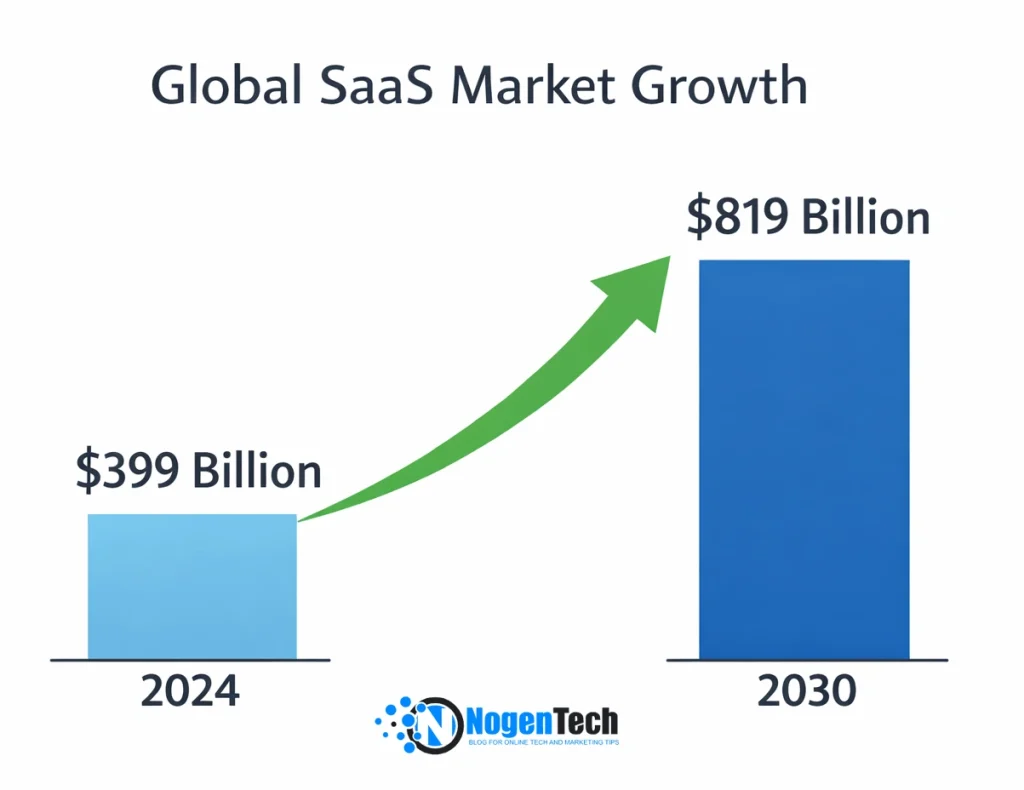
Experts estimate that the global SaaS market will grow from around $399 billion in 2024 to more than $819 billion by 2030, nearly doubling in size over six years. This reflects a steady annual growth rate of about 12% as more businesses shift to cloud-delivered software.
Other forecasts are even more optimistic, suggesting the SaaS market could even surpass $1 trillion before the mid-2030s as subscription-based services become the dominant model for business software.
This isn’t just numbers on a chart, but it shows that companies worldwide are increasingly ditching traditional software installs in favor of SaaS tools they can access anywhere, with lower cost and less technical overhead.
Cloud and AI are Driving the Next Phase
A major reason for this growth is the rise of cloud-native strategies and AI integration. Around 95% of organizations are expected to use AI-powered SaaS applications by 2025, meaning intelligent automation, predictive insights, and personalized experiences are becoming standard features in business tools.
Compared to older software, SaaS platforms are much easier to update, and as vendors rapidly add AI features, tools become smarter and more capable, which helps businesses automate routine tasks, analyze data faster, and make better decisions.
More Specialized and Industry-Focused Solutions
Another trend shaping the future of SaaS is vertical specialization, which means SaaS that’s built for specific industries. Instead of generic tools, companies are creating software tailored for healthcare, retail, finance, logistics, education, and more.
This shift helps businesses solve real problems faster because the software understands their industry needs. As SaaS becomes more “embedded” into daily operations, it increasingly influences everything from customer service workflows to product development cycles.
Broader Global Adoption
While North America remains a major hub for SaaS revenue, regions like Asia-Pacific are among the fastest-growing markets, with digital transformation accelerating cloud adoption in countries including India, Southeast Asia, and China.
This global footprint means SaaS is not just a tool for Silicon Valley companies; it’s powering businesses in every major economy and industry.
What This Means for Users and Businesses
For everyday users and organizations, the future of SaaS means:
- Smarter Tools: With AI baked into workflows, software won’t just respond to commands; it will help predict needs, automate tasks, and deliver insights.
- Greater Flexibility: With cloud-native systems, users can work from anywhere, from offices, homes, or even while traveling, without losing access to critical systems.
- More Innovation: Because SaaS providers update their systems frequently and automatically, users always benefit from the latest features and security protections without manual upgrades.
- Lower Barriers for Startups: New SaaS businesses can launch faster and scale with lower upfront costs, opening opportunities for startups and innovators worldwide.
Still Have Questions About SaaS? Here Are My Answers
Is SaaS the same as cloud computing?
No. Cloud computing is the broader technology, while Software as a Service (SaaS) is one of its service models that delivers software over the internet.
Is SaaS only for businesses?
No. While many SaaS applications target businesses, consumer platforms like Spotify, Netflix, Canva, and Dropbox also follow the SaaS model.
Can SaaS work without an internet connection?
Generally, no. Most SaaS applications require an internet connection, although some provide limited offline functionality that syncs data once users reconnect.
Is SaaS secure?
Yes, reputable SaaS providers use encryption, backups, multi-factor authentication, and compliance standards like GDPR, HIPAA, and SOC 2 to protect user data.
Can small businesses benefit from SaaS?
Yes. SaaS helps small businesses reduce upfront costs, access enterprise-grade software, and scale without investing in expensive hardware or IT infrastructure.
Is Microsoft 365 a SaaS product?
Yes. Microsoft 365 is a SaaS application that delivers productivity tools like Word, Excel, and Outlook through a cloud-based subscription.
Is Google Workspace a SaaS platform?
Yes. Google Workspace is one of the most widely used SaaS platforms, providing cloud-based email, document creation, storage, and collaboration tools.
Is Salesforce a SaaS company?
Yes. Salesforce is one of the world’s leading SaaS companies, offering cloud-based Customer Relationship Management (CRM) software on a subscription model.
What is the difference between B2B SaaS and B2C SaaS?
B2B SaaS serves businesses with tools like CRM and project management, while B2C SaaS targets individual consumers with applications such as Spotify, Netflix, and Canva.
What is SaaS pricing?
SaaS pricing is the method companies use to charge customers, including subscription, freemium, usage-based, per-user, and enterprise pricing models.
What is SaaS security?
SaaS security protects cloud-based applications and user data through encryption, identity management, access controls, monitoring, backups, and regulatory compliance.
Can I build my own SaaS product?
Yes. Individuals and businesses can build SaaS products using cloud platforms, modern development frameworks, and subscription-based business models, even with small teams.
What is a Micro SaaS business?
A Micro SaaS business develops niche software for a specific audience, usually with a small team, low operating costs, and recurring subscription revenue.
Is AI replacing SaaS?
No. Artificial Intelligence is enhancing SaaS, not replacing it. Modern SaaS platforms increasingly integrate AI to automate workflows and improve user experiences.
What is the biggest advantage of SaaS?
The biggest advantage of SaaS is that it provides scalable, cloud-based software with automatic updates, lower upfront costs, and access from virtually any internet-connected device.
My Final Thoughts on Software as a Service (SaaS)
After researching and writing extensively about Software as a Service (SaaS), Micro SaaS, cloud computing, AI-powered software, and software development, one thing has become clear to me:
“SaaS is no longer just another software delivery model; it’s the foundation of modern digital businesses.”
Whether you’re adopting your first SaaS platform, launching a Micro SaaS startup, or exploring Artificial Intelligence in SaaS, understanding these fundamentals will help you make smarter technology and business decisions.