Lag spikes, high ping, and random disconnects can ruin an online gaming session, but your internet speed is not always the main issue. WiFi signal strength, distance from the router, interference, network congestion, and the band your device uses can all affect gaming performance.
For most gaming setups, 5GHz WiFi is the better choice because it typically offers faster speeds and less interference than 2.4GHz. However, 5GHz has a shorter range and can weaken quickly through walls and floors. If your gaming PC or console is far from the router, a strong 2.4GHz connection may provide more reliable performance than a weak 5GHz signal.
This guide compares 2.4GHz vs. 5GHz for gaming, including speed, range, interference, ping stability, and when each WiFi band is the better option.
Comparison of 2.4ghz vs 5ghz for Gaming
5GHz is generally better for gaming because it offers lower ping, less interference, and more stable performance. However, 2.4GHz can be the better choice when the router is far away or separated by multiple walls.
| Gaming Factor | 5GHz | 2.4GHz |
| Ping | Lower | Higher |
| Latency | Better | Worse |
| Interference | Less | More |
| Congestion | Lower | Higher |
| Download Speed | Faster | Slower |
| Range | Shorter | Longer |
| Wall Penetration | Weaker | Stronger |
| Best For | Competitive Gaming | Long-Range Gaming |
| Overall Gaming Performance | Better | Good in Specific Situations |
For most gamers, ping, latency, and interference matter more than raw speed. Online games such as Call of Duty: Warzone, Valorant, Fortnite, and Counter-Strike 2 use relatively little bandwidth but rely heavily on a stable, low-latency connection.
What Is the Difference Between 5GHz and 2.4GHz WiFi?
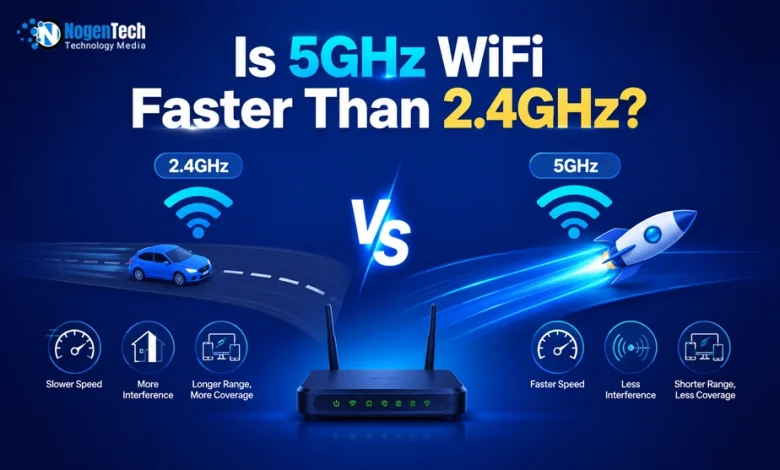
The main difference is frequency. 5GHz operates at a higher frequency, which means faster speeds and less interference, but shorter range. 2.4GHz operates at a lower frequency, which means slower speeds and more interference, but longer range and better wall penetration.
Frequency in WiFi works like lanes on a highway. The 2.4GHz band is like a two-lane road that every device in your neighborhood is trying to use at the same time. The 5GHz band is like a six-lane highway with far less traffic.
Here is what each frequency actually means in practice:
2.4GHz Band:
- Only 3 non-overlapping channels available
- Used by almost every wireless device, including microwaves, baby monitors, and Bluetooth devices
- Travels further and passes through walls more easily
- Gets congested very quickly in apartments or dense neighborhoods
- Maximum theoretical speed around 600Mbps on older standards
5GHz Band:
- Up to 23 non-overlapping channels available
- Used by fewer devices, which means less competition for bandwidth
- Does not travel as far and struggles more with thick walls
- Stays cleaner and more consistent in busy wireless environments
- Maximum theoretical speed up to 3.5Gbps on newer standards
When is 5 GHz usually better for Online Gaming?
5GHz is usually better for online gaming when your device is close to the router because it provides lower ping, less interference, reduced jitter, and a more stable connection than 2.4GHz.
5GHz improves gaming performance for several reasons:
- Lower latency: Data reaches the game server faster, reducing input delay.
- Less congestion: More available channels mean less competition from nearby devices and networks.
- Lower packet loss: Fewer signal collisions help prevent stuttering and rubber-banding.
- Reduced jitter: Ping remains more consistent during gameplay.
These advantages are most noticeable in fast-paced online games where reaction time matters.
| Game | How 5GHz Helps |
| Call of Duty: Warzone | Improves hit registration and reduces delay |
| Valorant | Provides more consistent low ping |
| Fortnite | Helps maintain smooth building and editing |
| Counter-Strike 2 (CS2) | Reduces latency fluctuations |
| Apex Legends | Improves movement and ability timing |
Quick Rule: If your gaming PC, PlayStation, Xbox, or other gaming device is within good range of the router, 5GHz is usually the best WiFi band for online gaming.
When Is 2.4GHz Better Than 5GHz for Gaming?
2.4GHz is better for high-speed internet gaming when the 5GHz signal is weak due to distance, walls, floors, or router limitations. A strong and stable 2.4GHz connection usually delivers better gaming performance than a weak 5GHz connection.
You should consider using 2.4GHz in these situations:
- Router is far away: 2.4GHz maintains signal strength over longer distances.
- Multiple walls or floors: Brick, concrete, and floors reduce 5GHz signal strength more aggressively.
- Basement gaming setups: Dense building materials often make 2.4GHz more reliable.
- Older routers: Some older routers have weaker 5GHz radios and perform better on 2.4GHz.
- Weak 5GHz coverage: Connection stability is more important than higher theoretical speeds.
Quick Rule: If your 5GHz connection produces higher ping, packet loss, or frequent disconnects, test 2.4GHz and use the band that delivers the lowest and most consistent latency.
How Do 5GHz and 2.4GHz Compare for Speed and Range?
5GHz is significantly faster than 2.4GHz but has a shorter range. 2.4GHz travels further and penetrates walls better but is slower and more prone to interference.
For gaming, raw speed matters less than stability and latency. Even the slowest gaming connections rarely max out 2.4GHz speed capabilities. However, if you also use your connection for downloading large game files, 5GHz is noticeably faster.
| Gaming Factor | 5GHz | 2.4GHz |
| Ping (Latency) | Lower | Higher |
| Response Time | Faster | Slightly Slower |
| Interference | Less | More |
| Packet Loss Risk | Lower | Higher |
| Connection Stability (Near Router) | Excellent | Good |
| Connection Stability (Far From Router) | Weaker | Better |
| Download Speed | Faster | Slower |
| Wall Penetration | Weaker | Stronger |
| Best Gaming Use Case | Competitive Online Gaming | Gaming Far From Router |
For typical online gaming, your actual gameplay only uses 1 to 5Mbps of bandwidth. Both bands are more than fast enough for that. The speed advantage of 5GHz matters most for:
- Downloading large game updates quickly
- Streaming gameplay to Twitch or YouTube
- Playing games while other household members use the network heavily
What Devices Should Be on 2.4GHz and 5GHz?
Gaming devices such as PCs, PlayStation consoles, and Xbox consoles should usually be connected to 5GHz for lower ping and less interference. Devices that are far from the router or that only need a stable connection should use 2.4 GHz.
| Device Type | Recommended Band | Reason |
| Gaming PC | 5GHz | Lower latency and faster response times |
| PS4 | 5GHz | Better online gaming performance |
| Xbox One | 5GHz | Reduced lag and network congestion |
| Smart TVs | 5GHz | Better streaming performance |
| Smartphones | 5GHz | Faster speeds and lower interference |
| Smart Home Devices | 2.4GHz | Better range and wall penetration |
| Security Cameras | 2.4GHz | More reliable long-distance coverage |
| Smart Plugs and Sensors | 2.4GHz | Low bandwidth needs and longer range |
How Do You Enable Both 2.4GHz and 5GHz on a Router?
Most modern dual-band routers can broadcast both 2.4GHz and 5GHz at the same time. You only need to make sure both WiFi bands are enabled in your router’s settings.
How to Enable Both 2.4GHz and 5GHz?
- Open a web browser on a device connected to your router.
- Enter your router’s IP address (commonly 192.168.0.1 or 192.168.1.1).
- Sign in using your router’s admin username and password.
- Navigate to Wireless Settings, WiFi Settings, or Wireless Network.
- Locate the 2.4GHz and 5GHz wireless band settings.
- Ensure both bands are turned on or enabled.
- Assign different WiFi names (SSIDs) if you want to choose the bands manually.
- Save the changes and restart the router if required.
Frequently Asked Questions About 5GHz vs. 2.4GHz WiFi
Is 5GHz or 2.4GHz Better for Gaming?
5GHz is better for gaming because it usually provides lower ping, less interference, and more stable latency. However, 2.4GHz can perform better when the router is far away or separated by multiple walls.
Which WiFi Band Gives Lower Ping?
5GHz usually provides lower ping than 2.4GHz because it operates on less congested channels and experiences less interference from nearby devices.
Does 5GHz Reduce Lag in Online Games?
Yes, 5GHz can reduce lag caused by wireless interference, network congestion, packet loss, and unstable latency, but it cannot fix lag caused by game servers or your ISP.
Is 2.4GHz Good for Gaming?
Yes, 2.4GHz is good for gaming when you are far from the router and need a stronger signal. A stable 2.4GHz connection often performs better than a weak 5GHz connection.
What Is the Best WiFi Band for PS5 and Xbox?
5GHz is the best WiFi band for modern gaming consoles such as the PlayStation 5 and Xbox Series X because it delivers lower latency, less interference, and faster download speeds.
How Much Ping Difference Is There Between 5GHz and 2.4GHz?
In many home networks, 5GHz can reduce ping by 5–30 milliseconds compared to 2.4GHz, especially in apartments and areas with heavy wireless congestion.
Final Words on 5GHz vs 2.4GHz for Gaming
For most gamers, 5GHz is the better WiFi band because it delivers lower ping, less interference, and a more stable connection for online games. It is the best choice for competitive titles such as Call of Duty: Warzone, Valorant, Fortnite, and Counter-Strike 2, especially when your gaming device is close to the router.
However, 2.4GHz should not be ignored. If your router is far away, separated by multiple walls, or your 5GHz signal is weak, a strong 2.4GHz connection can provide smoother and more reliable gameplay.
The simplest approach is to test both bands from your gaming setup and choose the one that delivers the lowest and most consistent ping. And if maximum gaming performance is your goal, a wired Ethernet connection remains the best option.