What Is Wi-Fi 7? What Problems Does It Actually Solve?
Wi-Fi 7 is a newer wireless technology designed to reduce slowdowns, lag, and connection issues when multiple devices share a network. But will it actually improve your home Wi-Fi? Here's what it can fix, what it can't, and how to tell if upgrading is worth it.

The most relatable problem you and I have all faced is that as soon as someone starts streaming while another person is gaming or downloading files on the same Wi-Fi, the connection starts struggling.
Now, here’s the interesting part: the problem isn’t always your internet speed. Sometimes, it’s how your router handles traffic between connected devices.
That’s where Wi-Fi 7 improves on Wi-Fi 6 and Wi-Fi 6E, handling more connected devices with fewer delays. But it can’t fix every connection problem.
So before blindly spending money on Wi-Fi 7, here’s a reality check: some homes will notice a real difference, while others won’t. Then let’s explore what Wi-Fi 7 actually fixes, when it’s worth upgrading, and when a simpler solution is enough.
What Problems Does Wi-Fi 7 Actually Solve?
Wi-Fi 7 (IEEE 802.11be) focuses on solving two main problems: slowdowns when several devices share Wi-Fi and delays caused by wireless interference or congestion.
It is the seventh generation of wireless networking, designed to transfer more data and manage busy networks more efficiently. It supports the 2.4 GHz, 5 GHz, and 6 GHz bands, although not every Wi-Fi 7 router includes all three.
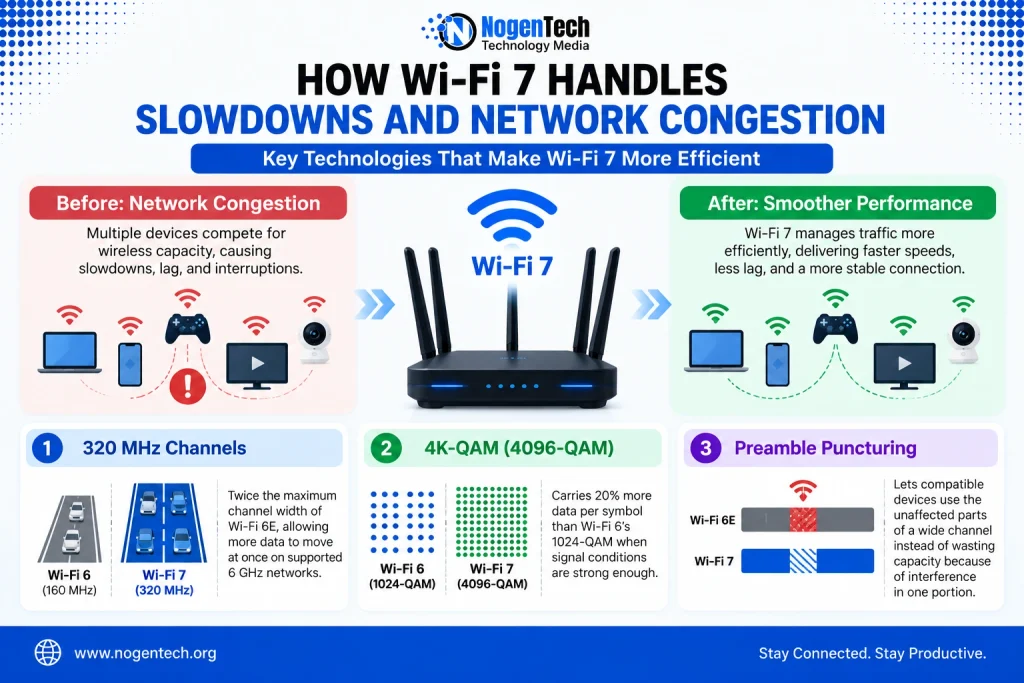
How Does Wi-Fi 7 Handle Slowdowns and Network Congestion?
When several devices stream, game, or download files at once, they compete for wireless capacity. Wi-Fi 7 addresses this through three improvements:
- 320 MHz channels: Twice the maximum channel width of Wi-Fi 6E, allowing more data to move at once on supported 6 GHz networks.
- 4K-QAM (4096-QAM): Carries 20% more data per symbol than Wi-Fi 6’s 1024-QAM when signal conditions are strong enough.
- Preamble puncturing: Lets compatible devices use the unaffected parts of a wide channel instead of wasting capacity because of interference in one portion.
These features can improve performance on busy networks, but the results depend on device support, interference, and signal strength.
How Does Wi-Fi 7 Reduce Lag and Connection Drops?
Wi-Fi 7 introduces Multi-Link Operation (MLO), allowing compatible devices to use multiple wireless links rather than depending on a single one.
For example, a device supporting both 5 GHz and 6 GHz can use those links to manage traffic more efficiently. This can reduce delays when one band becomes congested, although performance still depends on the router and device.
MLO also provides more flexibility when interference affects a link. However, it cannot fix weak coverage or an unstable internet connection. And because 2.4 GHz and 5 GHz Wi-Fi behave differently in terms of speed and range, the bands available to your devices still matter.
How Fast Is Wi-Fi 7 in Real Life?
Wi-Fi 7 has a theoretical maximum speed of around 46 Gbps, nearly five times the 9.6 Gbps maximum of Wi-Fi 6. But that’s a combined technical limit under ideal conditions, not the speed you’ll get on a single phone or laptop.
In everyday use, your actual speed depends on your router, device compatibility, distance, and interference. Even with Wi-Fi 7, a 100 Mbps internet plan won’t suddenly deliver gigabit downloads.
So if your connection feels slow, first identify whether the problem is your Wi-Fi or your internet plan.
You may be able to improve your home Wi-Fi speed without upgrading, while an Ethernet connection can offer more consistent performance for gaming or other latency-sensitive tasks.
Wi-Fi 7 vs Wi-Fi 6 and 6E: What's the Difference?
Wi-Fi 6 and Wi-Fi 6E are already fast enough for most everyday tasks. The real difference with Wi-Fi 7 is how much wireless data it can handle and how efficiently compatible devices can use the connection.
| Feature | Wi-Fi 6 | Wi-Fi 6E | Wi-Fi 7 |
|---|---|---|---|
| Wi-Fi Standard | 802.11ax | 802.11ax | 802.11be |
| Frequency Bands | 2.4 and 5 GHz | 2.4, 5, and 6 GHz | 2.4, 5, and optionally 6 GHz |
| Max Theoretical Speed | 9.6 Gbps | 9.6 Gbps | Around 46 Gbps |
| Maximum Channel Width | 160 MHz | 160 MHz | 320 MHz (6 GHz) |
| Modulation | 1024-QAM | 1024-QAM | 4096-QAM |
| Multi-Link Operation | No | No | Yes, on compatible devices |
| Main Advantage | Efficient everyday Wi-Fi | Access to the less-crowded 6 GHz band | Higher capacity and more flexible wireless connections |
What does this mean for your home? If your Wi-Fi 6 or 6E network already handles streaming, gaming, and video calls without issues, switching to Wi-Fi 7 may not make a noticeable difference. But if several devices regularly compete for wireless capacity, Wi-Fi 7 offers improvements that can help, provided your router and devices support them.
What Do You Need to Use Wi-Fi 7?
Before jumping onto Wi-Fi 7, check your devices, internet plan, and supported frequency bands to avoid an unnecessary upgrade.
- Wi-Fi 7 router: You need a router that supports Wi-Fi 7 (802.11be) to access its newer features.
- Compatible devices: Your phone, laptop, or other device must also support Wi-Fi 7 to benefit from those features.
- Older devices: Wi-Fi 7 is backward compatible, so existing phones, smart TVs, and other Wi-Fi devices can still connect using their supported standards.
- Internet plan: No special plan is required, but a slow broadband connection won’t deliver faster internet downloads just because you upgraded your router.
- 6 GHz support: Not every Wi-Fi 7 router includes 6 GHz. For 320 MHz channels, both your router and device must support this band, where regional regulations allow it.
Is Wi-Fi 7 Worth Upgrading To? Final Thoughts
Wi-Fi 7 is worth upgrading to if your current network struggles with heavy usage. If everything runs smoothly, you can probably wait.
Upgrade to Wi-Fi 7 if:
- Multiple people use Wi-Fi heavily: Gaming, video calls, and 4K streaming at the same time regularly cause slowdowns.
- You use demanding wireless devices: Compatible VR headsets may benefit from lower delays and better wireless performance.
- You have multi-gigabit internet: Wi-Fi 7 can help compatible devices take advantage of faster plans.
- You’re replacing an old router: A new Wi-Fi router for this seventh gen may be worth the extra cost.
Skip the upgrade for now if:
- Wi-Fi 6 or 6E works fine: There’s little reason to replace a network that handles your daily needs.
- Your problem is weak coverage: Better router placement or a mesh system may help more.
- Most devices are older: They won’t benefit from Wi-Fi 7’s new features.
- Your internet plan is slow: A new router won’t increase the speed your ISP provides.
Bottom line: Upgrade to solve a specific Wi-Fi problem, not just to get the latest technology.
WiFi 7 FAQs (Frequently Asked Questions)
Wi-Fi 7 (IEEE 802.11be) started rolling out in 2024, with wider adoption expected between 2025 and 2026.
The best Wi-Fi 7 router depends on your needs, but top options come from brands like TP-Link, ASUS, and Netgear, offering high speeds, better coverage, and advanced features.