
What Is xFi Complete and Do You Still Need It?
xFi Complete is now a legacy Xfinity add-on. Here’s what it included, what changed in 2026, and whether existing customers still need it.


xFi Complete is a legacy Xfinity add-on that bundled unlimited data with an xFi Gateway, Advanced Security, and whole-home WiFi features. It was mainly useful for customers on older Xfinity internet plans who wanted to avoid the 1.2 TB monthly data limit while using Xfinity’s equipment.
The situation is different in 2026. Xfinity’s newer internet plans include unlimited data and WiFi equipment, so xFi Complete is no longer offered as a new add-on. Xfinity has moved toward newer services such as Xfinity Pro, while some customers on eligible legacy plans may still see xFi Complete on their monthly bill.
If that’s you, don’t cancel it based on the product name alone. First check whether your current plan already includes unlimited data and WiFi equipment, whether a data limit still applies to your account, and which xFi Complete benefits you’re actually using. For some legacy customers, keeping it can still make sense; for others, moving to a newer plan may offer better value.
If you’ve seen it called “Xfinity Complete,” that refers to xFi Complete, which is the official service name.
What Does xFi Complete Include?
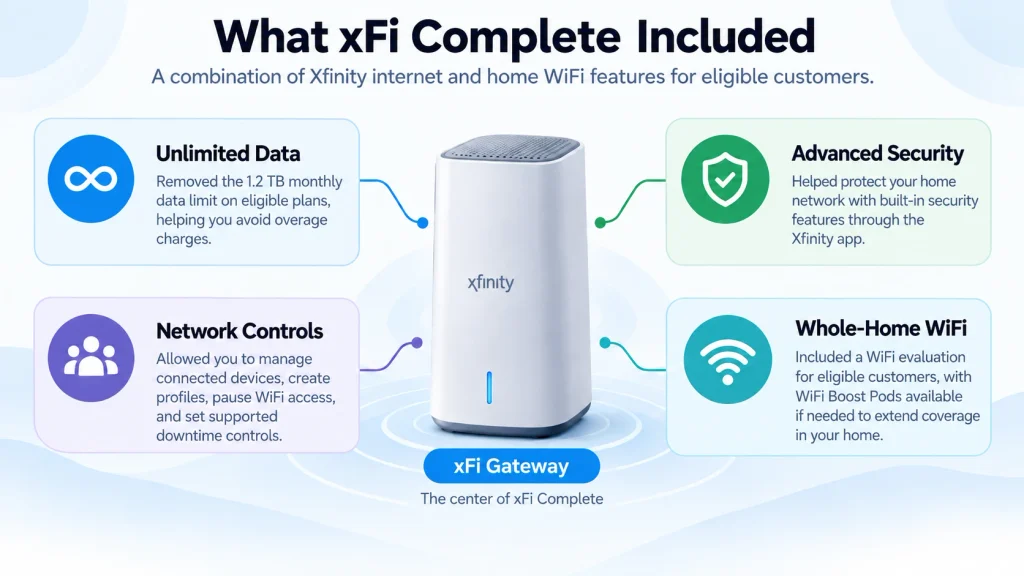
For eligible legacy customers, xFi Complete bundled unlimited data, the xFi Gateway, and home network management and security tools into one add-on.
It did not increase your subscribed internet speed, though better equipment and WiFi coverage could improve device performance around your home.
1. Unlimited Data
The biggest benefit for many legacy customers was unlimited data. On plans subject to Xfinity’s 1.2 TB monthly data limit, xFi Complete removed that limit and helped frequent users avoid overage charges.
This mattered most in homes with heavy data use from 4K streaming, large game downloads, cloud backups, remote work, and multiple connected devices.
If your account is still subject to a data limit, our guide to internet data caps in the USA explains how caps work and the options available to heavy internet users.
2. xFi Gateway
xFi Complete included the xFi Gateway, which combines modem and router functions and connects your home devices to Xfinity internet over WiFi or Ethernet.
The exact Gateway model isn’t determined by xFi Complete alone. Xfinity may provide different hardware depending on your internet plan, location, account eligibility, and equipment availability.
Newer Xfinity gateways support newer wireless technologies, including WiFi 7 on compatible models. If you’re considering newer hardware, our XB10 vs XB8 comparison explains the practical differences between two of Xfinity’s gateway generations.
3. Advanced Security and Network Controls
With a compatible xFi Gateway, customers can use Xfinity’s network-management and security features through the Xfinity app. These tools can help identify suspicious network activity and provide visibility into devices connected to the home network.
The app also lets customers organize devices into profiles, pause WiFi access, and set supported downtime controls. This can be useful in households where several phones, computers, TVs, gaming systems, and smart devices share the same network.
Security capabilities can also depend on the Gateway and its configuration. Newer WiFi equipment may support protocols such as WPA3; our WPA2 vs WPA3 guide explains the difference.
4. Whole-Home WiFi Evaluation
xFi Complete also included a whole-home WiFi evaluation for eligible customers. Xfinity could assess WiFi coverage around the home and determine whether additional equipment was needed to improve coverage.
If the assessment identified eligible coverage problems, Xfinity could provide a WiFi Boost Pod. These devices extend the Xfinity WiFi network into areas where the Gateway’s signal may be weaker.
A Pod isn’t automatically included simply because you have xFi Complete. Eligibility depends on Xfinity’s assessment and the customer’s account and home WiFi conditions.
You can learn more about how xFi Pods work and the broader difference between a WiFi booster and WiFi extender if poor coverage is the main problem you’re trying to solve.
Good to Know: Eligible legacy customers may have qualified for newer equipment through Xfinity’s Technology Upgrade Program. Eligibility depended on the account, plan, location, and equipment availability.
Do You Still Need xFi Complete?
If You’re on a Newer Xfinity Plan
Check your current plan details before paying for any additional service. If unlimited data and WiFi equipment are already included, you generally don’t need the older xFi Complete bundle.
If You’re on a Legacy Plan
Keeping xFi Complete may still make sense if your plan has a 1.2 TB monthly data limit and your household regularly approaches or exceeds it. Heavy 4K streaming, large game downloads, cloud backups, and multiple people working or studying from home can increase monthly data usage.
Before removing it, check three things:
- Your current plan: Does it already include unlimited data and WiFi equipment?
- Your recent data usage: Are you actually getting value from unlimited data?
- Your xFi features: Are you using the Gateway or any whole-home WiFi benefits tied to the service?
If your legacy plan still has a data limit and you regularly exceed it, compare the cost of keeping xFi Complete with your available Xfinity plan and unlimited-data options before making a change.
If you consistently stay below the limit and don’t rely on its other benefits, the separate xFi Complete charge may offer little practical value.
What to Check on Your Xfinity Bill
If xFi Complete still appears as a separate charge, use your actual account details rather than assuming you still need it.
Check your current internet plan, the xFi Complete charge, recent monthly data usage, and which equipment is assigned to your account. Then compare that total with the current Xfinity plans available at your address.
This gives you a clearer answer than looking at the xFi Complete fee alone, especially if you’ve stayed on the same Xfinity package for several years.
If you’re considering moving away from a legacy package, our Xfinity Home Internet review covers the current service, equipment, benefits, and limitations in more detail.
Is xFi Complete Still Available in 2026?
xFi Complete is no longer offered as a new add-on with Xfinity’s newer internet plans. An Xfinity employee confirmed on the official Xfinity Community Forum in 2026 that xFi Complete is a legacy service and is no longer available to new customers.
That doesn’t mean xFi Complete has disappeared from every account. Customers who remain on eligible legacy plans may still see it on their bills or continue using benefits associated with the older service.
If xFi Complete still appears on your account, the important question isn’t simply whether the product has been discontinued for new customers. Check what your existing plan includes and compare it with Xfinity’s current plans before changing anything.
Is Xfinity Pro the Same as xFi Complete?
No. Xfinity Pro and xFi Complete are different services, even though Xfinity has moved toward Pro as part of its newer home WiFi offering.
xFi Complete was primarily built around unlimited data, an xFi Gateway, network security, and whole-home WiFi benefits for eligible customers. Xfinity Pro focuses more on keeping the home connected during disruptions, with features such as a Pro WiFi Extender and cellular backup.
This distinction matters for legacy customers. Seeing Xfinity Pro promoted today doesn’t necessarily mean an existing xFi Complete service has simply been renamed. The features and purpose of the two services are different.
How Much Does xFi Complete Cost?
For legacy customers who still have it, xFi Complete typically costs $25 per month. The charge may look different on some accounts if an older promotional discount is still active or has recently expired.
That $25 legacy bundle included the xFi Gateway rental and unlimited data, along with eligible xFi security and whole-home WiFi features. Xfinity has also offered promotional pricing in the past, so the amount shown on an individual bill may not always match the standard legacy price.
The more useful comparison in 2026 is your total internet bill, not the xFi Complete charge by itself. Compare what you currently pay with the plans available at your address before deciding whether to keep the legacy add-on.
How to Cancel xFi Complete
If xFi Complete still appears on your bill and you no longer need it, first check what will change when the add-on is removed. This is particularly important on a legacy plan where xFi Complete may still provide unlimited data or other benefits tied to your account.
Before confirming cancellation:
- Check your current plan to see whether unlimited data and WiFi equipment are already included.
- Review your recent data usage if your legacy plan still has a monthly data limit.
- Ask Xfinity for your new monthly price without xFi Complete and confirm whether removing it changes any other plan benefits.
- Request removal through Xfinity customer support if the new arrangement makes more sense for your account.
- Check your next bill to confirm that the recurring xFi Complete charge has been removed.
Xfinity customer support can be reached at 1-800-XFINITY (1-800-934-6489). You can also check the support options available through your Xfinity account or the Xfinity app.
Don’t return or replace your xFi Gateway solely because you’re removing xFi Complete. Confirm with Xfinity which equipment is included with your current or replacement plan and whether any hardware needs to be returned.
Frequently Asked Questions
Does xFi Complete increase internet speed?
No. xFi Complete doesn’t increase the speed included with your Xfinity internet plan. A newer Gateway or improved WiFi coverage may help devices get a better connection around your home, but your subscribed plan still determines your internet speed.
Can I use my own modem or router with xFi Complete?
xFi Complete was designed around the xFi Gateway, so using your own equipment can affect which features or unlimited-data options are available. If you’re on a legacy plan, check the requirements for your specific account before replacing the Xfinity Gateway.
Do you automatically get a WiFi Boost Pod with xFi Complete?
No. A WiFi Boost Pod isn’t automatically provided to every xFi Complete customer. Xfinity evaluates eligible home WiFi connections and may offer additional equipment when its assessment identifies a qualifying coverage issue.



Learned something new today! Keep up the great work!…