Twitch is a live streaming platform where people watch and broadcast content like gaming, music, and real-life streams. Many beginners search for what is Twitch, what is Twitch used for, and whether Twitch is free before getting started.
Millions of users are attracted to this niche to entertain themselves or showcase their talent to the general audience. However, a question arises regarding watching the live stream of video gaming.
Twitch is not just for gamers anymore. Today, it is used for live podcasts, IRL (in real life) streaming, coding sessions, and online communities.
In this blog post, I have detailed what is Twitch alongside its features, use, subscriptions, top streamers and their earnings also.
What Is Twitch Streaming?
Start creating Verdict in seconds, and convert more of your visitors into leads.
Twitch streaming means broadcasting live video content to an audience in real time. Users can stream gameplay, music, tutorials, or just chat with viewers. This is why many people search for twitch streaming meaning or what is twitch streaming.
<strong>Key Take Aways</strong>
✅Twitch is owned by Amazon and is currently the most trustworthy gaming broadcaster available on the web.
✅You have to link your Twitch account to Amazon Prime to enjoy the exciting perks and advantages.
✅One of the biggest benefits of using Twitch to watch online gaming is that you will not suffer from data safety and privacy issues.
What is Twitch?
Start creating Verdict in seconds, and convert more of your visitors into leads.
Twitch is a live streaming platform that allows users to watch and broadcast live content, mainly focused on gaming but also including music, talk shows, and creative streams.
The website has been working since 2011, while in 2014, Amazon purchased it for $970 million. Since then, it has become one of the best sites for watching video games.
Users often search for terms like what is a Twitch account, what is Twitch channel, and what is Twitch app when learning about the platform.
Do You Know? Twitch holds over 70% of the market share for game streaming platforms and is outranking YouTube Gaming and Facebook Gaming combined.
Is Twitch Free?
Start creating Verdict in seconds, and convert more of your visitors into leads.
Twitch is free to use for both viewers and streamers. You can watch live streams, follow creators, and chat without paying anything.
However, Twitch also offers paid features like subscriptions, Bits, and Amazon Prime benefits (Twitch Prime).
What Is Twitch Used For?
Start creating Verdict in seconds, and convert more of your visitors into leads.
Twitch is used for:
- Watching live gaming streams
- Streaming your own content
- Chatting with communities
- Earning money through streaming
- Hosting live events, podcasts, and tutorials
What Is a Twitch Channel?
Start creating Verdict in seconds, and convert more of your visitors into leads.
A Twitch channel is your personal page where you stream content, interact with viewers, and build an audience. Each user gets their own channel after creating an account.
How to Stream on Twitch?
Start creating Verdict in seconds, and convert more of your visitors into leads.
1. Create an Account
- Open your updated browser and clear all the cookies and caches for seamless browsing.
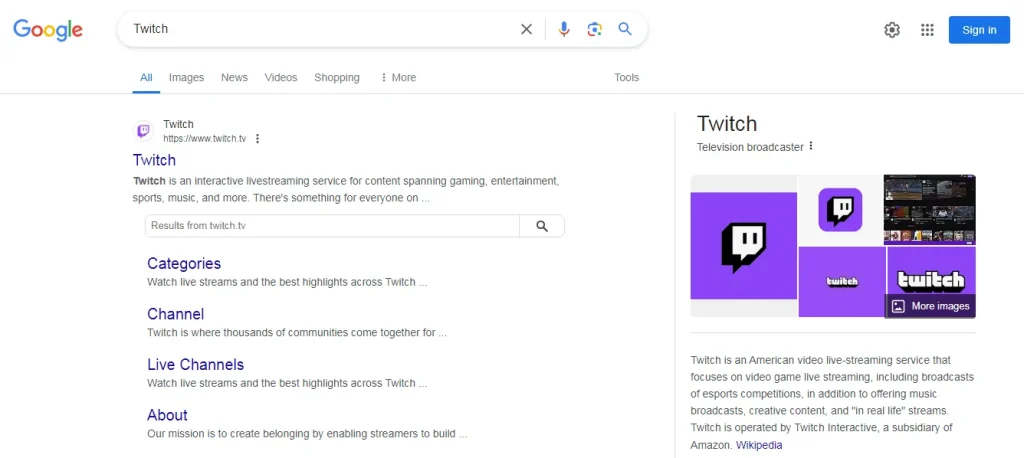
- Type Twitch in the search box and press enter.
- On the results page, click on the official website, https://www.twitch.tv/
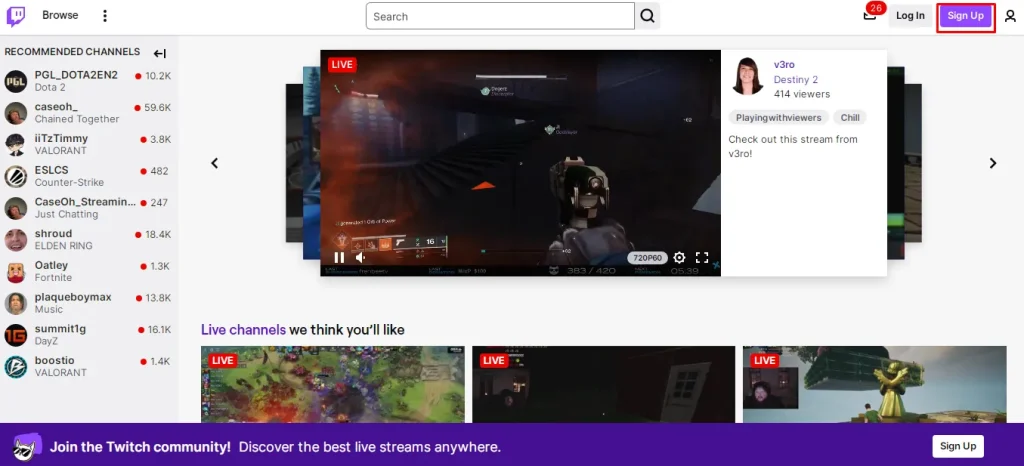
- Click on the Sign Up button (top right). You can also go through the Twitch Login option, if you have already created an account.
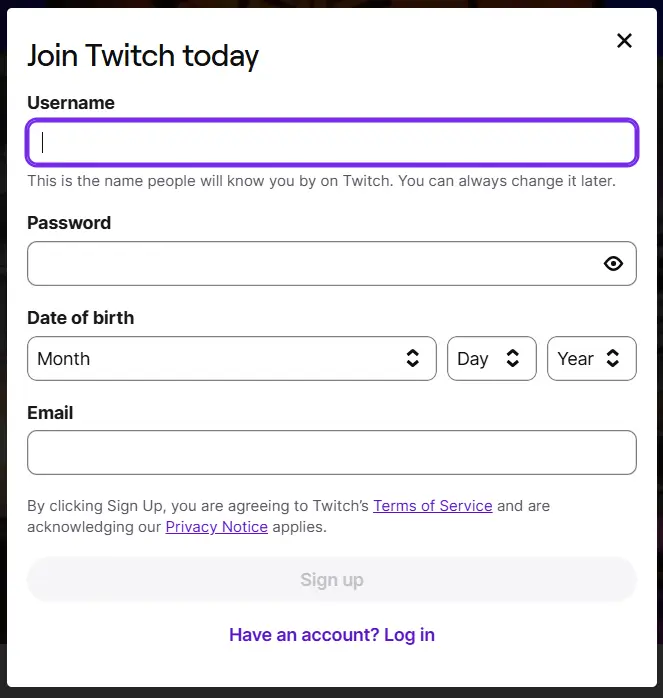
- Fill in your username, password, date of birth, and email or phone number.
- Verify your account using the code sent to your phone or email.
- Select your content interests (e.g., gaming, music, art).
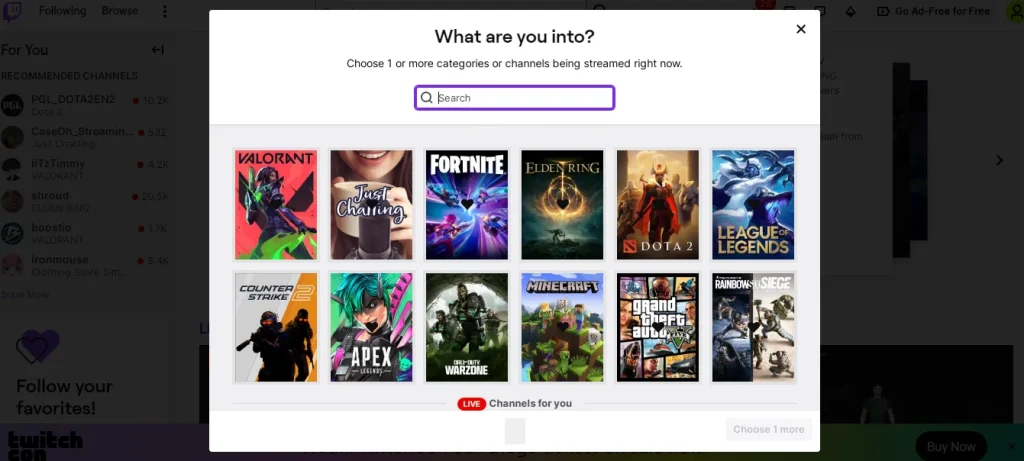
You must create a stronger password to keep your account secure. Additionally, it is necessary to enter an active number or email to get the verification code. Otherwise, you won’t be able to create your account.
2. Navigate the Platform
After creating your account, you must navigate through the Twitch interface to learn more about its offerings.
- Homepage: Featuring trending streams, categories, and recommended channels.
- Search Bar: Type keywords to find streamers, games, or categories.
- Sidebar: See followed channels and online streamers.
- Chat Panel: Join live discussions on any stream you watch.
3. Watch Streams
Twitch offers a larger number of streams in different categories so that everyone can find the content of their interest and preferences
Do You Know? You can stream content in up to 1080p at 60fps on Twitch for a smooth viewing experience.
You can switch to the browse tab to find the popular categories, like games, entertainment, and others.
A single click on the stream can help you join it to watch the broadcast and engage with the community by utilizing the chat option. Moreover, you can adjust the quality to limit the data usage.
💡Pro Tip: While Twitch relies heavily on advertisements to support creators and the platform, many users prefer an ad-free viewing experience. This is where the Twitch Adblocks extensions come in handy. These are browser tools to block or skip advertising when viewing a live steam or VOD.
4. Interact with Streamers
As mentioned previously, you can chat with other participants and viewers in the live chat on Twitch. While interacting with them you can,
- Use Emotes (custom emojis) in chat.
- Donate through “Bits” (Twitch’s virtual currency) or direct support.
- Join Subscriber-only chats and get exclusive access to content or Discord servers.
Twitch Subscriptions Cost
Start creating Verdict in seconds, and convert more of your visitors into leads.
| Subscription Type | Web Price | Mobile App Price | Key Benefits |
|---|---|---|---|
| Tier 1 Sub (Channel) | $5.99/month | $7.99/month | Supports one streamer; includes emotes, badges, ad-free viewing on that channel |
| Tier 2 Sub (Channel) | $9.99/month | (same) | Extra emotes, chat perks, higher support priority |
| Tier 3 Sub (Channel) | $24.99/month | (same) | Premium tier with exclusive perks |
| Twitch Turbo (Global) | $11.99/month | $11.99/month | Ad-free platform‑wide viewing, Turbo badge, extended VOD storage, custom emoticons |
1. Channel Subscription Tiers (Web)
Twitch offers three standard subscription tiers to support individual streamers. In the United States (web), pricing was increased to $5.99/month for Tier 1 in mid-2024 (previously $4.99).
Pricing for Tier 2 and Tier 3 remains at $9.99/month and $24.99/month (web) respectively, unchanged in the US.
Twitch also uses local subscription pricing, meaning prices vary by country to reflect cost of living. For example:
- Canada: Tier 1 is C$7.99 (web)
- Australia: Tier 1 is A$8.99
- UK: Tier 1 is £4.99 (web)
2. App vs Web Pricing
Twitch has increased Tier 1 subscription prices for mobile app purchases across over 40 countries. In the US, this raised it from $5.99 (web) to $7.99/month (via iOS or Android).
Tier 2 and Tier 3 prices remain unchanged on mobile.
Therefore:
- Web Tier 1 (US): $5.99/month
- Mobile Tier 1 (US): $7.99/month
- Higher mobile app prices offset Apple/Google store fees.
3. Twitch Turbo (Platform-Wide Subscription)
Twitch Turbo is a separate, platform-wide premium plan offering ad-free viewing and enhanced features. Further, Twitch raised Turbo pricing in the US from $8.99 to $11.99/month. There were no feature changes introduced at that time.
Country-specific Turbo pricing varies and can be confirmed via Twitch Help, but in the US it remains $11.99 monthly.
4. Twitch Prime
Twitch Prime (linked to Amazon Prime) allows you to subscribe to any channel for free once per month. You also get free games and in-game loot.
- Custom Username Chat Colors: Customize your chat username colors.
- Exclusive Chat Badge: Show off your Twitch Prime status in chat.
If you already have Amazon Prime, Twitch Prime is essentially a free bonus, don’t skip it.
5. Revenue Share for Streamers
- Standard share: Affiliates and most Partners receive 50% of subscription revenue (e.g. ~$3.00 from a $5.99 sub).
- Tiered revenue splits:
- Higher-tier streamers can qualify for 70% revenue share via the Partner Plus Program.
- In early 2024, Twitch added a 60/40 split tier with lower eligibility, and removed the $100K earning cap on the 70/30 tier.
Key Features of Twitch
Start creating Verdict in seconds, and convert more of your visitors into leads.
The following are the features of Twitch that will enable you to have your hands on ultimate perks.
1. Live Streaming
Twitch allows users to broadcast their gameplay to an audience. Streamers can share their screens, use webcams to show themselves and interact with their audience via chat.
This is the main feature of the Twitch experience where the content creators are building their communities.
2. VODs and Clips
After a live broadcast, Twitch saves the stream as a VOD, which can be watched later. VODs allow viewers who missed the live event to catch up.
Viewers can also create short clips from a live stream or VOD to share memorable moments. These clips are often shared on social media to highlight interesting parts of a stream.
3. Custom Emotes and Chat Interaction
Twitch supports the use of emotes, which are custom emojis used in live chat. Streamers can create unique emotes for their subscribers. Premium users and subscribers often gain access to exclusive emotes and animated options.
4. Live Chat & Community Engagement
Every live stream includes a chat panel where viewers can talk in real time. This interaction builds a sense of community and allows streamers to respond to comments, answerquestions, or shout out users during broadcasts.
5. Bits and Donations
Viewers can support their favorite streamers financially through Bits, Twitch’s official virtual currency. Donations can also be made directly. This monetisation method encourages streamers to produce high-quality, consistent content.
6. Channel Points System
Twitch includes a built-in Channel Points loyalty system. Viewers earn points just by watching, chatting, or participating in a stream.
These points can be redeemed for unique rewards set by each streamer, such as highlighted messages, emote unlocks, or in-stream actions.
7. Twitch Mobile App
The Twitch mobile app, available on iOS and Android, gives users the flexibility to watch streams, join chats, follow channels, and even go live directly from their smartphones. It’s ideal for staying connected to your favorite content on the move.
8. Custom Badges and Identity Features
Subscribers and long-time viewers earn Twitch badges, which appear next to their usernames in chat.
Twitch also allows users to customize their username colors, especially with Prime and Turbo subscriptions for an intention to add flair and personal identity to chat participation.
How to Make Money on Twitch?
As a gamer, a musician, or simply an outgoing host, you can use Twitch to monetize your steam in a variety of different ways. Next, in the artivclee I have
1. Twitch Affiliate Program
Once you qualify as a Twitch Affiliate, you can start earning from:
Subscriptions
Viewers can subscribe to your channel at Tier 1, Tier 2, or Tier 3 levels. You typically receive 50% of the subscription fee (higher for top partners).
- Tier 1: $5.99/month
- Tier 2: $9.99/month
- Tier 3: $24.99/month
Bits (Cheering): Viewers use Bits, a virtual currency, to cheer during your stream. Twitch pays you $0.01 per Bit.
Ad Revenue: Affiliates earn a share of ad revenue when Twitch runs ads on your stream. This varies based on viewer count and location.
2. Twitch Partner Program
Once you reach higher metrics, you can become a Twitch Partner with:
- Higher revenue share (up to 70%)
- Priority support and exclusive tools
- Greater customisation for your channel
- Access to the Partner Plus Program for consistent high performers
Twitch Affiliate Criteria
- 50+ followers
- 500 total minutes streamed in the last 30 days
- 7 unique broadcast days
- Average of 3 concurrent viewers
Once you’re eligible, Twitch will send an invitation to join the Affiliate Program via your dashboard.
How Much Do Twitch Streamers Make?
| Streamer Tier | Avg Viewers / Subs | Estimated Monthly Income* |
|---|---|---|
| Small Streamer | ~5-50 viewers | $50-1,000 (bits, subs, small donations) |
| Mid‑Tier Streamer | ~50-1,000 viewers | $1,000-5,000+ (subs, bits, ads, occasional sponsorships) |
| Large Streamer/Partner | ~1,000-10,000 viewers | $5,000-30,000+ (streaming revenue + ads ≈ $3.50 CPM + sponsorships & merch) |
| Top‑Tier / Elite Streamer | 10,000+ viewers / 10k+ subs | $100,000-200,000+ from subs, brand deals, merch; some make $300k-500k+/mo |
Top Twitch Streamers and their Earnings
- Kai Cenat is estimated to make $222K/month from 89K subscribers, plus millions via other platforms and brand partnerships.
- xQc reportedly earns around $197K/month from Twitch subscriptions alone, plus ~$100K/month via YouTube. Combined monthly income likely exceeds $300K.
- Jynxzi, another top Twitch streamer, earns approximately $120K-190K/month from Twitch subs and bits alone.
Most Popular Twitch Subscribers
| Streamer Name | Real Name | Followers (approx.) | Main Content |
|---|---|---|---|
| Ninja | Tyler Blevins | 19.3 million | Fortnite, Valorant, Apex Legends |
| Kai Cenat | Kai Cenat | 18.5 million | Variety, Just Chatting |
| Ibai | Ibai Llanos | 18.5 million | Variety Events, Esports Coverage |
| Auronplay | Raúl Álvarez | 16.8 million | GTA V, Minecraft, Reactions |
| Rubius | Rubén Doblas | 15.8 million | Gaming, Just Chatting (Spanish content) |
| xQc | Félix Lengyel | 12.1 million | Overwatch, Variety, Reactions |
| TheGrefg | David Cánovas | 12.2 million | Fortnite, Minecraft |
| Juansguarnizo | Juan Sebastián Guarnizo | 11.5 million | Minecraft, GTA V, Chatting |
| Shroud | Michael Grzesiek | 11.2 million | CS2, Valorant, FPS Shooters |
| Tfue | Turner Tenney | 11.3 million | Fortnite, Call of Duty, Apex Legends |
Final Summary
These are the details about what is Twitch alongside its features and subscription plans. You must create your account by adding the right credentials to enjoy amazing perks on this live streaming platform.
In this way, you can enjoy the broadcasts of top eSports competitions. The numerous categories integrated into this site allow everyone to find the content of their interest and preferences.
Twitch is widely used in regions like the United States, Europe, India, and Pakistan, where live streaming and gaming content continue to grow rapidly.
Above all, Twitch provides a comprehensive tools set and features that will ultimately improve your overall online experience. Subscribe to the premium tiers to have your hands on more quality benefits.
People Also Ask
Start creating Verdict in seconds, and convert more of your visitors into leads.
How to Stream on Twitch PC?
Download OBS or Twitch Studio, log in with your Twitch account, set up your stream settings, and click “Start Streaming.”
How to Set Up Donations on Twitch?
You can set up donations by linking a PayPal account or using third-party services like Streamlabs or Donorbox.
How Much Do Twitch Streamers Make?
Income varies widely. Small streamers can earn $50-$500/month, while top creators can earn thousands through subs, ads, and donations.
How to Download Twitch Clips?
Go to the clip’s page, copy the URL, and use a Twitch clip downloader website or browser extension to save it.
Who Owns Twitch?
Twitch is owned by Amazon, which acquired the platform in 2014 for $970 million.
How to Raid on Twitch?
Type /raid channelname in your chat, wait for the countdown, then click “Raid Now” to send your viewers to another stream.
Is Twitch only for gamers?
No, Twitch is used for gaming, music, podcasts, tutorials, and live chats.
Do you need an account to watch Twitch?
No, you can watch streams without an account, but you need one to chat or stream.