What Is 8K Video Quality? Resolution vs. Real Picture Quality
An 8K label measures raw pixel count, but real picture quality depends on compression, hardware, and viewing distance.

An 8K label can sound like a guarantee of sharper video. But a high-resolution file can still look blurry, and a well-produced 4K video can look excellent. So what does 8K actually tell you?
Simply put, 8K UHD video has a resolution of 7680 × 4320 pixels, or about 33.2 million pixels per frame. That is four times the pixel count of 4K UHD and sixteen times that of 1080p. More pixels can indeed preserve finer detail, but they do not guarantee a better-looking picture.
Here is how 8K compares with 4K in actual viewing, what you need for playback, and when the extra resolution is worth using.
What Does 8K Video Quality Actually Mean?
Start creating Verdict in seconds, and convert more of your visitors into leads.
The 8K name refers to the roughly 8,000 horizontal pixels in a consumer UHD frame. Pixels are the individual image elements a display uses to build a picture. Higher resolution allows more detail to be represented if the source footage contains it.
| Format | Dimensions | Pixels |
| 1080p | 1920 × 1080 | 2.1 million |
| 4K UHD | 3840 × 2160 | 8.3 million |
| 8K UHD | 7680 × 4320 | 33.2 million |
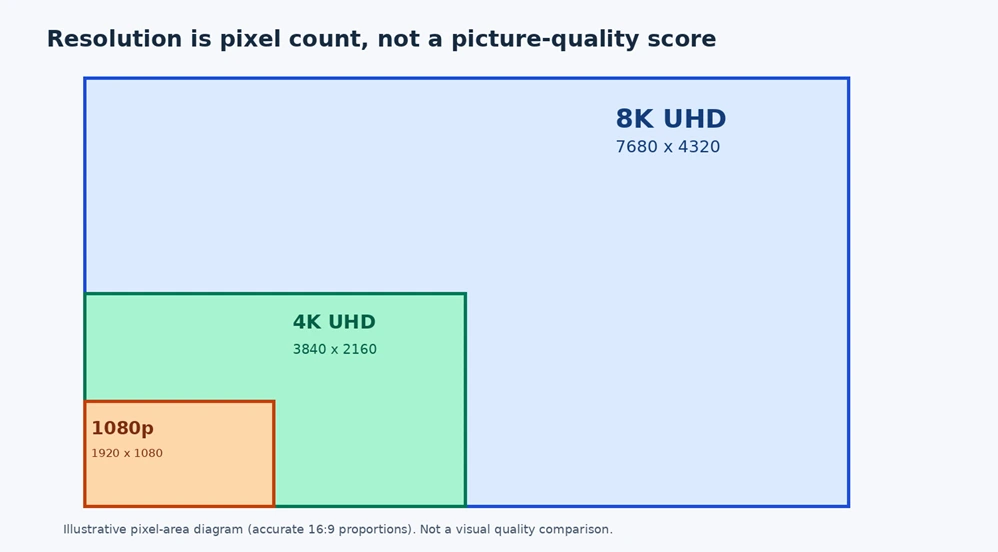
An 8K frame is twice as wide and twice as tall as a 4K frame, giving it four times the pixel count. That is a mathematical difference, not a promise that a video will look four times better.
Is 8K Really Better Than 4K?
Start creating Verdict in seconds, and convert more of your visitors into leads.
Native 8K footage can reveal finer textures, especially on a large display viewed close enough to appreciate the detail. On a large display viewed closely, 8K stands out while on a smaller TV across a standard living room, the extra pixels are difficult to notice.
Screen size, viewing distance, visual acuity, and the quality of the source all matter. When choosing a TV, contrast, HDR performance, brightness, motion handling, and panel quality can make a bigger visible difference than resolution alone.
A good 4K OLED TV, for example, may produce a more pleasing picture than an 8K model with weaker contrast. For related display features, see NogenTech’s smart TV guide:
What Is a Smart TV? Features, Types & How It Works
Why Can a Good 4K Video Look Better Than 8K?
Start creating Verdict in seconds, and convert more of your visitors into leads.
Resolution describes the size of the frame. It does not tell you how cleanly the image was recorded or compressed. The difference usually comes down to two areas:
Bitrate and Compression
Bitrate is the amount of data used per second of video. Excessive compression can smear textures, flatten fine details, and create blocky artifacts.
An aggressively compressed 8K stream can look worse than a carefully encoded 4K source. Codecs such as HEVC and AV1 help compress high-resolution video, but results depend on the settings and footage.
HDR, Camera quality, and Focus
Beyond resolution, features like High Dynamic Range (HDR) can preserve a wider range of brightness and contrast on compatible displays. Lens quality, sensor performance, lighting, and accurate focus also influence details.
It means upsizing soft footage to 8K does not recreate details that were never captured.
Native 8K vs. Upscaled 8K: What Changes?
Start creating Verdict in seconds, and convert more of your visitors into leads.
Native 8K begins with an 8K source while an upscaled 8K starts with a lower-resolution source, often 4K, and estimates extra pixels to fill an 8K screen.
Upscaling can improve perceived sharpness, but it cannot consistently recover all the information present in native 8K footage.
| Native 8K | Upscaled 8K |
| Captured or rendered at 8K | Lower-resolution footage enlarged to 8K |
| Can retain finer source detail | Depends on image-processing algorithms |
| Still affected by compression | Still limited by original source quality |
Can You Watch 8K Video on a 4K TV?
Start creating Verdict in seconds, and convert more of your visitors into leads.
Often yes, if the player can decode the file and output a compatible signal. In this scenario, the 8K video will be downscaled to the display’s 3840 × 2160 pixels.
A high-quality source may sometimes produce a clean downscaled image, but a 4K screen still cannot display 33.2 million separate pixels at once.
However, for everyday movies and show streaming, a properly mastered 4K version is generally the more practical option.
What Do You Need to Play 8K Video Smoothly?
Start creating Verdict in seconds, and convert more of your visitors into leads.
An 8K-capable TV alone does not guarantee that an app or streaming box can deliver 8K. Every part of the playback chain matters: source, codec, decoder, connection, output mode, and display.
Check whether the graphics card or media device supports the specific HEVC or AV1 profile and frame rate. HDMI 2.1 can carry supported 8K modes, but available formats depend on device bandwidth and compression support.
For streaming, sustained network throughput must match the video’s actual bitrate; there is no universal Mbps requirement for every 8K stream.
Netflix is a useful example of the distinction: its Ultra HD offering is associated with 4K playback, not a promise of native 8K titles. If Netflix looks blurry or buffers on your TV, that is a streaming-quality issue rather than proof that you need an 8K display. NogenTech has a relevant troubleshooting guide:
How Do I Troubleshoot Netflix Streaming Issues?
What If Your 8K Video Buffering or Not Playing in 8K?
Start creating Verdict in seconds, and convert more of your visitors into leads.
Start by checking whether the original video is available in 8K. Next, confirm that your app, device, codec decoder, output connection, and screen support the intended playback mode. After all, a fast internet connection cannot overcome an unsupported codec or display.
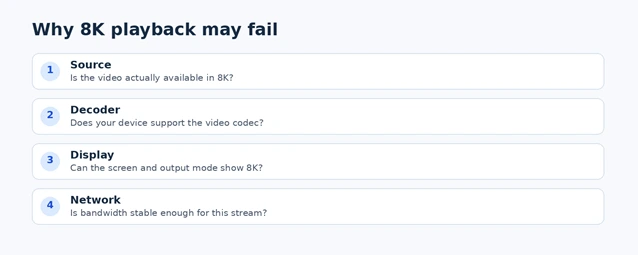
| Symptom | Likely check |
| 8K option missing | Source, app, browser, and device support |
| Video stutters | Hardware decoding and codec profile |
| Frequent buffering | Connection stability and stream bitrate |
| Output stays at 4K | Display and video-output settings |
| Local file will not open | Codec, bit depth, and player compatibility |
For instance, on YouTube, the 4320p quality option appears only when the video and playback environment support it. A genuine settings screenshot can be added later after checking it on a compatible device; this article deliberately avoids a fabricated screenshot.
How Much Storage Does 8K Video Need?
Start creating Verdict in seconds, and convert more of your visitors into leads.
The overall file size depends on bitrate, duration, codec, frame rate, and audio, not resolution alone. For an approximate decimal gigabyte estimate, multiply bitrate in Mbps by seconds and divide by 8,000.
| Illustrative bitrate | 10-minute video size |
| 40 Mbps | 3 GB |
| 80 Mbps | 6 GB |
| 120 Mbps | 9 GB |
| 200 Mbps | 15 GB |
These figures represent typical streaming estimates rather than fixed 8K rules, and uncompressed editing masters will be much larger. That said, capturing 8K footage remains a huge advantage for 4K projects, giving you freedom to crop, reframe, or stabilize shots without losing detail.
For more on that production workflow, see Adobe’s technical overview.
Is 8K Worth It in 2026?
Start creating Verdict in seconds, and convert more of your visitors into leads.
For everyday streaming, a high-quality 4K display remains a sensible choice. Native 8K becomes more compelling on very large screens with suitable footage and viewing conditions.
When it comes to gaming, frame rate, latency, and HDR may matter more than pushing the highest possible resolution. As for video creators, 8K recording can provide valuable cropping flexibility when the extra storage and processing demands are justified.
| Your main use | Practical priority |
| Movies and streaming | Strong 4K HDR display |
| Competitive gaming | Refresh rate, responsiveness, stable frame rate |
| Large-screen native 8K viewing | Verified 8K source and compatible playback chain |
| Cropping footage for 4K delivery | Consider 8K recording if workflow supports it |
At the end of the day, more pixels can preserve detail, but they do not automatically guarantee a better picture.
A Few Common Questions About 8K Video
Start creating Verdict in seconds, and convert more of your visitors into leads.
Can the human eye see 8K?
People can perceive added detail under suitable conditions, especially on large displays viewed relatively close. At greater distances, the difference becomes less noticeable.
Is 8K the same as 4320p?
Consumer 8K UHD is commonly called 4320p because it has 4,320 vertical pixels.