Missing follow-ups and losing potential customers can be a big hurdle for business growth.
There can be multiple reasons for that, like a small team, old-school techniques, or customer details spread across multiple spreadsheets. And this is where CRM can help you overcome all those hurdles.
The basic idea of a CRM (customer relationship management) system is quite simple. You can centralize data and customer service and streamline daily routine workflows.
Whether you’re a small business navigating CRM trends or a growing enterprise, understanding how this whole thing works is the first step toward choosing the right solution.
Key CRM Usage & Impact Statistics
✅91% of businesses now use CRM systems, which shows widespread adoption.
✅Cloud-based CRM platforms dominate, with 87% of businesses using cloud CRMs for scalable and remote access to customer data.
✅The average ROI from CRM investments is about $8.71 for every $1 spent, which illustrates the strong financial benefits of CRM adoption.
What Is CRM Software? A Clear Explanation of How It Helps Your Business
As a one-liner: CRM (Customer Relationship Management) software is a tool that can help your business manage customer information in one place, such as emails, support requests, and purchase history, in an organized view.
It helps your business by collecting information from different customer touchpoints and organizing it into a clear record. Teams can then use this data to manage interactions throughout the customer journey.
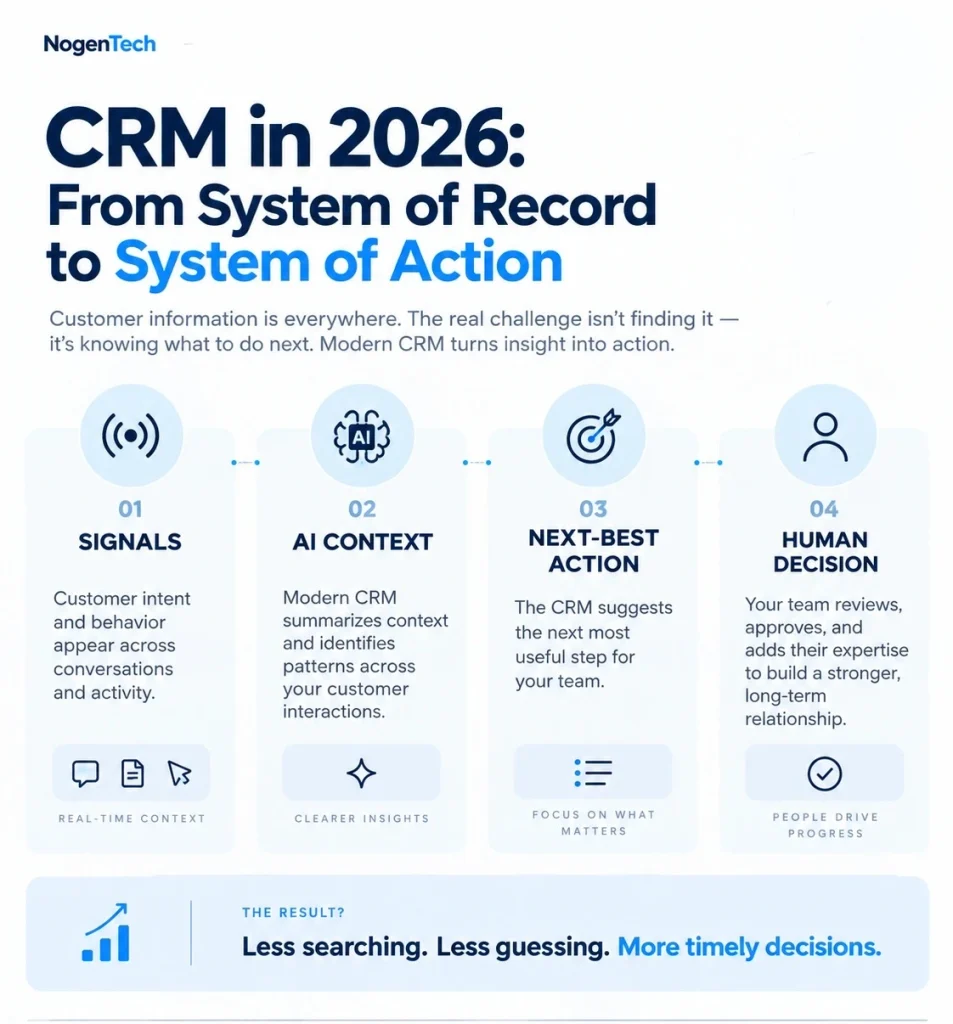
For example, when someone fills out a website form, sends an email, or contacts your business, their details can be added to the CRM. From there, teams can:
- Keep customer records with contact details, conversations, and purchase history.
- Follow leads as they move through different sales stages.
- Set up automatic follow-ups for emails, reminders, and other routine tasks.
- Handle support requests and keep previous conversations easy to find.
- Check reports and analytics to see sales and customer trends.
- Connect other tools such as Microsoft Outlook, Google Workspace, Slack, and QuickBooks.
Beyond these features, you can explore 12 key benefits of CRM software to better understand how a CRM can support different areas of your business.
💡Pro Tip: Do not overload your CRM with unnecessary data fields; it slows performance and user adoption.
What Are the Key Features of CRM Software?
Once you look inside a CRM, you’ll find several features designed to make the system fit different teams and workflows. Some of the most useful ones include:
- Sales Forecasting: Uses current and historical sales data to help teams estimate future revenue and plan.
- Customization: Lets businesses adjust fields, dashboards, workflows, and views to match the way their teams work.
- Mobile Access: Allows employees to check customer records, update deals, and manage tasks from their phones or tablets. A traditional CRM that may be mainly used from a desktop, a mobile CRM gives teams access to important customer information wherever they work. You can also compare mobile CRM vs. traditional CRM to understand how the two approaches differ.
- AI Features: Some modern CRMs use AI to score leads, summarize conversations, suggest follow-ups, and identify useful patterns in customer data.
- Interaction Tracking: You can easily have a complete record of when your customer got in touch with you, like emails, calls, purchases, sales, returns, support, and all follow-ups.
I have also created detailed content for you covering the most essential features of a CRM system that no business can ignore. If you want a deeper understanding of these, check out NogenTech’s content on CRM key features.
What Are the Different Types of CRM Software?
When you Google it, you may find enough CRM types online, as everyone is writing something about it, but as I have researched, CRM software mainly includes Operational CRM, Analytical CRM, and Collaborative CRM.
What Is Operational CRM?
Operational CRM is basically about automating everyday customer-facing tasks, such as sales, marketing, and customer service, so teams can handle them more efficiently.
It reduces manual work by organizing customer interactions and automating routine activities throughout the customer lifecycle.
Key capabilities of operational CRM include:
- Lead capture and qualification
- Sales pipeline management
- Marketing automation
- Customer support management
- Workflow automation
For Which Businesses Is Operational CRM Best?
- Small businesses
- Sales teams
- Service-based businesses
What Is Analytical CRM?
Analytical CRM looks at customer data to spot buying patterns, track performance, and help businesses make better-informed decisions.
It helps businesses understand customer behavior, improve marketing strategies, forecast sales, and increase customer retention.
Key capabilities of Analytical CRM include:
- Customer segmentation
- Sales forecasting
- Performance reporting
- Customer behavior analysis
- Campaign analytics
Using Analytical CRM is Best For:
- Marketing teams
- Data-driven businesses
- Large customer databases
What Is Collaborative CRM?
Collaborative CRM shares customer information across sales, marketing, and customer service teams to deliver a consistent customer experience.
A centralized customer record improves communication, reduces duplicated work, and ensures every team works with the same information.
Key capabilities of Collaborative CRM include:
- Shared customer records
- Cross-team collaboration
- Omnichannel communication
- Activity tracking
- Document sharing
Best Users for Collaborative CRM to Use:
- Growing businesses
- Multi-department organizations
- Customer-focused enterprises
Which Type of CRM Software Should You Choose?
The right CRM software depends on your business objectives. Choose Operational CRM to automate workflows, Analytical CRM to gain customer insights, or Collaborative CRM to improve teamwork.
Most modern platforms, including Salesforce, HubSpot CRM, Monday.com CRM, and Microsoft Dynamics 365, combine all three capabilities, allowing businesses to manage the complete customer lifecycle from a single platform.
How Do You Choose the Right CRM Software?
Choose CRM software based on your business needs, budget, team size, and required features. Avoid paying for advanced features your team doesn’t need. The right CRM should fit your existing processes and scale as your business grows.
Consider these factors when choosing a CRM:
- Business Size and Requirements: Consider the number of users, customer database size, sales complexity, and future growth.
- Core Features: Look for contact and lead management, sales pipelines, automation, customer support, and reporting.
- Ease of Use: Choose a CRM with a simple interface, easy navigation, mobile access, and a minimal learning curve.
- Integrations: Make sure it connects with tools you already use, such as Google Workspace, Outlook, Slack, Shopify, or Mailchimp.
- Customization and Scalability: Look for custom workflows, dashboards, permissions, automation rules, and API support. Businesses with complex requirements may also need a CRM developer for custom integrations.
- Pricing and Support: Compare plans, feature limits, add-ons, support, and free trials. Also consider why businesses overpay for CRM software to avoid unnecessary features and hidden costs.
What Are the Best Practices for Using CRM Software Effectively?
Getting the most from CRM software is less about simply having the tool and more about using it properly. Keep customer data accurate, train your team, automate repetitive tasks, and connect the CRM with the tools you already use.
Without getting into too much confusion, simply follow these practices to maximize the value of your CRM software.
1. Define Clear Business Goals
Identify what you want your CRM system to achieve before implementation. Examples include:
- Increase sales conversions
- Improve customer retention
- Automate repetitive tasks
- Enhance customer support
- Track marketing performance
Clear objectives help configure the platform around measurable business outcomes.
2. Keep Customer Data Accurate
Reliable customer data improves reporting, personalization, and decision-making. Maintain your database by:
- Removing duplicate records
- Updating contact information
- Standardizing data entry
- Archiving inactive contacts
Clean data leads to more accurate insights and better customer experiences.
3. Train Your Team
A CRM platform delivers value only when employees use it consistently. Training should cover:
- Contact management
- Sales pipeline updates
- Workflow automation
- Reporting dashboards
- Customer communication
Consistent usage improves collaboration and data accuracy.
4. Automate Routine Workflows
Use automation to reduce repetitive tasks and improve productivity. Automate:
- Follow-up emails
- Lead assignments
- Task reminders
- Customer notifications
- Sales activities
Automation allows teams to focus on customer relationships instead of manual administration.
5. Integrate Business Applications
Connect your CRM software with the tools your teams use daily. Common integrations include:
- Microsoft Outlook
- Google Workspace
- Slack
- QuickBooks
- Shopify
- Mailchimp
Integrated systems reduce duplicate work and keep customer information synchronized.
6. Monitor Performance Regularly
Review CRM reports to measure performance and identify opportunities for improvement. Track metrics such as:
- Lead conversion rate
- Sales revenue
- Customer retention
- Customer satisfaction
- Team productivity
Regular analysis helps optimize workflows and support continuous business growth.
Things People Want to Know More About CRM
What is the difference between CRM software and ERP software?
CRM software manages customer relationships, while ERP software manages finance, inventory, operations, and business resources.
Is CRM software only for sales teams?
No. CRM software supports sales, marketing, customer service, and management teams through shared customer data.
Can CRM Software Be Used in Real Estate?
Yes. Real estate CRM software helps agents manage leads, properties, client communication, follow-ups, and transactions from one platform.
Can CRM Software Be Used in Construction?
Yes. Construction CRM software helps contractors manage leads, client communication, project inquiries, estimates, and customer relationships.