IPTV buffering ruining your streams? Your internet type isn’t always the problem.
Nothing is more frustrating than an IPTV stream freezing during a live match or your favorite TV show. While many people blame slow internet, bandwidth is only one factor behind smooth streaming.
A reliable IPTV network infrastructure depends on multiple technologies working together, including:
- Quality of Service (QoS) for traffic prioritization
- Latency, jitter, and packet loss for stable video delivery
- CDNs, multicast, and adaptive bitrate streaming for faster, uninterrupted playback
Whether you’re using an IPTV service for live TV or video-on-demand (VOD), understanding these network components helps you identify the real causes of buffering and optimize your streaming experience.
In this guide, I’ll explain how IPTV networks work and why network quality matters more than internet speed alone.
What Is IPTV Network Infrastructure?
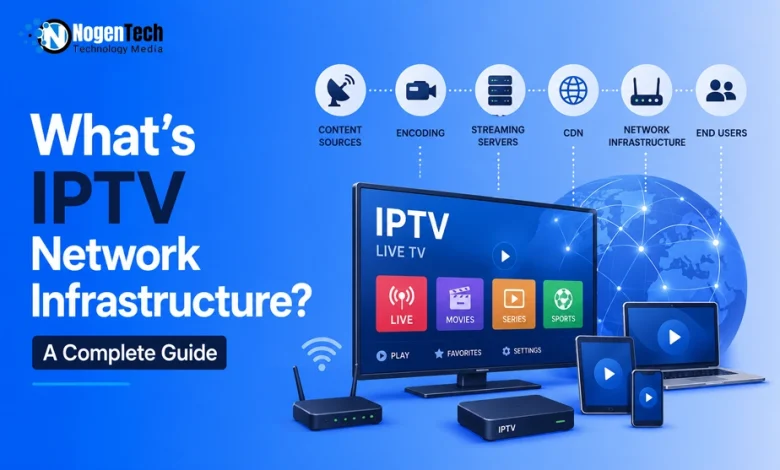
IPTV network infrastructure is the hardware, software, and IP networking components that deliver live TV and video-on-demand (VOD) through Internet Protocol using QoS, CDNs, and streaming servers.
It consists of interconnected technologies that capture, encode, transport, and distribute video content to end users.
Unlike traditional cable or satellite broadcasting, IPTV transmits media as IP data packets, making network quality essential for reliable streaming. Core components include:
- Content sources for live and on-demand video
- Video encoders for media compression
- Streaming servers for content delivery
- Content Delivery Networks (CDNs) to reduce latency
- Routers, switches, and access networks for packet transmission
- Subscriber devices, including smart TVs, smartphones, computers, and IPTV set-top boxes
Why Internet Speed Alone Doesn't Guarantee Smooth IPTV Streaming?
A fast internet connection cannot prevent IPTV buffering if your network has high latency, jitter, packet loss, or poor Quality of Service (QoS).
Many users assume upgrading to a higher-speed internet plan will solve every streaming issue. While having enough internet speed is necessary for IPTV, bandwidth only determines how much data your connection can carry, not how reliably it reaches your device.
A smooth IPTV streaming experience depends on multiple network factors, including:
- Bandwidth (throughput) to handle video bitrate
- Latency to reduce transmission delays
- Jitter to maintain consistent packet timing
- Packet loss to prevent missing video data
- Quality of Service (QoS) to prioritize IPTV traffic
When any of these factors degrade, IPTV streams may buffer, freeze, pixelate, or experience playback delays even on high-speed internet connections.
That’s why network quality often has a greater impact on streaming performance than internet speed alone.
What Is Quality of Service (QoS) in IPTV?
Quality of Service (QoS) is a network management mechanism that prioritizes IPTV traffic to reduce latency, jitter, packet loss, and buffering for stable video streaming.
Unlike file downloads, IPTV streams video in real time, where delayed or lost packets can interrupt playback. QoS allocates network resources to maintain consistent video delivery, especially during network congestion.
With QoS, an IPTV network can:
- Prioritize IPTV packets over non-critical traffic.
- Reduce latency for faster data delivery.
- Minimize jitter to keep packet timing consistent.
- Limit packet loss to prevent freezing and pixelation.
- Maintain smooth playback during peak network usage.
Without QoS, IPTV traffic competes with other applications for bandwidth, increasing the risk of buffering, playback interruptions, and inconsistent video quality.
The Four Network Metrics That Determine IPTV Performance
Bandwidth (throughput), latency, jitter, and packet loss are the four core network metrics that determine IPTV streaming quality, playback stability, and buffering.
Each metric affects IPTV streaming differently, making them essential for evaluating network quality and troubleshooting performance issues.
IPTV Network Performance Comparison
| Network Metric | Measures | Impact on IPTV |
| Bandwidth (Throughput) | Data delivered per second | Supports SD, HD, and 4K streaming. |
| Latency | Packet travel time | Affects live stream delay, channel switching, and response time. |
| Jitter | Variation in packet arrival | Causes buffering, stuttering, and video freezing. |
| Packet Loss | Missing data packets | Causes pixelation, freezing, and playback interruptions. |
Bandwidth (Throughput)
Bandwidth (throughput) is the amount of data an IPTV network delivers per second, determining whether it can stream SD, HD, or 4K video without interruptions.
In IPTV, bandwidth refers to the network’s maximum data capacity, while throughput is the actual data successfully delivered during streaming. Throughput reflects real-world network performance and is the more useful metric for evaluating stream quality.
Typical throughput requirements include:
- SD: 3–5 Mbps
- HD: 5–10 Mbps
- 4K UHD: 25 Mbps or higher
Insufficient throughput can cause buffering, lower video quality, and playback interruptions. However, bandwidth alone cannot ensure smooth IPTV streaming because latency, jitter, and packet loss also influence network performance.
Latency
Latency is the time data packets take to travel from the IPTV server to your device, affecting live streaming delay, channel switching, and playback response.
Latency is measured in milliseconds (ms) and indicates how quickly an IPTV network delivers video data. Lower latency improves stream responsiveness, while higher latency increases delivery delays.
High latency can lead to:
- Slower channel switching
- Higher delay in live IPTV streams
- Reduced playback responsiveness
- Buffering when combined with jitter or packet loss
Maintaining low latency helps deliver a smoother live TV experience and improves overall IPTV streaming performance.
Jitter
Jitter is the variation in data packet arrival times on an IPTV network, causing buffering, video freezing, stuttering, and playback instability.
Unlike latency, which measures packet delay, jitter measures the consistency of packet delivery. Even with adequate bandwidth, inconsistent packet arrival can interrupt video playback and reduce streaming quality.
High jitter can cause:
- Buffering and playback stuttering
- Video freezing
- Audio-video synchronization issues
- Pixelation in live IPTV streams
Low jitter ensures consistent packet delivery, resulting in smoother IPTV streaming and more stable live TV playback.
Packet Loss
Packet loss is the percentage of IPTV data packets that fail to reach the destination, causing buffering, pixelation, freezing, and playback interruptions.
In an IPTV network, missing packets create gaps in the video stream, reducing playback quality and stability.
Because live IPTV has limited time to recover lost data, even small amounts of packet loss can noticeably affect the viewing experience.
Common effects of packet loss include:
- Buffering and playback interruptions
- Pixelated or distorted video
- Video and audio freezing
- Lower streaming quality
Keeping packet loss low improves IPTV streaming reliability, video quality, and overall playback stability, especially for live TV services.
What Is Buffering in IPTV and Why Does It Happen?
IPTV buffering occurs when the playback buffer runs out of video data because the network cannot deliver packets consistently enough for continuous streaming.
A buffer temporarily stores video data before playback to compensate for normal network variations.
If incoming packets arrive too slowly or irregularly, the buffer empties before it can refill, causing the video to pause until more data is received.
Common causes of IPTV buffering include:
- Insufficient throughput (bandwidth)
- High latency
- Excessive jitter
- Packet loss
- Network congestion
Reducing these network issues helps maintain a full playback buffer, resulting in smoother IPTV streaming, fewer interruptions, and more consistent video quality.
Why a Faster Internet Connection Can Still Cause IPTV Buffering?
A faster internet connection cannot stop IPTV buffering if latency, jitter, packet loss, or network congestion disrupt continuous video packet delivery.
Internet speed measures bandwidth, not network stability. IPTV requires a continuous, ordered flow of data packets, so inconsistent delivery can interrupt playback even when bandwidth is sufficient.
For example, a 25 Mbps connection on a high-latency network like satellite internet compared to 5G home internet can buffer far more than a stable 10 Mbps wired connection.
Smooth IPTV streaming depends on:
- Adequate throughput (bandwidth)
- Low latency
- Minimal jitter
- Low packet loss
- Stable network quality
Improving these network metrics is often more effective than upgrading to a faster internet plan alone.
How Latency and Jitter Affect Live IPTV Streaming
Latency and jitter directly affect live IPTV streaming by delaying packet delivery and disrupting packet timing, resulting in playback delays, buffering, and video freezing.
Unlike video-on-demand (VOD), live IPTV streams content in real time with minimal buffering tolerance, much like online gaming, making low latency critical for stable playback. Delayed or inconsistent packet delivery leaves little opportunity to recover missing data before playback.
High latency and jitter can cause:
- Longer live stream delays
- Slower channel switching
- Buffering and video freezing
- Audio-video synchronization issues
Maintaining low latency and minimal jitter ensures smoother live TV playback, faster response times, and a more consistent IPTV streaming experience.
Best Practices for Optimizing IPTV Network Infrastructure
Optimizing IPTV network infrastructure requires stable bandwidth, low latency, minimal jitter, low packet loss, and effective traffic management to ensure consistent streaming performance.
Improve IPTV streaming by following these best practices:
- Enable Quality of Service (QoS) to prioritize IPTV traffic over less time-sensitive applications.
- Use a wired Ethernet connection instead of Wi-Fi or upgrade to a dual-band router to utilize the 5 GHz band to reduce latency, jitter, and packet loss.
- Maintain adequate bandwidth for SD, HD, or 4K streams based on viewing requirements.
- Reduce network congestion by limiting bandwidth-intensive downloads during streaming.
- Deploy Content Delivery Networks (CDNs) to shorten content delivery paths and reduce latency.
- Use Adaptive Bitrate Streaming (ABR) to automatically adjust video quality when network conditions change.
- Monitor latency, jitter, and packet loss regularly to identify and resolve network issues before they affect playback.
- Keep networking equipment updated, including routers, switches, and firmware, to maintain reliable performance.
You can also refer to comprehensive setup resources like theiptvguide.com for practical tips on configuring your streaming hardware to work seamlessly with CDNs.
Following these practices improves IPTV network performance, reduces buffering, and delivers smoother live TV and video-on-demand (VOD) streaming across different devices.
Frequently Asked Questions About IPTV Network Infrastructure
What is a good latency for IPTV streaming?
A latency below 50 ms is generally ideal for IPTV streaming, delivering faster channel switching, lower delays, and smoother live TV playback.
Although IPTV can tolerate slightly higher latency than online gaming, lower latency improves responsiveness and reduces playback delays, especially during live IPTV streaming.
How much bandwidth does IPTV need?
IPTV typically requires 3–5 Mbps for SD, 5–10 Mbps for HD, and at least 25 Mbps for 4K UHD streaming.
Actual bandwidth requirements vary depending on video bitrate, compression, and the number of simultaneous IPTV streams on the network.
Can IPTV work over Wi-Fi?
Yes, IPTV works over Wi-Fi, but Ethernet provides lower latency, less jitter, and more stable streaming performance.
Wi-Fi interference and signal congestion can increase packet loss and buffering, making a wired connection the better choice for uninterrupted IPTV playback.
Does QoS reduce IPTV buffering?
Yes. Quality of Service (QoS) reduces IPTV buffering by prioritizing video traffic over less time-sensitive network data.
QoS helps minimize latency, jitter, and packet loss, ensuring video packets reach the player consistently during network congestion.
What causes IPTV buffering besides slow internet?
High latency, jitter, packet loss, and network congestion can cause IPTV buffering even when internet bandwidth is sufficient.
IPTV depends on continuous packet delivery, making overall network quality more important than download speed alone.
Why is packet loss harmful for IPTV?
Packet loss interrupts IPTV streams by preventing video packets from reaching the playback device, causing freezing and pixelation.
Because live IPTV has limited time to recover missing data, packet loss directly affects stream quality and playback stability.
What is the difference between bandwidth and throughput?
Bandwidth is a network’s maximum data capacity, while throughput is the actual data successfully delivered during IPTV streaming.
Final Thoughts: Better IPTV Starts With a Better Network
Many people assume upgrading to a faster internet plan is the easiest way to fix IPTV buffering. After exploring how IPTV network infrastructure works, it’s clear that Quality of Service (QoS), bandwidth, latency, jitter, packet loss, and throughput have a much greater impact on streaming performance.
In my view, understanding these network fundamentals is the smartest way to troubleshoot IPTV issues because it helps you focus on the real bottlenecks instead of chasing higher internet speeds that may not solve the problem.