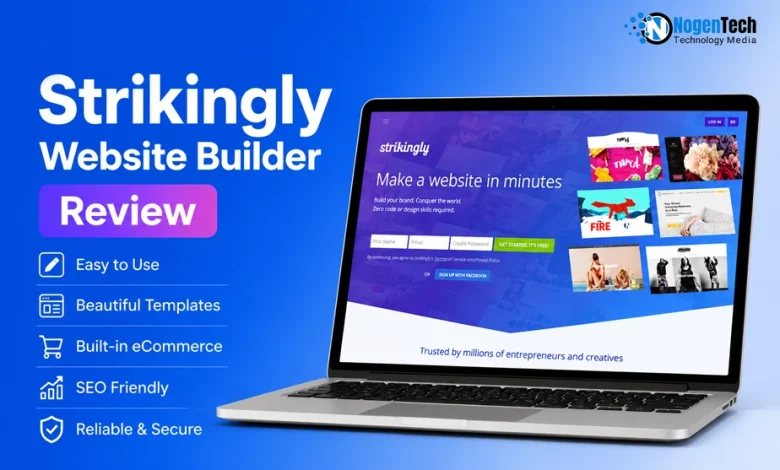
Building a website is easy; choosing the right website builder isn’t.
Building a professional website no longer requires coding or hiring a developer. Strikingly Website Builder has simplified everything by providing designed templates and built-in tools for creating business websites, portfolios, and online stores.
After testing the platform, I evaluated its:
- Website builder interface and editor
- Templates and customization options
- SEO and blogging tools
- eCommerce features
- Pricing and overall ease of use
Now, as you read next, I will walk you through what Strikingly is, explore its key features, pricing plans, SEO performance, and see how it compares with Wix, Squarespace, and WordPress to determine whether it’s the right website builder for you.
What Is Strikingly Website Builder and Who Should Use It?
Strikingly Website Builder is a cloud-based website builder that lets anyone create responsive websites without coding.
It combines a visual editor, responsive templates, web hosting for small businesses, blogging, eCommerce, custom domains, and SSL security into a single platform, making it ideal for freelancers, creators, and startups.
Unlike traditional Content Management Systems (CMSs), Strikingly emphasizes speed and ease of use over extensive customization. Users can create, publish, and manage websites from one dashboard without installing plugins or configuring hosting.
It is commonly used to create:
- Business websites
- Portfolio websites
- Landing pages
- Personal websites
- Blogs
- Small online stores
What Makes Strikingly Different?
Rather than offering unlimited design flexibility, Strikingly focuses on helping users launch websites quickly with essential built-in features, including:
- A beginner-friendly visual editor
- Mobile-responsive templates
- Built-in web hosting and SSL
- Custom domain support
- Native blogging and Simple Store eCommerce
- Integrated SEO features
Who Should Use Strikingly?
Based on my testing, Strikingly Website Builder is best for users who want to create and manage a professional website with minimal technical knowledge.
It’s particularly suitable for:
- Freelancers and creators
- Small businesses and startups
- Consultants and coaches
- Bloggers
- Individuals selling digital or physical products
If you need advanced customization, enterprise functionality, or a large eCommerce store, WordPress, Wix, and Squarespace are better alternatives.
What Features Does Strikingly Website Builder Offer?
Strikingly Website Builder includes everything needed to build and manage a professional website, including a visual editor, responsive templates, blogging, eCommerce, built-in SEO, custom domains, SSL security, and managed hosting.
The platform eliminates the need for multiple plugins or third-party services.
How Easy Is the Strikingly Website Editor to Use?
The Strikingly editor uses a section-based visual interface that makes website customization simple while maintaining clean, responsive layouts.
Key highlights include:
- Live visual editing
- Pre-built content sections
- One-click layout customization
- Real-time preview
It offers one of the easiest editing experiences I’ve tested. Although it provides less creative freedom than WordPress or Webflow, it is much easier to learn.
Does Strikingly Offer Professional Website Templates?
Yes. Strikingly offers professionally designed templates for different industries, all optimized for desktop and mobile devices.
Template categories include:
- Business
- Portfolio
- Blog
- Online Store
- Landing Page
- Event
While customization options are limited, the templates maintain a polished and consistent design.
Can You Create a Blog with Strikingly?
Yes. Strikingly includes a built-in blogging system for publishing and managing content.
It supports:
- Categories and tags
- Featured images
- SEO-friendly URLs
- Scheduled publishing
- Social sharing
It’s suitable for personal blogs and business content, though advanced publishing features remain stronger in WordPress.
Can You Build an Online Store with Strikingly?
Yes. Strikingly Simple Store lets users sell physical and digital products directly from their website.
Core eCommerce features include:
- Product management
- Secure payments
- Inventory tracking
- Discount coupons
- Order management
It’s ideal for small businesses, while larger stores may benefit from Shopify.
What SEO Features Does Strikingly Include?
Strikingly includes built-in SEO features that help improve search visibility without requiring additional plugins or manual activation. Users can optimize their website by editing key SEO elements directly within the editor.
The platform supports:
- SEO titles
- Meta descriptions
- Custom page URLs
- Image alt text
- Automatic XML sitemap
- Free SSL certificate
- Mobile-responsive design
Unlike WordPress, Strikingly doesn’t offer advanced SEO plugins or extensive technical customization.
During testing, I found that SEO features are available by default; you don’t need to enable them separately. However, you’ll still need to manually optimize elements like page titles, meta descriptions, image alt text, and URLs to improve your site’s search performance.
Does Strikingly Include Hosting and Custom Domains?
Yes. Strikingly provides managed cloud hosting with every website, while premium plans support custom domains.
Additional benefits include:
- Free SSL certificate
- Automatic updates
- Website security
- Reliable hosting
Everything is managed from one dashboard, removing the need for separate hosting services.
Does Strikingly Support Marketing and Analytics?
Yes. Strikingly includes built-in tools to help businesses capture leads and monitor website performance.
Features include:
- Contact forms
- Newsletter signup forms
- Social media integration
- Google Analytics integration
- Custom code support
These tools are sufficient for most small businesses and creators without relying on multiple marketing plugins.
Are Strikingly Websites Mobile Friendly?
Yes. Every Strikingly template is fully responsive and automatically adapts to different screen sizes.
This ensures:
- Consistent layouts
- Fast mobile performance
- Touch-friendly navigation
- No separate mobile design required
How Can You Create a Website with Strikingly?
Strikingly Website Builder lets you create a website in minutes using its AI Site Builder or professionally designed templates. Simply enter your website details, choose a template, customize the content, and publish your site without coding.
Now, to give you a straightforward example, I will create a portfolio-style website step by step to make you understand how you can create one yourself.
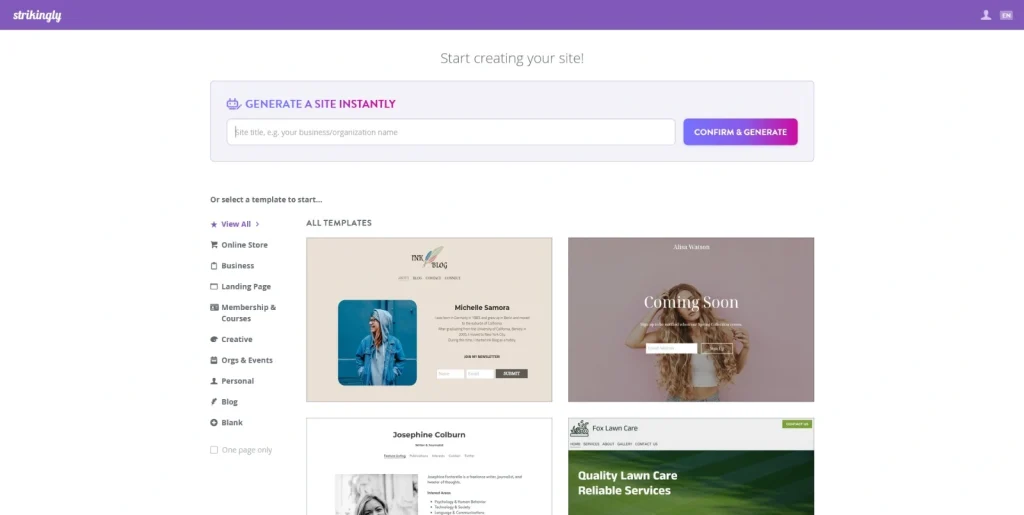
Step 1: Create a Strikingly Account
Go to the Strikingly homepage and click Create Your Free Website. Sign up or log in using your email address, or continue with your Facebook or LinkedIn account.
Step 2: Generate Your Website with AI
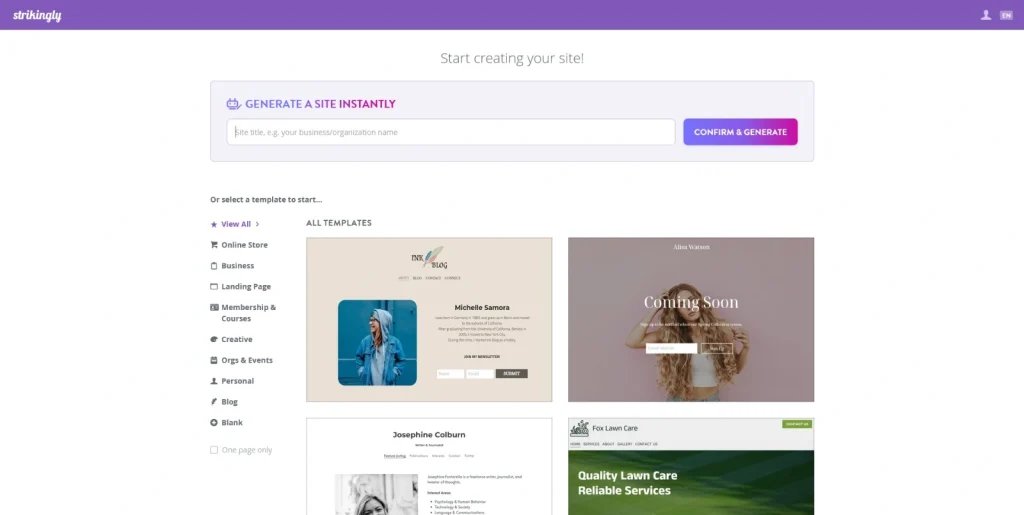
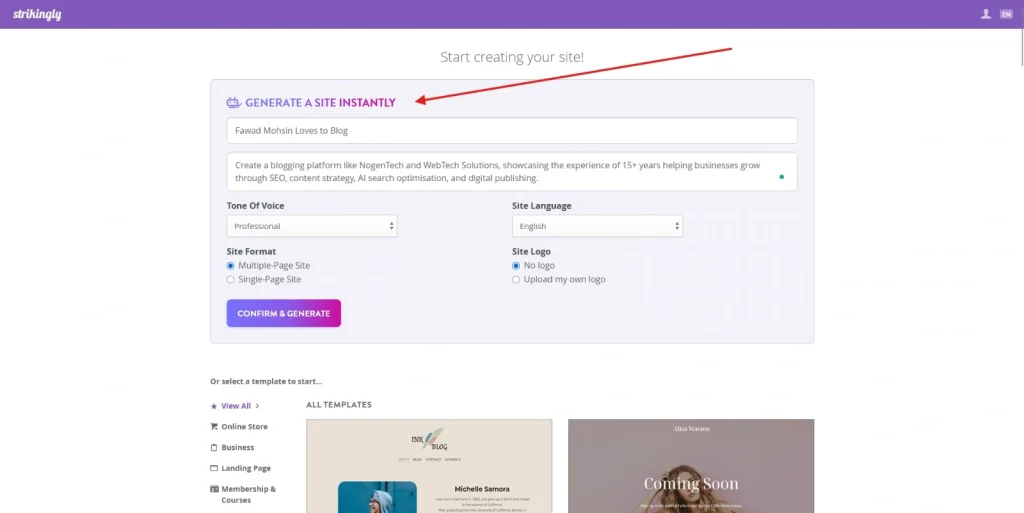
After creating your account, click Create New Site. At the top of the Templates page, you’ll find the AI Site Builder.
Enter:
- Website title
- Website description
Then configure the optional settings:
- Content tone
- Website language
- Single-page or multi-page website
- Brand logo
Click Confirm & Generate to let Strikingly AI create your website.
Step 3: Choose Your Preferred Template
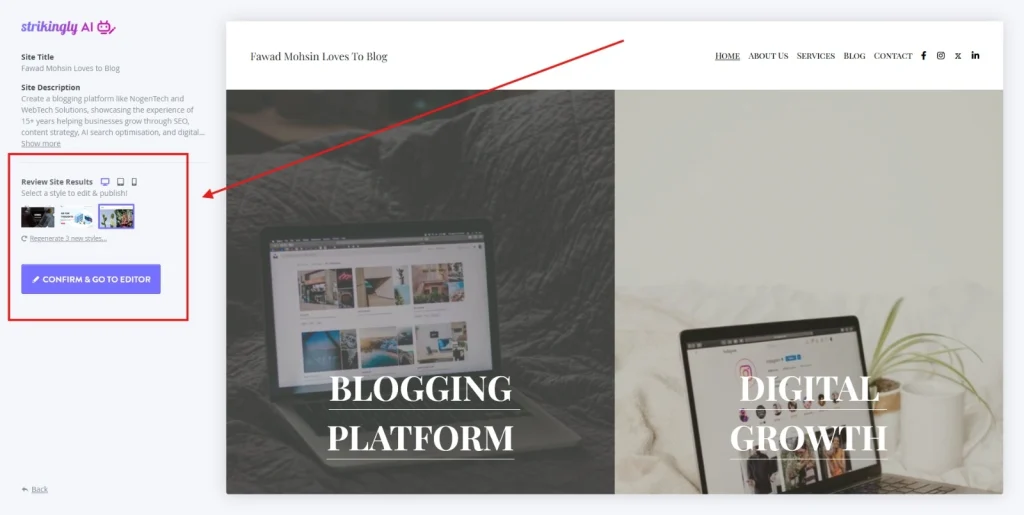
Once the AI finishes generating your website, Strikingly will display multiple template styles based on your input.
Select the layout that best matches your brand. If none fit your preferences, click Regenerate 3 New Styles to view additional options.
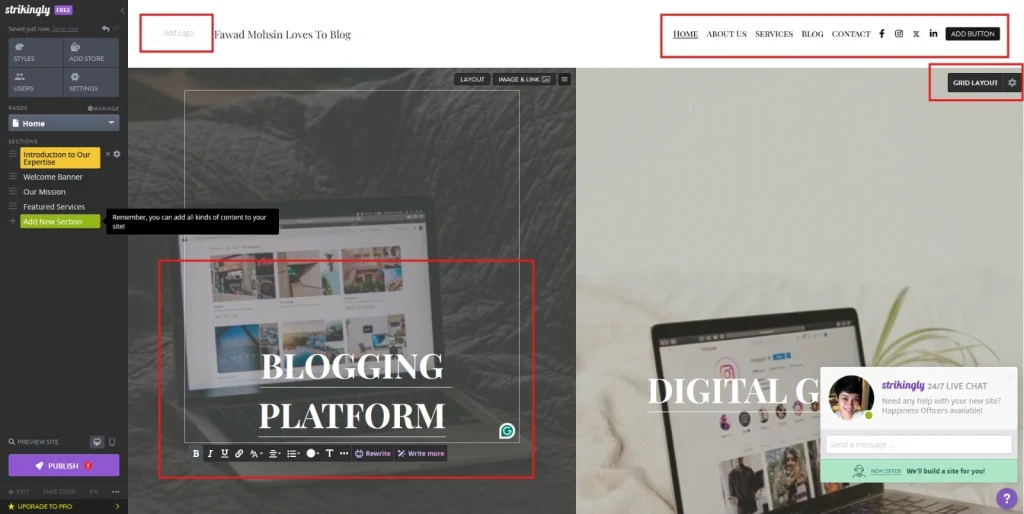
Step 4: Customize Your Website
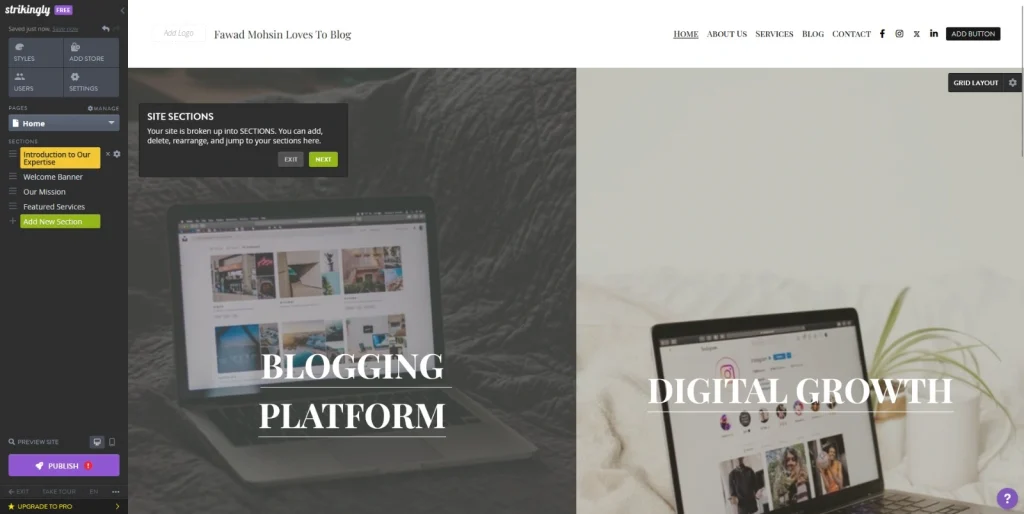
Click Confirm & Go to Editor to open the visual editor. From here, you can customize:
- Text and headings
- Images
- Colors and fonts
- Sections and layouts
- Navigation menu
- Buttons and banners
The editor also lets you:
- Add new sections
- Rewrite or expand AI-generated text
- Replace images with AI suggestions or custom uploads
Step 5: Add Essential Pages and Website Features
Expand your website by adding the pages and sections your visitors expect. Common additions include:
- About
- Services
- Blog
- Contact
- Store
- Testimonials
- Contact forms
- Image galleries
- Maps
- Social media links
This helps create a complete and user-friendly website.
Step 6: Optimize Your Website for Search Engines
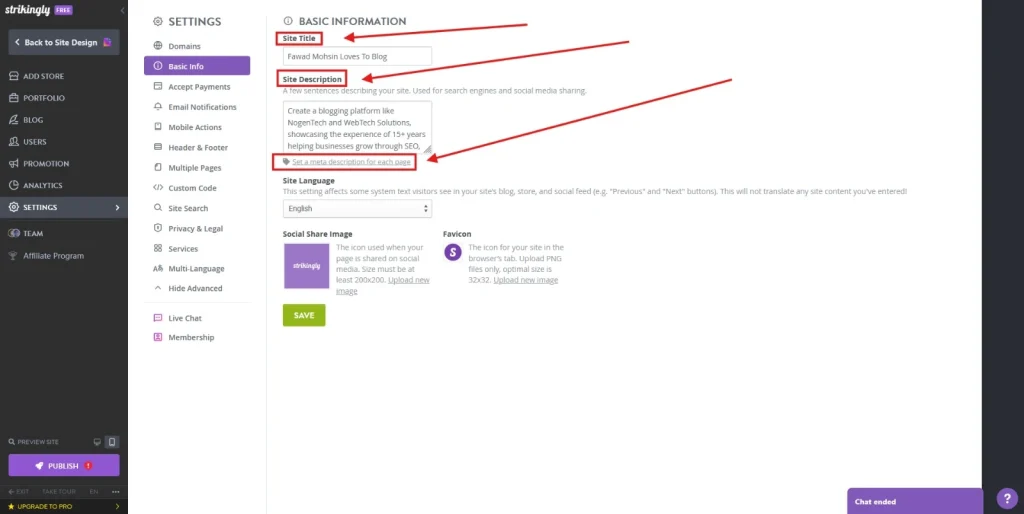
Before publishing, review the SEO settings for each page. Strikingly doesn’t require you to enable SEO; it provides the essential optimization fields by default.
Update the following:
- SEO title
- Meta description
- Custom page URL
- Image alt text
- Social sharing image
- Favicon
- Google Analytics (optional)
Adding relevant keywords and accurate page descriptions helps search engines better understand and index your website.
Step 7: Preview and Publish Your Website
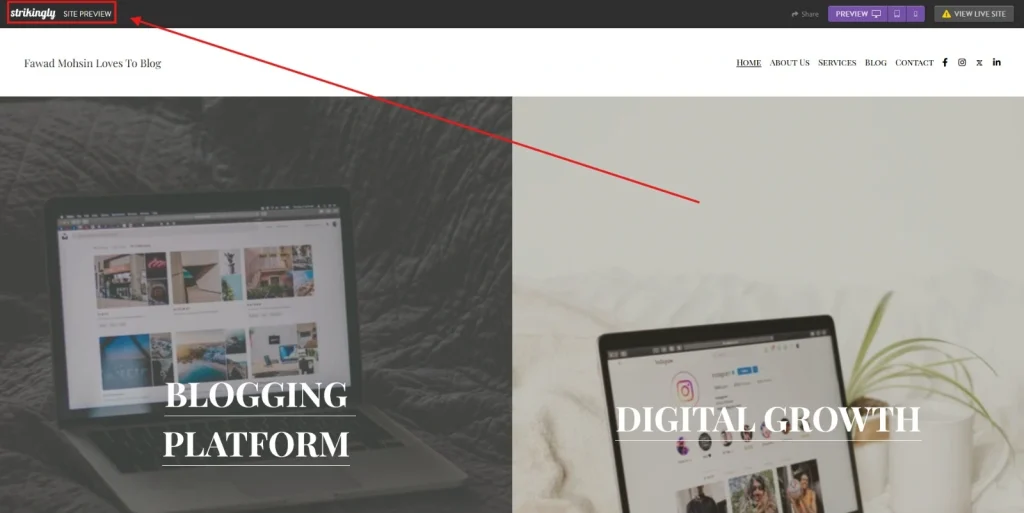
Preview your website to ensure every section looks correct across devices. Once you’re satisfied, click Publish.
Free users receive a Strikingly subdomain, while premium plans allow you to connect a custom domain for a more professional web address.
I found the AI Site Builder surprisingly effective for creating a solid first draft. It generated relevant sections, placeholder content, and images in minutes, significantly reducing setup time.
While I still refined the text and branding manually, it provided a much faster starting point than building a website from scratch.
How Much Does Strikingly Website Builder Cost?
Strikingly Website Builder follows a freemium pricing model with one free plan and three premium plans: Limited, Pro, and VIP.
Paid plans start at $12/month and unlock features such as custom domains, higher storage limits, advanced eCommerce tools, and business-focused functionality.
Strikingly Pricing Plans at a Glance
| Plan | Starting Price | Best For |
| Free | Free | Exploring the platform |
| Limited | $12/month | Personal websites & portfolios |
| Pro | $20/month | Small businesses & online stores |
| VIP | $59/month | Growing businesses & agencies |
Is the Free Plan Worth It?
Yes. The Free plan is ideal for testing the platform before committing to a subscription.
It includes:
- Free Strikingly subdomain
- Basic website builder
- Limited storage and bandwidth
- Up to 5 pages
- Basic online store
- 24/7 chat support
The main limitation is the inability to connect a custom domain or remove Strikingly branding.
What Does the Limited Plan Offer?
The Limited plan is designed for users launching a personal website or portfolio with a custom domain.
Compared to the free plan, it adds:
- Custom domain support
- Free SSL certificate
- More storage and bandwidth
- Support for multiple websites
- Basic eCommerce features
It’s a practical upgrade if you’re ready to publish a professional website.
Is the Pro Plan the Best Value?
For most users, yes.
The Pro plan removes many of the platform’s limitations and introduces features suited for growing websites and online businesses.
Key additions include:
- More websites and pages
- Expanded online store capacity
- Membership features
- Custom forms
- Site search
- Custom code support
- Lower transaction fees
The Pro plan offers the best balance between features and cost, making it the most suitable choice for freelancers, creators, and small businesses.
Who Should Choose the VIP Plan?
The VIP plan targets businesses that need greater scalability and premium support.
It builds on the Pro plan with benefits such as:
- Higher storage limits
- Unlimited products
- No transaction fees
- Multi-language support
- Priority customer service
- Dedicated account management
Unless you’re managing multiple business websites or a high-volume online store, the Pro plan will be sufficient for most users.
Are There Any Additional Costs?
Yes. Strikingly also offers optional services for users who need additional functionality.
These include:
- Audience Plan for email marketing features
- Custom Domain registration
- Custom Email addresses
Pricing for these services varies, so it’s best to check the official Strikingly pricing page for the latest details.
I’d recommend starting with the Free plan to explore the editor and AI features. Once you’re ready to use a custom domain or expand your website, the Pro plan provides the most practical combination of features and value.
What Are the Pros and Cons of Strikingly Website Builder?
Strikingly Website Builder stands out for its ease of use, AI-powered website creation, and all-in-one hosting solution.
However, its limited design flexibility and advanced customization options may not suit large businesses or complex websites.
Pros
After testing Strikingly, these are the features I found most valuable:
- Beginner-friendly interface with a minimal learning curve
- AI Site Builder for faster website creation
- Professionally designed, mobile-responsive templates
- Built-in hosting, SSL, and custom domain support
- Integrated blogging and eCommerce tools
- No plugins or coding required for most tasks
- Free plan available for testing the platform
- 24/7 customer support across all plans
Cons
While Strikingly performs well for simple websites, it does have a few limitations:
- Limited design flexibility compared to WordPress, Webflow, and Wix
- Fewer third-party integrations than some competitors
- Advanced SEO customization is limited
- Free plan displays Strikingly branding
- Lower-tier plans restrict storage, pages, and online store features
Based on my experience, Strikingly is an excellent option for beginners, freelancers, and small businesses that value simplicity over extensive customization.
Is Strikingly Website Builder Good for SEO?
Yes, Strikingly Website Builder is suitable for basic and intermediate SEO.
It provides the essential optimization features needed to help websites rank in search engines, but it isn’t designed for users who need advanced technical SEO customization.
For freelancers, bloggers, startups, and small businesses, the platform offers everything required to build a search-friendly website without relying on additional plugins.
What Are Strikingly’s SEO Strengths?
From my testing, Strikingly performs well in the areas that matter most for everyday websites.
Its biggest strengths include:
- Clean, responsive templates
- Secure HTTPS (SSL) by default
- Fast website setup and hosting
- Beginner-friendly SEO settings
- Mobile-optimized layouts
These features provide a solid foundation for improving search visibility and user experience.
What Are Strikingly’s SEO Limitations?
While Strikingly handles the essentials well, it offers less flexibility. Advanced users may find limitations in areas such as:
- Custom schema implementation
- Advanced technical SEO customization
- Plugin-based SEO extensions
These limitations are unlikely to affect most small websites but may matter for large, content-heavy projects.
Is Strikingly Better Than Other Website Builders?
Strikingly is one of the best website builders for users who value speed and simplicity. However, if your website requires extensive customization, advanced SEO, or enterprise-level eCommerce, platforms like Wix, Squarespace, WordPress, or Shopify may be a better fit.
Which Website Builder Should You Choose?
Instead of trying to be the most feature-rich platform, Strikingly focuses on helping users publish professional websites with minimal effort. Whether it’s the right choice depends on the type of website you want to build.
| If you want to… | Choose… | Reason |
| Launch a website as quickly as possible | Strikingly | AI-powered setup, simple editor, and minimal learning curve. |
| Create a highly customized website | Wix | Greater design flexibility and a larger app marketplace. |
| Build a premium-looking portfolio or brand website | Squarespace | Modern templates with strong visual appeal. |
| Scale a content-heavy or SEO-driven website | WordPress | Extensive customization, plugins, and advanced SEO capabilities. |
| Run a dedicated online store | Shopify | Built specifically for eCommerce with advanced selling tools. |
Still Have Questions About Strikingly Website Builder?
Does Strikingly provide web hosting?
Yes. Strikingly includes managed cloud hosting with every website, so you don’t need to purchase hosting separately. Premium plans also let you connect a custom domain, while SSL security is included by default.
Can I switch from the free plan to a paid plan later?
Yes. You can start with Strikingly’s Free Plan and upgrade to Limited, Pro, or VIP at any time without rebuilding your website.
Can I use my own domain name with Strikingly?
Yes, but only on premium plans. The Free Plan uses a Strikingly subdomain, while paid plans allow you to connect or purchase a custom domain for a more professional web address.
Can I migrate my website from Strikingly to another platform?
Yes, but Strikingly doesn’t provide a one-click migration tool. If you decide to move to platforms like WordPress or Webflow, you’ll typically need to transfer your content manually.
Does Strikingly support multilingual websites?
Yes. Strikingly’s VIP Plan includes multilingual website support with translation features, making it suitable for businesses targeting audiences in multiple languages.
Can multiple people edit the same Strikingly website?
Yes. Depending on your plan, Strikingly allows you to invite collaborators, making it easier for teams to manage website content together.
Is Strikingly suitable for large business websites?
Not usually. Strikingly is designed for portfolios, small businesses, landing pages, and simple online stores. Larger websites requiring advanced customization or enterprise-level functionality are generally better suited to WordPress, Webflow, or Shopify.
Is Strikingly Legit?
Yes. Strikingly is a legitimate website builder trusted by millions of users worldwide. It offers secure cloud hosting, free SSL certificates, multiple pricing plans, and 24/7 customer support, making it a reliable choice for building personal and business websites.
How Can You Cancel a Strikingly Subscription?
You can cancel your premium subscription by logging into your dashboard and navigating directly to your My Account page. From there, click Cancel Plan and follow the confirmation prompts. Your premium features will remain active until the end of your current billing cycle, after which your account reverts to the Free Plan
How Do You Delete a Strikingly Account?
To permanently delete your Strikingly account, you must contact their support team directly by emailing To permanently delete your Strikingly account, you must contact their support team directly by emailing or launching their Live Chat.
Before requesting account deletion, make sure to:
- Download or back up any important website content, as deletion is permanent and cannot be undone.
- Log into “My Sites” and click the gear icon to delete your individual websites.
- Go to your Domains page and disable auto-renew on any custom domains.
- Cancel any active add-on subscriptions like the Audience Plan or custom email plans.
Final Thoughts: Is Strikingly Website Builder Worth It?
Yes, Strikingly Website Builder is worth it for beginners, freelancers, creators, and small businesses looking to build professional websites without coding.
Its AI-powered builder, intuitive editor, responsive templates, and built-in hosting make website creation fast and hassle-free.
After testing Strikingly, I found it delivers exactly what it promises: an easy-to-use platform that simplifies website creation. While it doesn’t match the customization, advanced SEO, or eCommerce flexibility of WordPress, Wix, or Shopify, it excels in ease of use and quick deployment.
If your priority is launching a professional website with minimal effort, Strikingly is a reliable and worthwhile choice.