Choosing the right website builder is harder than building the website itself.
With dozens of website builders available, it’s not always easy to know which one offers the best balance of ease of use, design flexibility, features, and value for money.
Squarespace promises an easy way to build professional websites, but the real question is whether it delivers the features, flexibility, and value you’re looking for.
To find out whether it lives up to its reputation, I tested Squarespace by building a real demo website and evaluating its:
- Ease of use
- Website templates and customization
- AI Website Builder
- SEO features
- Pricing and overall value
Throughout this review, I’ll share my experience to help you decide whether Squarespace Website Builder is the right fit for your website.
What Is Squarespace?
Squarespace is an all-in-one website builder that helps individuals and businesses create, publish, and manage professional websites without coding or managing web hosting.
Squarespace is commonly used to build:
- Business websites
- Personal blogs
- Portfolio websites
- Landing pages
- Service-based business websites
- Restaurant websites
- Online stores
- Membership websites
While these features make Squarespace an attractive option on paper, a feature list alone doesn’t determine whether it’s the right website builder.
The real value comes from how easy those tools are to use, how well they perform, and whether they justify the price, which is exactly what this review evaluates.
What Makes Squarespace Different?
Rather than giving users unlimited design freedom, Squarespace focuses on helping them build visually appealing websites quickly through a structured editing experience and built-in tools.
Some of its standout features include:
- Beginner-friendly visual website editor
- Professionally designed templates
- AI-powered website builder
- Built-in SEO tools
- Managed web hosting and SSL security
- Custom domain support
- Integrated blogging platform
What Features Does Squarespace Website Builder Offer?
Squarespace Website Builder includes everything you need to build, publish, and manage a professional website from a single platform.
Instead of requiring separate hosting, security, plugins, or third-party tools, it combines the essential website-building features into one integrated solution.
Some of the key features include:
- Visual drag-and-edit website builder
- Professionally designed website templates
- AI Website Builder
- Built-in SEO tools
- Blogging platform
- Ecommerce functionality
- Managed web hosting
- Free SSL certificate
- Custom domain support
- Website analytics
- Contact forms and marketing integrations
- Mobile-responsive website design
Whether you’re creating a business website, portfolio, blog, or landing page, these built-in tools eliminate much of the technical work involved in launching and maintaining a website.
In the following sections, I’ll evaluate each of the platform’s core capabilities based on my hands-on experience to determine how well they perform in real-world use.
Is Squarespace Easy to Use?
Yes. Squarespace is one of the easiest website builders for beginners because of its intuitive interface and guided editing experience.
The dashboard is well organized, making it easy to edit pages, manage content, and customize your website without coding.
During my testing, I found that:
- The onboarding process was straightforward.
- Editing text, images, and buttons required only a few clicks.
- The visual editor displayed changes instantly.
- The learning curve was minimal for everyday website tasks.
Although the structured editor limits complete design freedom, it helps maintain clean and consistent page layouts.
Are Squarespace Templates Good?
Yes. Squarespace offers some of the highest-quality templates among website builders.
They are professionally designed, visually consistent, and require very little customization before they’re ready to publish.
From my experience:
- Most templates looked polished immediately.
- Layouts followed modern web design practices.
- Built-in sections reduced the amount of manual design work.
- Mobile responsiveness worked well without additional adjustments.
The main limitation is that templates follow a structured layout, so advanced users may find them less flexible than true drag-and-drop builders.
Is Squarespace Good for SEO?
Yes. Squarespace includes the essential SEO tools needed to optimize a website for search engines.
Most on-page SEO settings are built into the platform, allowing users to improve search visibility without installing additional plugins.
The platform supports:
- SEO titles and meta descriptions
- Custom page URLs
- Image alt text
- Automatic XML sitemaps
- SSL certificates
- 301 redirects
- Mobile-friendly templates
While it doesn’t offer the same level of technical SEO customization as WordPress, it provides everything most small businesses, bloggers, and creators need to build a search-friendly website.
Does Squarespace Include Hosting and a Custom Domain?
Yes. Squarespace includes managed hosting with every website, and premium plans allow you to connect or register a custom domain.
It also provides free SSL certificates, automatic software updates, and built-in security, so you don’t have to manage hosting separately.
How Can You Create a Website with Squarespace?
Creating a website with Squarespace is straightforward. Simply create an account, choose a professionally designed template or use the AI Website Builder, customize your content, review your website, and publish it, all without writing code.
To demonstrate how the platform works, I created a travel-related website. Below is the exact process I followed.
Step 1: Create a Squarespace Account
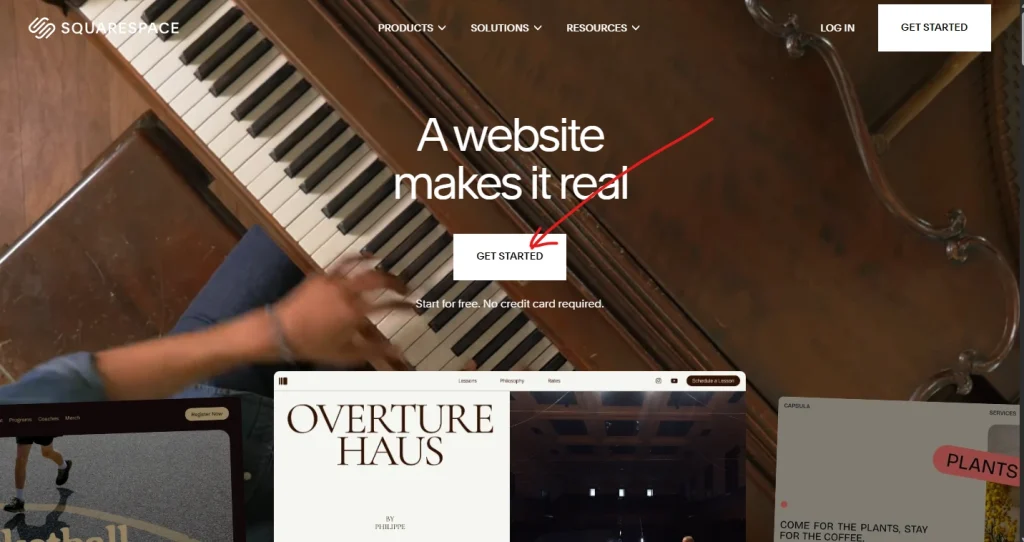
Visit the Squarespace website and click Get Started. Create a new account using your email address or continue with your Google or Apple account.
Step 2: Choose How You Want to Start
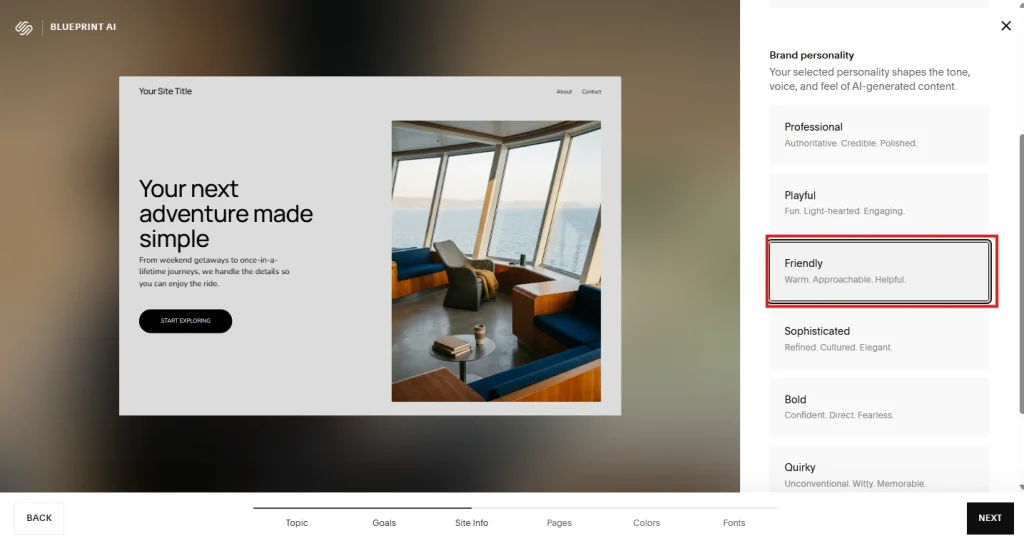
After creating your account, Squarespace lets you choose how you’d like to build your website.
For this review, I selected the friendly layout to see how well it performed.
Step 3: Generate Your Website with AI
Squarespace asks a few questions about your website before generating the initial design.
I entered details such as:
- Business name
- Website category
- Business description
- Website goals
The AI then generated a website structure with suggested pages and layouts.
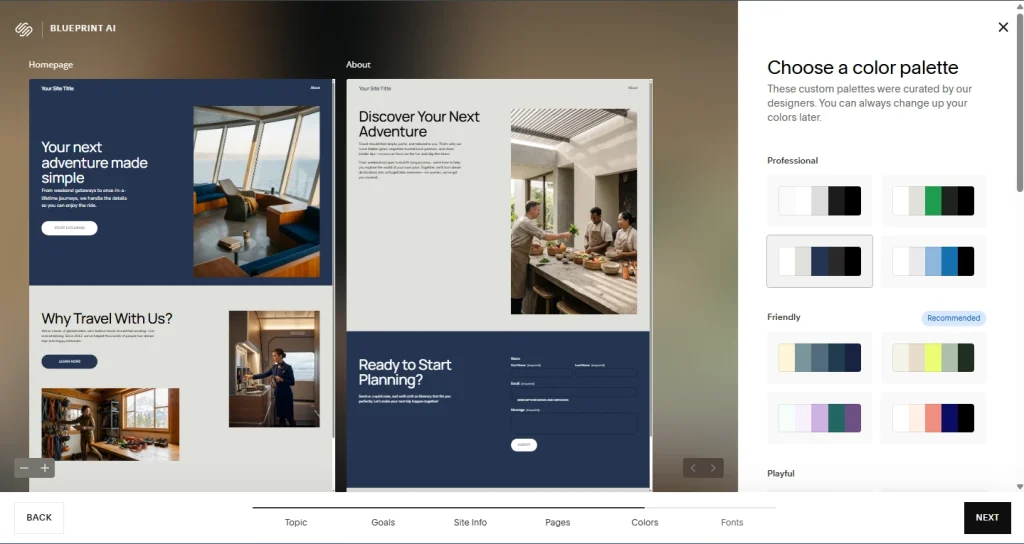
Step 4: Customize Your Website
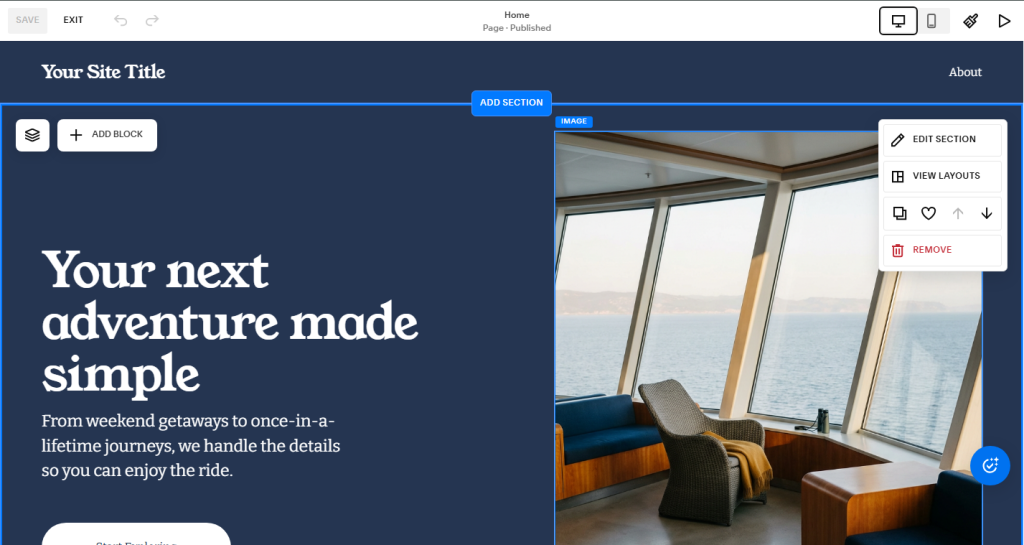
Once the website was generated, I opened the visual editor to personalize the design and content.
I customized:
- Hero section
- Headlines and text
- Colors
- Typography
- Navigation menu
The editor allowed me to make these changes directly on the page while previewing them in real time.
Step 5: Add Essential Website Sections
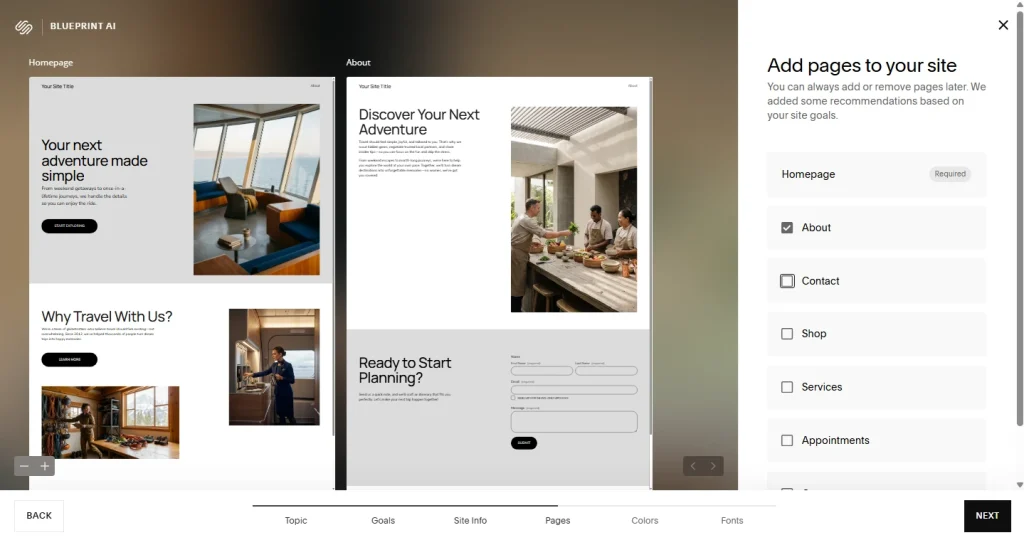
To complete the website, I added the sections most visitors expect to see.
These included:
- About Us
- Services
- Why Choose Us
- Testimonials
- Contact Form
- Footer
Adding and rearranging sections only required a few clicks.
Step 6: Preview and Publish Your Website
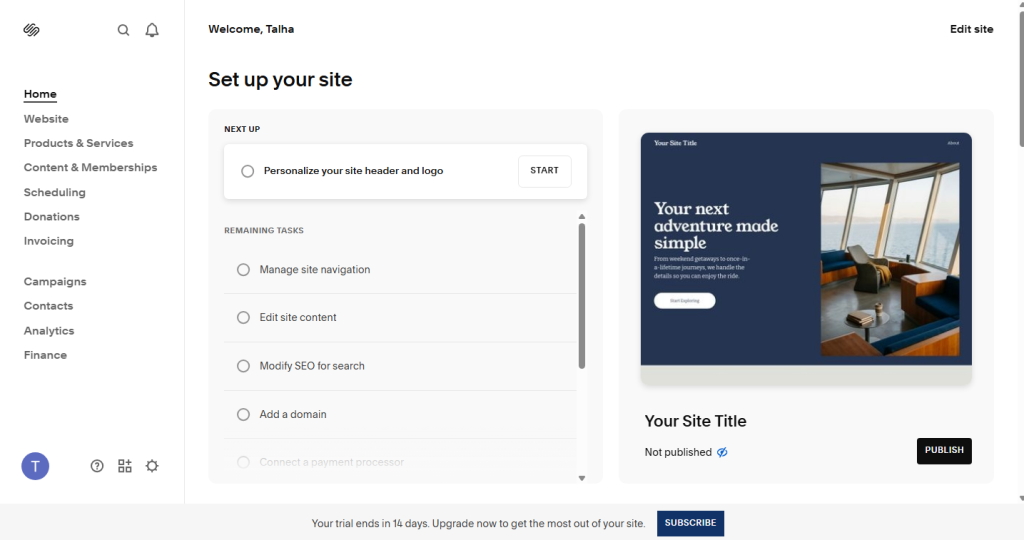
Before publishing, I reviewed the desktop and mobile versions to ensure everything displayed correctly. Once I was satisfied with the layout and content, I published the website.
How Much Is Squarespace?
v
Squarespace plans start at $16 per month (billed annually) or $25 per month (billed monthly), with higher-tier plans offering additional features for businesses and ecommerce websites.
While it doesn’t offer a free plan, every subscription includes website hosting, SSL security, professionally designed templates, and built-in website management tools.
Squarespace Pricing Plans
Squarespace offers four pricing plans to suit different website needs.
| Plan | Monthly Billing | Annual Billing | Best For |
| Basic | $25/month | $16/month | Personal websites, blogs, portfolios, and light online selling. |
| Core | $36/month | $23/month | Small businesses that need advanced analytics and 0% transaction fees. |
| Plus | $56–$59/month | $39/month | Growing online stores, memberships, and digital product businesses. |
| Advanced | $139/month | $99/month | High-volume businesses that need advanced commerce features. |
For most users, the Core plan offers the best balance between features and price, while the Basic plan is sufficient for personal websites and portfolios.
Is Squarespace Free?
No, Squarespace doesn’t offer a permanent free plan. However, new users can start with a free trial to explore the website builder, test its features, and create a website before choosing a paid subscription.
Which Squarespace Plan Should You Choose?
The right plan depends on your website goals.
- Basic – Best for personal websites, portfolios, and blogs.
- Core – A good choice for freelancers, agencies, and small businesses.
- Plus – Suitable for growing businesses that need memberships or expanded selling features.
- Advanced – Designed for businesses with high-volume ecommerce requirements.
If you’re creating a business website rather than a large online store, the Core plan provides the best balance of features and value.
What Are the Pros and Cons of Squarespace?
v
After building a demo landing page and testing Squarespace’s core website-building features, I found that it delivers an excellent balance of simplicity and professional design.
However, I also came across a few limitations that are worth considering before choosing it as your website builder.
Pros of Squarespace
During my testing, these were the biggest strengths of Squarespace Website Builder:
- The onboarding process made it easy to start building without feeling overwhelmed.
- Most templates looked professional with very little customization.
- Editing text, images, buttons, and sections felt intuitive throughout the project.
- The section-based editor helped maintain a clean and consistent page layout.
- Built-in SEO settings were easy to find and configure without additional plugins.
- The mobile version of my landing page looked well-optimized without requiring separate edits.
- Everything needed to build and publish the website was available within a single platform.
Cons of Squarespace
While the overall experience was positive, I also noticed a few drawbacks:
- The structured editor limited how freely I could position certain elements on the page.
- Some layout customizations required working within predefined section designs instead of creating completely custom layouts.
Is Squarespace Customer Support Good?
v
Yes, Squarespace provides reliable customer support through live chat, email, a comprehensive Help Center, and step-by-step guides, making it easy for most users to find assistance when needed.
While it doesn’t offer phone support, its self-service resources are among the most detailed I’ve seen for a website builder.
Customer Support Options
Squarespace offers several ways to get help:
- Live chat support
- Email support
- Comprehensive Help Center
- Video tutorials and guides
- Community forum
- AI-powered Help Assistant
These resources cover everything from setting up a website to troubleshooting common issues and learning advanced features.
People Also Ask About Squarespace
v
Who Owns Squarespace?
Squarespace is owned by funds advised by Permira. Founder Anthony Casalena continues to serve as CEO and Board Chairman while remaining one of the company’s largest individual shareholders.
Is Squarespace Down?
Squarespace is generally reliable, but like any online platform, temporary outages can occur. If you can’t access your website or dashboard, check Squarespace’s official status page to confirm whether there’s an ongoing service interruption.
How Do You Cancel a Squarespace Subscription?
You can cancel your Squarespace subscription from your account’s billing settings. After cancellation, your website remains active until the current billing period ends, unless you cancel during a free trial.
Is Square the Same as Squarespace?
No, Square and Squarespace are different companies. Squarespace is a website builder, while Square (now part of Block, Inc.) primarily provides payment processing and point-of-sale solutions for businesses.
What Is Squarespace Used For?
Squarespace is used to create and manage professional websites without coding. It’s commonly used for business websites, blogs, portfolios, landing pages, online stores, and service-based websites.
How Do You Add Keywords to Squarespace?
You can add keywords by optimizing your page titles, meta descriptions, headings, image alt text, URLs, and website content. Squarespace includes built-in SEO settings that make these optimizations easy to manage.
How Do You Change the Button Color in Squarespace?
You can change button colors from the Site Styles or Design settings. Squarespace allows you to customize button colors, typography, borders, and other design elements to match your brand.
Should You Choose Squarespace or Another Website Builder?
v
Squarespace is an excellent choice for users who want a professional website with minimal effort.
However, if your project requires advanced customization, enterprise ecommerce, or developer-focused features, another website builder may be a better fit.
| What you want | Choose | Best For |
| Build a professional business website | Squarespace | Premium templates, ease of use, and an all-in-one platform. |
| Customize every part of your website | Wix | Greater design flexibility and more integrations. |
| Launch a simple website quickly | Strikingly | Fast setup and beginner-friendly editing. |
| Build a content-rich or SEO-focused website | WordPress | Advanced customization and powerful SEO capabilities. |
| Create highly interactive websites | Webflow | Full design control for designers and developers. |
| Build a dedicated online store | Shopify | Advanced e-commerce and inventory management. |