I Tried 13 Platforms Like ChatGPT and These 5 Performed the Best
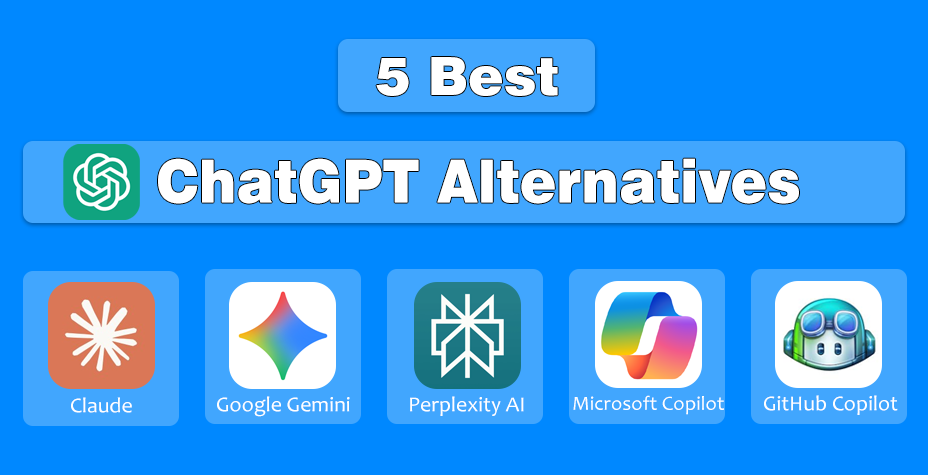
Claude AI, Google Gemini, Perplexity AI, Microsoft Copilot, and GitHub Copilot stand out as the top alternatives to ChatGPT.

I didn’t set out to replace ChatGPT, but curiosity and real workflow needs pushed me there. As a writer and researcher, I wanted to know which AI tools actually perform best beyond the hype.
So, I tested 13 platforms that claim to work like ChatGPT and evaluated them for accuracy, speed, creativity, and practical use. The timing made sense, too. ChatGPT reached 5.6 billion monthly active users faster than any consumer app in history, which proves how deeply AI is shaping daily work.
Not all tools live up to that standard. Therefore, after hands-on testing on thirteen websites like ChatGPT, I picked only five that truly stood out in productivity and efficiency.
Why Search for ChatGPT Alternatives?
ChatGPT is powerful, but it’s not a one-size-fits-all solution. Different users have different needs, and that’s where alternatives come in.
Some people look for lower pricing, especially if they use AI daily. Others want fresher data, faster responses, or fewer usage limits. For writers and marketers, certain tools offer better SEO optimization or tone control.
Developers often prefer platforms with stronger coding assistance or API flexibility. Privacy-conscious users may also seek tools with clearer data policies or local processing options.
In short, exploring ChatGPT alternatives isn’t about replacing it, but it’s about finding the AI tool that fits your workflow better, saves time, and delivers more consistent results for your specific goals.
Top 5 Best ChatGPT Alternatives You Can Try in 2026
ChatGPT remains one of the most capable AI tools for natural language processing, but it’s not always the best fit for every use case.
During my hands-on testing of 13 ChatGPT-like platforms, I found that some tools outperform ChatGPT in professional writing, research accuracy, business productivity, coding, and ecosystem integrations.
Below are the five best-performing ChatGPT alternatives based on real-world usage, features, and value.
| AI Tool | Best For | Key Strength | Real-Time Web | Ideal Users |
|---|---|---|---|---|
| Claude | Professionals | Handles long documents and complex reasoning exceptionally well | ❌ | Analysts, consultants, researchers |
| Google Gemini | Google integrations | Deep integration with Gmail, Docs, Drive, and Search | ✅ | Marketers, students, and Google Workspace users |
| Perplexity AI | Research purposes | Source-cited answers with live web data | ✅ | Journalists, academics, fact-checkers |
| Microsoft Copilot | Business productivity | Native integration with Word, Excel, and PowerPoint | ✅ | Corporate teams, enterprises |
| GitHub Copilot | Coding & development | Real-time code suggestions inside IDEs | ❌ | Developers, software engineers |
1. Claude – Best for Professionals
Claude, developed by Anthropic, stood out as the most reliable AI for professionals who work with long documents, structured reasoning, and nuanced conversations. It excels at handling context-heavy tasks like legal analysis, research summaries, and strategic writing.
Its ability to maintain context across lengthy discussions is one of the most impressive capabilities among modern large language models, making it ideal for researchers, analysts, writers, and legal professionals.
Claude feels more deliberate and human-like in conversation, which makes it especially useful for tasks that require careful interpretation rather than quick outputs.
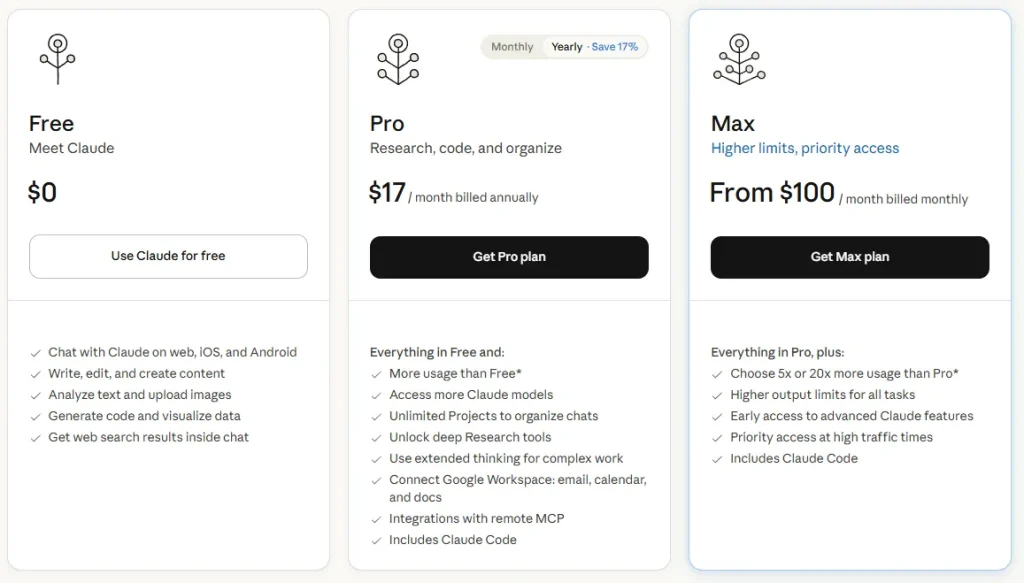
Pricing Details:
- Free Plan (Claude Sonnet): Limited usage, access to Claude 3.5 Sonnet
- Pro Plan: $20 per month, higher limits, access to advanced models
- Team Plan: From $25 per user/month (billed annually), collaboration features included
2. Google Gemini – Best for Google Integrations
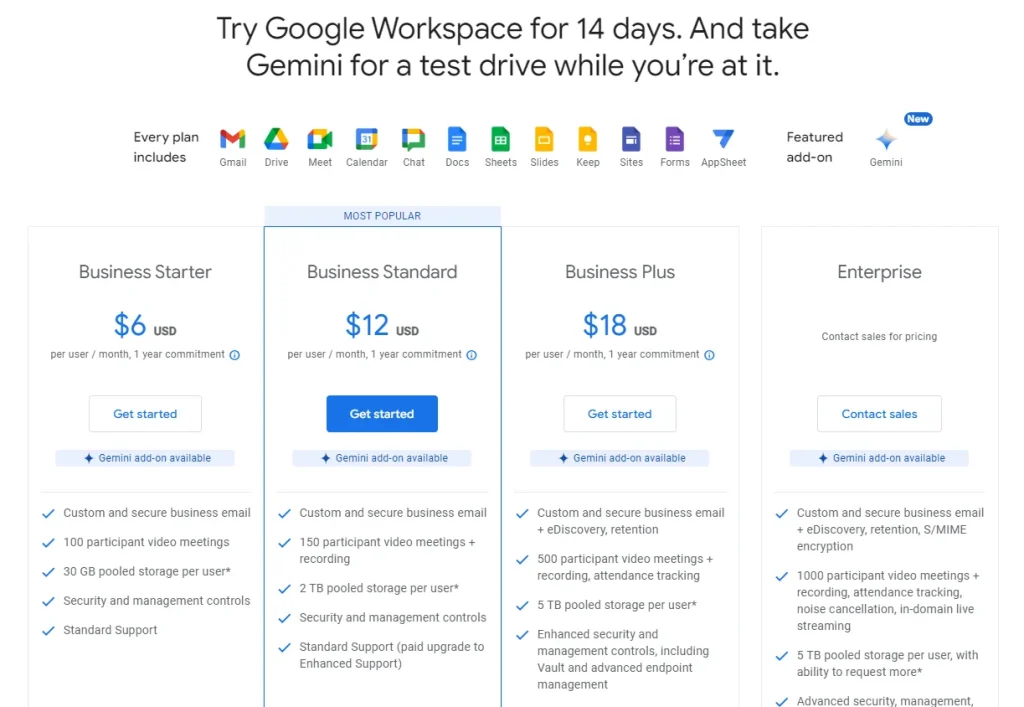
Google Gemini is the strongest choice if your workflow revolves around Google’s ecosystem. It integrates seamlessly with Gmail, Docs, Sheets, Drive, and Search, which allows you to summarize emails, draft documents, and analyze data without switching platforms.
Its real advantage lies in how naturally it pulls context from Google services, a capability explored in depth through hands-on Gemini experience, making it a productivity booster for marketers, students, and professionals already using Google Workspace.
Pricing Details:
- Free Version: Available with basic capabilities
- Gemini Advanced: Included with Google One AI Premium (pricing varies by region)
3. Perplexity AI – Best for Research Purposes
Perplexity AI is not just a chatbot, but it’s a research-first AI assistant. Unlike ChatGPT, it cites sources clearly and pulls real-time information from the web, which makes it extremely useful for journalists, researchers, and students.
If your primary goal is fact-checking, academic research, or deep topic exploration with verifiable sources, Perplexity AI outperforms most conversational AI tools.
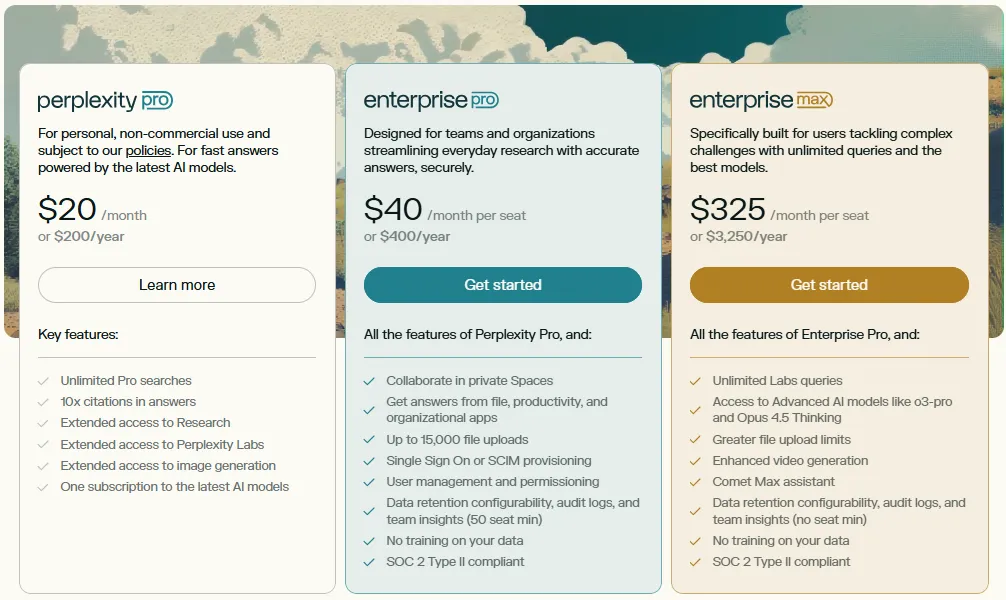
Pricing Details:
- Free Plan: Basic search and responses
- Pro Plan: Around $20 per month, advanced models, and deeper research tools
4. Microsoft Copilot – Best for Business Productivity
Microsoft Copilot shines in corporate and enterprise environments, establishing itself as one of the most powerful AI tools for business productivity currently available. Integrated deeply into Microsoft 365 apps like Word, Excel, PowerPoint, and Outlook, it helps automate reports, analyze spreadsheets, create presentations, and manage emails efficiently.
For teams already using Microsoft tools, Copilot feels less like a chatbot and more like an intelligent digital coworker.
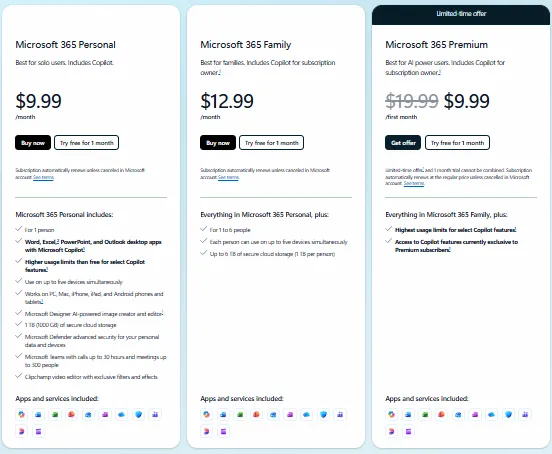
Pricing Details:
- Copilot for Individuals: Pricing varies by subscription
- Copilot for Microsoft 365: Business-focused pricing per user/month
5. GitHub Copilot – Best for Coding Activities
GitHub Copilot is hands-down the best ChatGPT alternative for developers. Trained on billions of lines of code, it works directly inside popular IDEs like VS Code, JetBrains, and Neovim to suggest code in real time.
Whether you’re writing functions, debugging errors, or learning a new programming language, GitHub Copilot acts like an always-available coding partner. It doesn’t just answer questions, it writes production-ready code as you type.
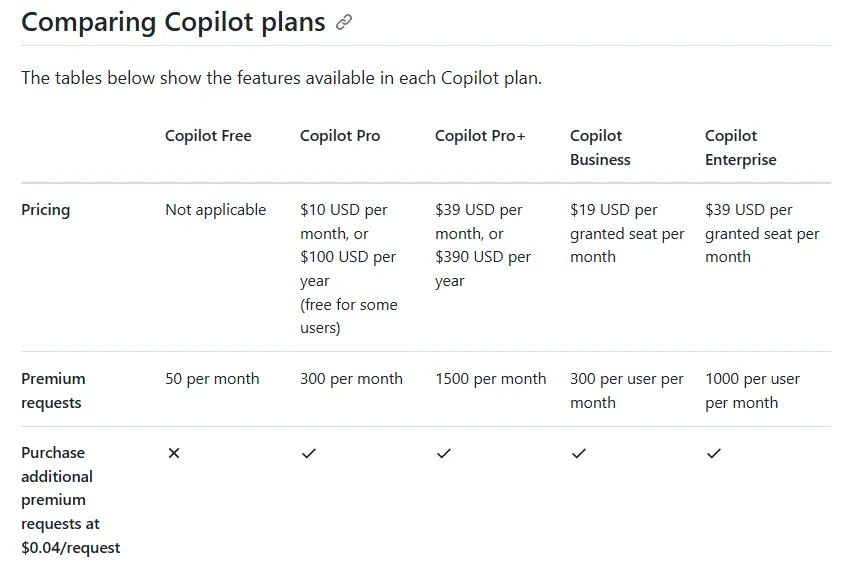
Pricing Details:
Individual Plan:
- Cost: $10/month or $100/year
- Ideal for solo developers and students
Business Plan:
- Cost: $19 per user/month
- Team management and policy controls
Enterprise Plan:
- Advanced security, compliance, and large-scale deployment
- Custom pricing
Concluding Lines on Sites Like ChatGPT
After testing 13 platforms hands-on, one thing became clear: there’s no single “best” AI tool, only the best tool for your specific needs. ChatGPT still leads as a general-purpose assistant, but alternatives like Claude, Google Gemini, and GitHub Copilot shine in focused use cases.
Whether you prioritize deep research, business productivity, seamless integrations, or real-time coding support, these tools prove that AI has evolved beyond one-size-fits-all solutions. Exploring ChatGPT alternatives isn’t about abandoning ChatGPT, but it’s about working smarter.