WordPress isn’t difficult until you start making the wrong decisions.
Working on NogenTech has shown me what WordPress can really do. Since 2014, our technology publication has been powered by WordPress, publishing thousands of articles while evolving through better themes, plugins, managed hosting, technical SEO, and Core Web Vitals optimization.
That hands-on experience has proven why WordPress remains the world’s leading content management system (CMS) for blogs, business websites, online stores, and media publications.
Now, moving next, I’ll share practical insights and cover:
- What WordPress is and what it’s used for
- WordPress pricing, hosting, and installation
- Themes, templates, and plugins
- WordPress login and dashboard basics
- Website design, development, security, and SEO
- Whether WordPress is still the best website builder in 2026
Whether you’re launching your first website or improving an existing one, this guide will help you use WordPress with confidence.
What Is WordPress?
WordPress is a free, open-source Content Management System (CMS) that lets you build, manage, and scale a website without coding.
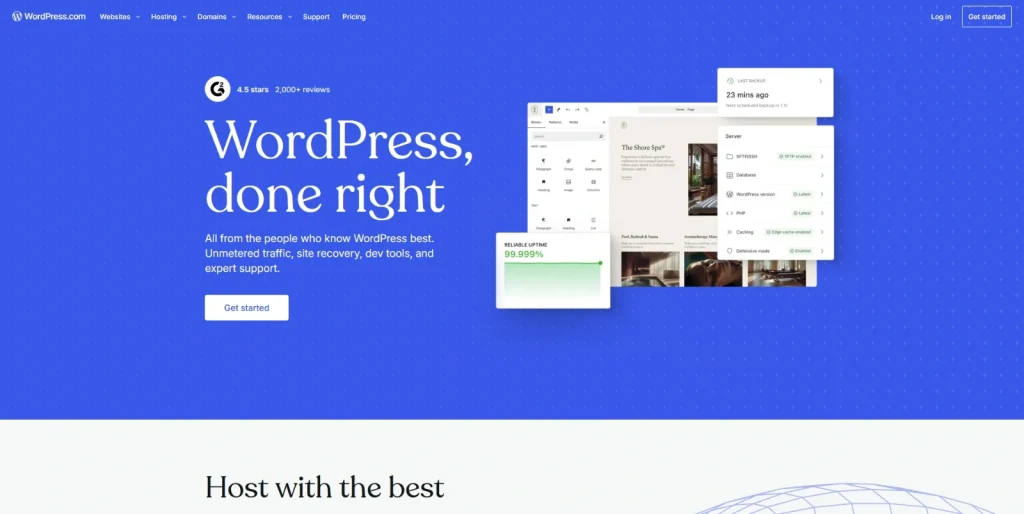
You can create pages, publish content, upload media, and customize your site’s design from a single dashboard.
It was launched in 2003 as a blogging platform, and now WordPress has evolved into the world’s most widely used CMS. Its open-source architecture and extensive ecosystem make it suitable for beginners, businesses, developers, and publishers like NogenTech.
| Component | Purpose |
| WordPress Core | Manages your website and content. |
| Themes | Control your website’s design and layout. |
| Plugins | Add features like SEO, security, forms, backups, and eCommerce. |
| Web Hosting | Stores your website files and keeps them online. |
| Domain Name | Gives your website its unique web address. |
What Is WordPress Used For?
WordPress is used to create blogs, business websites, eCommerce stores, portfolios, membership platforms, online courses, and media publications.
Its flexibility allows you to build almost any type of WordPress website without changing platforms as your business grows.
Is WordPress Free?
Yes, WordPress is free to download and use. However, you’ll need a domain name and WordPress hosting to launch a live website, while premium themes and plugins are optional.
Although the WordPress software is free, a professional website typically includes:
- Domain name
- WordPress hosting or managed WordPress hosting
- Premium themes (optional)
- Premium plugins (optional)
- Maintenance and security tools (optional)
In short, WordPress is free, but running a live WordPress website involves basic infrastructure costs.
Why Is WordPress So Popular?
WordPress is the world’s most popular CMS because it offers flexibility, scalability, strong SEO capabilities, and complete ownership of your website.
Unlike proprietary website builders, WordPress lets you choose your hosting provider, switch themes, install plugins, and expand your website without platform restrictions.
Its key advantages include:
- Free and open-source software
- Thousands of themes, templates, and plugins
- Beginner-friendly with developer-level flexibility
- Built-in blogging and strong SEO support
- Large community with regular updates
- Suitable for websites of any size
Whether you’re starting a blog or managing a large publication like NogenTech, WordPress provides the flexibility to grow without changing platforms.
What’s the Difference Between WordPress.com and WordPress.org?
WordPress.org is the free, self-hosted WordPress CMS, while WordPress.com is a managed website-building platform with built-in hosting.
WordPress.org offers greater control, flexibility, and customization. Although they share the same name, they work differently.
| WordPress.org | WordPress.com |
| Free, open-source CMS | Hosted website builder |
| Requires a domain name and WordPress hosting | Hosting included |
| Supports all themes and plugins | Features depend on your plan |
| Full control over your website and code | Limited customization on lower-tier plans |
| Ideal for blogs, businesses, and growing websites | Best for users who want a managed setup |
If you want complete ownership, unlimited customization, and the freedom to choose your WordPress hosting, WordPress.org is the better option for most websites.
How to Install WordPress?
You can install WordPress in minutes using your WordPress hosting provider’s one-click installer or by manually uploading the files. Most beginners prefer managed WordPress hosting for its simple setup, security, and automatic updates.
Installing WordPress is straightforward with most hosting providers. After installation, you can access the WordPress admin login, install themes and plugins, and start building your website.
What Do You Need Before Installing WordPress?
Before installing WordPress, you’ll need a domain name, WordPress hosting, and access to your hosting account.
Requirements:
- Domain name
- WordPress hosting plan
- SSL certificate (recommended)
- Hosting dashboard or cPanel access
How to Install WordPress in 5 Steps?
The easiest way to install WordPress is using your hosting provider’s one-click installer.
Follow these steps:
- Register a domain name.
- Buy a WordPress hosting plan.
- Log in to your hosting dashboard or cPanel.
- Open the WordPress Installer (e.g., Softaculous) and complete the setup.
- Visit yourdomain.com/wp-admin to access the WordPress login page.
If one-click installation isn’t available, download WordPress from WordPress.org, upload the files via FTP, create a MySQL database, and complete the installation wizard.
What Is WordPress Hosting?
WordPress hosting is web hosting optimized for WordPress websites, offering better performance, security, and compatibility than standard hosting.
A good WordPress hosting plan typically includes:
- One-click WordPress installation
- Free SSL certificate
- SSD or NVMe storage
- Automatic backups
- High uptime
- 24/7 support
What Is Managed WordPress Hosting?
Managed WordPress hosting is a service where the hosting provider handles updates, backups, security, caching, and server optimization for your WordPress website.
It’s ideal for users who want to spend less time on maintenance. Key benefits include:
- Automatic WordPress updates
- Daily backups
- Built-in caching
- Malware protection
- Performance optimization
- Expert WordPress support
Is Hostinger WordPress Hosting Worth It?
Hostinger WordPress hosting combines one-click installation, LiteSpeed servers, free SSL, and managed features, making it a strong option for beginners and growing websites.
Key features include:
- One-click WordPress installation
- LiteSpeed Cache
- Free SSL certificate
- Free domain on eligible plans
- Automatic updates
- AI-powered website tools
- 24/7 customer support
While Hostinger WordPress is a reliable option, compare it with other managed WordPress hosting providers based on your budget, traffic, and feature requirements.
Is WordPress a Website Builder?
Yes, WordPress is a website builder and an open-source Content Management System (CMS). It lets you create, customize, and manage a website while giving you full control over its design, functionality, and hosting.
Unlike many website builders, WordPress combines visual editing with extensive customization through themes, plugins, and page builders, making it suitable for beginners and developers alike.
What Is the WordPress Website Builder?
The WordPress website builder uses the Block Editor (Gutenberg) to create and customize pages visually without coding.
You can build pages using drag-and-drop content blocks, including:
- Text and headings
- Images and galleries
- Buttons
- Videos
- Columns and layouts
- Forms and embeds
For advanced design control, you can also use builders like Elementor, Divi, Bricks, and Beaver Builder.
Is the WordPress Website Builder Free?
Yes, the WordPress website builder is free. The Block Editor (Gutenberg) is included with every WordPress installation, while premium builders and themes are optional.
You can build a complete website using the free editor or upgrade to premium tools if you need additional design features.
What Is an AI WordPress Website Builder?
An AI WordPress website builder uses artificial intelligence to generate layouts, content, images, and website structures, helping you build a website faster.
It is offered by multiple website builders such as Squarespace, Strikingly, and Webflow as well.
Common AI features include:
- Website generation
- Content creation
- Image generation
- Layout suggestions
- Navigation creation
AI speeds up the process, but manual editing is still recommended for branding and accuracy.
Which Is the Best WordPress Website Builder?
The best WordPress website builder depends on your design needs, experience, and budget.
| Website Builder | Best For |
| Gutenberg | Beginners and content-driven websites |
| Elementor | Drag-and-drop design |
| Divi | Advanced visual customization |
| Bricks Builder | Performance-focused websites |
| Beaver Builder | Agencies and developers |
Is WordPress a Good Website Builder?
WordPress is one of the best website builders because it offers visual editing, strong SEO, thousands of extensions, and the flexibility to scale with your website.
Its key advantages include:
- Full ownership of your website
- Thousands of themes and plugins
- Built-in blogging tools
- Strong SEO and performance capabilities
- Suitable for blogs, business websites, and WooCommerce and Shopify stores
What Are WordPress Themes and Plugins?
WordPress themes define your website’s design, while WordPress plugins add features like SEO, security, contact forms, and eCommerce.
Together, they let you customize a WordPress website without coding. Every WordPress website relies on themes for its appearance and plugins for additional functionality.
Choosing well-coded, regularly updated options improves performance, security, and user experience.
What Are WordPress Themes?
WordPress themes control your website’s layout, colors, typography, and overall design without affecting its content.
Thousands of free and premium WordPress themes are available for different website types. Popular options include:
- Astra
- GeneratePress
- Kadence
- OceanWP
- Neve
Choose a theme that offers:
- Responsive design
- Fast loading speed
- SEO-friendly code
- Regular updates
- Plugin compatibility
What Are WordPress Templates?
WordPress templates are pre-designed page layouts within a theme that control the structure of individual pages, such as the homepage, blog, or contact page.
Common WordPress templates include:
- Homepage
- Blog archive
- Single post
- Landing page
- Contact page
- Full-width page
What Are WordPress Plugins?
WordPress plugins are extensions that add new functionality to your website without modifying the WordPress core.
Popular plugin categories include:
- SEO – Rank Math, Yoast SEO
- Security – Wordfence
- Caching – LiteSpeed Cache, WP Rocket
- Forms – WPForms
- Backups – UpdraftPlus
- eCommerce – WooCommerce
How Do You Install WordPress Themes and Plugins?
You can install WordPress themes and WordPress plugins directly from the WordPress dashboard.
To install a theme:
- Go to Appearance > Themes.
- Click Add New.
- Install and activate your preferred theme.
To install a plugin:
- Go to Plugins > Add New.
- Search or upload a plugin.
- Click Install and Activate.
How Many Themes and Plugins Should You Use?
Use only the WordPress themes and plugins your website needs to maintain speed, security, and compatibility.
Best practices:
- Keep one active theme.
- Remove unused themes and plugins.
- Install extensions from trusted developers.
- Keep themes and plugins updated.
- Review plugins regularly for compatibility and security.
How to Build a WordPress Website?
Building a WordPress website involves choosing WordPress hosting, installing WordPress, selecting a theme, adding plugins, creating pages, and publishing your content.
Most websites can be launched without coding. Whether you’re creating a personal blog, business website, or online store, WordPress provides everything you need to build, customize, and grow your website.
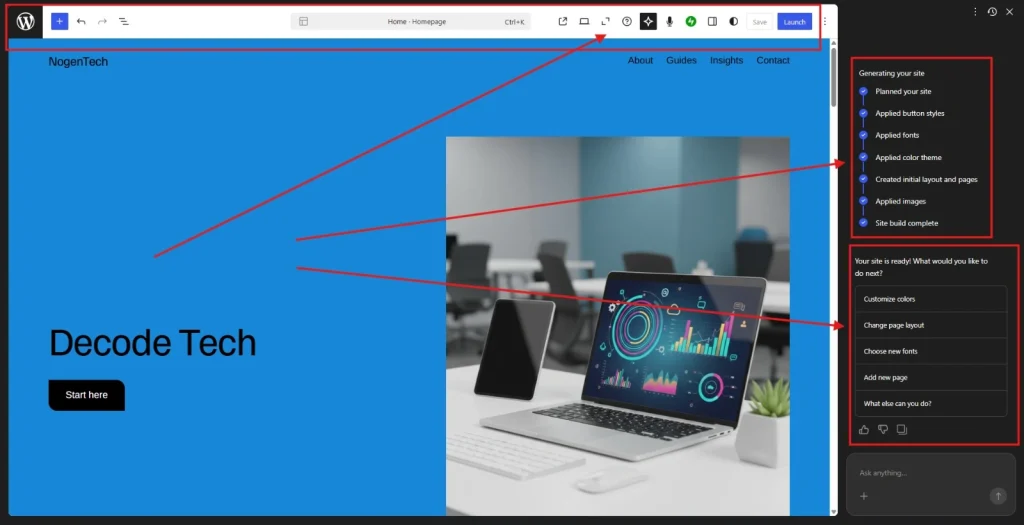
How to Make a WordPress Website Using Its AI Builder?
You can build a WordPress website in minutes with WordPress.com’s AI Website Builder. Describe your website, review the generated design, customize it, and launch.
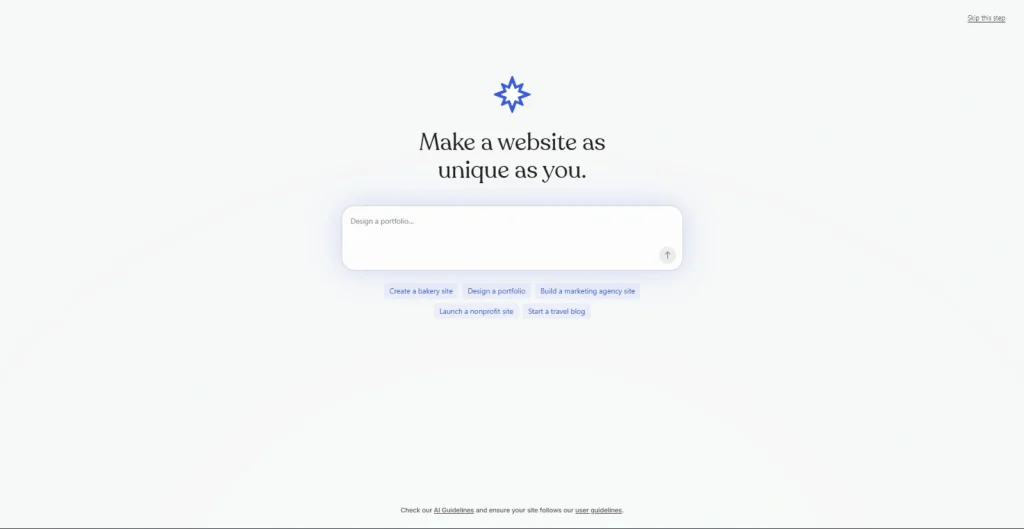
Step 1: Describe Your Website
Enter a prompt describing your website, including its niche, purpose, design preferences, and features. Then add your website title and meta description to help the AI generate a relevant design.
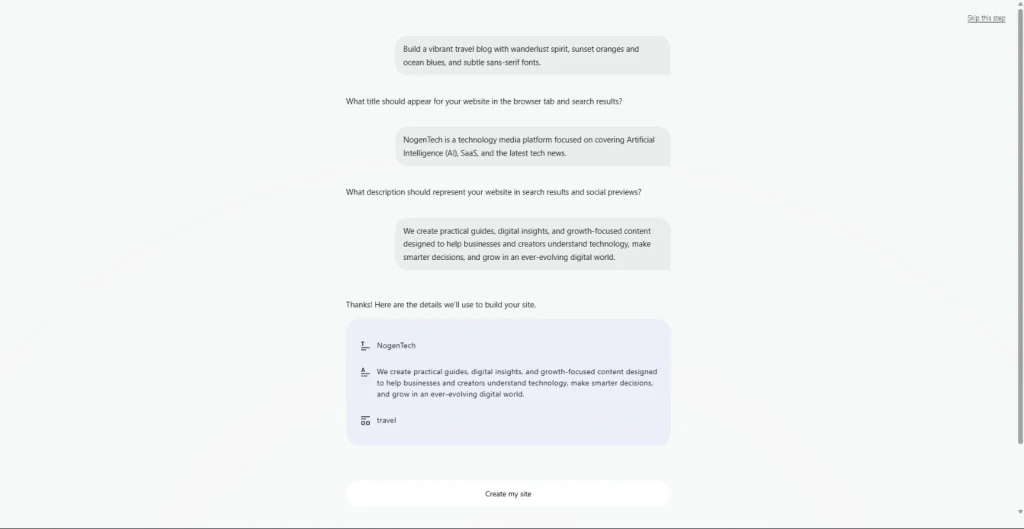
Step 2: Review the Generated Website
The WordPress AI Website Builder automatically creates your website’s layout, pages, colors, fonts, navigation, and starter content. Review everything and regenerate or edit any section if needed.
Step 3: Customize and Launch
Customize your website using the WordPress Block Editor (Gutenberg). Update the content, images, colors, layouts, and pages, then click Launch to publish your WordPress website.
What Pages Should Every WordPress Website Have?
Every WordPress website should include essential pages that improve user experience, trust, and search visibility.
Start with these pages:
- Home
- About
- Services or Products
- Blog
- Contact
- Privacy Policy
- Terms and Conditions
You can add pages like FAQs, testimonials, portfolios, or pricing as your website grows.
What Makes a Good WordPress Website Design?
A good WordPress website design is fast, responsive, easy to navigate, and optimized for both users and search engines.
Follow these design best practices:
- Use a responsive WordPress theme
- Keep navigation simple
- Maintain consistent branding
- Optimize images
- Use readable typography
- Add clear calls to action
- Prioritize accessibility
Do You Need a WordPress Developer?
You don’t need a WordPress developer for most websites, but custom functionality or complex projects may require professional development.
You can build most websites yourself using themes, plugins, and the Block Editor. Consider hiring a developer if you need:
- Custom plugins
- Custom themes
- API integrations
- Advanced functionality
- Enterprise-level solutions
What Is WordPress Development?
WordPress development involves creating or customizing themes, plugins, and website functionality using technologies like PHP, HTML, CSS, JavaScript, and the WordPress REST API.
Developers typically work on:
- Custom theme development
- Plugin development
- Website optimization
- Third-party integrations
- Performance and security improvements
As your website grows, you can start with no-code tools and later use WordPress development to add advanced features without migrating to another platform.
How to Secure a WordPress Site?
Secure a WordPress site by updating WordPress Core, themes, and plugins, enabling strong login protection, using regular backups, and installing a trusted security plugin.
A secure WordPress website reduces the risk of hacking, malware, and data loss while improving reliability. Some of the best practices include:
- Update WordPress Core, themes, and plugins.
- Use strong passwords and enable Two-Factor Authentication (2FA).
- Install Wordfence or Sucuri.
- Enable an SSL certificate.
- Limit login attempts.
- Remove unused themes and plugins.
How to Protect WordPress Files?
Protect WordPress files by securing file permissions, restricting access, and disabling unnecessary editing features.
Key measures:
- Set secure file permissions.
- Disable the built-in file editor.
- Protect the wp-config.php file.
- Disable directory browsing.
- Use a Web Application Firewall (WAF).
How to Backup a WordPress Site?
Back up your WordPress site regularly to restore it quickly after data loss, malware, or server failures.
Your backup strategy should include:
- Automatic backups
- Cloud storage
- Database and file backups
- One-click restore
Popular backup plugins include UpdraftPlus, Jetpack Backup, and Solid Backups.
How to Improve WordPress SEO?
Improve WordPress SEO by optimizing your content, Core Web Vitals, site structure, and technical settings while using a reliable WordPress SEO plugin..
Focus on these essentials:
- Install Rank Math or Yoast SEO.
- Use SEO-friendly URLs.
- Optimize title tags and meta descriptions.
- Build a strong internal linking structure.
- Add schema markup.
- Submit your sitemap to Google Search Console.
Over the years of working on NogenTech, I’ve learned that rankings don’t come from plugins alone. A quick look at NogenTech.org shows the impact of consistent technical SEO, optimized content, strong internal linking, and performance improvements all working together to build long-term organic visibility
How to Improve LCP, INP, and CLS in WordPress?
Improve LCP, INP, and CLS by using fast WordPress hosting, page caching, image optimization, and a CDN to meet Core Web Vitals standards.
Best practices:
- Choose fast WordPress hosting.
- Enable LiteSpeed Cache or WP Rocket.
- Compress images and use WebP.
- Minify CSS and JavaScript.
- Use Cloudflare CDN.
- Remove unused themes and plugins.
- Enable lazy loading.
What Are the Best WordPress SEO Plugins?
Rank Math and Yoast SEO are leading WordPress SEO plugins for optimizing metadata, XML sitemaps, redirects, and schema markup.
Other reliable options include:
- All in One SEO
- SEOPress
What Are the Best WordPress SEO Practices?
Successful WordPress SEO combines quality content, technical optimization, and continuous monitoring.
Follow this checklist:
- Publish helpful, original content.
- Optimize headings and target keywords.
- Improve Core Web Vitals.
- Build internal links.
- Fix broken links.
- Optimize images.
- Keep WordPress updated.
- Monitor performance with Google Search Console and Google Analytics.
How to Access the WordPress Login Page?
You can access the WordPress login page by visiting yourdomain.com/wp-login.php or yourdomain.com/wp-admin.
After signing in, you’ll reach the WordPress admin dashboard, where you can manage your website.
The WordPress admin login is the control center of your website. From the dashboard, you can create pages and posts, install WordPress plugins, customize themes, manage users, and configure website settings.
What Is the WordPress Admin Dashboard?
The WordPress admin dashboard is the backend of your WordPress website, where you manage content, design, plugins, users, and settings.
From the dashboard, you can:
- Create and edit posts and pages
- Install themes and plugins
- Manage comments and users
- Customize your website
- Monitor updates and website health
What if You Can’t Access the WordPress Login Page?
If you can’t access the WordPress login, the issue is usually related to incorrect credentials, plugin conflicts, or server configuration.
Try these solutions:
- Reset your password.
- Clear your browser cache.
- Disable conflicting plugins via File Manager or FTP.
- Restore a recent backup.
- Contact your WordPress hosting provider.
How Can You Secure Your WordPress Login?
Protect your WordPress admin login with strong authentication and login security to prevent unauthorized access.
Follow these best practices:
- Use a strong, unique password.
- Enable Two-Factor Authentication (2FA).
- Limit failed login attempts.
- Change the default admin username.
- Install a security plugin like Wordfence.
What Is WordPress Pricing?
WordPress is free, but the cost of running a WordPress website depends on your hosting, domain, themes, plugins, and maintenance requirements.
Your budget varies based on your website’s size and features. A personal blog can cost very little, while a business or WooCommerce website may require premium tools like WordPress VPS servers and managed hosting.
| Expense | Typical Cost |
| Domain Name | $10–20/year |
| WordPress Hosting | $3–30/month |
| Managed WordPress Hosting | $20–100+/month |
| Premium Theme | $30–100 (one-time) |
| Premium Plugins | $0–300+/year |
The biggest advantage of WordPress is its flexibility. You can start with free themes and plugins, then upgrade your hosting or premium tools only as your website grows.
Now, after all this, if you still feel that you need proper guidance or you are interested in getting a web development or web designing service, then you can easily reach out to NogenTech’s Service section and get support for any issue you are facing.
Questions I Get Asked Most About WordPress
Is WordPress better than Wix for SEO?
WordPress generally offers greater SEO flexibility than Wix because it supports advanced optimization through plugins like Rank Math and Yoast SEO, custom code, schema markup, and complete control over your website.
Can I build a professional website with WordPress without coding?
Yes. You can build a professional WordPress website using the Block Editor (Gutenberg), themes, and plugins without writing code. Coding is only required for advanced customization.
How long does it take to build a WordPress website?
A basic WordPress website can be created in a few hours, while business websites, membership platforms, and WooCommerce stores may take several days or weeks depending on their complexity.
How many WordPress plugins should I install?
Install only the WordPress plugins your website needs. Fewer, well-maintained plugins generally improve performance, security, and compatibility.
Which WordPress theme is best for beginners?
Lightweight themes such as Astra, GeneratePress, Kadence, and Neve are excellent choices because they’re fast, customizable, and compatible with most page builders and plugins.
Does WordPress include hosting?
No. The self-hosted version, WordPress.org, requires separate WordPress hosting, while WordPress.com includes hosting as part of its managed plans.
Can I migrate my existing website to WordPress?
Yes. You can migrate websites from platforms like Wix, Squarespace, Shopify, or Joomla using migration plugins, manual methods, or professional migration services.
How often should I update WordPress?
Update WordPress Core, themes, and plugins as soon as stable updates are available to improve security, compatibility, and performance.
Is WordPress secure enough for business websites?
Yes. With regular updates, strong passwords, Two-Factor Authentication (2FA), trusted security plugins, and reliable WordPress hosting, WordPress is secure enough for business and enterprise websites.
Can WordPress handle high-traffic websites?
Yes. Many large publishers and enterprise websites use WordPress. Combined with quality managed WordPress hosting, caching, a CDN, and performance optimization, it can handle millions of monthly visitors.
What More Than a Decade With WordPress Has Taught Me
After working with WordPress at NogenTech for more than a decade, one thing is clear: it’s more than a website builder it’s a platform that grows with your goals.
From managing content and improving WordPress SEO to optimizing Core Web Vitals, security, and performance, we’ve experienced its flexibility firsthand.
If you choose reliable WordPress hosting, use quality themes and plugins, and keep optimizing your website, WordPress can support everything from a personal blog to a high-traffic business website.