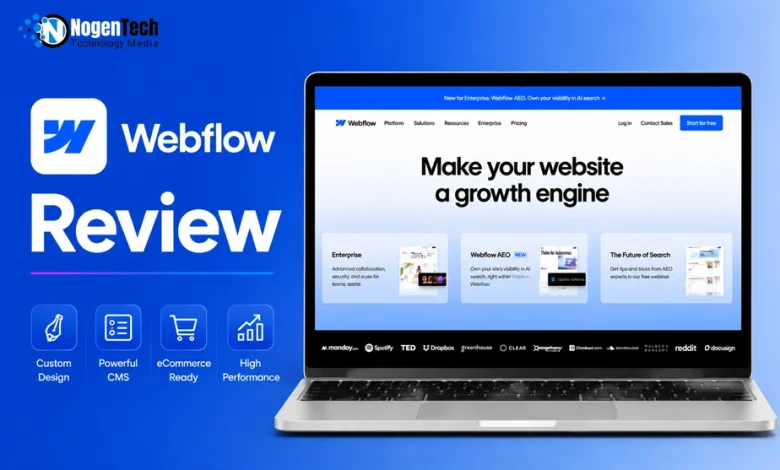
Not every website builder is worth the time it takes to learn.
If Webflow is on your shortlist, you’ll want to know whether its flexibility, pricing, and learning curve are actually worth it before committing to a new platform.
Often ranked among the best website builders, Webflow combines website design, content management, hosting, and publishing into one platform. That’s also why many people compare it with WordPress, Wix, and Framer when choosing a website builder.
As you continue reading this Webflow review, you’ll learn what the platform does well, where it falls short, and whether it’s the right choice for your website and long-term goals.
What is Webflow?
Webflow is a cloud-based visual website development platform that allows users to design, build, and publish responsive websites without writing most of the underlying code.
Instead of relying on pre-built themes or plugins, Webflow provides a visual canvas where every design change translates into clean HTML, CSS, and JavaScript.
The platform combines several essential website tools into a single solution, such as:
- Visual website builder
- Content Management System (CMS)
- Managed hosting
- Ecommerce functionality
- SEO management
- Team collaboration tools
Webflow gives designers direct control over CSS properties such as flexbox, grid layouts, spacing, positioning, and responsive breakpoints. This makes it popular among professionals who want custom websites without the maintenance burden of traditional CMS platforms.
Does Webflow Have Analytics?
Yes. Webflow includes built-in website analytics on eligible plans, allowing you to monitor visitor activity and site performance without relying entirely on third-party tools.
Depending on your subscription, you can access metrics such as:
- Page views
- Unique visitors
- Traffic sources
- Engagement trends from your dashboard
For businesses that need deeper insights, Webflow also supports integrations with external analytics platforms, including Google Analytics and other AI marketing tools.
Is Webflow Good for SEO?
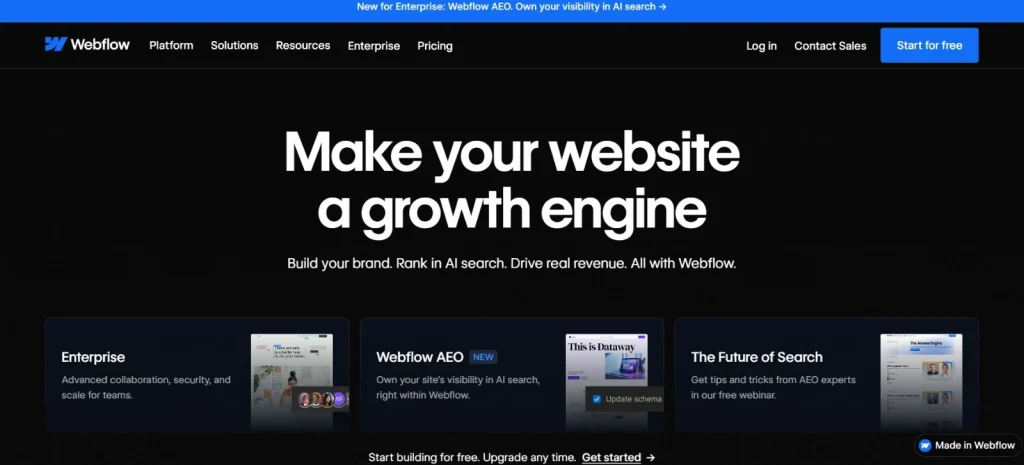
When it comes to SEO, Webflow is widely regarded as a strong website builder because it gives users direct control over many technical and on-page optimization settings.
Some of its built-in SEO capabilities include:
- Custom page titles and meta descriptions
- Clean semantic HTML
- Editable URLs
- Automatic XML sitemap generation
- Robots.txt customization
- Canonical tags
- 301 redirects
- Open Graph settings
- Fast hosting with global CDN support
Webflow allows marketers to optimize important parts of SEO without installing additional plugins and can provide a strong technical SEO foundation.
However, Webflow itself doesn’t guarantee higher rankings, and they would still depend on factors like content quality, backlinks, and overall SEO strategy.
Is Webflow Good for eCommerce?
It can be, especially if design flexibility matters to you. Webflow includes built-in eCommerce functionality that lets businesses create visually customized online stores.
You can sell physical products, digital products, membership-related products, and subscription-based offerings (through supported integrations).
Its ecommerce features include:
- Product management
- Inventory tracking
- Secure checkout
- Discount codes
- Shipping rules
- Tax settings
- Order management
Webflow Performance Overview
A fast website benefits both your visitors and search rankings, and Webflow performs well thanks to its optimized hosting environment.
To maximize performance, you should also compress images, minimize unnecessary scripts, and optimize animations wherever possible.
Webflow Templates You Can Use
Starting a website from scratch isn’t always necessary. Webflow offers templates for different industries and website types, so you can begin with a ready-made design and customize it to fit your brand.
Available options include:
- Business website
- Portfolios
- Ecommerce stores
- Blogs
- SaaS landing pages
- Agency websites
- Restaurant websites
- Personal websites
While many templates are free, premium templates offer more advanced layouts and features. You can also customize any template extensively to match your brand.
Webflow Integrations That Matter
Webflow works with many popular business tools, so you can add more functionality without changing your existing workflow.
Popular integrations include:
- Google Analytics
- Google Tag Manager
- HubSpot
- Zapier
- Stripe
- Mailchimp
- Airtable
- Memberstack
- Make
- CRM Software
These integrations support marketing automation, analytics, lead generation, ecommerce, and customer relationship management.
Using Webflow Customer Support
If you ever need help, Webflow offers several support resources for users at every experience level.
These include:
- Comprehensive documentation
- Webflow University tutorials
- Community forums
- Customer support tickets
- Enterprise support for eligible customers
Webflow University deserves special mention because it offers detailed video lessons covering everything from beginner fundamentals to advanced website development techniques.
Why Should You Choose Webflow?
If design flexibility is a priority, Webflow brings website design, hosting, CMS functionality, and SEO tools together in one platform, so you don’t have to manage them separately.
Some of its biggest advantages include:
- Professional-quality visual website design
- Responsive layouts without coding
- Built-in content management
- Reliable managed hosting
- Strong SEO controls
- Fast website performance
- Secure infrastructure
- Minimal maintenance
- Collaboration features for teams
For businesses that want complete control over their website without maintaining servers or installing numerous plugins, Webflow provides a streamlined solution.
Who Should Use Webflow?
Webflow can be a good fit for users who want greater control over website design without managing complex development workflows.
It is particularly well suited for:
- Designers who want pixel-perfect websites
- Agencies managing multiple client websites
- Marketing teams
- SaaS companies
- Startups
- Businesses focused on SEO and performance
Who Should Not Use Webflow?
Although Webflow is powerful, it isn’t the right fit for:
- Users looking for the simplest website builder
- Large ecommerce stores with complex inventory needs
- Developers building custom web applications
Webflow Pricing Plans 2026
Webflow offers several pricing tiers designed for individuals, businesses, ecommerce stores, and teams. Instead of a one-size-fits-all model, it separates
- Site Plans
- Platform Plans
- eCommerce Plans
- Workspace Plans
📌 Note: If you want to build and publish your website, you should choose Site Plans or Platform Plans.
1. Webflow Site Plans
| Plan Name | Pricing (Billed Yearly) | Key Features |
| Starter | Free | Webflow.io domain, limited Webflow CMS, 2 static pages, 1 GB bandwidth, 50 form submissions, Webflow AI, MCP server, Webflow Cloud app hosting, free Starter Workspace. |
| Basic | $15/month | Custom domain, 300 static pages, 10 GB bandwidth, unlimited form submissions, password protection, Webflow AI, MCP server, Webflow Cloud app hosting, free Starter Workspace. |
| Premium | $25/month | Everything in Basic, plus Webflow CMS, 50 GB bandwidth, code components, site search, form file uploads, well-known files support. |
2. Webflow Platform Plans
| Plan Name | Pricing | Key Features |
| Team | $2,500/month (Annual contract required) | Everything in Premium, plus Site & Workspace, Webflow Localize, AEO agents, publishing workflows, single-page publishing, site activity log & API, foundational governance, enhanced security & compliance, priority support. |
| Enterprise | Custom Pricing | Everything in Team, plus enterprise-ready scale, granular permissions, custom roles, advanced governance, secure integrations, dedicated account manager, enhanced SLAs, custom configurations. |
3. Webflow Ecommerce Plans
| Plan Name | Pricing (Billed Yearly) | Key Features |
| Standard | $29/month | 500 ecommerce items, 2% transaction fee, custom shopping cart and checkout. |
| Plus | $74/month | 5,000 ecommerce items, 0% transaction fee, custom shopping cart and checkout, unbranded emails. |
| Advanced | $212/month | 15,000 ecommerce items, 0% transaction fee, custom shopping cart and checkout, unbranded emails. |
4. Webflow Workspace Plans (For Teams)
| Plan Name | Pricing (Billed Yearly) | Key Features |
| Starter | Free | Unlimited paid hosted sites, 2 staging sites, 2 pages per staged site, 50 CMS items per staged site, 200 AI credits, 1 full seat, agency/freelancer guests. |
| Core | $19/month | Everything in Starter, plus 10 staging sites, 300 pages per staged site, 300 AI credits, custom code, code export, shared libraries. |
| Growth | $49/month | Everything in Core, plus unlimited staging sites, 400 AI credits, site password protection, 301 redirects, site-specific access, site-level roles, publishing permissions. |
5. Webflow Workspace Plans (For Freelancers & Agencies)
| Plan Name | Pricing (Billed Yearly) | Key Features |
| Starter | Free | 2 staging sites, agency/freelancer guests, 1 full seat, 1 free client seat per paid site, 200 AI credits. |
| Freelancer | $16/month | Everything in Starter, plus 10 staging sites, free guest access in Client Workspaces, 1 free client seat per site, full CMS access on staging sites, client payments, shared libraries, 300 AI credits. |
| Agency | $35/month | Everything in Freelancer, plus unlimited staging sites, 3 free client seats per site, unlimited shared libraries, site-level roles, publishing permissions, site password protection, 301 redirects, 400 AI credits. |
Is Webflow a CMS?
It is. Webflow includes a powerful Content Management System (CMS) that lets you create, organize, and publish dynamic content without modifying website layouts whenever you add new content.
Instead of creating every page manually, you build reusable templates connected to Collections, which work like structured databases.
For example, you can create Collections for:
- Blog posts
- Team members
- Case studies
- Products
- Events
- Testimonials
- Job listings
- Portfolios
When you add a new item to a Collection, Webflow automatically generates the corresponding page using the design you’ve already created. This approach saves time while maintaining design consistency across your website.
Unlike traditional CMS platforms that rely heavily on plugins, Webflow’s CMS is built directly into the platform, reducing compatibility issues and ongoing maintenance.
Webflow vs WordPress
Webflow and WordPress are both powerful website platforms, but they serve different types of users.
| Feature | Webflow | WordPress |
| Ease of Setup | Simple managed hosting | Requires hosting setup |
| Design Flexibility | Excellent visual designer | Depends on themes and page builders |
| Plugins | Limited but integrated | Extensive plugin ecosystem |
| Maintenance | Minimal | Regular updates required |
| SEO | Built-in SEO controls | Plugin-dependent for advanced features |
| Security | Managed by Webflow | User-managed |
| Hosting | Included | Purchased separately |
- Choose Webflow if you want an all-in-one platform with visual design control and less maintenance.
- Choose WordPress if you need maximum flexibility, custom plugins, or access to thousands of third-party extensions.
How Does Webflow Compare To Framer?
Both Webflow and Framer focus on modern website creation, but their strengths differ.
- Framer emphasizes speed, simplicity, and rapid landing page creation. Its interface is easier for beginners, making it a good option for startups and marketing teams launching websites quickly.
- Webflow, however, provides significantly more control over responsive layouts, CMS management, animations, and website structure. It also offers more advanced customization for larger websites.
If your priority is building sophisticated marketing websites with scalable content management, Webflow is generally the stronger option.
If you mainly create landing pages or portfolio websites and value ease of use, Framer may be a better fit.
How Does Webflow Compare To Wix?
Wix is known for its beginner-friendly drag-and-drop editor, while Webflow focuses on professional-grade website design.
- Wix allows users to build websites quickly with minimal technical knowledge. It includes hundreds of templates, an extensive app marketplace, and built-in business tools.
- Webflow provides far greater design precision. Instead of restricting users to predefined layouts, it allows complete control over positioning, spacing, responsive behavior, and animations.
In terms of SEO, performance, and scalability, Webflow generally offers more flexibility for experienced users. If you prefer a simpler learning curve, Wix is the easier option.
What are the Top Webflow Features?
Webflow stands out by bringing many essential website tools into one platform, so you don’t have to rely on multiple plugins or third-party services for everyday website management.
- Visual Website Builder: Build websites visually while Webflow generates clean HTML, CSS, and JavaScript behind the scenes. Every design element can be customized without manually writing code.
- Responsive Design: Every website created in Webflow can be optimized for desktop, tablet, and mobile devices using responsive breakpoints. This helps ensure a consistent experience across different screen sizes.
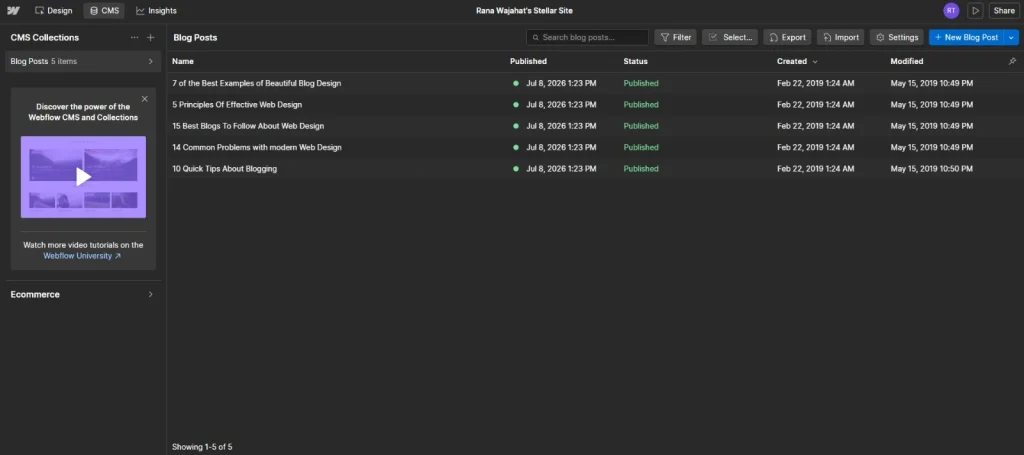
- Content Management System: The built-in CMS supports dynamic content through Collections, making it easy to manage blogs, directories, portfolios, case studies, and other content-heavy websites.
- Managed Hosting: Webflow includes managed hosting with SSL certificates, automatic backups, and a global content delivery network (CDN). This reduces the need for server administration while improving website performance.
- Components: Reusable components allow designers to update repeated website elements, such as navigation menus, buttons, cards, and footers, from a single source. Changes automatically apply wherever the component is used.
- SEO Tools: Webflow provides essential SEO settings such as custom meta titles, meta descriptions, canonical tags, XML sitemaps, robots.txt editing, 301 redirects, clean URLs, and open graph settings. These tools help website owners optimize their content for search engines without installing additional plugins.
- Ecommerce: Businesses can manage products, categories, inventory, checkout, discounts, shipping rules, and customer orders from one dashboard while maintaining full control over storefront design.
- AI Features: Webflow continues to expand its AI capabilities to help users generate content, accelerate website creation, and streamline design workflows. These tools can reduce repetitive tasks while improving productivity.
- Integrations: Webflow integrates with numerous marketing, analytics, automation, CRM, and payment platforms, allowing businesses to extend functionality without rebuilding their websites.
How to Use Webflow?
Getting started with Webflow is straightforward once you understand its workflow. Instead of coding each page manually, you’ll use the visual Designer to create layouts, style elements, and publish your website.
Here’s a simple process to build your first website:
- Create a Webflow account.
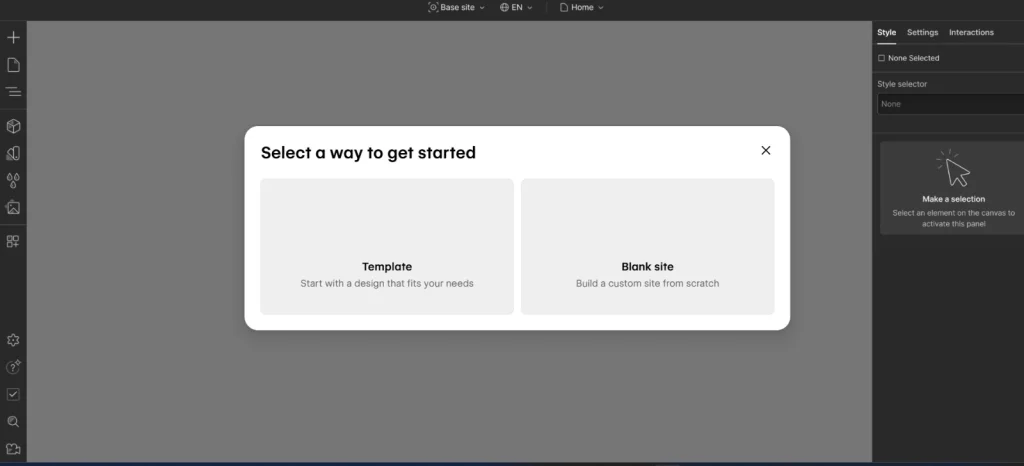
- Start with a blank canvas or choose a template.
- Customize your pages using the visual Designer.
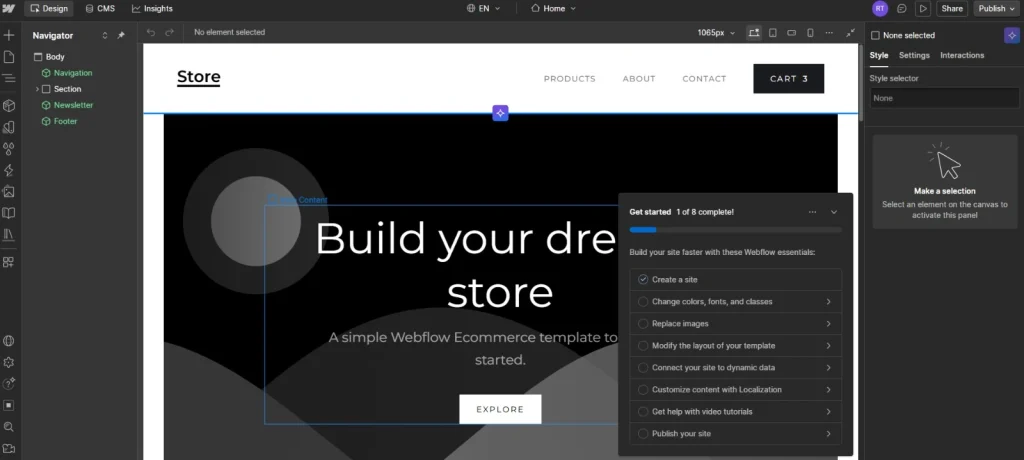
- Create CMS Collections if your website includes blogs, portfolios, or dynamic content.
- Optimize your pages for SEO.
- Preview your website across different devices.
- Connect a custom domain and publish your site.
Once you are familiar with these basics, you can explore more advanced features like interactions, animations, custom code, and integrations.
How To Add Custom Code In Webflow?
Webflow allows you to add custom HTML, CSS, and JavaScript when you need functionality beyond the built-in Designer.
To add custom code:
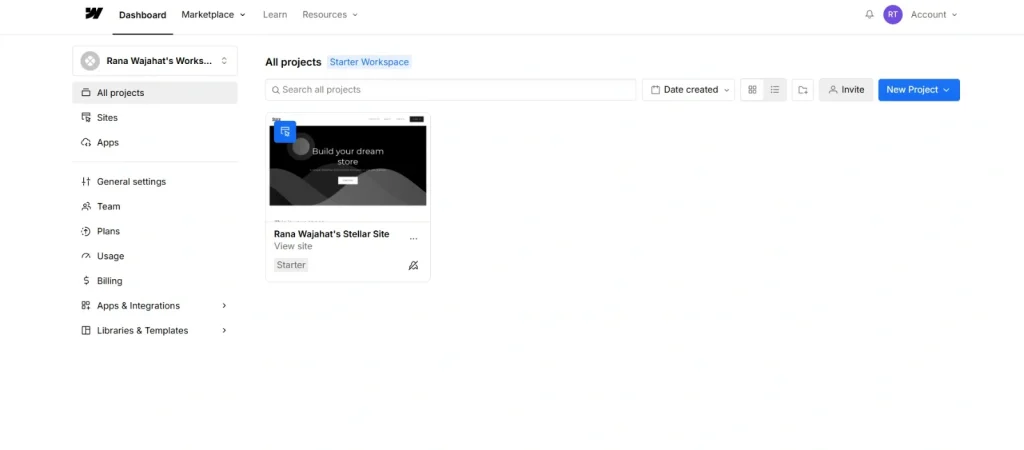
- Go to Dashboard.
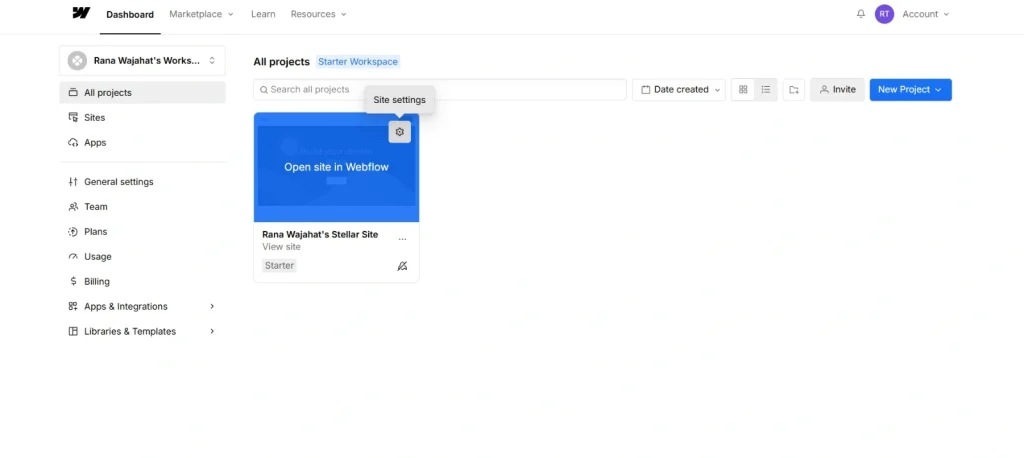
- Open your project.
- Go to Project Settings.
- Select Custom Code on the left side.
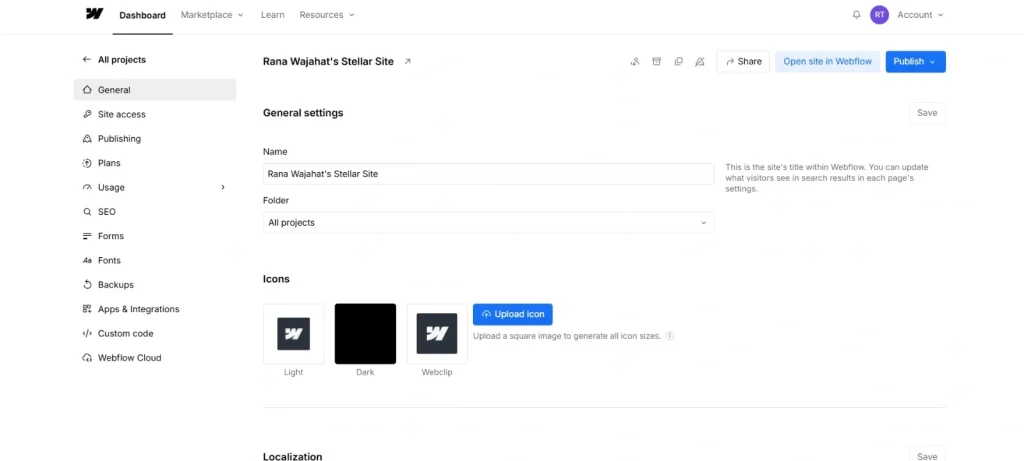
- Add code inside the Head or Before Body section.
- Save your changes and republish the website.
You can also embed custom code on individual pages using the Embed element within the Designer.
📌 Note: You must subscribe to a premium plan to unlock Custom Codes.
How To Put Text Over An Image In Webflow?
Adding text over an image is a simple way to create banners, hero sections, and call-to-action blocks.
To do this:
- Add a Div Block.
- Set a background image or insert an Image element.
- Place a Text Block or Heading inside the container.
- Use Flexbox or Grid to position the text.
- Adjust spacing, alignment, and colors for readability.
You can also add a semi-transparent overlay behind the text to improve contrast.
How To Add A Page In Webflow?
Creating a new page only takes a few steps.
- Open the Pages panel.
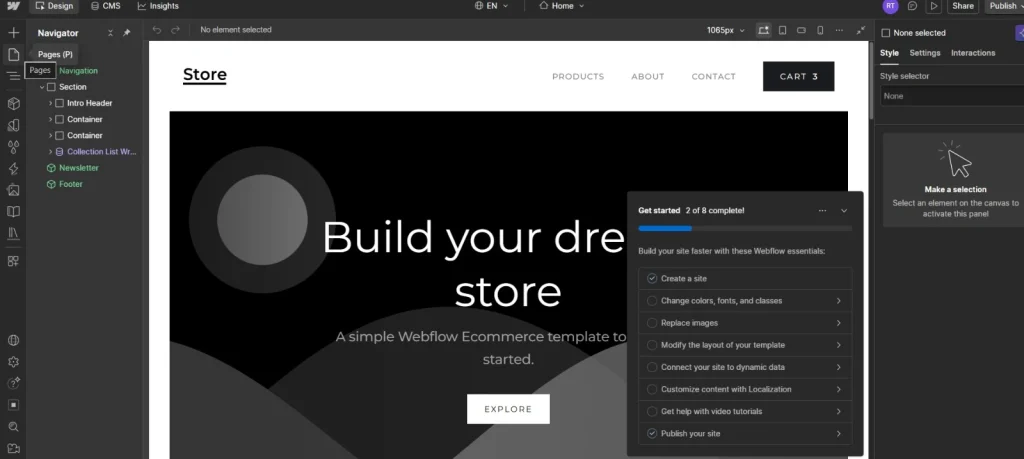
- Click Create New Page.
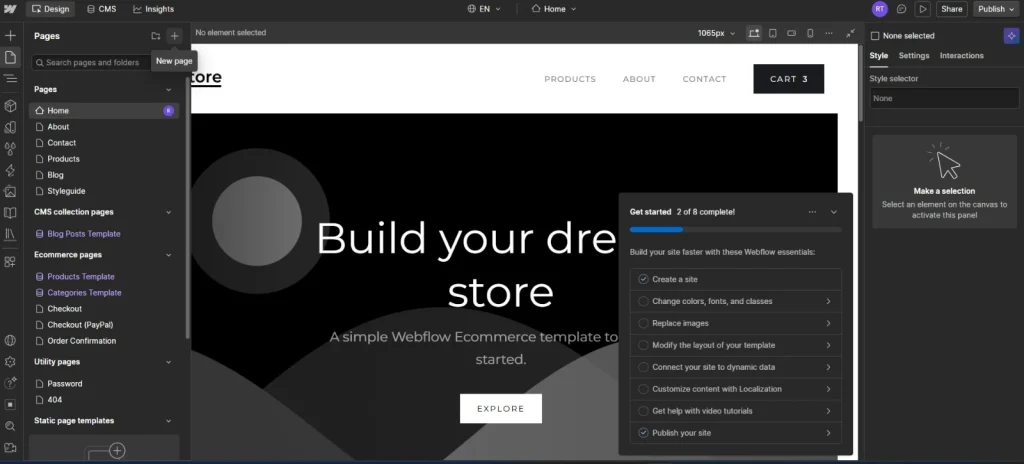
- Enter a page name and URL.
- Choose whether it’s a static page or CMS template.
- Save and begin designing.
After publishing, the new page becomes part of your website.
How Do You Make A Component Instance In Webflow?
Components help maintain consistency across your website.
To create one:
- Select the element you want to reuse.
- Right-click on Components.
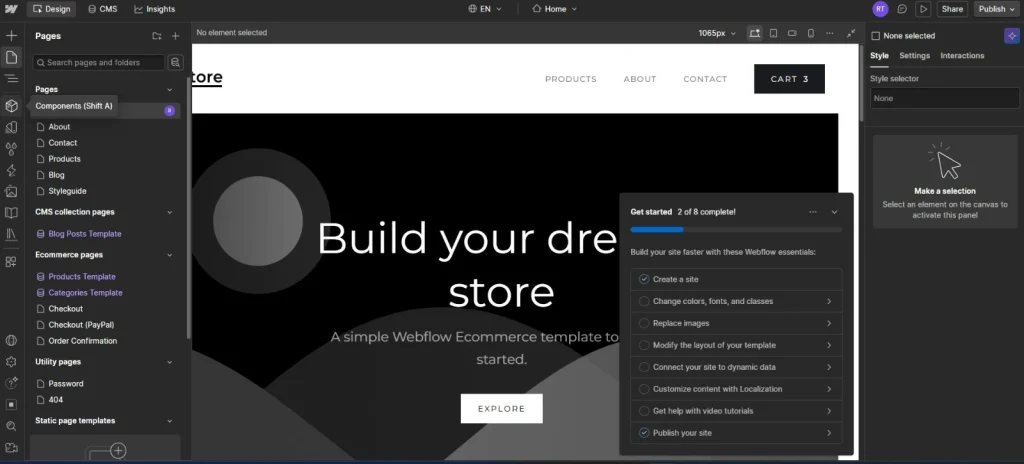
- Choose Create Component.
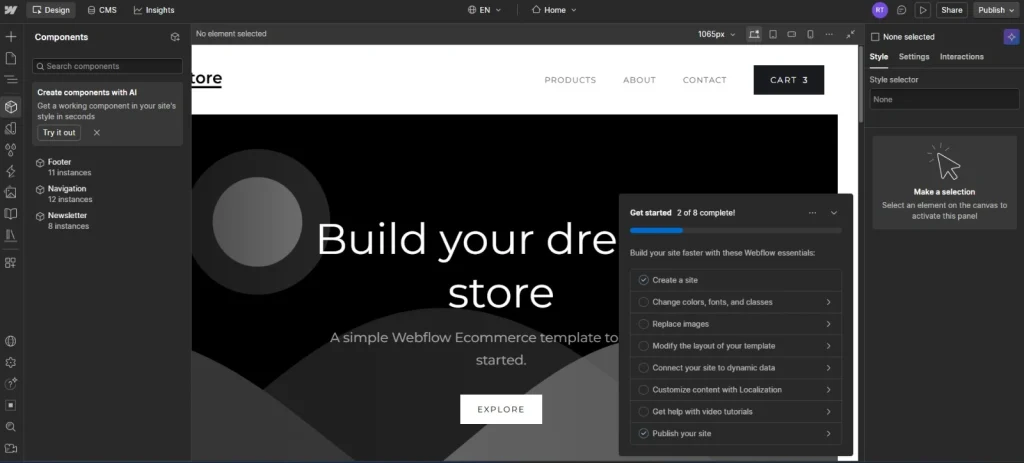
- Give it a descriptive name.
- Insert component instances anywhere on your website.
Updating the main component automatically updates every instance, saving time during future edits.
How To Export Figma Design To Webflow?
There isn’t a built-in one-click export from Figma to Webflow. However, you can recreate or streamline the process using supported tools.
A typical workflow is:
- Design your layout in Figma.
- Organize layers and components.
- Use a compatible plugin or integration if available.
- Import assets such as images and icons.
- Rebuild layouts inside Webflow using Flexbox and Grid.
- Add interactions and responsive settings.
Many designers also use Figma as a planning tool before implementing the final design in Webflow.
How To Add Google Analytics To Webflow?
Connecting Google Analytics allows you to measure website traffic and visitor behavior.
To set it up:
- Create a Google Analytics property.
- Copy your Measurement ID or tracking code.
- Open Project Settings in Webflow.
- Add the tracking code to the Head section or connect through the platform’s integration options.
- Publish your website.
- Verify that data is being collected in your Google Analytics dashboard.
Webflow Pros and Cons
Like any website builder, Webflow has strengths and trade-offs. Here’s a quick look at where it excels and where it may fall short.
| Pros | Cons |
| Powerful visual website builder | Steeper learning curve for beginners |
| Highly customizable designs | |
| Built-in CMS | |
| Fast managed hosting | |
| SEO-friendly features | |
| Responsive design tools | |
| Clean code output | |
| Strong security | |
| Great for agencies & businesses | |
| Minimal maintenance |
How Does Webflow Handle Site Scalability?
As your website grows, Webflow’s cloud infrastructure helps websites handle increased traffic without requiring you to manage servers or configure performance settings manually.
Key scalability features include:
- Global Content Delivery Network (CDN)
- Managed hosting
- SSL Certificate
- Dynamic CMS Collections
- Team collaboration tools
- Enterprise solutions for larger organizations
Is Webflow Down?
Like any cloud platform, Webflow may occasionally experience service interruptions, although major outages are relatively uncommon.
If you suspect a problem:
- Check Webflow’s official status page.
- Review recent announcements.
- Test your internet connection.
- Clear your browser cache.
- Try another browser or device.
If the issue persists after confirming the platform is operational, contacting Webflow support is the next step.
Is Webflow Worth It in 2026?
For most designers, agencies, startups, and businesses, Webflow is well worth considering, as it combines design flexibility, a built-in CMS, reliable hosting, responsive design tools, and strong SEO capabilities in one platform.
My Personal Experience With Webflow
If you want complete creative freedom without managing plugins, web hosting, or server maintenance, Webflow is an excellent choice.
Based on my overall experience with the platform, here’s how I would rate it:
| Category | Rating |
| Ease of Use | 4.2/5 |
| Design Flexibility | 5/5 |
| SEO Features | 4.8/5 |
| CMS | 4.7/5 |
| Ecommerce | 4.3/5 |
| Performance | 4.8/5 |
| Customer Support | 4.4/5 |
| Value for Money | 4.5/5 |
Webflow has evolved into much more than a no-code website builder by bringing professional design tools, a powerful CMS, reliable hosting, ecommerce capabilities, and advanced SEO features into a single platform.
In my experience, that makes it a practical choice for freelancers, agencies, startups, and businesses that want those capabilities in one place.
People Also Ask
Is Webflow free?
Yes. Webflow offers a free plan that lets you explore the platform and build websites on a Webflow subdomain. You’ll need a paid Site Plan to connect a custom domain and unlock additional features.
Is Webflow hard to learn?
Webflow has a steeper learning curve than many drag-and-drop website builders because it follows modern web design principles. However, beginners can become comfortable with the platform by using tutorials and practicing with smaller projects.
Can beginners use Webflow?
Yes. Beginners can build websites with Webflow, though it may take longer to master compared to simpler builders. The platform’s learning resources make it easier to understand its tools and workflows.
Does Webflow require coding?
No. Most websites can be built visually without writing code. However, developers can add custom HTML, CSS, and JavaScript when advanced functionality is needed.
Can Webflow replace WordPress?
For many users, yes. Webflow combines website design, hosting, and CMS functionality into one platform, reducing the need for plugins and ongoing maintenance. However, WordPress remains a better option for projects that rely on a large ecosystem of plugins or extensive backend customization.
Is Webflow good for blogging?
Yes. Webflow’s CMS makes it easy to create, organize, and publish blog posts using dynamic templates while maintaining complete control over design and SEO settings.
Can I migrate from WordPress to Webflow?
Yes. You can migrate content manually, import supported data, or use migration tools and services. The process usually involves transferring pages, blog posts, images, and SEO settings.
Is Webflow better than Wix?
It depends on your needs. Wix is easier for beginners, while Webflow offers greater design flexibility, stronger customization options, and more professional design tools.
Is Webflow worth the money?
If you value professional design, built-in hosting, strong SEO capabilities, and reduced maintenance, Webflow provides excellent value. Its pricing may be higher than some competitors, but many businesses find the additional flexibility and performance worthwhile.