Struggling to find a free AI voice generator that sounds natural and works without heavy restrictions? TTSMaker solves this problem.
I agree that finding a free, natural-sounding AI text-to-speech tool that supports multiple languages and commercial use is still challenging.
I have used several AI voice generators for YouTube narration and short-form content, but most had paywalls or limited downloads. But TTSMaker proved far more practical for quick AI voiceovers and downloads, especially after testing both English and Arabic voices.
In this TTSMaker review, I’ll cover its features, voice quality, pricing, free plan limits, commercial use, and safety, just like I gave you in the Uberduck review. This will also include a step-by-step guide to create voice-overs for YouTube, TikTok, and podcasts, and comparisons with ElevenLabs and Murf AI.
What is TTSMaker?
TTSMaker is a free online AI text-to-speech tool that converts written text into natural-sounding voice output in multiple languages.
It is commonly used by creators in the USA for YouTube narration, TikTok voiceovers, podcasts, online learning, and faceless content generation, where fast and free AI voice generation is needed. Unlike many paid AI voice tools, TTSMaker focuses on simplicity. You just paste your text, choose a language and voice, then generate and download the audio instantly.
This is the major reason that it appears as a popular AI voice generator free for YouTube. It also supports multiple languages, including English, Arabic, Spanish, and more.
Key Features of TTSMaker
TTSMaker supports free downloads and flexible voice settings. Here are some of the most essential key features that every user must know:
Free Text to Speech Conversion
TTSMaker allows users to convert text into speech instantly without signing up or installing. It supports multiple languages, including:
- English
- Arabic
- Spanish
- French
- German
- Chinese
- Japanese
- Korean
Commercial Use Support
One of the most interesting features is that TTSMaker is free for commercial use. The platform allows downloaded audio to be used in commercial projects such as YouTube videos, TikTok content, Instagram reels, podcasts, and client work (based on its usage policy).
Multiple Voice Styles and Languages
Users can choose from different AI voice styles and accents, making it suitable for storytelling, education, digital marketing, and narration content.
Audio File Download Options
It supports multiple export formats, including MP3, OGG, AAC, OPUS, and WAV, allowing flexibility for video editing and content creation.
Audio Quality Control
Users can adjust MP3 quality settings, such as standard or higher quality, depending on file size and use case.
Voice Speed Control
You can change speaking speed, such as 1.0x default or faster/slower, which helps match different content styles like tutorials or storytelling.
Voice Volume Adjustment
TTSMaker allows volume control to balance narration for videos, podcasts, and background audio.
Pitch Adjustment for Voice Effects
Users can modify pitch to create different voice tones, which is useful for creative content and AI voice effects.
Pause and Timing Control
It includes paragraph pause settings, such as 300ms by default, to improve natural speech flow and clarity in generated audio.
Background Music Option
Users can upload or add background music (BGM) to combine narration with audio tracks for professional content creation.
Listen Mode for Character Saving
A special listen mode allows limited preview output (first 50 characters) to help users test voices before generating full audio, saving character usage.
How to Use TTSMaker?
TTSMaker is designed for quick AI voice generation, so you don’t need any technical setup or software installation. You can use it directly from your browser in just a few steps, as I mentioned below:
- Open your browser and search for TTSMaker or visit https://ttsmaker.com/
.
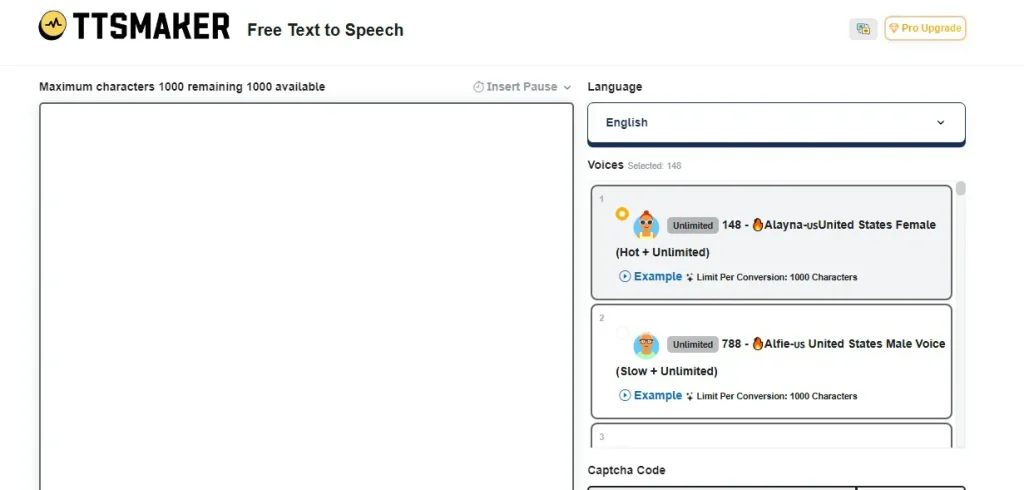
- Copy and paste your script, article, or narration text into the input box.
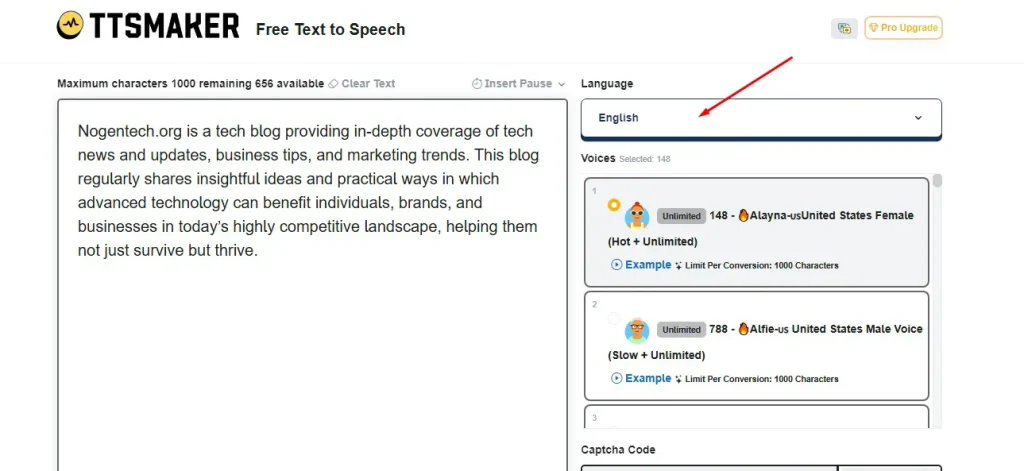
- Select your preferred language, such as English, Arabic, or Spanish, and pick an AI voice style which you like.
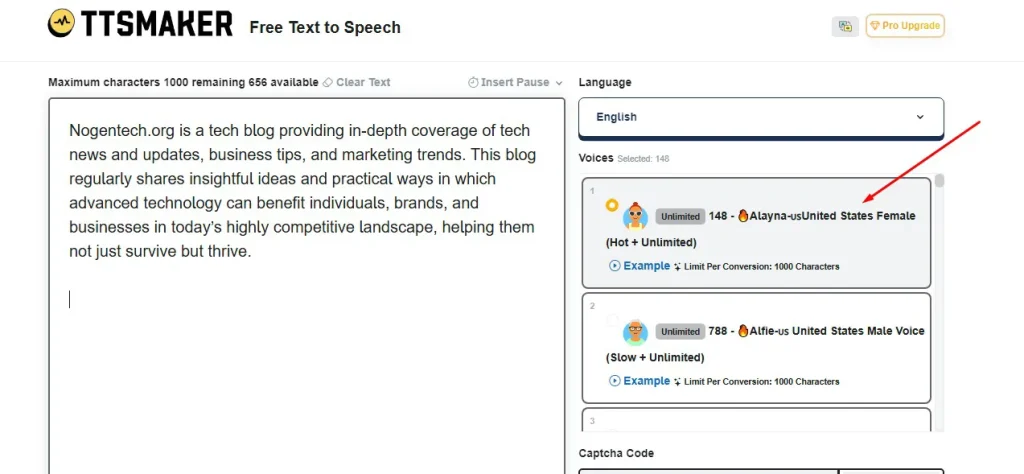
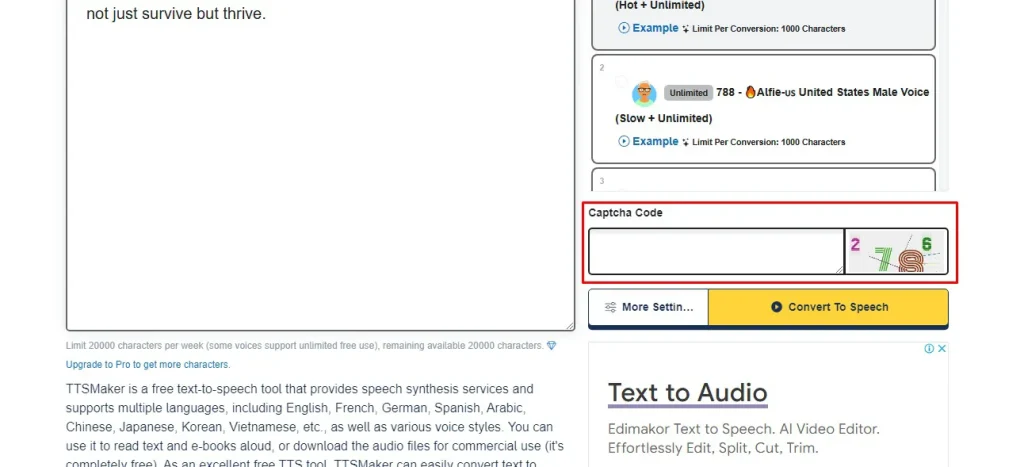
- Verify the captcha code.
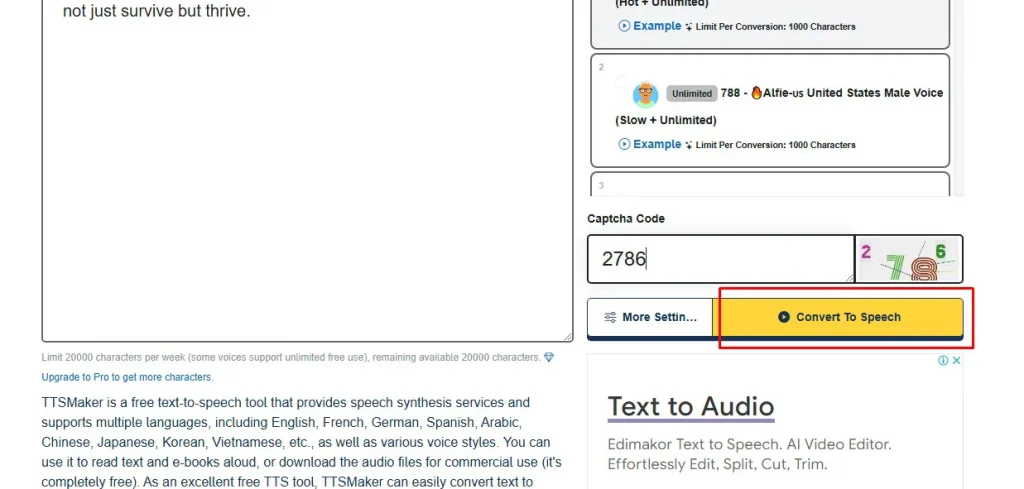
- Lastly, click the Convert to Speech button. TTSMaker will process your text and generate the AI voice within seconds.
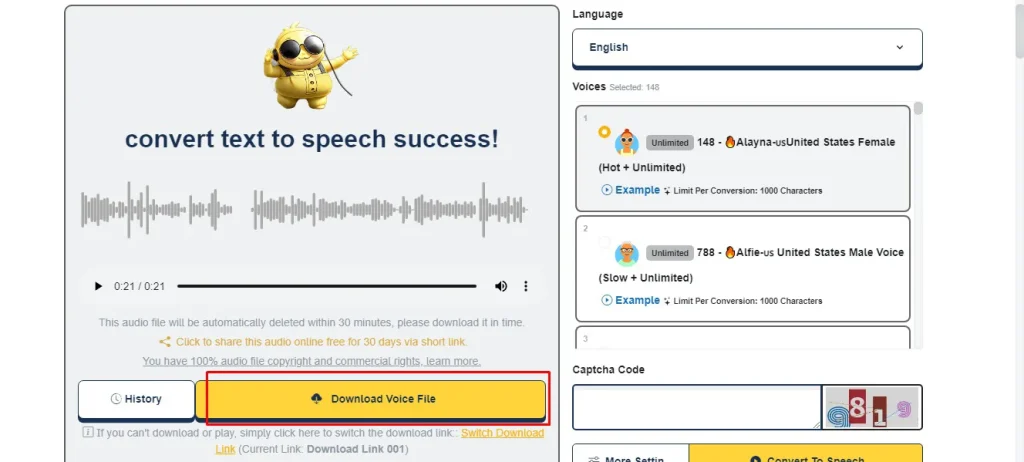
- You can preview the audio and download it in formats like MP3 or WAV for commercial or personal use.
Can You Use TTSMaker for Commercial Use?
Yes, TTSMaker allows commercial use on both the free and paid plans.
Users can generate and download AI voiceovers for:
- YouTube videos
- TikTok content
- Podcasts
- Create Online courses to sell
- Marketing videos
- Client projects
- Audiobooks and narration
This makes TTSMaker useful for beginners, freelancers, and faceless YouTube creators who need free AI voice generation.
Important Things to Remember
- Review the latest usage policy on the official website
- Check licensing terms for premium voices
- Follow monetization rules for YouTube and TikTok
- Avoid uploading sensitive or copyrighted content
For basic short-form content, the free plan is usually enough. Pro plans are better for high-volume commercial workflows and access to more realistic AI voices.
TTSMaker Pricing and Free Plan
TTSMaker offers a strong Free Plan along with paid Pro tiers, making it one of the few AI text-to-speech tools that balance accessibility with scalability.
Many USA users search for the TTSMaker pricing and about its free plan, or whether its commercial use is free, before deciding. Here’s how its pricing works:
Free Plan (Most Popular Option)
The free plan is the main reason TTSMaker trends. It includes:
- Around 20,000 characters per week
- Some voices are marked as unlimited free use
- 100+ languages, including English, Arabic, Spanish, Hindi, etc.
- Access to 200+ AI voices
- Up to 50 pause insertions per conversion
- No registration or credit card required for basic use
- Direct access from the homepage
Most importantly:
Audio generated on the free plan is allowed for commercial use, including YouTube videos, TikTok content, advertisements, and client work.
TTSMaker Pro Pricing
For heavy users, TTSMaker offers upgraded plans with higher limits and advanced features:
1. Lite Plan: $9.99/month
- 300,000 characters/month
- 600+ AI voices
- 100 pause insertions
- 24-hour conversion history
- Around 6.9 hours of audio generation monthly
2. Pro Mini Plan: $18.99/month
- 600,000 characters/month
- 600+ AI voices
- 300 pause insertions
- 24-hour conversion history
- Around 13.8 hours of audio generation monthly
3. Pro Max Plan: $24.99/month
- 1,200,000 characters/month
- 600+ AI voices
- 300 pause insertions
- 24-hour conversion history
- Around 27.6 hours of audio generation monthly
Free vs Pro Comparison (What Actually Matters)
| Feature | Free Plan | Pro Plan |
|---|---|---|
| Voice Quality | Standard AI voices | Higher fidelity, more natural-sounding voices |
| Pause Control | Up to 50 insertions per conversion | Up to 300 insertions per conversion |
| Usage Limits | Weekly character cap | Massive monthly generation capacity (up to Pro Max limits) |
| Advanced Tools | Not available | AI Voice Studio (multi-voice dialogues) included |
Is TTSMaker Safe and Legit?
TTSMaker is generally considered a safe and legitimate AI text-to-speech platform for voice generation and audio downloads.
Many creators in the USA use it for YouTube automation, voiceovers, podcasts, and educational content because it works directly in the browser without software installation.
The platform uses HTTPS encryption, does not require a credit card for the free plan, and allows basic text-to-speech conversion without account registration.
Safety Highlights
- Browser-based tool with no installation required
- No credit card needed for free usage
- HTTPS-secured website connection
- Downloadable audio generated directly from the platform
- No signup required for basic use
Things to Keep in Mind
- Use only the official TTSMaker website
- Avoid unofficial clone or fake download pages
- Do not upload sensitive information
- Review commercial usage terms before large-scale monetized use
During testing, English voices sounded more natural than some multilingual voices, which occasionally produced robotic pauses or pronunciation issues.
TTSMaker Pros and Cons
TTSMaker is widely used for free AI voice generation, but like any tool, it has both strengths and limitations. Many users compare it with tools like ElevenLabs, Murf AI, and PlayHT to decide if it fits their content needs.
Pros of TTSMaker
- Free AI text-to-speech with commercial use support
- No signup or credit card required for basic usage
- Supports 100+ languages, including English, Arabic, Hindi, Spanish, etc.
- Large library of 200+ AI voices
- Simple browser-based interface (no installation needed)
- Audio download available in multiple formats, like MP3 and WAV
- Useful for YouTube, TikTok, podcasts, and faceless channels
- Adjustable voice speed, pitch, and pause controls
Cons of TTSMaker
- Voice quality is not as natural as premium tools like ElevenLabs
- Some multilingual voices sound robotic or less smooth
- Limited emotional expression compared to advanced AI voice generators
- Weekly character limits on the free plan
- Advanced features like AI Voice Studio are locked behind paid plans
- Less suitable for professional audiobook or high-end commercial production
Tools Like TTSMaker
TTSMaker is mainly used for free AI voice generation, but it is not the only option in the AI text-to-speech market. Some tools focus on ultra-realistic narration, while others are better for business voiceovers, accessibility, or creative content.
Here are some popular alternatives that creators in the USA commonly compare with TTSMaker:
1. ElevenLabs
ElevenLabs is known for highly realistic AI voices with natural emotions and smoother speech patterns. It is widely used for YouTube narration, audiobooks, storytelling, and podcast production where voice realism matters most.
2. PlayHT
PlayHT is a cloud-based AI voice platform designed for scalable voice generation. It supports multiple accents, API integration, and commercial workflows, making it popular among developers, startups, and SaaS businesses.
3. Uberduck AI
Uberduck AI is more focused on experimental and creative AI audio generation. It became popular for AI rap vocals, meme voices, parody content, and entertainment-style voice synthesis rather than professional narration workflows.
4. Murf AI
Murf AI focuses more on professional voiceovers for presentations, training videos, advertisements, and business content. Its studio-style editing tools make it a strong option for agencies and corporate teams.
5. Speechify
Speechify is built around accessibility and listening productivity. Many users rely on it to convert articles, PDFs, emails, and documents into audio for easier consumption on mobile devices.
Which Tool Is Better for Your Needs?
The right platform depends on the type of content you create:
- Choose ElevenLabs for realistic AI narration
- Choose PlayHT for API access and scalability
- Choose Murf AI for business and marketing voiceovers
- Choose Speechify for reading and accessibility
- Choose TTSMaker for free AI voice generation and quick downloads
- Choose Uberduck AI for rap vocals and meme-style audio
My Final Opinion on TTSMaker for Creators
TTSMaker is a practical AI text-to-speech tool that fits well for beginners, especially where users require a free AI voice generator.
It delivers solid multilingual voice generation for YouTube, TikTok, and podcast content without complex setup. While it lacks the emotional depth of tools like ElevenLabs, its free commercial use, simple interface, and downloadable audio make it a strong option for quick AI voiceovers and basic content creation needs.
People Also Ask
Does TTSMaker sound natural compared to other AI voice tools?
It sounds decent for basic narration, but tools like ElevenLabs produce more realistic and emotional human-like voices.
Do I need to create an account to use TTSMaker?
No, the basic text-to-speech feature can be used directly from the website without signing up or using a credit card.
Which languages does TTSMaker support?
It supports 100+ languages, including English, Arabic, Spanish, Hindi, French, German, Chinese, Japanese, and Korean.
Is TTSMaker better than ElevenLabs or Murf AI?
It is better for free usage, but ElevenLabs and Murf AI offer more realistic and professional voice quality for premium content.
Why is TTSMaker so popular in the USA?
It offers free AI voice generation with commercial rights, making it attractive for content creators, freelancers, and small businesses.