Every time you type a question into ChatGPT, that message leaves your device, travels to a server somewhere, and comes back with an answer.
A local LLM skips that entire trip. The same kind of model runs on your own machine and answers you without leaving your machine.
I built a small chatbot to actually understand this instead of just reading about it. Nothing fancy, a simple web page where I type a message and get a reply, except the model answering me lives entirely on my own laptop.
No API key, no monthly bill, no internet required once it’s set up. Getting that working taught me more about how LLMs actually function under the hood than any article had.
Let’s go through what a local LLM actually is, how it works, and what it takes to run one yourself.
What is a Local LLM?
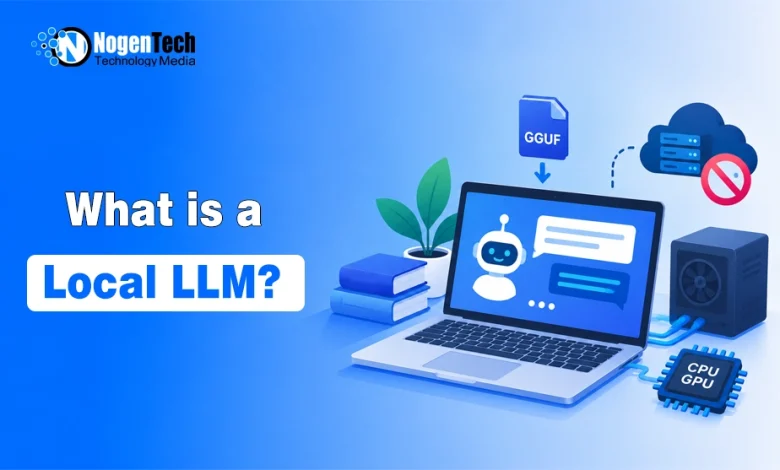
A local LLM is a large language model that runs directly on your own computer instead of on a remote server operated by a company like OpenAI or Google.
The model itself is the same basic technology behind ChatGPT or Claude. It’s trained to predict text, hold conversations, write code, and answer questions. The difference is entirely about where that model physically runs when you use it.
With a cloud LLM, you send a request over the internet to a data center, and someone else’s hardware thinks. With a local LLM, your own CPU or GPU does the thinking, following the same broader idea behind Edge AI, where processing happens closer to the device instead of depending entirely on the cloud.
This is closely related to the idea of offline AI, which covers AI models of any kind running without a connection. A local LLM is one specific, very popular example of that broader idea, focused purely on language models.
Local LLM vs Cloud LLM
| Local LLM | Cloud LLM | |
| Where it runs | Your own device | Remote data centers |
| Internet required | No, after setup | Yes, always |
| Cost | One-time hardware cost, no per-use fees | Subscription or pay-per-token |
| Privacy | Data never leaves your device | Data is sent to a third party |
| Model capability | Limited by your hardware | Virtually unlimited |
| Speed | Depends on your hardware | Depends on your connection |
| Updates | Manual; you control versions | Automatic, provider controls it |
| Customization | Full control, can fine-tune freely | Limited to what the provider allows |
Neither side wins every category. A model like GPT-4-class systems simply needs more computing power than a laptop can offer. But for everyday tasks like drafting text, answering questions about your own documents, or writing basic code, a smaller local model handles it fine without ever touching the internet.
Why Run an LLM Locally?
- Privacy: Privacy is the biggest driver for most people. Whatever you type stays on your device. For anyone working with sensitive documents, personal notes, or client data, this removes an entire category of risk instead of relying on a provider’s privacy policy.
- Cost-efficient: Cost adds up fast with cloud APIs. Every request to a cloud model costs money once you go past free tiers. A local model costs nothing per use after you’ve downloaded it, which matters a lot if you’re experimenting constantly like I was while building my chatbot.
- No internet: It works without internet. Once the model is downloaded, a local LLM keeps working on a plane, during an outage, or anywhere connectivity is unreliable.
- Ollama’s Scale: Adoption backs this up at scale. Ollama, the most widely used tool for running models locally, is now used by nearly 8.9 million developers every month and sits inside 85% of Fortune 500 companies, according to its founder’s statements to TechCrunch following its $65 million funding round in July 2026. That is not a niche hobbyist number anymore.
How Local LLMs Actually Work
The model you download isn’t being trained on your machine. The machine learning process used to train these models generally requires far more computing power than a typical personal device can provide, so training is usually completed before the model reaches your laptop.
What you’re downloading is a trained model that’s been compressed through a process called quantization. This reduces the precision of the model’s internal numbers, shrinking file size dramatically while keeping most of its ability intact. A model that might be 30 gigabytes in full precision can shrink to under 5 gigabytes after quantization, with only a small drop in output quality.
These compressed models are usually distributed in a format called GGUF, which packages everything a local runtime needs to load and run the model efficiently on regular consumer hardware.
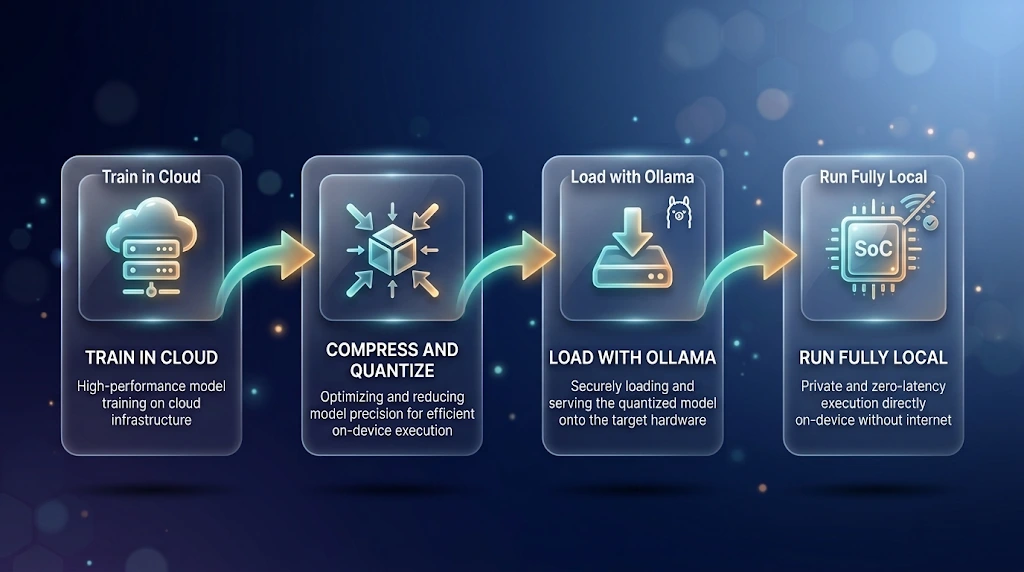
Once loaded, the actual process of answering your question is called inference. Your prompt gets converted into tokens, the model processes them through its layers, and it generates a response one token at a time, which is why local models sometimes visibly type out their answer rather than showing it instantly.
Hardware Requirements
This is where theory meets reality fast. Running a model locally depends almost entirely on how much RAM and, ideally, GPU memory your machine has.
A consistent rule of thumb across current hardware guides holds up well: roughly 1 to 2 gigabytes of memory per billion parameters at 16-bit quantization, the most common compression level for local use.
In practical terms, a 3 billion parameter model runs comfortably on 4 to 8 gigabytes of RAM using CPU alone. A 7 billion parameter model typically wants 8 to 16 gigabytes. Moving to 13 billion parameters usually needs 16 gigabytes or more, and anything above 30 billion generally needs a dedicated GPU with substantial VRAM to stay usable.
You don’t need a gaming PC to get started. My chatbot ran Meta’s Llama 3.2 3B model, which has roughly a 2-gigabyte disk footprint and used around 4 gigabytes of RAM, entirely on CPU inference with no GPU involved at all. It wasn’t instant, but it was fast enough for a real conversation.
Popular Tools for Running Local LLMs
- Ollama has become the default starting point for most people. It handles downloading, managing, and serving models through a simple command-line interface, and exposes a local API at http://localhost:11434 that other applications can call directly. If you want a full step-by-step walkthrough of setting this up with a chat interface.
- LM Studio offers a full graphical interface for people who’d rather not touch a terminal, with model browsing and chat built into one app.
- llama.cpp is the performance engine underneath much of this ecosystem. Many other tools, including Ollama, are built on top of it.
- GPT4All takes a desktop-first approach, bundling several models into one downloadable application aimed at non-technical users.
- Jan is a newer, fully open-source alternative built specifically to keep everything local by default, including chat history.
A Hands-On Example: Building My Own Local LLM Chatbot
I wanted proof this actually worked the way it claimed to, so I built a minimal version myself rather than just reading tutorials about it. I called it, plainly, the Local LLM Chatbot project.
The goal was simple. A completely free, completely private chatbot running entirely on a normal laptop, with no paid API, no subscription, and no external service involved anywhere in the process.
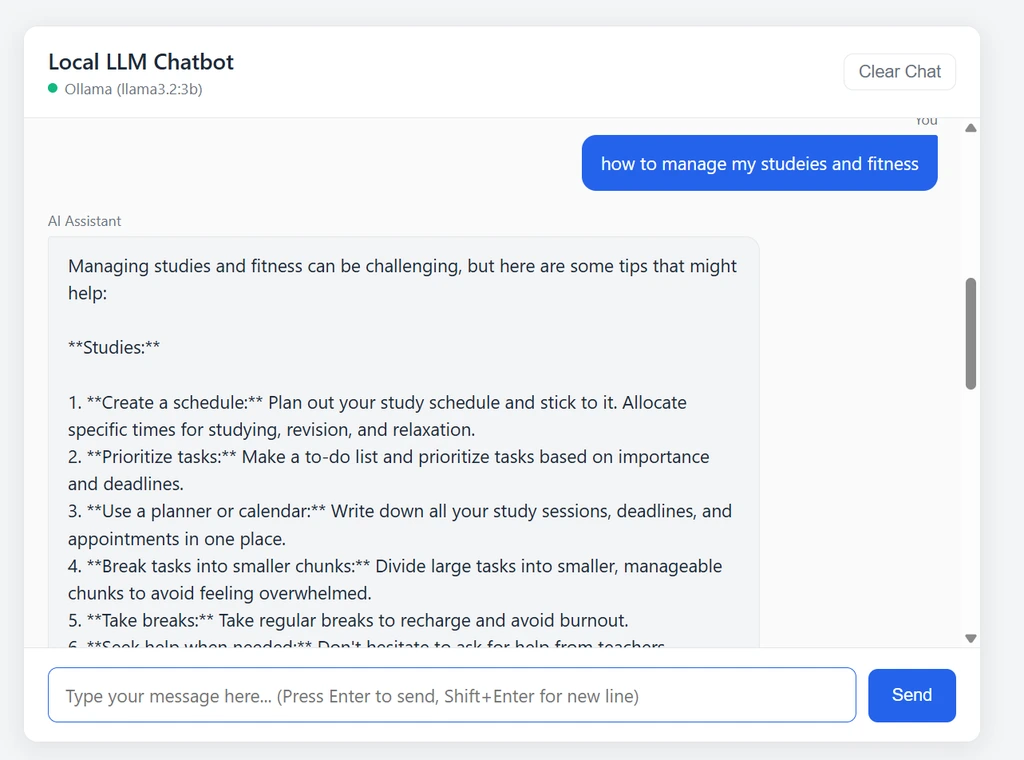
I used Ollama to host Meta’s llama3.2:3b model locally. For the backend, I wrote a small Python application using FastAPI and Uvicorn, which is a fast and lightweight way to build an API. The frontend was intentionally basic, just plain HTML, CSS, and JavaScript using the browser’s built-in fetch API, with no React or Node.js involved.
The flow works like this. I type a message in the browser, which sends it to my FastAPI backend running at localhost:8000. The backend appends that message to the current session history and forwards it to Ollama’s local API at localhost:11434. Ollama runs the model and generates a response, which flows back through FastAPI to the browser and appears in the chat window.
What struck me most was how little was actually happening outside my own laptop. Every single step, from typing the message to generating the response, stayed on one machine the entire time. Disconnecting Wi-Fi mid-conversation changed nothing about how it worked, which was the moment the whole concept genuinely clicked for me.
Best Local LLM Models Right Now
The open model ecosystem has grown fast enough that choice is rarely the bottleneck anymore; hardware is.
- Meta’s Llama family, including Llama 3.2 and 3.3, remains one of the most widely supported and well-documented options across every local tool.
- Qwen, developed by Alibaba, has built a strong reputation for both general use and coding tasks, with smaller variants that run well on modest hardware.
- Mistral models are known for being efficient relative to their size, often outperforming larger models on specific tasks.
- Google’s Gemma family is built specifically with smaller, locally-runnable use in mind, aligning with Google’s broader push toward on-device AI.
- Microsoft’s Phi series focuses on strong reasoning performance in a small parameter footprint, making it a solid option for lower-end hardware.
Matching a model to your hardware matters more than chasing the newest release. A well-chosen 7B model running smoothly beats a 30B model that stutters through every response.
Limitations of Local LLMs
Being honest about this matters more than making local AI sound perfect.
- Capability has a ceiling. A model that fits on a laptop cannot match the reasoning depth of the largest cloud-hosted systems. There’s a real trade-off between what fits locally and what’s actually possible with unlimited compute.
- Setup still has friction. Tools like Ollama have made this dramatically easier, but getting the right model size matched to your hardware, troubleshooting slow performance, and understanding quantization trade-offs is a genuine learning curve for a complete beginner.
- No automatic improvement. Cloud models get silently upgraded by their providers constantly. A local model stays exactly as capable as the version you downloaded until you manually replace it.
- Hallucination risk doesn’t disappear. Across 26 leading foundation models studied in 2026, hallucination rates ranged from 22% to 94% depending on the model and task, according to data compiled by Hostinger. Smaller local models are not immune to this, and in some cases perform worse than their larger cloud counterparts on factual accuracy.
Real-World Use Cases
- Developers use local LLMs for coding assistance without sending proprietary codebases to a third party, which matters enormously for companies with strict internal policies.
- Researchers and students use them to summarize or query personal document collections entirely offline, especially useful with inconsistent internet access.
- Privacy-focused writers and professionals use local models for drafting sensitive content, from legal notes to personal journaling tools, without that content ever reaching an external server.
- Businesses in regulated industries like healthcare, finance, and legal services are increasingly exploring local deployment specifically because data residency requirements make sending information to external APIs legally complicated.
- Field teams and remote workers rely on local models when connectivity genuinely cannot be guaranteed, such as agricultural surveyors, offshore technicians, or journalists working in low-infrastructure regions, where cloud AI simply isn’t an option at all.
- Hobbyists and students learning AI, which is honestly where my own project fits, use local LLMs simply to understand how these systems work by building something small and watching it run.
The Future of Local LLMs
Open model releases keep narrowing the gap with frontier cloud systems faster than most people expected a couple of years ago. Quantization techniques keep improving, letting larger models fit into smaller memory footprints with less quality loss each year.
Hardware is moving in the same direction. Laptops are increasingly shipping with dedicated AI acceleration built in, and this is only going to make the kind of setup I built more common rather than less, not something only technical hobbyists bother with.
The direction doesn’t look like local replacing cloud entirely. It looks more like people finally having a genuine choice, running the model that fits their actual task instead of defaulting to the cloud for everything by habit.
Final Thoughts
Before building my own chatbot, local LLMs felt abstract to me, something developers with powerful machines did. Actually setting one up on a normal laptop changed that completely.
The model, the API call, the response generating entirely offline — none of it required anything beyond what I already had.
If you want to understand this properly, the fastest path is doing exactly what I did. Install Ollama, pull a small model, and build the simplest possible chat interface around it.
Watching your own messages get answered without an internet connection teaches you more about how LLMs actually work than any explainer, including this one, ever fully can.