Most people assume AI needs the internet to function. Ask a question; it goes somewhere far away, a server thinks about it, and an answer comes back. That assumption is only half true anymore.
Offline AI flips that concept entirely. The model sits on your own device and answers you without ever touching a network.
I ran into this idea from an odd direction. I had built a small sketch generation project that took a rough input and generated a sketch, along with a cleaner version of it, and I originally framed it purely as a generative AI experiment. The image is the output of my sketch generation model.

It was only later, when I disconnected my laptop from Wi-Fi and it kept working perfectly, that I realized I hadn’t just built a generative AI tool. I had built an offline AI tool. Same code, same model, but a completely different lens on what it actually was.
That distinction matters more than it sounds like it should. Let’s get into why.
What is Offline AI?
Offline AI refers to artificial intelligence models that run entirely on a local device, with no dependency on an internet connection or a remote server, at the point of use.
The key phrase there is “at the point of use.” Researchers may have trained the model somewhere using heavy cloud infrastructure. But once you download and install it on your laptop, phone, or dedicated hardware, you can use it to generate answers, recognize images, or hold a conversation without sending a single byte anywhere else.
This is different from simply having a bad connection and an app that fails gracefully. Offline AI is built from the ground up to never need that connection at all.
Why Does Offline AI Exist?
Three separate pressures pushed this forward at the same time.
- Privacy concerns grew louder. Sending personal documents, medical questions, or business data to a third-party server is a real liability for a lot of people and companies. Keeping everything local removes that risk structurally, not just through a privacy policy promise.
- Hardware caught up. Laptops and even phones now ship with enough memory and processing power to run genuinely capable models. What needed a data center five years ago now runs comfortably on a mid-range gaming laptop.
- The numbers reflect this shift clearly. Gartner projects that AI-capable PCs will represent around 55% of the entire PC market by the end of 2026, meaning most new laptops sold will have the hardware needed to run models locally by default.
That last stat is worth sitting with. Offline AI isn’t a niche hobbyist trend. It’s becoming a default hardware capability whether people use it consciously or not.
How Does Offline AI Actually Work?
The process looks similar to Edge AI in structure, but the intent behind it is different. Edge AI is about where computation physically happens on a network. Offline AI is specifically about independence from connectivity altogether, and the two overlap heavily but aren’t identical, which I’ll get into shortly.
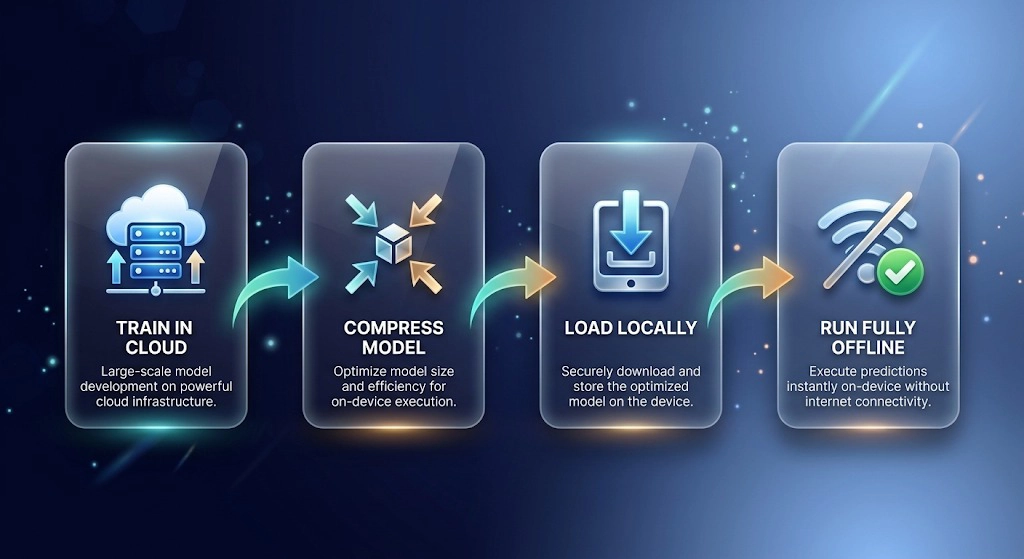
The typical flow for offline AI looks like this.
Researchers train a model using large-scale cloud infrastructure, since training still needs massive compute. Once trained, they compress the model through quantization, shrinking its size dramatically while keeping most of its capability intact.
This compressed version gets packaged into a format a regular computer can run, commonly using tools like GGUF for language models. A local runtime, something like Ollama or LM Studio, loads that model into memory on your machine. From that point forward, your own hardware processes every question you ask entirely, and you get the output without making a single network request in the background.
I tested this directly with my sketch project. Once I had the model files stored locally, turning off Wi-Fi completely changed nothing about how it performed. That was the moment the concept actually clicked for me, rather than just reading about it.
Offline AI vs Edge AI
These two get confused constantly, so it’s worth being precise here.
Edge AI is about computation location relative to a network architecture. A factory sensor running inference on-site instead of sending data to a data center is Edge AI, and it may still occasionally sync with the cloud for updates or logging.
Offline AI operates entirely without any connection by design, for the entire time you use it.
Every offline AI system is technically running at the edge. But not every edge AI system is meant to work fully offline. A smart camera might process video locally but still send alerts to a cloud dashboard every few minutes, which makes it edge but not strictly offline.
My sketch generation project fits both labels depending on which question you’re asking. Where does the computation happen? At the edge, on my laptop. Does it need the internet at all? No, which makes it offline AI specifically.
Offline AI vs Cloud AI
| Offline AI | Cloud AI | |
| Where it runs | Entirely on your device | Remote servers |
| Internet required | No | Yes |
| Speed | Instant, no network delay | Depends on connection quality |
| Privacy | Data never leaves the device | Data is transmitted and processed remotely |
| Model size limits | Constrained by local hardware | Virtually unlimited |
| Cost structure | One-time setup, no ongoing API fees | Often subscription or usage-based |
| Update process | Manual, you control versions | Automatic, provider controls it |
| Best suited for | Privacy-sensitive tasks, no-connectivity environments | Large models, heavy compute tasks |
Neither one wins outright. A massive model like the ones behind large language models like ChatGPT or Gemini simply cannot fit on a laptop. But a smaller local model handling document search, basic writing help, or simple image tasks doesn’t need that scale, and running it locally removes an entire category of privacy and reliability concerns.

Popular Offline AI Tools and Models
A few tools have made this genuinely accessible to regular developers, not just researchers.
Ollama lets you download and run open models like Llama, Mistral, and Gemma with a single command, and it’s become the easiest entry point for anyone wanting to try this. LM Studio offers a similar experience with a graphical interface, which suits people who prefer not to touch a terminal.
GPT4All from Nomic AI packages several open models into one desktop app. For vision-based tasks, Google’s AI Edge Gallery brings offline image and text models directly to Android devices, showing that users can now run these models on more than just laptops.
Most of these rely on open-weight models available through Hugging Face, which has become the default distribution hub for anything meant to run locally.
Advantages of Offline AI
- Complete privacy by architecture: Nothing you type or upload leaves your machine, which matters enormously for legal, medical, or personal use cases.
- Zero latency: There’s no network round trip, so responses feel instant regardless of your internet situation.
- Works anywhere: Whether it’s flights, remote areas, disaster zones, or just a bad ISP day. The model doesn’t care; it works everywhere.
- No recurring cost: Once downloaded, there’s no subscription or per-request API fee eating into a budget. It is just a one-time investment.
- Full control over versions: You decide when to update a model, rather than a provider silently changing behavior on you overnight.
Limitations of Offline AI
Along with all the above benefits, offline AI also has some limitations. So, being fair here matters more than sounding impressive.
Capability ceiling is real
A model that fits on a laptop simply cannot match the reasoning depth of a massive cloud-hosted model. There’s a genuine trade-off between size and intelligence.
Storage and RAM demands add up
Larger local models can require tens of gigabytes of storage and significant RAM to run smoothly, which older or budget hardware struggles with.
No automatic improvement
Cloud models get upgraded behind the scenes constantly. A local model stays exactly as capable as the version you downloaded until you manually update it.
Setup has a learning curve
Downloading a model file and running a local server is not the same one-click experience as opening ChatGPT in a browser tab, even with tools like Ollama simplifying most of it.
When I first got my sketch project working locally, getting the model format compatible with my hardware took longer than writing the actual generation logic. That’s a genuinely underrated part of working with offline AI that tutorials rarely mention, honestly.
Real-World Use Cases
- Healthcare uses offline AI for patient data analysis where regulations often prohibit sending records to external servers at all.
- Field research and agriculture rely on it in areas with no reliable connectivity, running crop or soil analysis directly on portable devices.
- Legal and financial firms use local document analysis tools to keep sensitive client data from ever touching a third-party API.
- Personal privacy-focused writing and coding assistants: Developers increasingly run these locally because they don’t want to send their code or drafts to an external company.
- Education in low-connectivity regions is a genuinely underrated use case. Google’s AI Edge Gallery specifically targets this, letting students use AI-assisted learning tools without needing reliable internet, which matters a great deal in areas where connectivity is inconsistent or expensive.
Common Misconceptions
Is offline AI completely independent of the internet, always?
Mostly, once downloaded. Getting the model in the first place still needs an internet connection, and some tools quietly check for updates unless you explicitly block that. Truly air-gapped use requires deliberate setup.
Does offline AI always guarantee privacy?
Running locally means your data doesn’t leave the device, but it doesn’t automatically mean the application handling it is secure. A poorly built local app can still leak data through other channels, so the guarantee is architectural, not absolute.
Can offline AI match ChatGPT-level capability?
Not yet, for most consumer hardware. Smaller local models are improving fast, but there’s still a real gap for complex reasoning tasks compared to frontier cloud models.
The Future of Offline AI
Small models keep closing the capability gap faster than most people expected. Reasoning-focused small models are already improving step-by-step accuracy, narrowing the distance from cloud-scale models.
Experts expect regulated industries like banking, healthcare, and legal services to lead broader adoption first, driven by data residency requirements, with smaller businesses following as hardware costs continue to drop.
As this connects to the future of AI more broadly, the direction seems less about offline replacing cloud entirely, and more about people finally getting a genuine choice between the two depending on what a specific task actually needs.