As businesses grow, customer data usually becomes scattered across spreadsheets, inboxes, and different tools. Losing control over this data can lead to missed follow-ups and ultimately lost opportunities.
This is where the right CRM software brings all information together and helps you manage leads, automate routine tasks, and make better sales decisions.
According to Salesforce’s 2026 State of Sales report, 51% of sales leaders using AI say disconnected systems slow or limit their AI initiatives.
But more features do not always mean a better CRM. What matters is choosing a CRM with features that solve real business problems and support your team’s workflow. Now, moving next, you will explore some of the most essential ones that you must have, regardless of which CRM system you opt for.
| CRM Feature | Business Problem It Solves |
|---|---|
| Contact Management | Keeps scattered customer details and interaction history in one place. |
| Lead Management & Scoring | Prevents leads from getting lost and helps prioritize the best prospects. |
| Sales Pipeline & Opportunity Management | Shows where every deal stands and which opportunities need attention. |
| Workflow Automation | Automates repetitive follow-ups, assignments, updates, and routine work. |
| Security & User Permissions | Protects customer data and controls who can view or change sensitive information. |
| Email & Calendar Integration | Keeps emails and meetings connected to customer records without manual logging. |
| Reporting & Analytics | Turns CRM data into insights about sales, leads, campaigns, and team performance. |
| Sales Forecasting | Helps businesses estimate future revenue and plan resources more accurately. |
| AI-Powered CRM Features | Saves time through summaries, lead scoring, recommendations, and predictive insights. |
| Mobile CRM Access | Let’s manage customers and deals while working away from the office. |
| Marketing Automation | Automates lead nurturing and keeps marketing and sales activity connected. |
| Customer Support Features | Gives support teams customer history and context for faster, consistent service. |
| Third-Party Integrations | Connects the CRM with existing business tools and reduces duplicate data entry. |
| Customization & Flexibility | Let’s help businesses adapt fields, pipelines, dashboards, and workflows to their processes. |
| Data Quality Management | Keeps customer data accurate, organized, duplicate-free, and easier to migrate. |
| Task & Activity Management | Prevents missed calls, meetings, tasks, and customer follow-ups. |
Tip: A business does not need every CRM feature. Prioritize the ones that solve current workflow problems and support future growth.
Reasons Explained for Choosing These Essential CRM Features for Your Business
These CRM features help businesses manage customer relationships, streamline sales processes, and improve decision-making at every stage of the customer journey.
How Does Contact Management Improve Customer Relationships?
Contact management keeps customer details, conversations, and activity history in one place. This gives sales, marketing, and support teams a shared view of each customer instead of searching across spreadsheets, inboxes, or separate tools.
This lets your business:
- Store customer and company details
- Track calls, emails, meetings, and notes
- Segment contacts by source, location, industry, or status
- Detect or prevent duplicate records
- View a complete customer interaction history
This makes it easier to personalize conversations, coordinate follow-ups, and keep customer information accurate as your business grows, whether it’s an online store for e-commerce or anything else.
Why Is Lead Management Essential for Converting Prospects?
Lead management helps businesses capture, qualify, assign, and nurture prospects without letting potential customers slip through the cracks. It keeps every lead and interaction organized, while strategies like AI-powered lead conversion can help teams prioritize promising prospects.
A structured lead process helps sales teams focus their time on leads that are more likely to convert.
- Capture leads from multiple channels
- Qualify and score prospects
- Route leads to the right sales reps
- Track follow-ups and conversion progress
How Does Sales Pipeline and Opportunity Management Help Close More Deals?
Sales pipeline and opportunity management give businesses a clear view of every active deal, from initial interest to closing. It helps sales teams see which opportunities are moving forward, which are stalled, and where follow-up is needed.
Visual CRM tools, such as those discussed in our guide to Monday CRM features and benefits, can also make deal tracking easier across different pipeline stages.
- Track deals through each sales stage
- Monitor deal value and expected close dates
- Customize pipelines around your sales process
- Identify stalled or high-priority opportunities
- Assign ownership and next actions
Why Is Workflow Automation a Must-Have CRM Feature?
Workflow automation handles repetitive CRM tasks such as lead assignment, follow-ups, reminders, and record updates without requiring manual action.
It helps businesses maintain consistent sales processes while giving teams more time to focus on customers and high-value work.
- Route leads automatically
- Send follow-up emails
- Create tasks and reminders
- Update records or deal stages
- Trigger actions based on predefined rules
Why Are Security and User Permissions Important in a CRM?
CRM systems can contain sensitive customer, sales, and business information, so security and user permissions help control who can access, edit, export, or manage that data.
A good CRM should let businesses give employees the access they need without giving every user unrestricted control.
- Assign roles and permissions
- Restrict access to sensitive records
- Control editing and administrative rights
- Manage data export permissions
- Review security and compliance requirements
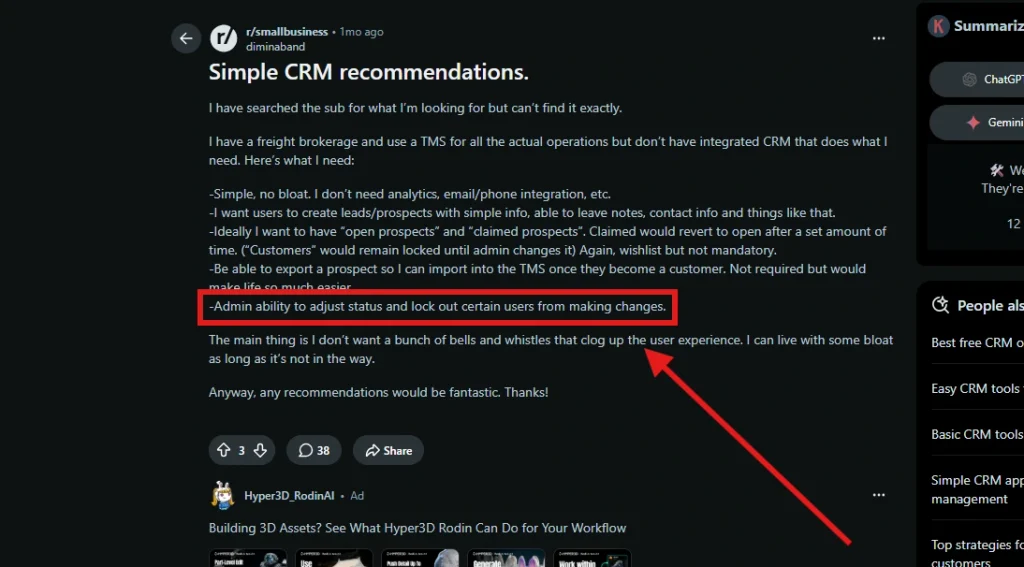
This is also a practical buyer concern, not just a technical checkbox. In a recent r/smallbusiness discussion, one business owner specifically wanted admin control over status changes, such as the ability to restrict users from making changes and to easily export data.
Why Is Email and Calendar Integration Important?
Email and calendar integration connects your CRM with tools like Google Workspace and Microsoft Outlook, keeping customer emails, meetings, and scheduled activities connected to the right records.
This reduces manual data entry and app switching while giving teams a clearer history of customer communication.
- Sync emails with customer records
- Schedule meetings and appointments
- Set reminders for follow-ups
- Track communication history
- Keep calendars and CRM activities aligned
How Do Reporting and Analytics Support Better Business Decisions?
Reporting and analytics turn CRM data into dashboards and reports that help businesses understand sales performance, lead activity, and team results.
A good CRM should make it easy to spot trends, identify bottlenecks, and track the metrics that matter to your business.
- Monitor important KPIs
- Build custom reports and dashboards
- Analyze sales and conversion performance
- Compare team or pipeline results
- Identify trends and bottlenecks
Why Is Sales Forecasting Important for Business Growth?
Sales forecasting uses historical performance, current pipeline data, and expected deal outcomes to estimate future revenue. It helps businesses set realistic sales targets and plan ahead with greater confidence.
Better forecasts can support decisions around budgeting, hiring, inventory, and resource allocation.
- Estimate future revenue
- Set realistic sales targets
- Identify sales trends
- Plan budgets and resources
- Adjust strategy as pipeline conditions change
How Can AI-Powered CRM Features Improve Productivity?
AI-powered CRM features help teams analyze customer data, summarize interactions, prioritize leads, generate content, and recommend next actions. These capabilities can reduce routine work and help sales teams respond faster.
AI also extends the key benefits of CRM systems by turning stored customer data into more actionable insights.
- Score and prioritize leads
- Summarize customer interactions
- Draft emails and follow-ups
- Recommend next actions
- Automate routine data entry
- Surface predictive insights
Why Does Mobile CRM Access Matter for Modern Teams?
Mobile CRM access lets teams view customer information, update deals, and log activities from smartphones or tablets while away from their desks. It is especially useful for field sales, remote, and hybrid teams that need CRM access while working on the go.
- Access customer records
- Update deals and opportunities
- Log calls and meetings
- Complete tasks and follow-ups
- Receive important notifications
If mobility is important to your team, compare mobile CRMs vs. traditional ones to understand which setup better fits your workflow.
How Does Marketing Automation Improve Lead Engagement?
Marketing automation helps businesses generate leads with timely, relevant communication without manually managing every interaction. When connected with CRM data, it can also help sales and marketing teams coordinate around the same prospects.
- Automate email campaigns
- Segment audiences
- Nurture leads over time
- Trigger messages based on customer actions
- Track campaign and lead engagement
Why Are Customer Support Features Important in a CRM?
Customer support features give service teams access to customer history, previous conversations, and support requests in the same system. This provides more context when resolving issues and helps maintain consistent service across the customer lifecycle.
- Manage customer inquiries and support requests
- View previous interactions
- Track issue status and follow-ups
- Share customer context across teams
- Monitor support activity
Why Are Third-Party Integrations Essential in CRM Software?
Third-party integrations connect your CRM with tools your business already uses, such as email, accounting, marketing, and collaboration platforms. This keeps data flowing between systems and reduces unnecessary manual work.
A CRM with the right integrations can:
- Sync customer and business data
- Reduce duplicate data entry
- Connect sales, marketing, and support tools
- Improve collaboration across teams
- Reduce switching between applications
For more complex or custom connections, understanding the role of a CRM developer can help you determine when technical expertise is necessary.
Why Does CRM Customization and Flexibility Matter?
CRM customization allows businesses to adapt the system to their own sales processes instead of changing workflows to fit rigid software.
Look for enough flexibility to match how your team actually works without making the CRM unnecessarily complex.
- Create custom fields
- Customize pipeline stages
- Adjust dashboards and reports
- Configure workflows and rules
- Adapt records to specific business needs
Why Is CRM Data Quality Management Important?
A CRM is only useful when the customer data inside it is accurate and manageable. Data quality management helps businesses import, organize, clean, update, and export records without creating duplicate or unreliable information.
HubSpot’s updated CRM requirements checklist also recommends evaluating existing data before migration and checking how clean it is, since migration complexity can affect which CRM is suitable for a business.
- Import and export CRM data
- Detect and merge duplicate records
- Standardize customer information
- Update records efficiently
- Support cleaner data migration
How Does Task and Activity Management Keep Teams Organized?
Task and activity management keeps calls, meetings, follow-ups, and other sales activities connected to customer records, so teams know what has happened and what needs to happen next.
It helps businesses prevent missed follow-ups, improve accountability, and keep customer-facing work on schedule.
- Assign tasks to team members
- Schedule calls and follow-ups
- Track meetings and activities
- Set due dates and reminders
- See upcoming and overdue tasks
What People Also Want to Know About Modern-Day CRM Features
Which CRM features increase sales?
Features like Lead Management, Sales Pipeline Management, Sales Forecasting, Workflow Automation, and AI tools in Salesforce Einstein and HubSpot AI help improve conversions and sales performance.
Do small businesses need every CRM feature?
No. Small businesses should start with Contact Management, Lead Management, automation, and reporting, then adopt advanced features as their needs grow.
What makes a modern CRM different?
Modern CRM platforms like Salesforce, HubSpot CRM, Microsoft Dynamics 365, and Zoho CRM combine AI, automation, analytics, and integrations beyond basic contact management.
What CRM Features Are Most Important for Small Businesses and Startups?
Small businesses and startups should prioritize contact management, lead tracking, pipeline management, automation, reporting, and integrations. Add advanced features as the business grows.