Ask a general-purpose language model how to cancel an order, and it will answer like a general search summary. It tells you the steps “may vary depending on the platform, service, or store.” That may be accurate, but useless when you are the one running the store.
I ran that exact test, then trained the same model for under two minutes on 1,000 customer-support examples. The second answer opened with an apology and gave five direct steps in the company’s voice. The model had not become smarter. It had become specific.
That gap between “generally capable” and “useful for this job” is what AI fine-tuning closes. Fine-tuning is the most misunderstood tool in the AI toolbox. People reach for it to fix wrong answers, but it does so poorly. They overlook it for tone, format, and repeatable behavior, which it does very well.
In this blog, I have covered what fine-tuning is, how it differs from training, RAG, and prompting. I also discussed the main techniques and a step-by-step walkthrough with real numbers from my run. It ends with a simple way to decide whether you need it at all.
What Is AI Fine-Tuning?
AI fine-tuning is the process of taking a pre-trained model and training it further on a smaller, task-specific dataset. The model keeps what it learned from enormous general data and adjusts it for your use case. It can also be described as a subset of transfer learning, which is the practice of reusing what a model already knows as the starting point for a new task.
Picture a chef who has worked in many kitchens and can cook almost anything. When they join your restaurant, they do not relearn how to chop onions. They learn your menu, your plating style, and how your team talks to customers. The pre-trained model is the experienced chef, and your dataset is their first month on the job.
There is a second reason it matters, and it is less obvious. A freshly pre-trained language model does not actually answer your question. It continues your text. IBM gives a neat example: prompt a base model with “teach me how to make a resumé,” and it may simply complete the sentence with “using Microsoft Word.” Fine-tuning is what teaches the model to treat your prompt as a request.
Why Base Models Fall Short
General-purpose models are built to be useful to everyone, so they run into predictable limits:
- Knowledge cutoff means the model knows nothing about events or documents after its training date, as Nebius points out.
- Hallucinations show up when the model fills gaps with confident but invented answers.
- Inherited bias carries skews from the original training data into the outputs.
- Generic answers appear because the model does not know your company, product, or policies.
- Inconsistent format means the same question can return a paragraph once and a list the next time.
Fine-tuning fixes some of these much better than others. Keep that split in mind, because it decides almost every choice later in this guide.
Fine-Tuning vs Training From Scratch
Training from scratch (often called pre-training) starts with random weights and learns language from trillions of words. Oracle notes that this can require up to thousands of GPUs and millions of dollars. Fine-tuning starts from the finished model and nudges it with a far smaller dataset.
| Factor | Training from scratch | AI fine-tuning | My run |
| Starting point | Random weights | Pre-trained weights | Pre-trained 1.2B model |
| Data | Trillions of words | Hundreds to thousands of examples | 1,000 Q&A pairs |
| Hardware | GPU clusters | Often one GPU | Free Tesla T4 |
| Time | Weeks to months | Minutes to hours | 1.9 minutes |
| Peak GPU memory | Very high | Modest with LoRA | 1.68 GB |
The last column changed my expectations. I assumed fine-tuning would be cheaper than training from scratch. I did not expect the training cell to finish before I had finished reading its logs.
Fine-Tuning vs RAG vs Prompt Engineering
Three approaches dominate customization, and they solve different problems.
| Approach | What it changes | Best for | Weak at |
| Prompt engineering | The instructions you send | Quick tests, light tone control | Long prompts get costly and drift |
| RAG | What the model can read at answer time | Fresh facts, private documents, sources | Does not change the model’s style |
| AI fine-tuning | The model’s weights | Tone, format, narrow repeatable tasks | Adding new or fast-changing facts |
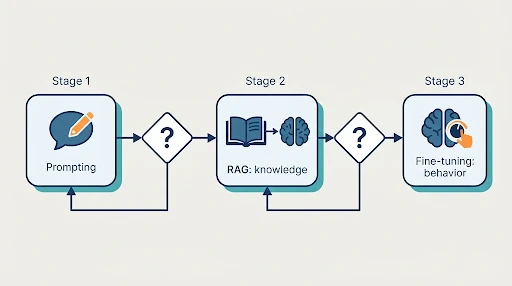
The shortest way to remember this is that RAG gives a model a library, while fine-tuning gives it habits. If the model lacks information, retrieve it. If it does not behave the way you want, fine-tune it. TrueFoundry puts the same idea simply: fine-tuning changes how a model behaves, while RAG gives it access to information outside its training. If you want the retrieval side in depth, I covered it in my beginner’s guide to RAG.
These approaches are not rivals. Fin’s customer-service glossary notes that most organizations get better results with less maintenance by pairing a strong general model with retrieval, and that the best architectures use both.
Microsoft’s guidance gives a practical order of operations: start with prompt engineering, move to fine-tuning once you have enough data, and train from scratch only when nothing else works. It suggests prompting for fewer than about 100 examples and fine-tuning when you have roughly 1,000 to 10,000 labeled examples.
Main Types of AI Fine-Tuning
Full Fine-Tuning
Every weight in the model gets updated. This gives the most flexibility but demands the most memory. IBM, citing research on parameter-efficient methods, notes that training all parameters can require 12 to 20 times more GPU memory than the model weights alone (Lialin et al.). It also carries the highest risk of catastrophic forgetting, where a model gets good at your task and worse at things it previously handled well.
Instruction Fine-Tuning
The model learns from examples that pair an instruction with an ideal response. A summarizer sees passages with good summaries, and a support bot sees customer questions with correct, on-brand answers. This is a form of supervised fine-tuning, and it is the format my project used.
Parameter-Efficient Fine-Tuning (PEFT)
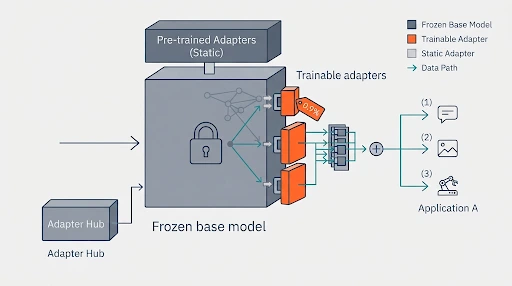
Instead of rewriting the whole textbook, imagine clipping small annotation sheets onto its pages. PEFT freezes most of the model and trains a thin set of extra or selected weights. The original adapter research reported performance equivalent to full fine-tuning on BERT while training only about 3.6% as many parameters, according to IBM’s summary of the adapters paper.
LoRA and QLoRA
LoRA (Low-Rank Adaptation) is the most popular PEFT method. It leaves the original weights frozen and trains two small matrices that together represent the change. Because only the small matrices are saved, different task-specific adapters can be swapped onto the same base model.
QLoRA goes one step further by loading the frozen base model in lower precision to save even more memory. Microsoft cites figures of roughly 0.1% of parameters trained, about 90% less GPU memory, and about 70% less training time with LoRA. Treat those as ballpark numbers, since real results depend on the model and setup. My own run trained about 0.90% of parameters, which fits the same picture.
Domain Adaptation and RLHF
Domain adaptation trains a model on text from one field, such as law or medicine, so it picks up that field’s vocabulary. Reinforcement learning from human feedback (RLHF) uses human ratings of model responses to teach qualities that are hard to write as examples, like helpfulness or humor. It is usually applied after supervised tuning, so most small projects never need it.
How AI Fine-Tuning Works: Step by Step
Most guides, including Nebius’s seven-stage pipeline, break the workflow into stages from data preparation to monitoring. I will walk through the same flow using the actual numbers from my run, so each step has something concrete attached to it.
Step 1: Prepare the Data
My dataset held 1,000 customer-support questions paired with answers. The answers contained placeholders like {{Settings}}, {{Upgrade Account}} and {{Account Type}}. Dataset authors use these, so one template works across many products.

This detail matters more than it looks. The model learns the shape of a good support answer, not facts about any real website. Consistency beats volume here. Microsoft’s guidance says 1,000 high-quality examples will typically outperform 10,000 noisy ones, and suggests manually auditing about 10% of labels.
Step 2: Load the Model and Attach Adapters
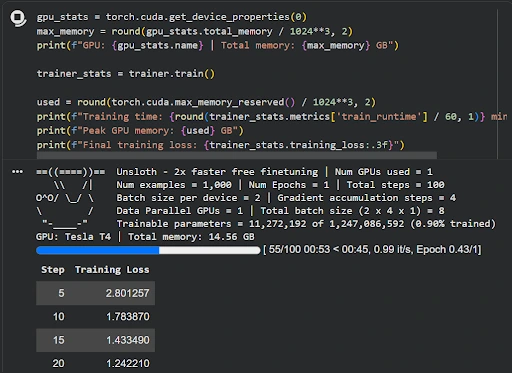
I loaded an open-source model of about 1.2 billion parameters with Unsloth on a free Tesla T4 GPU with 14.56 GB of memory. Then I attached LoRA adapters. The logs reported 11,272,192 trainable parameters out of 1,247,086,592, which is about 0.90%. Unsloth patched 16 layers, covering the attention projections and the feed-forward (MLP) blocks.

Small models are a good starting point. Mistakes are cheap, and iteration is fast. Microsoft’s rule of thumb is that a 1B-parameter model wants more than about 1,000 examples, so my dataset sat right at the edge of that guidance.
Step 3: Configure the Training
Three settings define most of a fine-tuning run:
- Batch size per device was 2, meaning two examples were processed at a time.
- Gradient accumulation was 4, meaning gradients were collected over four rounds before each update.
- Effective batch size was therefore 8 examples per update.
Gradient accumulation works like marking exam papers when you can only hold two at a time. You read two, jot notes, repeat four times, and only then adjust your teaching plan. It lets a small GPU behave as if it had a bigger batch.
I capped the run at 100 steps. At 8 examples per step, that is 800 examples, so the model saw about 80% of the dataset once.
Step 4: Train and Watch the Loss
Training took 1.9 minutes at roughly one step per second and peaked at 1.68 GB of GPU memory. The number to watch is loss, which you can think of as a score for how surprised the model is by the correct answer. High loss means surprise. Low loss means the dataset’s style now feels natural.
| Training step | Loss |
| 5 | 2.80 |
| 10 | 1.78 |
| 15 | 1.43 |
| 20 | 1.24 |
| 60 | 1.05 |
| 100 | 0.97 |
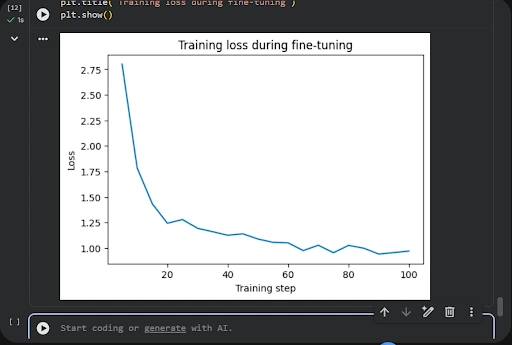
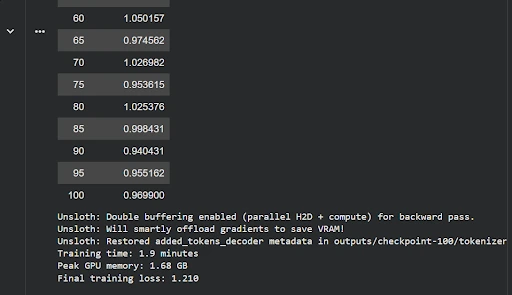
The curve has the typical shape. Loss falls steeply at first, and most of the total improvement happens in the first 20 steps. After step 60, it wobbles between roughly 0.94 and 1.03, which is normal noise from small batches. At that point, the model had absorbed what this dataset could teach, and training longer would mostly risk memorizing it. Oracle lists early stopping among the standard guards against this.
One number can confuse you. The script printed “Final training loss: 1.210,” which looks higher than the last logged steps near 0.97. That figure is the average across the entire run, including the high early steps. Check which value your framework reports before concluding.
Step 5: Evaluate
Training loss only tells you how well the model fits data it practiced on. A proper evaluation holds back part of the data. Microsoft suggests a 70/15/15 split for training, validation, and testing, and says to watch for validation loss rising while training loss falls, which is the classic sign of overfitting.
My own check was simpler. I asked the same three questions before and after training and compared the answers. That is a useful sanity test, but three questions are not a benchmark, and I would not claim more than that.
Step 6: Deploy and Monitor
Once the results look right, you save the adapter, load it on top of the base model or merge it, and serve it through an app or API. Models drift as policies, products, and user questions change.
Microsoft suggests retraining on a schedule or when performance drops noticeably. Because a small tuned model needs little hardware, it can also run on your own machine, which connects to the ideas of edge AI and how AI inference works.
Before and After: What Fine-Tuning Changed
I asked the same three questions before and after training.
| Aspect | Before fine-tuning | After fine-tuning |
| Opening | Steps “may vary depending on the platform” | Opens with an apology and goes straight to help |
| Voice | Generic advice for any store | First person, speaking as the company |
| Scope | Several carriers and platforms listed | One path of five clear steps |
| Follow-up | Asked for order number and details | Answered directly |
- What worked: Answers became shorter, more direct, and consistent. All three questions got the same voice, which is exactly what a support team wants.
- What did not work: Some phrases were off. The tracking answer began with “I’m on the same page!” and the address answer with “I’m glad you’re interested in changing your delivery address.” The tone was learned, but the right sentence for each situation was not always chosen.
- The bigger problem: The model described buttons like “My Orders” and “Cancel Order” as if it knew a real website. It does not. It learned the pattern of support answers, not the facts of any product. Deployed as is, it would confidently point customers to menus that may not exist. That is the clearest demonstration of why fine-tuning and retrieval complement each other.
When Should You Use AI Fine-Tuning?
- Brand voice matters when every answer should sound like the same team, whether the topic is billing or shipping.
- Strict output formats such as JSON or fixed templates are easier to enforce through training than through long prompts.
- Domain vocabulary in legal, medical, or financial text is handled more reliably after domain-specific tuning, as Databricks and IBM both note.
- Narrow repeated tasks like classification, extraction, or ticket tagging run thousands of times, so a small tuned model can pay for itself.
- Privacy and control become reasons to tune when regulated data cannot leave your own infrastructure.
- Lower prompt cost is a quieter benefit, since a model that already knows the behavior needs shorter instructions.
- Continuous refresh works when you periodically retrain on new examples instead of starting from scratch.
When You Should Not Fine-Tune
- Fast-changing facts like prices, policies, and laws belong in a retrieval system, not baked into weights.
- Source citations need RAG, because a fine-tuned model cannot show where an answer came from.
- Tiny or messy data teaches the model your noise. Databricks and Microsoft both stress dataset quality over size.
- Untested prompting is the most common mistake. If you have not tried clear instructions and examples, start there.
- No evaluation plan means you cannot tell whether it worked. Decide your test questions first.
- Heavy maintenance is a hidden cost. Fin’s glossary points out that fine-tuned models need updating as products and policies change.
Common Challenges and How to Handle Them
- Overfitting happens when a model memorizes the training set. Use a validation split, keep epochs low, and stop when validation loss stops improving.
- Catastrophic forgetting is the loss of earlier abilities. LoRA reduces the risk because the base weights stay frozen, and mixing general examples into your data helps further.
- Poor data quality produces inconsistent behavior. Clean, standardize, and audit a sample before training.
- Bias amplification can occur when skews in the base model or data get stronger after tuning. Test with varied inputs.
- Hyperparameter choices like learning rate and batch size all matter. Change one at a time and log the result.
- Compute limits are easier to manage with LoRA or QLoRA and small models before you reach for bigger hardware.
Tools Worth Knowing
- Unsloth is a memory-efficient fine-tuning library that made a free T4 enough for this experiment.
- Hugging Face PEFT is the standard open-source library for LoRA and related methods, with documentation here.
- Google Colab and Kaggle provide free GPU notebooks that are enough for small LoRA runs.
- Managed platforms from Databricks, Microsoft Azure, and others handle infrastructure when you move to production.
For wider context, my earlier posts on machine learning, natural language processing, and generative AI cover the foundations. If you want to see the trade-offs of the models themselves, the pros and cons of large language models is a good companion read.
Final Verdict
What stayed with me is how small the training step turned out to be. Under two minutes and under 2 GB of GPU memory means compute is no longer the barrier. The hard parts are deciding what behavior you want, writing examples that show it consistently, and building an evaluation you actually trust.
If I repeated the project, I would change two things. First, I would hold out a validation split, so the loss curve means more than “it fits the training data.” Second, I would pair the tuned model with retrieval, so it stops inventing menu names and starts reading real ones.
My advice is to treat AI fine-tuning as a way to shape behavior, not to add knowledge. Begin with prompts, add retrieval for facts, and reach for fine-tuning when you notice you are repeating the same instructions in every request. Used that way, it is one of the most practical skills in applied AI.
FAQ
Is AI fine-tuning better than RAG?
Neither is better overall. Fine-tuning changes how a model behaves, while RAG changes what it can read. Many production systems use both.
How much data do I need for fine-tuning?
It depends on the task and model size. Microsoft suggests roughly 1,000 to 10,000 labeled examples for typical fine-tuning, and IONOS says a few thousand high-quality examples are often enough. My run used 1,000 and already shifted the tone clearly.
Can I fine-tune a model on a free GPU?
Yes, with small models and LoRA or QLoRA. My run peaked at 1.68 GB of GPU memory on a free Tesla T4.
Does fine-tuning stop hallucinations?
Not reliably. It can make answers more consistent in a narrow domain, but it can also teach the model to sound confident about things it does not know. Retrieval is usually the better tool for factual grounding.