How to Login to Unity Wireless, Activate Your SIM & Set Up eSIM (2026 Guide)

Ever tried logging in to Unity Wireless and getting stuck with codes, slow speeds, or unclear settings?
Many users face this problem, and if you are also facing the same issue, then you are at the right spot. Accessing your account isn’t just about signing in; you also need to activate your SIM, set up eSIM (if supported), and improve internet performance.
Here’s exactly how you can log in to Unity Wireless, manage your settings, fix common issues, and optimize your home internet speed without confusion.
Whether you need to activate service, manage devices, or resolve Wifi connection problems, this will help you take full control of your account quickly and efficiently.
What is Unity Wireless and How Does It Work?
Unity Wireless is a U.S. wireless provider offering free or low-cost mobile service to eligible users through government programs such as the Federal Lifeline Program.
It is designed for individuals who need affordable connectivity without monthly bills or credit checks. The service runs on the T-Mobile 5G network, providing stable nationwide coverage for calls, texts, and mobile data.
Many users looking for Unity Wireless login or activation want to access or manage their free service after approval. If eligible, simply apply online, get approved, and activate your SIM or account to start using the service.
Key Features of Unity Wireless
- Free or low-cost unlimited talk, text, and data
- 100% Free monthly talk, text, and data via the Federal Lifeline Program.
- Keep your own phone and number with a free SIM kit.
- No monthly bills, no credit checks, and no contracts.
- SNAP, Medicaid, and SSI eligibility support
- Powered by the T-Mobile 5G network
- Simple online application with no credit check
How to Log in to Unity Wireless Account
Follow these simple steps to log in to your Unity Wireless account safely and access your dashboard without issues.
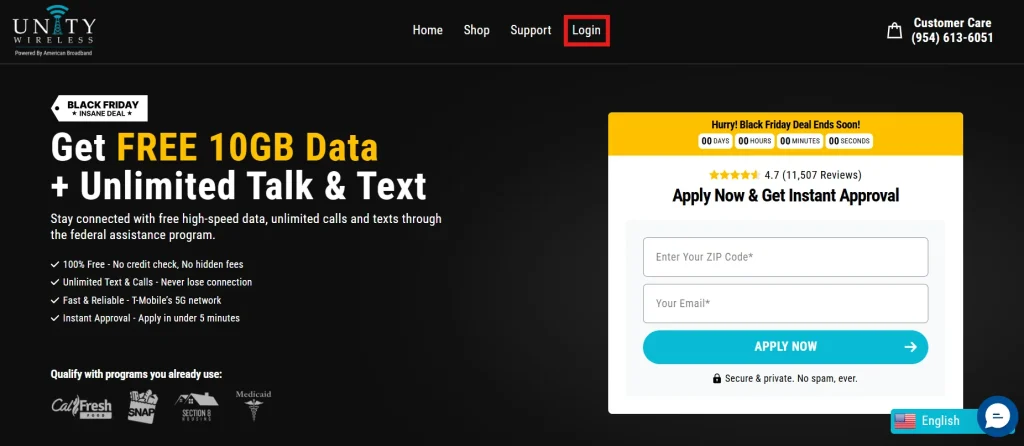
- Go to the official Unity Wireless website: https://unitywireless.com/.
- Click on the “Login” button, usually located at the top-right corner of the homepage.
- Then type your registered phone number and password linked to your Unity Wireless account.
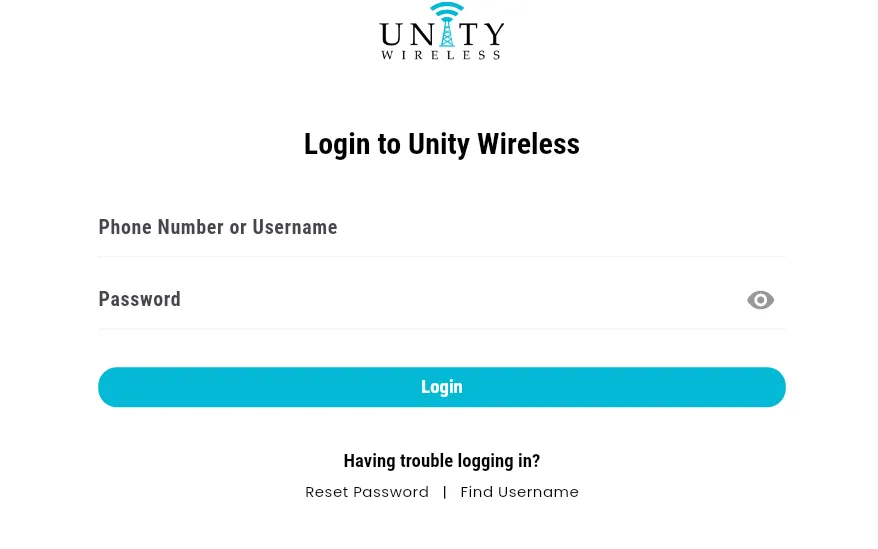
- After that, if prompted, enter the verification code sent to your smartphone or tablet.
- Once logged in, you can check your account details, data usage, connected devices, and settings.
👉 Pro Tip: Save your login credentials securely for faster access next time.
Configuring Unity Wireless APN Settings for Better Internet Speed
If your mobile data is slow or not working after activation, you may need to correctly configure your APN settings for Unity Wireless.
Follow these steps to add APN settings on your phone before entering values:
APN Settings
- APN: wholesale
- Username: (leave blank)
- Password: (leave blank)
- MMSC: http://wholesale.mmsmvno.com/mms/wapenc
- MMS Port: 8080
- MCC: 310
- MNC: 240
- APN Type: default, supl, mms, ia, hipri
- APN Protocol: IPv4/IPv6
- Roaming Protocol: IPv4
Once saved, restart your device to apply the settings.
How to Improve Internet Speed on Unity Wireless
After setting up your APN, you can further improve internet speed performance with these simple ways:
- Place your WiFi router in a central location for better coverage.
- Disconnect unused devices to reduce network load.
- Enable data saver mode to prioritize important apps.
- Keep your device and router firmware updated.
- Prefer 5G or stronger network modes when available.
These adjustments can help improve secure browsing, download speed and streaming on your Unity Wireless connection.
How to Activate Unity Wireless SIM Card
Once your SIM is delivered, you need to activate it before you can start using calls, texts, and data. The activation process is simple if you follow the correct steps.
- Insert your SIM card: Place your Unity Wireless SIM into your phone and restart the device.
- Connect to the network: Ensure your phone shows a signal after inserting the SIM card. If it doesn’t, turn aeroplane mode on and off once.
- Complete activation: Log in to your Unity Wireless account and follow the activation steps.
- Verify your details: You may be asked to verify your identity or confirm your phone number during activation.
- Wait for activation confirmation: Once completed, your SIM will be activated, and you can start using unlimited talk, text, and data.
Common Activation Issues and Fixes
If your SIM is not activating, try these quick fixes:
- Restart your phone after inserting the SIM.
- Make sure APN settings are correctly configured.
- Check if your eligibility approval is complete.
- Try switching network mode to 4G/5G.
- Contact support if activation is still pending.
Pro Tip: If your activation doesn’t complete instantly, it may take a few minutes to a few hours, depending on verification status.
So, is Unity Wireless Worth It and Easy to log in?
If you’ve ever struggled with confusing setup steps, login issues, or slow mobile service, Unity Wireless actually makes things much simpler once everything is correctly set up.
From activation to APN configuration and speed optimization, the whole process is manageable. In my opinion, it’s a solid option for eligible users who want free or low-cost mobile service without monthly stress.
If you still face issues, they are usually related to the login or activation steps explained above.
People Also Ask About
Can I put my Unity wireless SIM card in another phone?
After activation through the Unity Wireless login method, you can use the SIM card on different devices.
Is Unity Wireless legit or a scam?
Unity Wireless is a legitimate provider in the U.S. It offers free or low-cost mobile service through government programs like the Federal Lifeline Program for eligible users.
What network does Unity Wireless use?
Unity Wireless runs on the T-Mobile 5G network, giving users nationwide coverage for calls, texts, and mobile data.
Does Unity Wireless support eSIM?
Unity Wireless mainly uses physical SIM cards. eSIM support is not guaranteed and depends on device compatibility and account approval.
Why is my Unity Wireless SIM not working?
This usually happens due to incomplete activation, wrong APN settings, or network delay. Restart your phone and recheck activation status and settings.
What should I do if Unity Wireless activation fails?
Make sure your eligibility is approved, SIM is inserted correctly, and your device is restarted. If it still fails, contact support.
Who can get Unity Wireless service?
Eligibility is based on programs like SNAP, Medicaid, SSI, Section 8, or other government assistance programs.
How do I contact Unity Wireless support?
Support is available through the official website help section for activation, login, and technical issues.
Do Unity Wireless plans have monthly bills?
Eligible users get free or low-cost service with no monthly bills under the Lifeline program.