How to Find the Cause of Your Organic Traffic Drop and Recover It
Identify what caused your traffic to drop, fix the issues affecting your pages, and track recovery using Google Search Console and GA4.

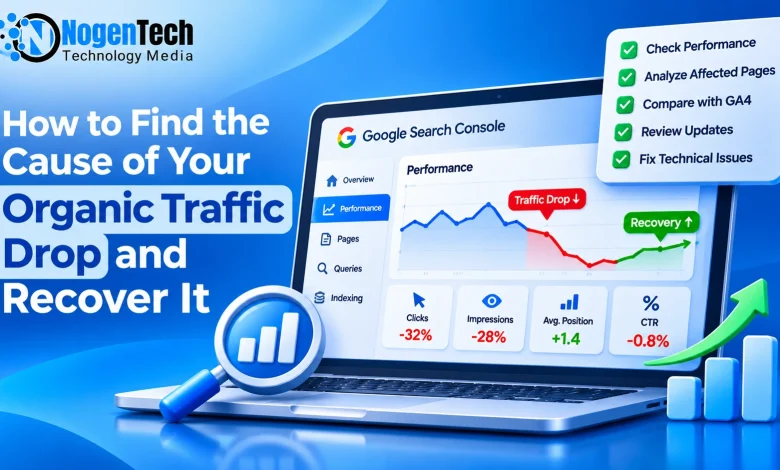
An organic traffic drop can happen even when your website is indexed and appearing on Google. You may see fewer clicks, declining impressions, or lost visitors without even making major website changes.
The first step is to identify what dropped: rankings, impressions, clicks, or recorded sessions. Each points to a different problem and requires a different fix.
I’ve worked in SEO since 2010 and managed NogenTech since 2014. In August 2026, we saw a sharp drop in US Google Search traffic, followed by a recovery in clicks and impressions during September and October.
That experience reinforced why I investigate affected URLs before rewriting or removing content. Here’s how to diagnose an organic traffic drop, find what needs fixing, and measure recovery.
Why Is My Organic Traffic Dropping?
Start creating Verdict in seconds, and convert more of your visitors into leads.
Organic traffic can decline because your pages lose rankings, fewer people search for your topics, or users stop clicking your results.
Technical errors and website changes can also affect search visibility. The pattern in your data often provides the first clue.
| What changed? | What to investigate |
| Clicks and impressions declined | Rankings, indexing, search demand |
| Clicks declined, impressions stayed stable | CTR, SERP features, query positions |
| Traffic dropped 30% but average rankings stayed stable | Query mix, search demand, CTR |
| GSC clicks stayed stable but GA4 sessions declined | Tracking and attribution |
| Traffic dropped after a website launch | Redirects, canonical tags, noindex |
| Only older articles lost traffic | Content accuracy, relevance, competition |
| Important pages disappeared from Google | Indexing, crawling, HTTP responses |
These patterns aren’t confirmed causes. To understand what’s happening, start by checking which metrics and pages were affected.
Check What Dropped in Google Search Console
Open Google Search Console → Performance → Search results.
Compare the latest 28 complete days with the preceding 28 days. If the decline happened suddenly, compare shorter periods to identify when it started.
Review clicks, impressions, average CTR, and average position.
Find the Pages Responsible for the Loss
Open the Pages tab and compare clicks between periods. If most of the decline comes from three or four articles, investigate those URLs before making site-wide changes.
Next, select an affected page and open the Queries tab. For example, suppose an article previously received 500 monthly clicks and now receives 200.
If its main keywords lost rankings, compare the content with pages currently ranking above it. If rankings remain similar but impressions declined, check whether search demand changed.
Also filter by country and device. A decline affecting US mobile users may have a different explanation from one affecting the entire website.
Make Sure It Isn’t an Analytics Problem
Before making SEO changes, compare Google Search Console data with Google Analytics 4 (GA4).
Search Console measures clicks from Google Search, while GA4 measures sessions using its own attribution and tracking methods. Their numbers won’t match exactly.
However, if GSC clicks remain stable while GA4 organic sessions fall sharply, investigate Google tag installation, consent settings, Google Tag Manager changes, and attribution.
Use Google / Organic in GA4 when comparing specifically against Google Search. A tracking issue requires an analytics fix, not an SEO content update.
Rankings Haven't Changed, So Why Is Traffic Down?
Start creating Verdict in seconds, and convert more of your visitors into leads.
Organic traffic can drop by 30% even when average rankings remain stable. There are three situations I would investigate:
- Search demand has declined. Your page may still rank third, but fewer people are searching for its topic. Compare query impressions in GSC and check Google Trends.
- Search results have changed. AI Overviews, featured snippets, advertisements, and video results can influence how users interact with organic listings.
- Your query mix has changed. Site-wide average position can remain stable even when important keywords lose rankings. New impressions from other queries can affect the average.
That’s why I don’t rely on site-wide average position alone. I compare the queries that previously drove the most clicks and check how their individual performance has changed.
Did a Google Update Affect Your Traffic?
Start creating Verdict in seconds, and convert more of your visitors into leads.
If organic traffic dropped around a Google core or spam update, check the Google Search Status Dashboard and compare the confirmed update dates with the start of your decline.
Next, examine the affected pages. Are competing articles providing more accurate information? Has search intent changed? Does your content still answer what users are looking for?
For product reviews and technical guides, check whether screenshots, specifications, prices, or instructions have become outdated.
Also inspect the Manual Actions report in Search Console. A ranking decline doesn’t automatically mean Google has penalized your website.
Google’s core update guidance explains how to evaluate meaningful performance changes.
If an article is still accurate and satisfies its intended query, don’t rewrite it simply because an update occurred. Focus on problems you can actually identify.
Check Whether Google Can Still Access Your Pages
Start creating Verdict in seconds, and convert more of your visitors into leads.
Technical SEO problems can cause sudden traffic losses when important URLs become inaccessible or excluded from indexing.
Open Search Console → Indexing → Pages and inspect affected URLs.
Look for accidental noindex tags, incorrect canonical URLs, robots.txt restrictions, server errors, and broken redirects. These are some of the issues covered in NogenTech’s advanced technical SEO guide if you need a deeper technical review.
Use URL Inspection to check whether Google has indexed an important page and which canonical URL it selected.
Remember that crawling, indexing, and ranking are different. A page can be accessible to Googlebot without being indexed. An indexed page can also rank poorly because it doesn’t satisfy search intent or compete effectively.
If a valuable article has an accidental noindex directive, correct it. If the article is indexed but losing positions, investigate its content and competing results instead.
Don't Overlook Broken Links and Redirects
Start creating Verdict in seconds, and convert more of your visitors into leads.
Broken internal links deserve attention when investigating traffic loss, especially on websites that have removed or reorganized older content.
A broken link can prevent readers from reaching an important guide and interrupt the internal navigation path to that page. However, a few broken links don’t automatically explain a site-wide ranking decline.
How I Check Broken Internal Links
I use Screaming Frog SEO Spider to crawl the website. Open Response Codes, filter for Client Error (4xx), and inspect the Inlinks report for each affected URL. This shows which pages contain links pointing to missing destinations.
Prioritize broken links in navigation, popular articles, and important content sections.
| Situation | What to do |
| Article moved to another URL | Update the internal link |
| Old URL has a relevant replacement | Use an appropriate 301 redirect |
| Useful page accidentally deleted | Restore it |
| Content permanently removed | Remove outdated internal links |
| Redirect chain | Link directly to the final destination |
| No suitable replacement exists | Allow a legitimate 404 or 410 response |
Don’t redirect every deleted article to the homepage. The replacement should satisfy the original user’s intent.
Check Internal Links and Orphan Pages
Fixing broken links is one part of the process. I also check whether important pages have relevant internal links and can be reached through the website’s navigation.
Suppose someone is reading about declining organic traffic and discovers that their page is indexed but ranking poorly. NogenTech’s on-page SEO guide could help them investigate the next problem.
That’s a natural reason to add an internal link, rather than inserting links just to increase their number.
I also check for orphan pages by comparing the website’s URL inventory with crawl results. Important articles without discoverable internal links may need contextual links from related content.
Before adding a link, ask whether the destination answers the reader’s next likely question. If it doesn’t, leave it out.
Should You Update, Merge, or Remove Old Content?
Start creating Verdict in seconds, and convert more of your visitors into leads.
As a website grows, maintaining content quality becomes harder. Older articles may contain outdated information, discontinued products, broken screenshots, or instructions that no longer work.
But low traffic doesn’t automatically mean an article is low quality.
Before updating, merging, or removing a page, review its search intent, accuracy, historical impressions, backlinks, and relevance to the website.
| Content condition | Recommended action |
| Useful but outdated | Update information and examples |
| Relevant but missing important answers | Improve the content |
| Two articles satisfy nearly identical intent | Evaluate consolidation |
| Low traffic but helpful to a specific audience | Keep |
| Misleading or no longer relevant | Consider removal |
| Valuable page with technical errors | Fix the technical issue |
What About Keyword Cannibalization?
Multiple pages ranking for the same keyword aren’t necessarily a problem. What matters is whether they serve different search intents.
For example, Why Is My Wi-Fi Slow? and How to Fix Slow Wi-Fi on Windows 11 may share keywords but answer different user questions.
Before merging overlapping pages, check whether each provides a distinct answer. NogenTech’s keyword clustering guide explains how related queries can be organized into separate topics.
If two articles substantially duplicate the same intent, consolidation may make sense. The decision should depend on usefulness and intent, not simply whether two URLs share keywords.
Could AI Overviews Be Affecting Your Clicks?
Start creating Verdict in seconds, and convert more of your visitors into leads.
Google AI Overviews can change how people interact with search results. Some users may find the information they need without clicking a traditional organic listing.
However, a decline in CTR doesn’t prove that AI Overviews caused it. A Search Engine Land analysis also explains why organic traffic declines shouldn’t automatically be attributed entirely to AI.
Start by identifying queries where clicks declined while impressions remained relatively stable. Check their ranking positions, current SERP features, and changes in search demand.
Google Search Console doesn’t provide a standard standalone report showing exactly how many clicks were lost because of AI Overviews, making direct attribution difficult.
If an affected query now displays an AI Overview, consider it part of the investigation rather than the final explanation.
Did Traffic Drop After a Website Redesign or Migration?
Start creating Verdict in seconds, and convert more of your visitors into leads.
A sudden organic traffic drop after a website launch, redesign, or domain migration often calls for a technical audit.
Start by checking whether old URLs redirect to their correct new destinations. Also verify canonical tags, robots.txt rules, XML sitemaps, and internal links.
Common problems include leaving staging-site noindex settings enabled after launch or changing URL structures without mapping old pages to relevant replacements.
For important URLs, verify the HTTP response, redirect destination, canonical URL, and indexability.
If the problem is a missing redirect or indexing restriction, rewriting the article won’t fix it.
What Happened When NogenTech Lost Search Traffic in 2026?
Start creating Verdict in seconds, and convert more of your visitors into leads.
In August 2026, NogenTech experienced a sharp decline in US Google Search traffic, followed by an increase in clicks and impressions during September and October.
I’ve managed NogenTech since 2014, and this experience reinforced why traffic recovery requires more than looking at one metric.
The Traffic Decline Was Visible in August
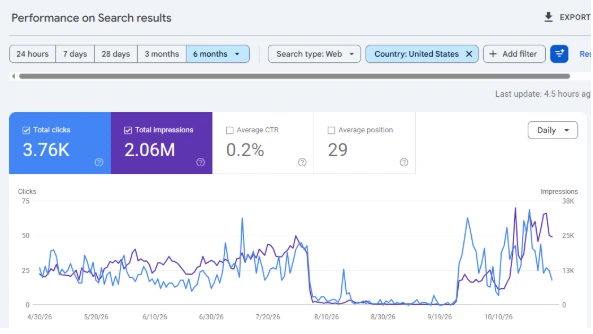
Our six-month Google Search Console report, filtered to the United States, shows a sharp decline in clicks beginning in early August 2026.
Traffic remained very low through much of August and September before increasing again in late September. Search impressions also rose substantially during October.
Across the six-month reporting period, NogenTech recorded approximately 3,760 US search clicks and 2.06 million impressions.
What We Reviewed During the Content Audit
During our 2026 content review, we examined older articles, thin content, indexing issues, and pages that no longer aligned with our technology-focused editorial direction.
Our work involved approximately 200 URLs associated with indexing and content cleanup, along with roughly 100 thin or insufficiently useful articles reviewed for improvement or removal.
The review focused on three areas:
- Content usefulness: We reviewed older articles for accuracy, relevance, and whether they answered a clear reader question.
- Editorial relevance: We assessed pages that no longer supported NogenTech’s technology and digital publishing focus.
- Indexing and URL management: We examined URLs that were no longer intended to remain available in Google Search and evaluated how they should be handled.
These were selective editorial decisions, not a policy of deleting every low-traffic page. The work formed part of our SEO maintenance, but the performance chart alone cannot establish which changes contributed to the later increase.
US Organic Clicks Increased Nearly Threefold
To examine the improvement, I compared the latest 28 days with the preceding 28 days in Google Search Console, keeping the United States filter active.
| Metric | Previous 28 days | Latest 28 days |
| Organic clicks | 313 | 934 |
| Impressions | 63.2K | 505K |
| Average CTR | 0.5% | 0.2% |
| Average position | 22.9 | 19.4 |
US organic clicks increased by 198.4%, while impressions rose approximately 699%
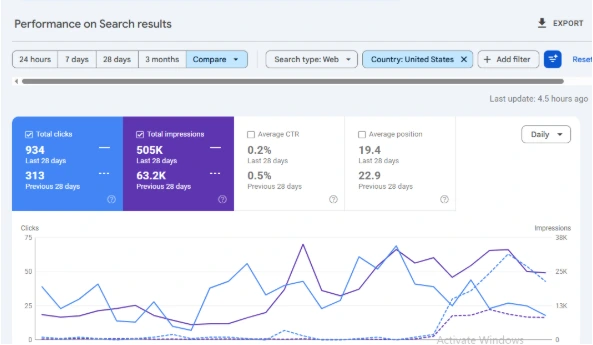
The improvement in clicks is meaningful, but impressions increased considerably more. Average CTR declined from 0.5% to 0.2%.
That doesn’t automatically indicate lower content quality. The website may have gained impressions across a broader set of queries, including searches where its pages received relatively few clicks.
The next step is to identify which pages and queries gained visibility and whether those impressions translated into relevant visits.
What This Experience Taught Me
The traffic decline and subsequent improvement reinforced three practical lessons:
- Identify affected pages first. Don’t make site-wide changes before understanding which URLs lost traffic.
- Evaluate content individually. Some older pages need updates, while others remain useful despite receiving little search traffic.
- Separate results from assumptions. Performance improvements don’t automatically prove which SEO changes caused them.
Our Search Console data confirms a significant decline followed by improved US search visibility. It doesn’t establish that content removal or any single technical change caused the recovery.
What Should You Fix First to Recover Organic Traffic?
Start creating Verdict in seconds, and convert more of your visitors into leads.
When organic traffic drops, I prioritize these steps:
- Confirm the decline: Compare equivalent periods in Google Search Console, check GA4 tracking and attribution, and identify affected pages, queries, countries, and devices.
- Investigate the cause: Compare Google update dates, search demand in Google Trends, and changes in rankings and SERP features.
- Fix technical issues: Check indexing, canonicals, redirects, server responses, broken internal links, and missing destinations.
- Review affected content: Update inaccurate information, check search intent, and investigate keyword cannibalization and orphan pages.
- Measure recovery: Record the changes and monitor affected URLs to see whether clicks, impressions, and rankings improve.
Prioritize confirmed problems affecting valuable pages. An accidental noindex tag needs immediate attention, while a minor CTR fluctuation may only need monitoring.
NogenTech’s 2026 traffic decline and subsequent improvement reinforced why I investigate affected pages before rewriting or removing content. Our US clicks and impressions increased substantially, but the data doesn’t establish which changes caused the improvement.
Fix technical errors, improve content that no longer serves its intended query, and leave useful pages alone when there’s no evidence they need changing.
The goal isn’t to make more SEO changes. It’s to make the ones your data actually supports.
Frequently Asked Questions
Start creating Verdict in seconds, and convert more of your visitors into leads.
Why does Ahrefs show a traffic drop when Google Search Console doesn’t?
Ahrefs estimates organic traffic using keyword rankings, search volume, and its own data. Google Search Console reports recorded Google Search clicks. Changes in Ahrefs estimates may not reflect equivalent changes in actual visits.
How long does it take to recover lost organic traffic?
There is no fixed timeline. Technical fixes may be reflected after Google recrawls affected pages, while broader content and ranking improvements can take weeks or months. Track the affected URLs rather than relying only on site-wide traffic.
Can organic traffic recover without changing website content?
Yes. Traffic can improve when technical issues are resolved, search demand increases, or rankings fluctuate in your favor. Content updates are useful when a page has a verified accuracy, relevance, or usefulness problem.