Have you ever wondered why your WiFi is fast in one room but slow in another, even with the same internet plan?
In many cases, the answer comes down to the WiFi band your device is using. Most modern routers support both 2.4GHz and 5GHz, but the speed and performance of each band depend on factors such as distance from the router, walls and obstacles, interference, network congestion, and router capabilities.
Generally, 5GHz delivers faster speeds and lower latency, while 2.4GHz provides better range and wall penetration. In this guide, you’ll learn how 5GHz and 2.4GHz WiFi compare in terms of speed, range, interference, and the best use cases for each band.
What Is WiFi and How Do 2.4GHz and 5GHz Bands Work?
WiFi is a wireless networking technology that allows devices to connect to the internet and to each other without physical cables.
Your wireless router broadcasts a WiFi signal that devices such as smartphones, laptops, gaming consoles, smart TVs, and tablets pick up and use to access the internet.
WiFi uses radio waves to carry data between your router and your devices. The frequency of those radio waves determines how fast and how far the signal travels.
GHz stands for gigahertz. It is a unit that measures how many times per second a radio wave cycles.
- 2.4GHz means 2.4 billion cycles per second
- 5GHz means 5 billion cycles per second
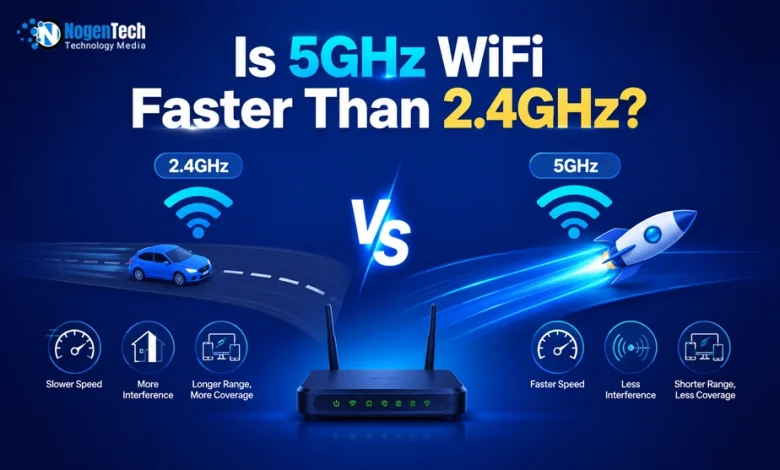
A higher frequency means the signal can carry more data at once, which leads to faster speeds. However, higher-frequency signals do not travel as far and have more difficulty passing through solid objects.
| Feature | 2.4GHz | 5GHz |
|---|---|---|
| Speed | Slower | Faster |
| Range | Longer | Shorter |
| Wall Penetration | Better | Weaker |
| Latency | Higher | Lower |
| Interference | More | Less |
| Gaming | Fair | Excellent |
| 4K Streaming | Good | Better |
| Smart Home Devices | Excellent | Good |
What Is 2.4GHz WiFi and How Does It Perform?
2.4GHz WiFi is the older and more common wireless frequency band. It travels farther and passes through walls better than 5GHz, but it is slower and more congested.
The maximum theoretical speed of 2.4GHz WiFi is around 600 Mbps under the 802.11n standard.
In real-world conditions, most 2.4GHz connections deliver between 50 Mbps and 150 Mbps, depending on your router, internet plan, interference, and distance.
This is enough for basic web browsing, email, smart home devices, and standard-definition streaming, but it may struggle with multiple 4K streams or competitive gaming.
What Range Does 2.4GHz WiFi Provide?
2.4GHz WiFi has a longer range than 5GHz WiFi.
| Environment | Typical Range |
|---|---|
| Indoors | Up to 150 feet (46 meters) |
| Outdoors | Up to 300 feet (92 meters) |
Why Is 2.4GHz More Prone to Interference?
The 2.4GHz band is heavily congested because it is used by many devices beyond WiFi routers.
Devices that can interfere with your 2.4GHz WiFi signal include:
- Bluetooth devices
- Microwaves
- Cordless phones
- Neighboring WiFi networks
- Smart home devices
Because only 3 non-overlapping channels exist on 2.4GHz, nearby routers in apartments and dense neighborhoods often compete on the same channels. This causes slowdowns even when your router is performing perfectly.
Which Devices Work Best on 2.4GHz?
2.4GHz is best for devices that need range more than speed, and devices that are far from the router.
Devices that work well on 2.4GHz include:
Smart home hubs
- WiFi thermostats
- Smart lights and plugs
- Security cameras
- Baby monitors
- Older laptops and smartphones
- IoT sensors
- Smart doorbells
- Robotic vacuums
- Garage door openers
What Is 5GHz WiFi and How Does It Perform?
5GHz WiFi is the faster frequency band. It delivers higher speeds and lower latency than 2.4GHz, but it has a shorter range and does not penetrate walls as well.
The maximum theoretical speed of 5GHz WiFi is around 1,300 Mbps under the 802.11ac (WiFi 5) standard.
Under the newer 802.11ax (Wi-Fi 6) standard, 5 GHz can reach theoretical speeds of up to 9.6 Gbps across combined channels.
In real-world conditions, most 5GHz connections deliver between 200 Mbps and 800 Mbps, depending on your router, internet plan, distance, and connected devices.
What Range Does 5GHz WiFi Provide?
5GHz WiFi has a shorter range than 2.4GHz WiFi because higher-frequency signals lose strength more quickly over distance and when passing through walls, floors, and other physical obstacles.
| Environment | Typical Range |
|---|---|
| Indoors | Up to 75 feet (23 meters) |
| Outdoors | Up to 150 feet (46 meters) |
Although 5GHz does not travel as far as 2.4GHz, it can transmit more data and typically delivers faster speeds when devices are located near the router.
Why Does 5GHz Struggle Through Walls?
5GHz uses a higher frequency with a shorter wavelength. Shorter wavelengths lose energy more quickly when they hit dense materials.
- Materials that weaken 5GHz signals include:
- Concrete and brick walls
- Floors and ceilings
- Metal doors and cabinets
- Plaster walls with metal mesh
- Thick wood furniture
- Fish tanks and large appliances
If your device is in the same room or an adjacent room with a clear path to the router, 5GHz will perform well. If your device is several rooms away or on a different floor, a 2.4GHz or a WiFi extender may deliver a more stable connection.
Which Devices Work Best on 5GHz?
5GHz is best for devices that need fast speeds and are located close to the router.
Devices that perform best on 5GHz include:
- Gaming PCs and gaming laptops
- PlayStation 5
- Xbox Series X and Series S
- Smart TVs with 4K streaming
- Work laptops for video conferencing
- Tablets and smartphones near the router
- Desktop computers without Ethernet
- WiFi mesh nodes for backhaul
When Should You Use 5GHz?
Choose 5GHz when:
- Your device is in the same room or close to the router
- You need fast speeds for gaming, streaming, or video calls
- You are in a congested area, like an apartment building
- Your device supports 5GHz and is compatible with your router
- You want lower latency for online gaming or real-time applications
When Should You Use 2.4GHz?
Choose 2.4GHz when:
- Your device is far from the router or separated by thick walls
- You are connecting smart home or IoT devices
- Your device does not support 5GHz
- You need broad coverage across a large home
- Speed is not critical, and range is the priority
My Experience Using 5GHz and 2.4GHz WiFi at Home
To see how this plays out in a real home environment, I tested both bands. However, 2.4GHz provides better range and wall penetration. For gaming, streaming, video calls, and high-speed internet plans, 5GHz is usually the better choice. For smart home devices and rooms far from the router, 2.4GHz often remains the more reliable option.
Switching a gaming console or work laptop from 2.4GHz to 5GHz does not change the maximum speed of your internet plan. I have tested both bands using a WiFi 6 router on a Comcast Xfinity 1 Gbps plan, and the plan speed was the same ceiling on both bands.
Running both bands together with separate SSIDs gave the best overall results across all devices.
Frequently Asked Questions About 5GHz vs. 2.4GHz WiFi
Is 5GHz WiFi faster than 2.4GHz?
Yes. 5GHz WiFi is generally two to five times faster than 2.4GHz in real-world conditions because it has more spectrum, wider channels, and less interference.
What is the difference between 2.4GHz and 5GHz WiFi?
2.4GHz has a longer range and better wall penetration but slower speeds. 5GHz delivers faster speeds and lower latency, but has a shorter range and weaker signal through walls.
Is 5GHz better for gaming?
Yes. 5GHz provides lower latency, faster speeds, and less interference, which makes it the better choice for online gaming on consoles and PCs.
Why does my 5GHz WiFi not reach another room?
5GHz has a shorter range and weaker wall penetration than 2.4GHz. A WiFi extender or mesh WiFi system can help extend 5GHz coverage to other rooms.
Do 5GHz and 2.4GHz use the same security protocols?
Yes. Both bands support the same WPA2 and WPA3 security protocols. The band itself does not affect your network’s security settings.
Is 5GHz more secure than 2.4GHz?
Not significantly. 5GHz signals travel shorter distances, which makes them slightly harder to detect from outside your home, but both bands use the same security standards.
What is Dynamic Frequency Selection (DFS) on 5GHz?
DFS is a regulatory feature that requires some 5GHz routers to automatically switch channels to avoid interference with weather radar and military systems. Your router may briefly disconnect while switching channels.
Why do older devices prefer 2.4GHz?
Older devices were built before 5GHz became widely adopted. Many of them only have 2.4GHz radios and cannot connect to a 5GHz network at all.
Can WiFi 7 use 2.4GHz, 5GHz, and 6GHz at the same time?
Yes. WiFi 7 introduces Multi-Link Operation (MLO), which allows compatible devices to use all three bands simultaneously for higher combined speeds and lower latency.
Is WiFi 7 backward compatible with older 2.4GHz and 5GHz devices?
Yes. WiFi 7 routers are backward compatible with older WiFi 4, WiFi 5, and WiFi 6 devices on both 2.4GHz and 5GHz bands.