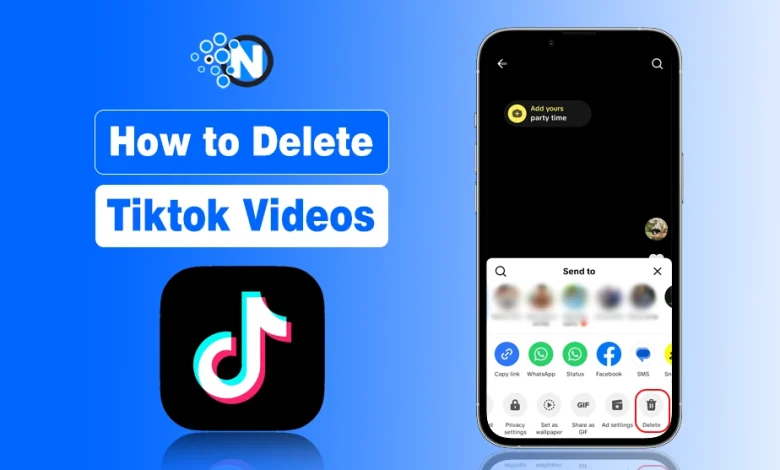
Before deleting anything, understand TikTok algorithm & to delete a video, all you need to do is open the TikTok app, go to your profile, select the video, tap the three-dot menu, and hit Delete, then confirm. The video, along with its likes, comments, and views, is permanently removed.
While that’s the basic process, there’s a bit more to know if you want to manage your TikTok content efficiently on multiple devices and grow your profile.
The article will provide a step-by-step guide on how to delete TikTok videos on Android, iPhone, and desktop, how to remove draft videos, what happens after deletion, and when it might be better to make a video private instead.
How to Delete TikTok Videos on Mobile (iOS and Android App)
Deleting a TikTok video is super easy, whether you posted it recently or a long time ago. Just follow the steps below:
- Open the TikTok App by tapping on the TikTok logo
- Tap the Profile icon at the bottom-right corner of the screen.
- Select the Video You Want to Delete
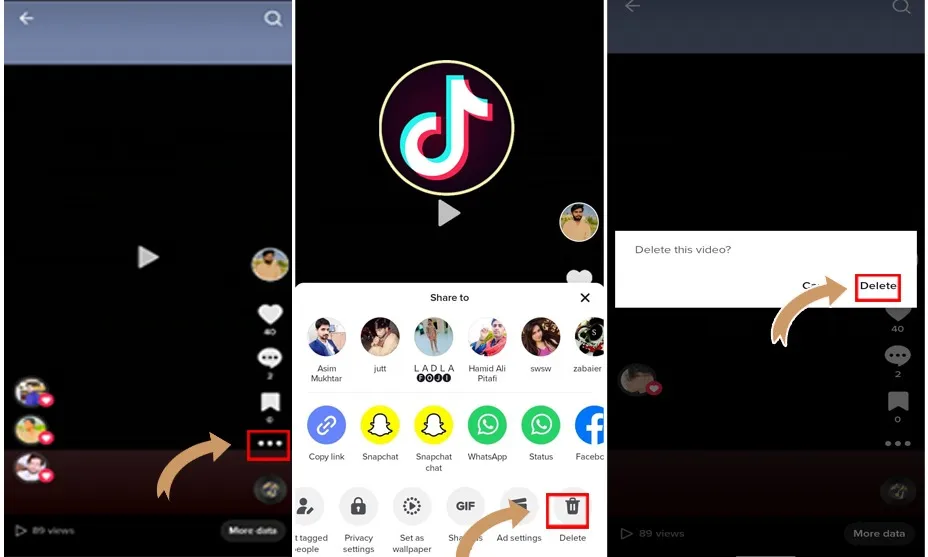
- Tap the Three Dots (…). You’ll find these in the bottom-right corner or right side of the screen.
- Here, click on the Bin (Delete) icon
- Confirm Deletion. TikTok will ask: “Are you sure you want to delete this video?”
- Tap Delete again.
Pro Tip: If TikTok rolls out the “Recently Deleted” feature in your region, you may be able to restore deleted videos within 30 days from your account settings.
How to Delete TikTok Videos on Desktop? (Web Version)
As we have deeply discussed how to delete videos on TikTok on mobile phones, now let’s get into the process for the desktop version.
- Open TikTok on the web desktop
- Move your cursor to the top-right corner of the page and hover it over your profile picture. Click on ‘Profile‘ once you see it appear.
- Select the video you want to delete
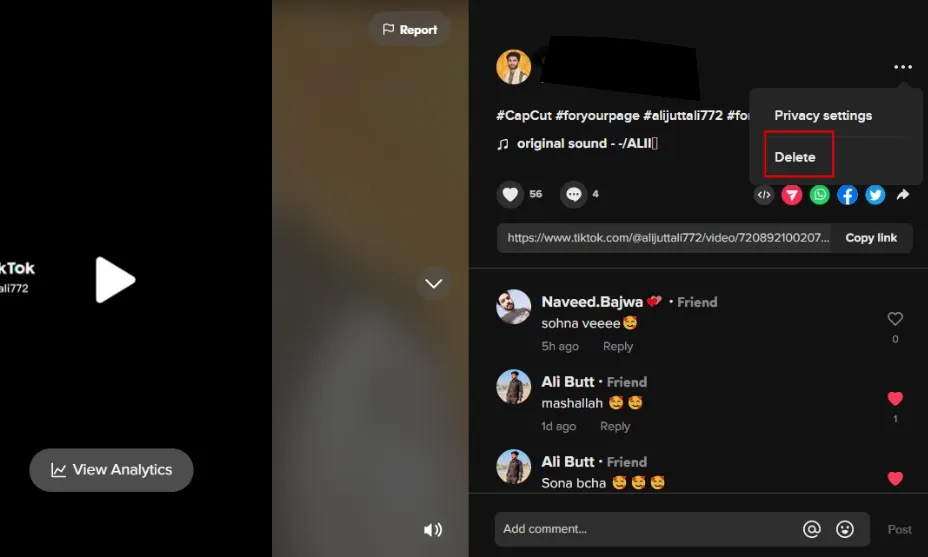
- To access the video’s options, click on the three vertical dots located in the bottom right corner.
- Select ‘Delete Video‘ from the drop-down menu to proceed.
For deleting TikTok stories, you can read this separate tutorial: How to Delete TikTok Stories.
Common Issues When Deleting TikTok Videos
Sometimes users face issues while trying to delete a video. Below are common problems and solutions.
Delete Option Missing
If you don’t see the delete option:
- Update the TikTok app to the latest version
- Restart the app
- Log out and log back in
- Check for temporary app glitches
Account Restrictions
- Your account violates TikTok policies
- The app is experiencing server issues
What Happens After You Delete a TikTok Video?
Deleting a TikTok video has permanent consequences. Understanding what happens after taking down your TikTok video helps avoid mistakes. When you delete a TikTok video:
- The video is permanently removed from your profile
- All likes, comments, shares, and views are deleted
- The video cannot be recovered or restored
- The video will no longer appear in search or recommendations
TikTok currently does not provide a universal recovery or “Recently Deleted” feature, so make sure you save a copy of your video before deleting it if you might need it later.
Alternative: Hide the Video Instead of Deleting It
If you don’t want to remove the video permanently, you can hide it from everyone.
Here’s how:
- Open your video.
- Tap the three dots (…).
- Select Privacy settings.
- Tap: Who can watch this video?
- Choose Private.
This makes the video visible only to you, while keeping it stored on your account. Properly managing and deleting your TikTok videos can help you maintain a professional profile, especially if you’re using TikTok for your brand.
Instead of deleting older videos, some creators prefer improving their captions and hashtags because these elements play a role in TikTok SEO and video discoverability.
How to Delete Draft TikTok Videos
Draft videos are different from published videos. A draft TikTok video is saved on your device and is not visible to other users.
Steps to Delete Draft Videos:
- Open the TikTok app
- Tap the Profile icon
- Open the Drafts folder
- Tap the draft video you want to remove
- Tap Back, then select Discard
Tips Before Deleting Your Video
- Save a copy to your phone if you might need it later.
- Check analytics if you’re unsure; sometimes videos grow after a slow start.
- If you just want a cleaner feed, consider using the Private option instead.
Let me tell you that deleting a TikTok video is not always the right option. Before deleting a video, you may want to review your TikTok privacy settings to control who can view or interact with your content. And if you think your content is valuable, you can push it by using tools like Zefoy.
Final Words
Deleting TikTok videos is simple once you know the steps. Whether you’re using iOS, Android, or a desktop browser, you can quickly remove any video from your profile, including draft videos.
Remember, deleted videos are permanent, so always check whether making a video private might be a better option. By following this guide, you now have full control over your TikTok content and can manage your profile efficiently, keeping it clean, organized, and up to date in 2026.
You may also want to read how to delete a repost on TikTok to help you manage your unwanted content.
Frequently Asked Questions
Can I recover a deleted TikTok video?
No. TikTok does not provide a restore option once a video is deleted. If you saved the video to your phone, you can re-upload it.
Does deleting a video affect my account?
No, deleting a video has no negative impact on your account or algorithm performance.
Can I delete multiple TikTok videos at once?
TikTok does not have a bulk-delete option. You must delete videos one by one.
Can I delete a video without opening it?
No, you need to open the video to access the delete option.
Why can’t I delete a TikTok video?
You can’t delete a TikTok video if you lack permissions, have app glitches, or connectivity issues.