I guess I have talked much about the Cash App in my other blog posts, and to be very honest, it is one of the best mobile finance apps. The features it offers are very unique, which is why everyone, especially freelancers, highly rates it.
However, the fact is that nothing can appeal to all, and this application is no exception. Some users are not happy with the restrictions on Cash App history deletion. While others are just annoyed with old interface. Thus, the Internet is stormed with the query of how to delete Cash App account.
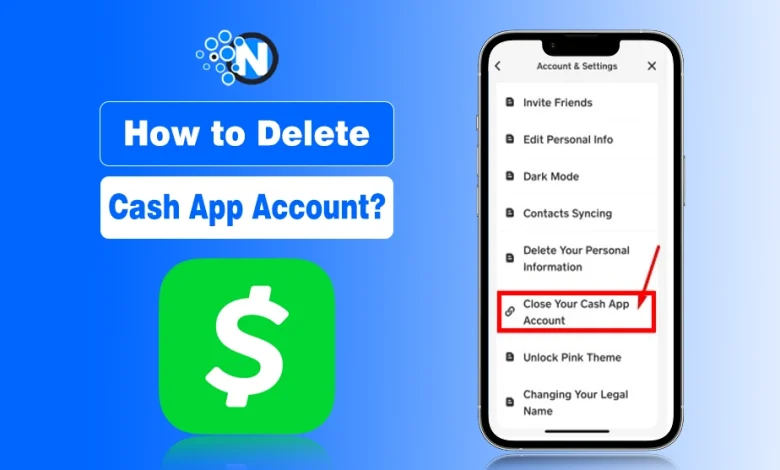
In this guide, I have mentioned a complete step by step guide to help you delete your Cash App account. In this way, you can move to other money management apps that resonate with your preferences and requirements.
How to Delete a Cash App Account Permanently?
- Locate the Cash App on your smartphone and open it.
- Tap the profile icon on the home screen of the app.
- Now, choose the Support option.
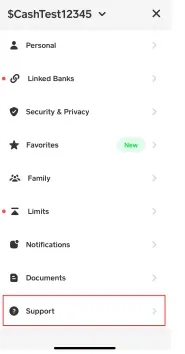
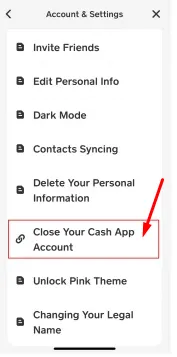
- Next, find Accounts & Settings and tap on it.
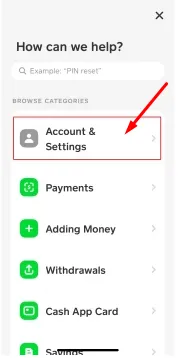
- Select the Close Your Cash App Account option.
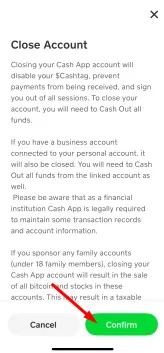
- Confirm the deletion by tapping the Continue button.
Note: You surely have add the debit card to your Cash App. It would also be better to unlink it as well as the bank account before deleting your Cash App account.
Things to Follow Before Deleting a Cash App Account
Deleting the Cash App account is not challenging. Nevertheless, there are some precautions, and you should pay attention to them to save your funds and delete the account permanently. These are:
- If you have add cash to the Cash App, transfer your funds to any other wallet from it before deleting.
- Unlink your bank account and debit card.
- Inform your contacts not to send any payment to you on Cash App. Even you should unblock contacts on Cash App and inform to avoid any misunderstanding.
- If the unlock borrow option on Cash App is available on your account and you have lent the money, pay it back
Note: You cannot delete the Cash App history manually. And even after deleting the account, the transaction history will remain on Cash App servers, in case of any security emergency.
Final Thoughts
These are the details on how to delete Cash App account. I know that deleting your account is a personal decision, and there can be different concerns behind it. Therefore, I have added all the steps you should follow to make sure you can delete your account.
Remember that you won’t be able to pay or receive money from this app after deleting the account. So, you should transfer your funds to other accounts to avoid wasting them.
Still confused at any point? Let me know in the comments!
People Also Ask
How to delete Cash App business account?
Navigate to your profile, select Support, open Account Settings, and choose Close Account to delete your Cash App business account.
How to delete Cash App account on computer?
You cannot delete your Cash App account from a computer. Instead, contact support from Cash App mobile application to delete your account.
How to delete Cash App account permanently?
Open Cash App, go to Support, choose Accounts Settings, select the Close Your Account option, and delete the Cash App permanently.
How to delete Cash App account on iPhone?
On your iPhone, install the Cash App, open it, and go to the Settings section. Choose the Accounts option and select Delete your account.
How to delete a Cash App account and make a new one?
Close your existing Cash App account, then sign up again with a different email address or phone number to create a new account.