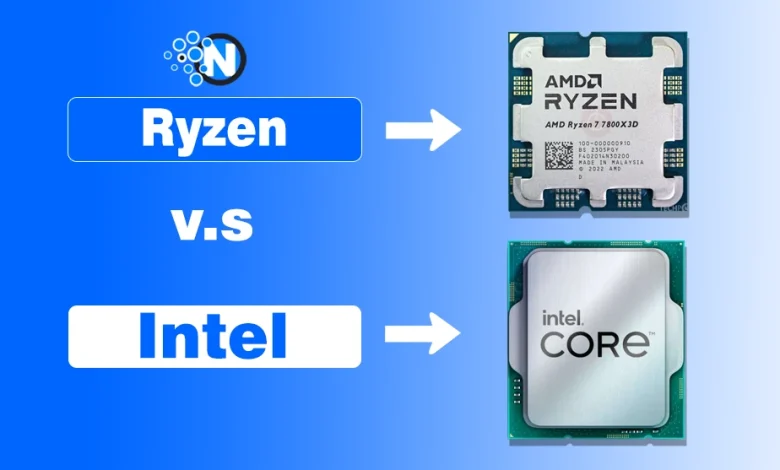
When you are buying a business laptop, choosing between AMD Ryzen and Intel can get confusing fast. Both now offer fast processors, AI features, enterprise security, and tools for managed business PCs.
For a business laptop, the processor has to make sense for the actual work being done. An accountant, a developer, and an employee who spends most of the day in Teams and a browser do not need the same CPU.
So, we compared AMD Ryzen vs. Intel for business laptops used in our daily schedule based on performance, battery life, security, IT management, and overall value.
AMD Ryzen vs Intel: What Makes the Difference for Business Laptops?
Both AMD and Intel make regular consumer processors, but businesses should pay closer attention to their commercial platforms.
AMD combines its business processors with AMD PRO Technologies, which adds hardware-backed security, manageability, and commercial platform support. Intel offers comparable business-focused capabilities through Intel vPro on eligible Core and Core Ultra systems.
That distinction is important because a Ryzen laptop is not automatically a Ryzen PRO laptop, and an Intel laptop does not automatically support vPro.
Here is the comparison you would use before looking at individual models:
| What Matters | AMD | Intel |
|---|---|---|
| Business platform | Ryzen PRO / Ryzen AI PRO | Core/Core Ultra with vPro |
| Everyday office work | Strong options available | Strong options available |
| Heavy multitasking | Depends on exact CPU | Depends on exact CPU |
| Hardware security | AMD PRO Security | Intel vPro Security |
| IT management | AMD PRO Manageability | Intel vPro Manageability |
| AI acceleration | Ryzen AI on supported models | NPU on supported Core Ultra models |
| Battery life | Depends heavily on the laptop | Depends heavily on the laptop |
In other words, there is no useful “all Ryzen is better than all Intel” answer. The exact processor and the laptop built around it matter more.
Ryzen vs Intel Performance for Business Work
You don’t necessarily need the fastest processor available. You need one that can comfortably handle your workload without making you pay for performance your employees will never use.
For Everyday Office Work
For employees working mainly with Microsoft 365, browsers, CRM software, cloud applications, video calls, and regular spreadsheets, modern midrange Ryzen and Intel processors already provide plenty of CPU performance.
We pay just as much attention to the rest of the laptop.
For example, moving from 8GB to 16GB or 32GB of RAM can be more useful for an employee constantly switching between Teams, Excel, Outlook, and dozens of browser tabs than buying a premium CPU while leaving the machine short on memory.
The same applies to storage, display quality, webcam, keyboard, ports, and warranty.
So if the workload is ordinary office work, don’t overspend on Ryzen 9 or Core Ultra 9 just because it sits higher in the product stack.
For Heavy Multitasking and Professional Work
The processor becomes more important for developers, analysts, engineers, content teams, and other employees running demanding applications.
And this is where generic Ryzen-vs-Intel claims start falling apart.
Independent business-laptop testing provides a good example. In Notebookcheck’s testing of comparable office laptops, a ThinkPad T14S Gen 6 with Ryzen AI 7 PRO 360 scored 13,794 points in Cinebench R23 multi-core, compared with 10,946 for a ThinkPad T14 Gen 6 using Core Ultra 7 258V. However, their single-core results were much closer.
That does not mean every Ryzen business laptop will outperform every Intel model. Newer testing also shows Intel and AMD systems changing positions depending on the processor and workload.
Which Has Better Battery Life? Ryzen or Intel Laptop
If employees travel frequently, battery life may matter more than a small benchmark advantage. But we wouldn’t call either AMD or Intel the automatic winner here.
The processor matters, but so do the battery capacity, display, laptop cooling, power settings, wireless hardware, and manufacturer tuning.
You can see that clearly in independent tests. Notebookcheck recorded about 15.2 hours in its standardized Wi-Fi test from a Dell Pro 14 Premium with a Core Ultra 7 268V and 60Wh battery, while a ThinkPad T14S Gen 6 with Ryzen AI 7 PRO 360 and a 58Wh battery managed about 14.1 hours in the same comparison. Another AMD-powered HP EliteBook with a 62Wh battery reached roughly 14.2 hours.
More recent business laptops move those numbers again: one tested Ryzen AI 7 PRO 450 ThinkPad reached about 17.4 hours, while an Intel Core Ultra 7 258V system in the same comparison reached 19.1 hours.
So you shouldn’t buy an “Intel laptop for battery life” or a “Ryzen laptop for efficiency.”
Check battery testing for the exact laptop you are buying. That is much more useful than judging runtime from the CPU badge.
The same applies when comparing brands. NogenTech’s Lenovo vs HP laptop comparison showed how two laptops with the same Intel processor still delivered different real-world results because their overall configurations were different.
Ryzen PRO vs Intel vPro: What Matters for a Business?
For one personal work laptop, Ryzen PRO and Intel vPro features may not change your decision much. For a company managing dozens or hundreds of devices, they can.
Security
AMD’s PRO Technologies include features such as AMD Secure Processor, AMD Memory Guard, Shadow Stack, and support for Microsoft Pluton. AMD notes that some capabilities require support or enablement from the laptop manufacturer, so checking the actual system specification is still important.
Intel takes a similar hardware-focused approach with Intel vPro. Current vPro platforms include technologies for memory protection, platform security, and business device management; the exact feature set varies by platform configuration.
For our company, the practical takeaway is simple: if business security is one of the reasons you are comparing the processors, compare Ryzen PRO against a vPro-enabled Intel system, not ordinary Ryzen against any Intel laptop.
IT Management and Platform Stability
This is another area an individual laptop review can easily overlook.
AMD PRO supports DASH-based management and works with familiar enterprise tools including Microsoft Intune and Configuration Manager. AMD also currently states that its PRO platform provides at least 18 months of platform stability and availability, plus 60 months of committed software support after the last ship date.
Intel vPro offers its own remote-management capabilities. On supported systems, Intel Active Management Technology (AMT) provides out-of-band management, including remote KVM and other management functions.
If your company already has an established device-management setup, you should therefore ask the IT team which platform fits its existing tools before choosing CPUs based on benchmark scores alone.
What About Ryzen and Intel AI Laptops?
You will see AI PC everywhere while shopping for newer business laptops, but this is one area where you should avoid paying for a bigger number without knowing what it does.
Both companies now offer laptop processors with dedicated NPUs, which can handle supported AI workloads locally.
That hardware has already become relevant to Windows features. Microsoft’s current Copilot+ PC requirements and developer guidance say many Copilot+ experiences require an NPU capable of at least 40 TOPS, and Microsoft lists supported systems based on AMD Ryzen AI 300 and Intel Core Ultra 200V processors among the compatible platforms.
The important word there is supported.
Having an NPU does not automatically make Word, Excel, accounting software, or your company’s internal applications dramatically faster. AMD itself notes that AI features can depend on OEM and software-developer enablement.
Closing Thoughts on Which Should You Choose for a Business Laptop?
After looking at both, no one can reduce the decision to “Ryzen is better” or “Intel is better.” The better business laptop is ultimately the one that matches the employee’s workload and the company’s IT requirements, not simply the one with Ryzen or Intel written on the sticker.
This is the quicker way to decide:
| Your Business Need | What You Should Prioritize |
|---|---|
| Word, Excel, email, and browser work | Midrange Ryzen or Intel + enough RAM |
| Heavy multitasking | Exact CPU performance in relevant applications |
| Frequent travel | Tested battery life of the complete laptop |
| Managed company fleet | Ryzen PRO or Intel vPro |
| Existing remote-management setup | Compatibility with current IT tools |
| Local AI applications | NPU capability + software support |
| Small business purchase | Total laptop price, warranty, and support |
For a small business, we would start with the complete laptop. A business-focused model such as a Lenovo ThinkPad also shows why CPU specs need to be considered alongside RAM, display, ports, and the actual workload.
For a larger managed fleet, Ryzen PRO and Intel vPro deserve more attention. AMD emphasizes open standards, familiar management tools, security, and long-term commercial support through AMD PRO. Intel’s vPro platform provides its own enterprise security and management stack, including AMT on supported configurations.
And for performance, don’t buy the brand name. Independent laptop testing shows why: Ryzen and Intel business systems can trade advantages depending on whether you care about multi-core performance, efficiency, battery runtime, or another workload.