Just started using Cash App? Now want to make transactions but do not have enough funds in the account? No worries, as numerous beginners do not know how to add cash to Cash App.
While Cash App is known for its simplicity, the process of adding money can still be confusing, especially when you have recently started using it. To help you with this procedure, I have created this blog post.
I have mentioned and detailed all the steps to provide comfort to you. So, what are you waiting for? Go to your favorite section to know the answer.
How to Add Cash to Cash App From Debit Card?
The most straightforward way to add money to your Cash App balance is by adding a debit card to Cash App and then linking a bank account. It is because when you tap the Add Cash button on the Cash App, it will quickly retrieve funds from your bank account.
The steps you have to follow are:
- Open Cash App on your phone.
- Tap the Banking tab (the icon looks like a bank or a house).

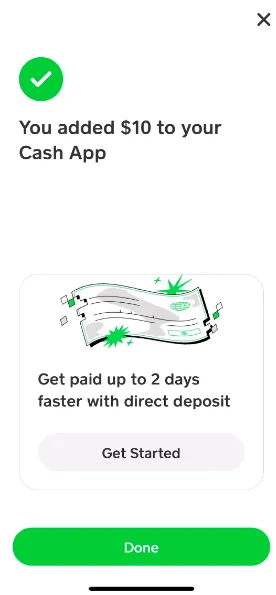
- Tap “Add Cash.”
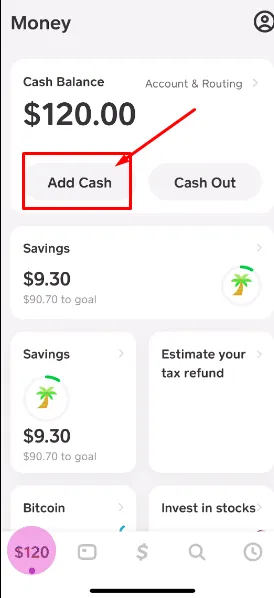
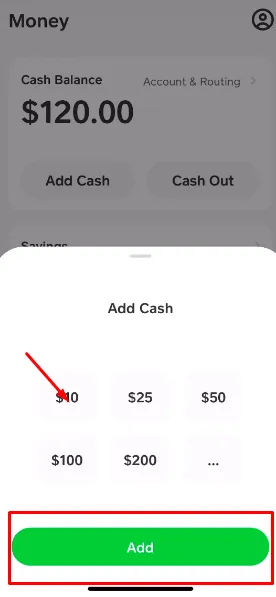
- Enter the amount you want to add and press add.
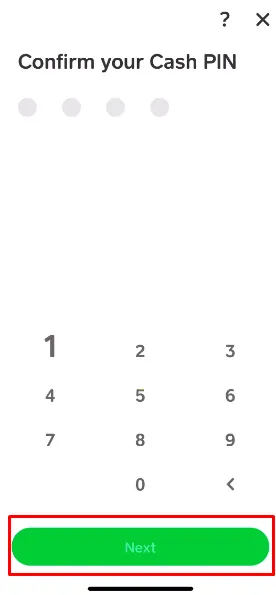
- Confirm the transaction by entering your PIN or Touch ID and tapping Next.
- The money will be transferred from your linked bank account or debit card to your Cash App balance instantly in most cases.
Before moving ahead, you should be clear about why you are adding money. Maybe you have recently unlock borrow option on Cash App and acquired the funds, and now you want to return them. Similarly, you may want to invest in stocks or pay someone else.
How To Add Money From Apple Pay To Cash App?
You cannot transfer money directly from one digital wallet to another, but you can move funds between Apple Cash and Cash App using a linked debit card or by sharing a bank account
- Open the Apple Wallet and check your Apple Cash balance.
- Tap the three dots present in the right corner of Apple Wallet.
- Choose the Transfer to Bank option.
- Enter the amount you want to transfer.
- Tap Next.
- Click Add Bank Account, and a new page opens asking for banking details.
- Go to your Cash App now.
- Click on the Home icon or “$” icon in the bottom left corner.
- On the Home icon, tap on the Account and Routing.
- Copy the Routing Number and Account Number.
- Now, paste them into the Apple Wallet and tap Next.
- The Sutton Bank (banking partner of Cash App) will be added.
- Now, go to the transfer screen again on Apple Wallet and tap Next.
- Tap on the Instant Transfer or Free Transfer option.
- Apple asks you to confirm the transaction.
📌 Fact: If a bank account is already linked to your Apple Wallet, you need to unlink it to add Cash App bank details.
How To Add Money From Cash App To Apple Pay?
Transferring money from Cash App to Apple Pay requires linking your Cash App Debit Card to your Apple Wallet and using it as a funding source to add funds to Apple Cash.
- Open Cash App and make sure you have a Cash App Card or a linked bank account.
- If using a Cash App Card, open the Wallet app on your iPhone and tap the + button to add it to Apple Wallet.
- Once added, you can use your Cash App Card to make purchases with Apple Pay.
- If you want to move money to Apple Cash, first transfer funds from Cash App to your linked bank account.
- Then open Wallet > Apple Cash > Add Money, and use the same linked bank account or eligible debit card to fund your Apple Cash balance.
How to Add Cash to Cash App Without Debit Card?
Cash App is not like the other banking apps. If you are looking for how to add cash to Cash App without debit card, it is important to note that it can be possible only when you visit the supported retailer stores. These are:
- Dollar General
- 7-Eleven
- Rite Aid
- Walmart
- Family Dollar
- Walgreens
The procedure of adding money to Cash App without Debit card is also super easy, and I have enlisted all the essential steps below. You just implement them to add funds to one of the best money management apps.
- Open the Cash App.
- Find the Paper Money option on the app and tap on it.
- Now, follow the directions to reach the nearby store.
- After reaching the shop, tap the retailer on the map of Cash App.
- It will generate a barcode.
- Let the retail shop owner scan the code.
- Press pay on your Cash App.
- Hand over the cash to the retailer.
Remember that every transaction you make, Cash App will keep in its records. So, you should be careful about sending and receiving money. Otherwise, you may find it necessary to learn how to delete Cash App transaction history, and the surprising answer will shock you more.
Final Thoughts
These are the details on how to add cash to Cash App. I have mentioned both processes, with or without debit card. You only have to visit the dedicated store to make sure you can add the desired funds to your account.
Plus, if you want to add funds to your Cash App while enjoying the comfort of your home, link your debit card and bank account. Just be cautious of fees and double check your linked accounts to ensure seamless and transparent transactions.
People Also Ask
How to add paper money to Cash App?
You can use Cash App’s Paper Money feature to find a supported store and deposit cash into your balance.
How to add cash to Cash App at a store?
You can visit a supported retailer, show your Cash App barcode, and give the cashier cash to add funds.
How do I add money to my Cash App Card?
You can add money to your Cash App balance through a linked bank account, debit card, direct deposit, or cash deposit option.
How to add cash to Cash App Card at ATM?
You cannot add cash to your Cash App Card through an ATM. Instead, you should use Cash App’s supported funding methods.
How to add cash to Cash App without a card?
You can add funds using a linked bank account, direct deposit, or Cash App’s Paper Money deposit option.
Can I add money from Apple Pay to Cash App?
You can’t transfer money directly from Apple Pay to Cash App. However, if your Apple Pay is linked to the same bank account as Cash App, you can move funds manually.
Can I use a credit card to fund Cash App?
No, Cash App does not allow adding balance via credit cards.
How long do store deposits take?
Store cash deposits are usually added instantly, but processing time can vary depending on the retailer and transaction. Usually the process is completed within minutes, but it may take up to 10 minutes.