Still paying for expensive phone lines when your internet can handle your calls?
Imagine answering your office number from a smartphone, joining meetings on a laptop, or calling clients from anywhere, all without a traditional landline. A VoIP phone (Voice over Internet Protocol) makes this possible by routing voice calls over the internet instead of the public telephone network.
Whether you’re a homeowner or a business, a VoIP phone service offers key advantages:
- Lower calling costs
- Greater flexibility for remote work
- Advanced calling features
- Easy scalability as your needs grow
Today, VoIP phone systems are widely used across the United States. This guide explains what a VoIP phone is, how it works, its benefits, potential drawbacks, and how to choose the right solution for your home or business.
What is a VoIP Phone?
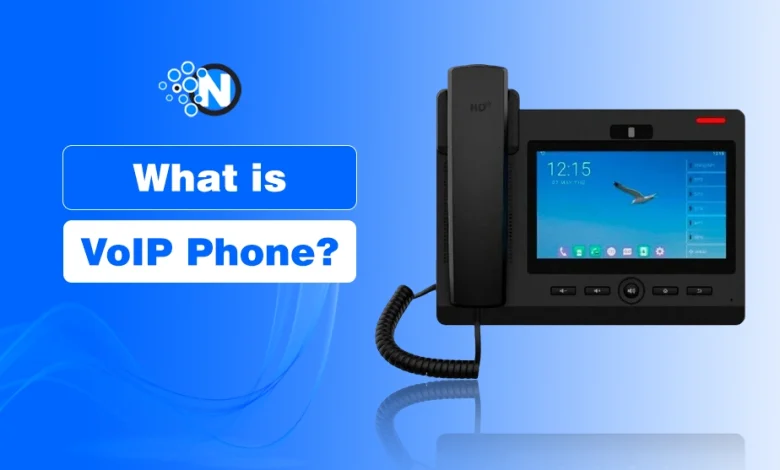
A VoIP phone (Voice over Internet Protocol) lets you make and receive calls over a broadband internet connection instead of the traditional Public Switched Telephone Network (PSTN).
You can use a VoIP phone in different ways:
- A dedicated IP phone
- A softphone app on a computer or smartphone
- An Analog Telephone Adapter (ATA) with an existing telephone
Compared to traditional phone systems, VoIP phone systems support features that improve everyday communication, including:
- HD voice for clearer audio
- Call forwarding and call routing
- Voicemail-to-email
- Video conferencing
- Number porting to keep your existing phone number
- Mobile and desktop apps for remote calling
Today, VoIP phone services are widely used by homeowners, small businesses, and enterprises across the United States because they reduce communication costs, support remote work, and scale easily as needs grow.
The estimated market value of global VoIP services was $151.21 billion in 2024 and is projected to reach $236.25 billion by 2028.
How Does a VoIP Phone Work?
A VoIP phone converts your voice into digital data, sends it over a broadband internet connection using IP, and converts it back into audio for the recipient.
During a call, your voice is digitized, securely transmitted as data packets, and reassembled into clear audio almost instantly. The process works in four simple steps:
- Capture your voice: An IP phone, softphone, or ATA records your voice.
- Convert to digital data: Your voice is encoded into digital packets.
- Transmit over the internet: The packets travel through a broadband internet connection using Internet Protocol (IP).
- Deliver the call: The recipient’s device converts the packets back into audio in real time.
To use a VoIP phone service, you’ll typically need:
- Broadband internet connection: A stable high-speed connection (via Wi-Fi or Ethernet cables) ensures reliable, jitter-free voice calls.
- VoIP service provider: A provider that manages your phone number, calling plan, and cloud-based phone system.
- IP phone: A dedicated phone designed to make and receive
- VoIP calls over the internet.
- Softphone: A desktop or mobile app that lets you use your computer, smartphone, or tablet as a VoIP phone.
- Analog Telephone Adapter (ATA): Connects a traditional landline phone to a VoIP network if you want to keep your existing handset.
- Router or modem: Connects your devices to the internet and helps maintain stable call quality.
- Headset (optional): Improves audio quality and hands-free communication for remote workers and customer support teams.
Because VoIP phone systems run over the internet, they also support features such as call forwarding, voicemail, and the ability to make or receive calls from a computer or smartphone with your account credentials.
How Does a VoIP Phone Compare to a Traditional Landline?
A VoIP phone uses the internet for calling, while a traditional landline relies on the Public Switched Telephone Network (PSTN).
Although both systems let you make and receive calls, VoIP phones provide greater flexibility, advanced features, and easier scalability than traditional landlines.
| Feature | VoIP Phone | Traditional Landline |
|---|---|---|
| Connection | Broadband internet | PSTN |
| Calling Cost | Lower monthly costs | Higher monthly charges |
| Mobility | Use anywhere with internet | Fixed to one location |
| Scalability | Add users instantly | Requires new phone lines |
| Features | Voicemail, call forwarding, video conferencing, call recording | Basic calling features |
| Hardware | IP phone, softphone, or ATA | Traditional desk phone |
| Remote Work | Fully supported | Limited |
For businesses and remote teams, VoIP phone systems generally offer better value due to lower operating costs and cloud-based flexibility.
Benefits of Using VoIP Phone for Small Businesses
A VoIP phone system reduces communication costs, supports remote work, scales with your business, and offers advanced calling features unavailable with traditional landlines.
Whether you’re a small business or a growing enterprise, VoIP phone services can improve productivity without requiring expensive on-premise hardware.
How Does a VoIP Phone System Reduce Communication Costs?
VoIP phone services lower calling costs through subscription-based pricing, free on-network calls, and reduced long-distance charges.
Unlike traditional landlines, most VoIP services offer flexible options similar to top business phone plans, with predictable monthly subscriptions that include features often billed separately with legacy phone systems.
Businesses can also save money by:
- Avoiding expensive hardware installations
- Making free on-network calls
- Paying lower international and long-distance rates
- Choosing local phone numbers in different area codes without opening physical offices
Why Are VoIP Phone Systems Easier to Scale?
VoIP phone systems let businesses add users, phone numbers, and extensions without replacing existing hardware.
As your business grows, you can quickly expand your VoIP phone system without installing new phone lines or complex infrastructure.
Additional advantages include:
- Add or remove users in minutes
- Create new phone extensions instantly
- Connect multiple office locations
- Integrate with CRM software and other business applications
How Does VoIP Improve Customer Service?
VoIP phone systems route calls intelligently, helping customers reach the right department faster while improving response times.
Modern VoIP phone services include features that streamline customer communication, including:
- Auto attendants (IVR) for call routing
- Call forwarding
- Voicemail
- Call queues
- Business hours routing
These tools reduce missed calls, streamline support operations, and complement strategies like outsourcing call center services for scaling customer support.
Can You Use a VoIP Phone From Anywhere?
Yes. A VoIP phone works anywhere with a stable internet connection, allowing users to make and receive calls on multiple devices.
Unlike traditional desk phones, VoIP supports remote and hybrid work by allowing employees to use:
- IP phones
- Desktop softphones
- Smartphone apps
- Laptops and tablets
This ensures your business phone number stays accessible whether you’re in the office, at home, or traveling, making VoIP one of the best cloud-based collaboration tools for remote teams.
Are VoIP Phone Systems Secure?
Yes. Most business VoIP providers protect calls with encryption, authentication, and network security features.
Depending on the provider, security features may include:
- Call encryption
- User authentication
- Firewalls
- Fraud detection
- Access controls
Following security best practices and using a trusted VoIP service provider helps protect business communications.
Does VoIP Improve Call Quality?
Yes. A reliable broadband connection allows VoIP phone systems to deliver HD voice quality with minimal latency.
Many VoIP providers support:
- HD Voice
- Noise reduction
- Call recording
- Stable audio over high-speed internet
Call quality ultimately depends on your network configuration, bandwidth, and minimizing issues like internet jitter.
How Does VoIP Support Business Continuity?
Cloud-hosted VoIP systems help businesses stay connected by routing calls to other devices or locations during outages.
If an office becomes unavailable, employees can continue answering calls from:
- Smartphones
- Laptops
- Another office location
- Remote workstations
This minimizes downtime and helps maintain uninterrupted customer communication.
Do VoIP Providers Offer Mobile and Desktop Apps?
Yes. Most VoIP providers offer mobile and desktop apps that let you manage business calls from virtually anywhere.
These apps allow users to:
- Make and receive business calls
- Access voicemail
- Transfer calls
- Manage contacts
- Stay connected across multiple devices using the same business number
How Do You Set Up a VoIP Phone at Home?
Set up a VoIP phone by choosing a provider, connecting your device to the internet, and activating your VoIP account.
Most VoIP phone services can be set up in just a few steps:
- Choose a VoIP service provider.
- Connect your IP phone or ATA to your router.
- Activate your VoIP account using the provider’s instructions.
- Configure your phone number and calling preferences.
- Test your connection by making a call.
For the best experience, use a stable broadband internet connection and position your router where it provides a strong, reliable signal.
What Is a VoIP Phone Number?
A VoIP phone number is a virtual phone number that uses the internet instead of a traditional phone line to make and receive calls.
It has basically 2 types: Fixed VoIP Phone Number and Non-Fixed VoIP Phone Number.
What Is a Fixed VoIP Phone Number?
A fixed VoIP phone number is assigned to a verified physical address and is commonly used by businesses.
A fixed VoIP number is associated with a specific location, making it suitable for businesses that require local presence, address verification, or support for emergency services.
What Is a Non-Fixed VoIP Phone Number?
A non-fixed VoIP phone number isn’t tied to a physical address and can be used from virtually anywhere with internet access.
Many non-fixed VoIP numbers are managed by major telecommunications carriers like Onvoy LLC, providing cheap and flexible calling options across multiple locations.
Can You Get a Free VoIP Phone Number?
Yes. Some VoIP providers offer free phone numbers, but they usually include limited features, usage restrictions, or advertising.
A free VoIP phone number can be useful for personal use, testing, or occasional calling. However, businesses often benefit from paid plans that include:
- Better call quality
- Business phone features
- Customer support
- Number porting
- Higher reliability
- Stronger security
How Do You Choose the Right VoIP Provider?
Choose the best VoIP providers based on features, pricing, reliability, security, scalability, and customer support to match your communication needs.
Before selecting a VoIP phone service, compare providers using these key criteria:
- Business needs: Ensure the plan supports your number of users, phone lines, and required calling features.
- Pricing: Look for transparent monthly pricing with no hidden fees or unnecessary add-ons.
- Scalability: Choose a provider that lets you easily add or remove users, phone numbers, and extensions.
- Call quality: Check for HD Voice, high uptime, and a reliable network.
- Features: Prioritize essentials like call forwarding, voicemail, auto attendants (IVR), call recording, and video conferencing.
- Security: Look for call encryption, multi-factor authentication (MFA), and fraud protection.
- Integrations: Verify compatibility with your CRM, help desk, or collaboration tools.
- Customer support: Choose a provider with responsive 24/7 support and a strong service reputation.
- Number porting: Confirm you can transfer your existing business phone numbers.
- Free trial or money-back guarantee: Test the service before committing to a long-term plan.
This version is much more skimmable, eliminates repetition, and naturally includes relevant semantic entities without drifting into “best VoIP provider” comparison territory.
Common Questions About VoIP Phones, Answered
Can I Keep My Existing Phone Number When Switching to VoIP?
Yes. Most VoIP providers support number porting, allowing you to transfer your existing phone number without changing it.
Can I Use a VoIP Phone Without a Traditional Landline?
Yes. A VoIP phone only requires a broadband internet connection and a VoIP service, eliminating the need for a traditional landline.
Can I Use a VoIP Phone for Remote Work?
Yes. A VoIP phone lets you make and receive business calls from any location using an internet-connected computer, smartphone, or IP phone.
Do VoIP Phones Support International Calling?
Yes. Most VoIP phone services offer international calling with lower rates than traditional landlines and flexible calling plans.
Can I Use a VoIP Phone at Home and for Business?
Yes. VoIP phone systems are suitable for home users, small businesses, remote teams, and large organizations needing flexible communication.
Do VoIP Phones Support International Calling?
Yes. Most VoIP phone services offer international calling with lower rates than traditional landlines and flexible calling plans.
Is a VoIP Phone the Right Choice for You? Closing Opinion
A VoIP phone is more than a replacement for a traditional landline; it’s a flexible communication solution that adapts to how people work and connect today.
Whether you need an affordable VoIP phone service for your home or a scalable VoIP phone system for your business, it offers the features, mobility, and cost savings that many traditional phone systems can’t match.
If there’s one takeaway from this guide, it’s that the right VoIP solution isn’t necessarily the one with the most features; it’s the one that fits your communication needs, budget, and future growth.
Taking time to compare providers, evaluate your requirements, and choose a reliable service will help you get the most value from your investment, whether you’re making a few calls a day or managing communication across an entire organization.