
New macOS Privacy Controls Add Friction For AI Agents Seeking Access
Apple's developer post never mentions AI agents, yet TechCrunch and Engadget tie the macOS 27.3 beta changes to them, and no source says how business fleets are affected.


Apple has rewritten how a Mac device hands out its broadest permissions, and the timing is no accident.
AI agents that run on the machine and ask for full disk access are what pushed it, TechCrunch reports. Apple’s own post, though, talks only about apps.
That gap matters if you run agents or automation on company Macs. The new rules hit what gets approved from now on, not what’s already approved, and the details that decide your exposure aren’t public yet.
What Apple actually changed
Apple’s developer post splits Device Control and Data Access into two settings: System & App Protection Override and Accessibility.
You grant either by picking the requesting app from a list. Full Disk Access now works folder by folder, while the override works app by app.
Users also see clearer details on what an app can reach, can set it to ask every time, and get an alert when one app controls another.
Apple’s wording on the risk is blunt. Before granting this access, users “should understand that it puts all of the data on their Mac at risk.”
Developers are told to expect users to hand over less, and to make apps “gracefully handle having access to only a limited set of folders or apps.”
Backup and accessibility apps can request special permission to bypass these new prompts on fresh installs, though Apple says details on how to apply are coming “soon.”
Where the Agents Come In
The press is connecting the dots to AI agents, even if Apple isn’t.
TechCrunch says agents often ask for full disk access, and cites two incidents: a journalist’s claim that Meta’s Muse app read private messages, and a Wired report of a flaw in ChatGPT’s Mac app.
Reports also name ChatGPT, Anthropic’s Claude and Google’s Gemini as examples of apps that would need the access.
Apple has also warned in its annual SEC filing about the risks associated with AI agents.
Still, these controls won’t block you from granting access; they are meant to make you think twice.
Screenshots shared by an X user, madeby_ldt, quoted by Engadget, show a new prompt warning that your Mac “will not be able to protect your data” from the app before listing the exact files and permissions at stake.
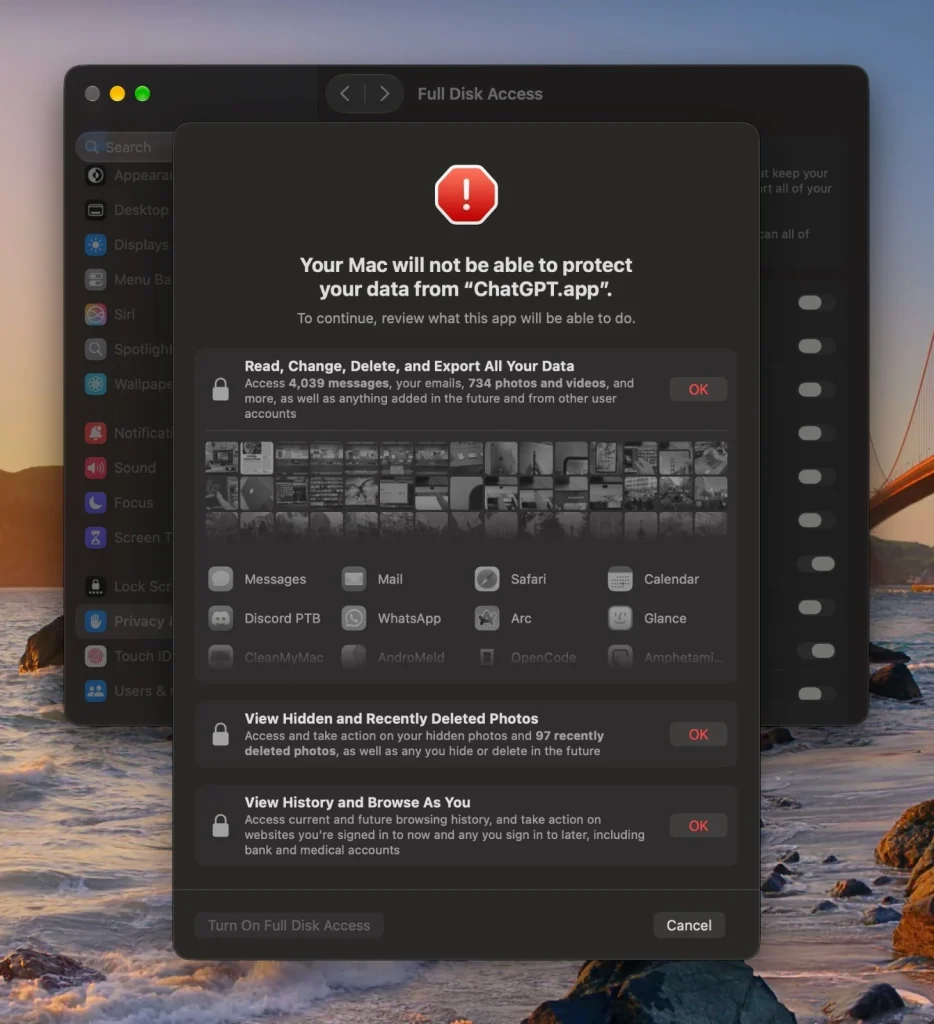
Apple hasn’t published that text, so treat it as unconfirmed.
What a business should and shouldn’t read into this
Apple’s updates add friction by design, and the friction lands on the next approval, not the last one.
Because existing grants remain untouched, any Mac already giving an AI agent sweeping access keeps doing so after updating, forcing admins or users to manually remove and re-add apps in System Settings to trigger the stricter prompts.
The “ask every time” setting is the biggest wildcard for automation. An agent running unattended overnight cannot click through a prompt.
However, per-folder scoping offers a practical middle ground for workflows that only need a single project directory, rather than the whole disk.
Then there’s what nobody has answered. Neither Apple nor early reports clarify whether ChatGPT, Claude, or Gemini trigger these new prompts today, how corporate-managed Macs are handled, or which tools qualify as “known apps” that are exempt from the rules.
Until Apple publishes full entitlement details, IT teams should test the beta on a single machine to see which automated tools stall.
Source: Apple reveals new Mac security controls as AI agents raise privacy risks