How to Set up Xfinity Home Internet? Complete Step By Step Guide (2026)

If you have decided to choose the Comcast Xfinity Home Internet, I would appreciate it because it can bring value to your life. But, to ensure getting all the perks, you need to set it up perfectly.
I know it can be a technical nightmare for many because it involves terminal commands and confusing phone calls to activation centers.
However, Xfinity has poured a lot of resources into its “Self Install” process, which makes it almost as simple as plugging in a toaster.
And in this guide, I am going to tell you how to set up Xfinity Home Internet, so you can enjoy streaming, competitive gaming, and downloading seamlessly.
How to Set up Xfinity Home Internet?
When your kit arrives, it will contain the gateway, a power cord, and a coaxial cable. I have found that as long as you have an active cable outlet in your home, the whole process takes less than 20 minutes.
The simple step by step procedure to set up Xfinity Home Internet is as below:
- Download the App: Get the Xfinity app on your phone and sign in with your account credentials.
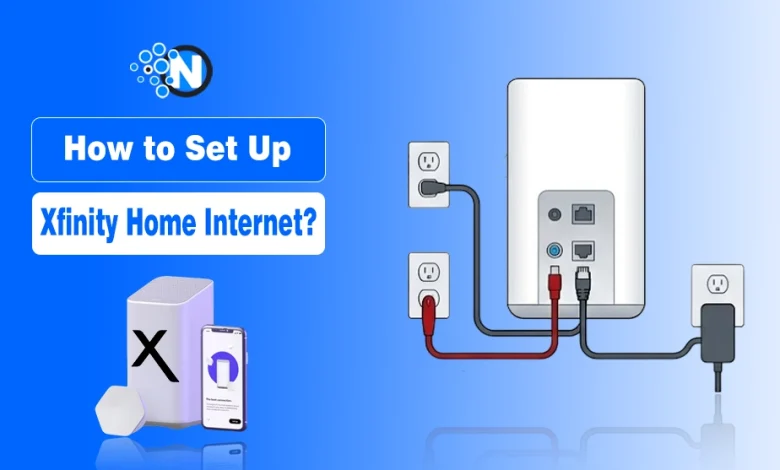
- Find the Coax Outlet: Locate the cable outlet in your home (usually a silver threaded cylinder on the wall) and screw in one end of the coaxial cable.
- Connect the Gateway: Screw the other end of the coaxial cable into the back of your Xfinity Gateway.
- Power Up: Plug the power cord into the Gateway and then into an electrical outlet.
- Wait for the Light: Give it a few minutes until the light on the front of the Gateway stops blinking and stays a solid white or blue.
- Activate via App: Open the app again, select “Activate Gateway,” and follow the on-screen prompts to name your WiFi and set a password.
How to Use the Xfinity App for Activation of Xfinity Home Internet?
The real secret to a smooth setup is downloading the Xfinity app on your phone before you even unpack the box. The app uses your phone’s camera to scan a QR code on the bottom of the gateway, which links the hardware to your account instantly.
It then takes you through the physical connections. Once the lights on the front of the gateway turn a solid white or blue, the app takes over to configure your network name and password. I love that you can do all of this without ever having to talk to a human being.
Position Your Gateway for Best Coverage
One tip I always give people is to be mindful of where you place the gateway. Coaxial outlets are often tucked away in corners or behind heavy furniture, which is the worst place for a WiFi signal.
If possible, use a longer cable to move the gateway to a central, elevated location in your home. Since the 2026 gateways use high-frequency bands for WiFi 7, they are more sensitive to physical obstructions like brick walls or large metal appliances.
Keeping it out in the open will ensure you actually get those high speeds in every room.
Final Thoughts
The setting up of Xfinity Home Internet only takes 20 minutes but I advise you to spend 10 minutes more to ensure proper configuration and set up.
If you are getting old gateway in your plan, consider purchasing the xFi Complete add-on because it not only comes with modern XB10 gateway but also removes the data cap of 1.2 TB. Hence, you can download unlimited videos and stream on Netflix in HD quality.
People Also Ask
Can I use my own router instead of the Xfinity Gateway?
Yes, you can use your own equipment as long as it is compatible with Xfinity’s service and you enable “Bridge Mode” on your Gateway.
What should I do if the Gateway light continues to blink orange or red?
Ensure all coaxial connections are finger-tight and try a different wall outlet, as the signal may not be reaching that specific port.
How long does the entire self-activation process of Xfinity Home Internet typically take?
The physical setup and digital activation usually take between 15 to 20 minutes from start to finish.
Do I need a technician to come to my house for a self-install?
No, a technician is not required as long as your home has an active coaxial line and you have the Getting Started kit.
Where is the best place to position my Gateway for the strongest signal?
Place your Gateway in a central, elevated location away from walls and large metal objects to ensure maximum Wi-Fi coverage.