Creating convincing furry AI art has some unique challenges that general-purpose AI generators often don’t handle well.
Many users discover that when they try to generate furry characters, the results feature vaguely animal-like humans with ears rather than true anthropomorphic characters with proper species anatomy.
Successful furry AI generation requires both thoughtful character planning and strategic model selection working together.
Rather than relying on increasingly complex prompts to force a generic model into anthro territory, choosing models trained specifically for anthro artwork dramatically improves results and saves enormous amounts of time and credits.
In this guide, I am going to discuss the basics of furry art, why standard tools struggle with it, and the practical workflow that produces authentic anthro characters consistently.
What Is Furry AI Art?
Furry art describes artwork featuring anthropomorphic animal characters that combine human intelligence, posture, and facial expressions with animal appearance and anatomy.
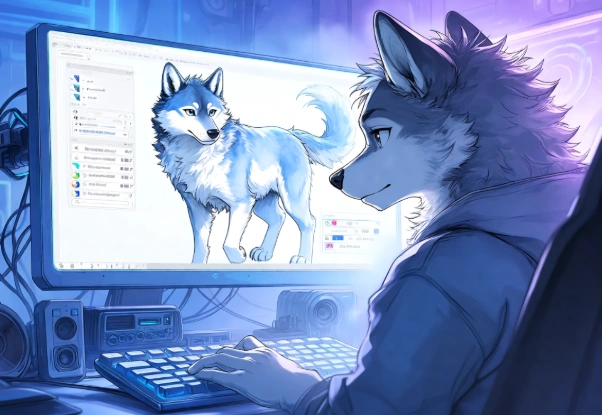
“Anthro” is short for anthropomorphic. A fursona represents a creator’s personal furry character within the community, often serving as an avatar and identity across social platforms and conventions.
Because a high-quality character avatar directly impacts your online presence, much like how social media impact is driven by AI-powered content tools, having a distinct visual style helps your fursona stand out in community feeds.
Common furry species include wolves, foxes, felines, dragons, rabbits, birds, and countless hybrids and original species. The furry community is very diverse, with artists creating artwork across all skill levels and art styles.
Furry art ranges from highly realistic animal-human hybrids with detailed fur rendering to stylized cartoon interpretations with simplified shapes, each with distinct visual characteristics and dedicated audiences. Understanding these stylistic variations helps you choose the right generation approach for your specific character vision and intended use.
Artificial Intelligence has become very advanced in the field of art. If you want to become a good AI artist and create amazing Furry art, it’s important to understand the basics of AI.
This is why NogenTech created a detailed guide on what Artificial Intelligence is. Take a look at it and understand AI deeply so that you can start using it better as an artist.
Why Generic AI Generators Often Struggle With Anthro Characters
Most general AI models train mostly on human characters and photographs, making them heavily biased toward human anatomy and facial structure. When asked to generate anthro characters, they often default to human facial structure and body type, simply adding animal ears on top without truly translating the character into proper anthro anatomy.
For example, a generic AI might generate a human girl with wolf ears instead of a proper wolf anthro with an appropriate snout, digitigrade legs, fur patterns, and species-accurate body proportions a common limitation you’ll notice when comparing general AI art vs. anime AI generators. Using specialized models trained specifically on furry artwork generally produces far more species-accurate results with correct muzzle shapes, paw structure, and fur flow.
This is the single most important insight for furry generation: model selection matters more than prompt complexity. No amount of clever prompting can make up for a model that has never learned anthro anatomy.
How to Create AI Furry Art as a Beginner?
Now that you understand why model choice matters so much, it’s time to go through the actual process step by step. The workflow below moves from initial character planning through model selection, prompting, and long-term consistency, each stage building on the last.
Planning Your Character Before Generating
Before touching any generator, spend time defining your character concept clearly. Decide on the species and whether you want realistic or stylized proportions. Choose fur colors, patterns, and distinctive markings such as white-tipped tails, facial stripes, or heterochromatic eyes.
Consider body type athletic, slim, stocky and personality traits that should read through posture and expression. Document these decisions in a short character description you can reference in every prompt.
This planning step turns random generation into directed character creation, dramatically improving consistency across sessions and making it possible to build a recognizable fursona rather than a series of unrelated animal characters.
Choosing the Right Furry AI Model
Model selection is the most important decision when generating furry artwork. The right model understands species-specific anatomy, fur textures, and the proportion adjustments necessary for authentic anthro characters.
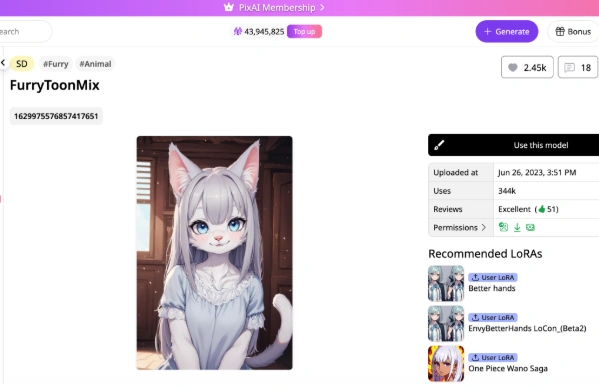
When you explore the PixAI model market, you can browse furry- and anthro-trained models suitable for different species and artistic styles. Fine-tuned models trained specifically on furry artwork produce dramatically better results than general anime models.
However, if your projects extend beyond furry characters into general illustration or branding, comparing the best AI image generators for designers and creators can help you pick the right base platform before adding specialized art models.
Trying different furry models helps you discover which ones best match your artistic vision and the specific species or aesthetic you’re pursuing.
For example, some models excel at realistic wolf anthros with detailed fur rendering, while others specialize in cute stylized characters or dragon anatomy. Community ratings, sample galleries, and model descriptions help you shortlist candidates quickly before spending credits on test generations.
Crafting Effective Furry Prompts
Effective furry prompts require clarity about species, anatomy, style, and emotional tone in that order of priority.
Start by clearly state the species: “wolf anthro,” “fox character,” or “dragon hybrid.” Add specific physical traits: “gray fur with white chest markings,” “athletic build,” “digitigrade legs,” or “feminine features.”
Include artistic direction: “realistic fur rendering,” “cartoon style,” or “soft cel shading.” Specify clothing and accessories where relevant: “wearing a leather jacket,” “tactical gear,” or “simple hoodie.” Finish with pose and expression: “confident stance, slight smirk” or “shy pose, ears lowered.”
The more specific you are about anatomy and appearance, the better your results will be, because specificity gives anthro-trained models clear signals about which learned features to apply.
Using LoRA Models to Improve Anthro Characters
LoRA (Low-Rank Adaptation) models allow fine-tuning of base models to achieve specific styles, species, or even individual character likenesses.
Many community creators develop furry-specific LoRAs covering particular species, fur styles, and aesthetics. To learn how to apply anthro-specific LoRAs effectively, consult the guide on how to use LoRA models in AI art, which explains trigger words and weight settings for achieving character consistency and style accuracy.
For example, a LoRA might specialize in “fluffy wolf anthros” and activate with a trigger word like “fluffy_wolf_style” at a weight of 0.7.
This knowledge lets you to combine base anthro models with specialized LoRAs for even better furry character generation, and you can stack multiple LoRAs one for species, one for art style to produce genuinely unique results that match your fursona vision precisely.
Building Consistency for Your Fursona
Once you achieve a generation that captures your character, consistency becomes the priority. Save your successful prompts verbatim, including model and LoRA settings. Generate a reference set showing your character from multiple angles and with multiple expressions.
Document exact color descriptions “burnt orange fur” produces different results than “orange fur” and reuse identical phrasing every session.
Over time, this disciplined approach builds a recognizable fursona whose artwork reads as one coherent character across dozens of images.
Just as visual consistency is central to how AI image generation is transforming digital marketing and brand identity, keeping your character’s traits, colors, and proportions uniform is what makes a fursona instantly recognizable across the community.
Quick Tips for Better Furry Art Generation
A few extra habits can shave off wasted generations and help your fursona come together faster:
- Test species accuracy first: Before refining fur colors or poses, run a quick generation to confirm the model handles your chosen species’ anatomy well (muzzle shape, ear placement, leg structure)
- Keep a prompt log: Save every prompt that produces a good result, along with the model and LoRA weights used, so you can replicate or tweak it later
- Change one variable at a time: When a generation isn’t working, adjust only the pose, or only the color, or only the style tag, so you know exactly what caused the improvement
- Use reference sheets early: Generate a simple front/side/back view set as soon as you lock in a design, rather than after dozens of unrelated images
- Lean on community galleries: Browsing sample outputs from a model before committing to it saves credits and reveals its actual strengths with specific species
- Don’t overload single prompts: Cramming species, anatomy, clothing, pose, and style into one dense sentence often confuses the model; structure prompts in the priority order (species → anatomy → style → clothing → pose)
Frequently Asked Questions About Furry AI Art
How do I ensure my furry character looks like a specific species?
Use species-specific descriptors in your prompt and select models trained for that species. For example: “wolf anthro with gray fur, pointed ears, snout, standing posture,” combined with a wolf-specialized model produces far better results than generic prompts on general models.
What’s the best way to describe anatomy in furry prompts?
Include both species characteristics and anatomy details. Example: “fox anthro with orange fur, white-tipped tail, feminine features, athletic build, realistic proportions.” This specificity helps AI models generate species-accurate characters consistently.
Can I mix species in furry character generation?
Yes, hybrid characters are entirely possible. Try prompts like “wolf-dragon hybrid anthro” or “cat-rabbit anthro,” though result quality depends heavily on your chosen model’s training data and may require more generation attempts.
How do I maintain consistency for my fursona across multiple images?
Generate character reference sheets, document specific traits (fur color, markings, body shape) with exact wording, and reuse consistent prompt structures with the same model and LoRA settings. The more detailed and consistent your reference information, the more consistent future generations will be.
Final Thoughts on Furry AI Art
Successful furry AI art depends far more on selecting an anthro-trained model and planning a strong character concept than on writing increasingly complicated prompts for the wrong tools. Experiment with community-created furry models while refining your own fursona designs through documented, repeatable workflows.
The furry community deserves artwork that authentically represents each creator’s vision, and using appropriate specialized tools makes this genuinely achievable for beginners. Start with a clear character concept, choose a species-appropriate model, apply relevant LoRAs, and iterate through generations until you achieve the fursona you imagined from the beginning.