Struggling to log in to the One Walmart GTA Portal? Stick to this guide, as I have covered the complete procedure for Walmart associates here. But before I want you to know something important.
Walmart has updated its employee platforms and expanded features through the MyWalmart app. The One Walmart GTA portal allows employees to check attendance, review work hours, monitor attendance points, access My Time, request Paid Time Off (PTO) or Protected Paid Time Off (PPTO), and view other work-related information.
Owing to these changes, associates have been unsure where to access the GTA Portal and its services.
If you are looking for the latest login process and features of the GTA Portal of OneWalmart, I have covered everything in this guide, and it will help you use the OneWalmart GTA Portal with ease.
How to Log In to the One Walmart GTA Portal?
Logging in is simple. Follow these steps:
- Visit the official Walmart GTA Portal (use the One Walmart website).
- Enter your User ID.
- Select your location from the list.
- Click Sign In.
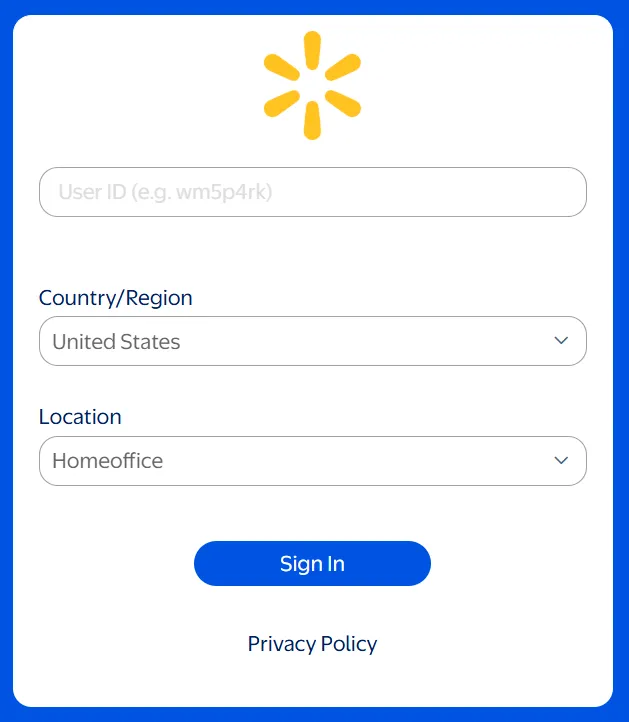
- Enter your password to access your GTA Portal dashboard.
What is the OneWalmart GTA Portal?
The OneWalmart GTA Portal (Global Time & Attendance) is Walmart’s official employee portal for managing attendance, work hours, schedules, attendance points, and time-off requests.
It enables associates and managers to track time records, review attendance, and maintain accurate payroll and workforce information.
Why is the GTA Portal useful?
- Employees can view attendance, work hours, and leave records.
- Managers can track employee activities and monthly working hours.
- It helps in accurately calculating salaries based on clock-in and clock-out times.
- Managers can view attendance summaries and adjust schedules if needed.
In short, the GTA Portal makes attendance and time management easier and more transparent for everyone.
What is the MyWalmart App, and how does it help Walmart Employees?
The MyWalmart app is Walmart’s official mobile app and provides mobile access to GTA features along with other employee services. On the other hand, the OneWalmart GTA Portal focuses on attendance and time management.

Requirements to Log in to the One Walmart GTA Portal
Before logging in, make sure you have:
- A valid Walmart User ID and password
- Active enrollment in 2-Step Verification (2SV) (This must be set up on a store computer while on-the-clock).
- A stable internet connection (mobile, tablet, or PC)
- An updated web browser
Note: If you have not set up 2SV at your store facility, you will be unable to log into the portal from a home device.
📌 Fact: If you’re a Walmart affiliate program member, then this portal isn’t for you, as Walmart has introduced a different forum for you under the name of Impact.
One Walmart Portal GTA Benefits
The One Walmart GTA Portal offers several benefits that help associates manage their daily work activities more efficiently, including:
- Check attendance records and monitor attendance history from your employee account.
- View attendance points to stay informed about occurrences and maintain good attendance.
- Access My Time to review work hours, time punches, and scheduled shifts.
- Request and manage PTO or PPTO directly through the portal.
- View paystub information through the OneWalmart payroll section after signing in.
- Hourly associates can clock in or out using the mobile app, but they must be physically inside their store facility to do so.
- Access control ensures only authorized personnel (like managers) can approve changes.
How to Reset Your One Walmart GTA Portal Password (If Forgotten)?
Because of strict corporate security policies, Walmart does not send password reset links to personal email addresses. If you are locked out of your account, you must use one of the following official channels:
- At the Store: Log in to a physical computer workstation terminal while on the clock to update your security profile.
- Management Support: Speak directly with your facility’s People Lead (HR Manager) to reset your login credentials.
📌 Contact Field Support: If you’re unable to access your email or are facing any other issues, call Field Support at 479-273-4357 for assistance.
People Also Want to Know More About Walmart GTA Portal
Can I get access to the One Walmart GTA Portal at home?
Yes. You can access it from home if you previously set up 2-Step Verification (2SV) on an in-store computer.
How do we verify Walmart’s compliance and points?
When you need to check your Walmart compliance and points, via the GTA portal, just log in with your Walmart account and see all the endorsements and points.
When can I see a One Walmart payment receipt?
You can see your OneWalmart payment receipt (paystub) on the Sunday before payday.
How do I log in to the GTA Portal?
Just make an effort to check the information that we have shared in the above body of text. You just need to follow those steps to log in to Walmart.
What to do when the GTA Portal is not working?
If there is any problem logging in to your GTA portal account, Please, Contact the customer service of Walmart at +1 (800) 421-1362 or go to the official Walmart website.
Final Words on This Login Guide
The One Walmart GTA Portal is an essential tool for Walmart employees. It helps them access exclusive features such as attendance tracking, work hours, leave management, pay stub details, and more.
Logging in is simple, but if you forget your password, you cannot reset it from a personal email link due to corporate security rules. You must log in to a computer station or ask your facility’s People Lead for help.
However, they need to log in to the portal with the provided username and password. Once you are on the store network or have verified through your mobile 2-Step Verification (2SV), you can gain access to the portal. You can simply follow the above steps to log in and get the advantages as well.