I get asked this more than any other Instagram privacy question: “Are these Instagram viewer tools actually safe to use, or am I putting my account at risk?” It’s the right question.
The space is flooded with tools promising anonymous access, private profile visibility, and zero-risk browsing, but the reality is far more layered than those marketing claims suggest.
I’ve reviewed, tested, and analyzed third-party Instagram viewer tools across multiple risk categories. Before you connect anything or share your credentials, read this first.
Here, I cover the full risk spectrum, security red flags, safe and unsafe practices, common misconceptions, and long-term account consequences, grounded in Meta’s official documentation and real platform behavior.
Are Private Instagram Viewer Tools Safe?
No, Private Instagram viewer tools are unsafe and cannot access private profiles. Users must avoid unauthorized logins, malware downloads, phishing, and invasive tracking, which violate platform terms and face strict penalties under FTC, CCPA, and CFAA guidelines.
| Safety Concerns | What the User Thinks | The Actual Hidden Risk |
|---|---|---|
| Anonymity | I am 100% invisible. | You are hidden from the user, but not from the tool’s owner. |
| Ads | They are just annoying. | They can be “malvertising” that installs trackers. |
| Data | I didn’t log in, so I’m safe. | Your IP and device “fingerprint” are still being tracked. |
| Phishing | It’s just a bot check. | It’s a trick to steal your actual Instagram password. |
| Reliability | It always works. | Instagram’s code updates can cause the tool to fail or “leak” your identity. |
This question is certainly one of those that requires a detailed answer. And I am going to mention all the privacy concerns associated with private or anonymous Instagram viewer tools. In this way, you can have an idea whether these platforms are safe or not.
1. Anonymity or Private Browsing
Instagram viewer tools let you watch public stories without revealing your identity. If anonymity is your main concern, they are generally safe to use.
These tools access Instagram content as a “guest,” not through your logged-in account, which means there is no direct technical link between your profile and the story you view.
2. Malicious Ads and Pop-Ups
You may have seen that whenever you try to download a reel or story from an Instagram viewer tool, you are redirected to different sites again and again until the download button becomes functional. It is a way for these platforms to earn money.
For secure browsing, you should visit only trustworthy platforms and avoid clicking on “System Update” or “Scan Now” pop-ups that often appear on these sites.
3. Data Harvesting and Tracking
Even though you don’t log in, these websites can still collect information about you behind the scenes. Every time you visit, the tool can collect information about your
- IP address
- Approximate location
- Device type
To stay safe, it is best to use these tools in Incognito mode or Private mode or use a VPN to ensure the website isn’t building a profile of your browsing habits.
4. Phishing and Credential Theft
Some sites will show you a few stories and then claim you need to “Verify you are human” by signing into your account. This is almost always a phishing trap designed to steal your username and password.
If a site asks for your credentials, you should leave immediately to avoid phishing traps, as entering your info could lead to your actual Instagram account being hacked or disabled.
5. Technical Reliability (The Ghost Glitch)
In rare cases, if you have the Instagram app open or are logged in on another tab in the same browser, a glitch in the tool’s code could accidentally trigger a “seen” receipt. While this is uncommon, the safety concern here is unpredictability.
If 100% secrecy is your goal, you must remember that these tools are unofficial and can break at any time without warning.
What are the Risks of Ads, Cookies, and Data Collection When Using Instagram Viewer Tools?
Using these tools exposes you to aggressive tracking cookies and malicious ads that harvest your personal data. These deceptive data collection practices violate platform terms and face strict enforcement under FTC, CCPA, and CFAA regulations
Most users I speak with focus entirely on whether a tool will get their account flagged. But in my experience reviewing these platforms, there is a quieter risk that nobody talks about: what the tool itself collects from you during your visit.
Here is what I consistently find across these platforms:
- GramSnap, InsAnony, AnonyIG, PVStory, and Insnoop are free to use, no login, no payment, but
- These free platforms fill that gap through advertising revenue and passive data collection
- Dolphin Radar holds account-level data as an authenticated tool. I always recommend reading its privacy policy carefully before connecting any Instagram account
- Instatroid 2.0 is the platform I warn users about most firmly. It pushes false promises of hidden Instagram analytics to pull users through survey flows and app downloads that exist purely for revenue generation and potential adware exposure
My rule is simple. If a tool is free, understand exactly how it funds itself before you use it, because the cost is almost always your data.
What is the Risk Level of Instagram Viewer Tools?
Instagram viewer tools range from low risk for public scrapers that require no login, to moderate risk for downloaders with tracking ads, and high risk for credential-demanding phishing traps.
The first thing I want to establish is that third-party Instagram viewer tools are not a monolithic category. They sit across a clear risk spectrum, and where a tool lands on that spectrum determines the real danger it poses to your account and your data.
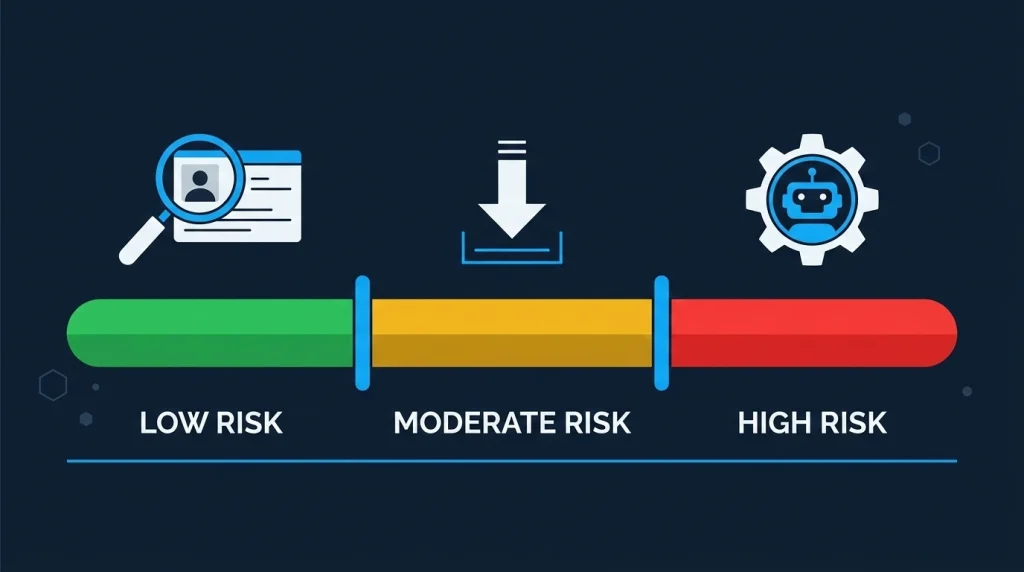
Low-Risk: Public Content Viewers and Story Browsers
At the lowest end sit tools that display publicly available Instagram content without requiring any login or account authentication.
- Tools like Picuki and Dumpor fall here; they essentially act as Instagram web mirrors, fetching publicly accessible profiles, posts, and stories without touching your credentials.
- Imginn, InstaDP, Pixwox, and similar tools operate on the same model, each serving slightly different use cases (content browsing, post downloading, and full-size profile picture viewing, respectively) but all dealing exclusively with publicly available data.
📦 Are tools like Picuki and Dumpor safe to use in the US?
Yes, for basic public content browsing. They require no Instagram login and access only publicly available data, making them low-risk for US users when used within that scope.
Moderate-Risk: Story Downloaders and Viewer Hybrids
- Tools like Snapinsta and StoriesDown introduce more complexity. They fetch media files from Instagram’s CDN based on publicly accessible URLs; still, no login is required, but the risk here shifts from account security to policy compliance.
- StoriesIG (also known as Mystalk) and GreatFon and insacret sit in a similar position, anonymous Instagram viewer tools that carry minimal account-level risk when used for public content, but still warrant a check on what browser permissions they request and whether they’re running suspicious background scripts.
According to Instagram’s official Terms of Use, users agree not to reproduce or distribute platform content without authorization. That distinction matters if you’re downloading and resharing someone else’s content.
High-Risk: Instagram viewer Tools With Automation and Growth Bots
This is where things become genuinely dangerous. Tools like Inflact operate in a far more complex space, offering DM automation, hashtag research, and profile analytics, some of which require authenticated access to your Instagram account.
Step-by-Step Safety Process on Third-Party Insta Viewer Tools
I follow a strict evaluation process before recommending or personally using any Instagram-related tool. Here’s the exact framework I use, adapted for any user:
- Determine whether the tool requires your Instagram credentials. If it does, verify it uses official OAuth authentication through Meta, not a direct username/password form on a third-party site.
- Check whether the tool’s core function involves only public content (low-risk) or account-level actions like following, liking, or messaging (high-risk).
- Search for independent security audits or credible reviews of the tool, not just testimonials on the tool’s own website.
- If possible, test with a secondary Instagram account that doesn’t hold critical content or a large following.
- Review what app permissions they ask. Any tool asking for permissions beyond what its stated function requires is a red flag.
Common Misconceptions That Get Instagram Users Into Trouble
Here are some of the most common misconceptions that get Instagram users into trouble:
“Anonymous viewer tools are the same as bot tools.”
They’re not. Using Dumpor or Instanavigation to view a public story anonymously carries a fundamentally different risk profile than using a bot that automates engagement on your account.
“If a growth tool works slowly, Instagram won’t detect it.”
This is a common and risky misconception. Instagram’s detection systems are highly sophisticated, and even “safe” bots are eventually flagged because the platform monitors long-term behavior patterns, not just short-term activity speed.
“Private viewer tools work; I just need to find a reliable one.”
As I’ve explained, this reflects a misunderstanding of how Instagram’s privacy architecture works at the server level. No tool can legitimately bypass server-side privacy controls.
“Connecting a tool once can’t really hurt.”
Conducting monthly reviews of connected applications by navigating to Settings → Security → Apps and Websites and removing unused or suspicious apps immediately is considered a security best practice.
What People Also Ask About Private Instagram Viewers
No. If you’re truly anonymous, your username won’t appear in their viewer list.
Some anonymous viewers work for public Instagram accounts by accessing publicly available content. They generally don’t work for private accounts, and many sites stop working when Instagram updates its systems.
Safety depends on the website. Avoid tools that ask for your Instagram password, request app installation, or make suspicious promises. Reputable viewers typically don’t require login credentials.
In some cases, yes. Public Instagram stories may be accessible through third-party viewing tools. Private account stories cannot be viewed without logging into an approved Instagram account.
The most common method is using an anonymous story viewer that supports public accounts. These tools allow viewing stories without adding your username to the account’s viewer list.
Instagram generally does not notify users when someone screenshots a story. The only exceptions have involved limited testing features in the past.
The best option changes frequently because Instagram updates its platform regularly. Users generally prefer viewers that don’t require an account login.
Share Your Experience of Using Instagram Third-Party Tools
I’d value your experience. Real user feedback on account restrictions, data concerns, or safe outcomes helps create a clearer picture for everyone.
Share your experience in the comments or submit it through the contact form. I review every submission and factor real-world insights into future tool evaluations.