A comfortable mouse can make a noticeable difference when you spend hours gaming, especially if you prefer a shape that supports your entire hand rather than a compact, lightweight design.
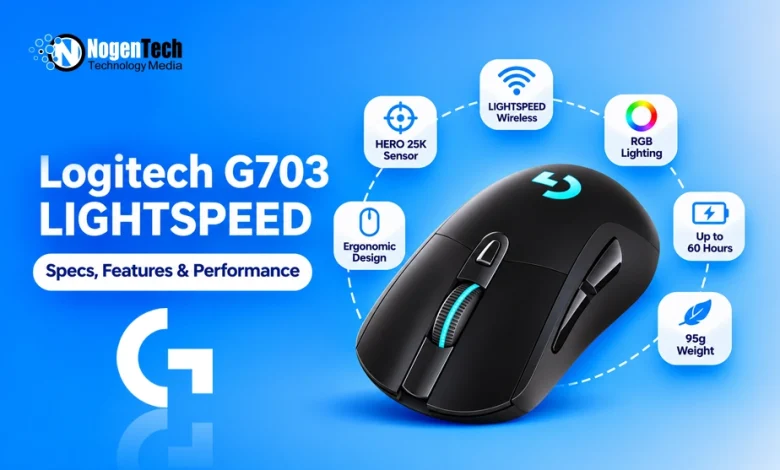
The Logitech G703 LIGHTSPEED is built around that idea. It combines an ergonomic right-handed shape with wireless connectivity, a HERO 25K sensor, and customizable RGB lighting.
However, the G703 is not a new-generation ultralight mouse. It weighs 95g, uses a Micro-USB charging connection, and has a maximum polling rate of 1,000Hz.
So, is it still a good gaming mouse in 2026, or are newer alternatives a better investment? In this guide, we will look at its specifications, features, and gaming performance.
What Is the Logitech G703 LIGHTSPEED?
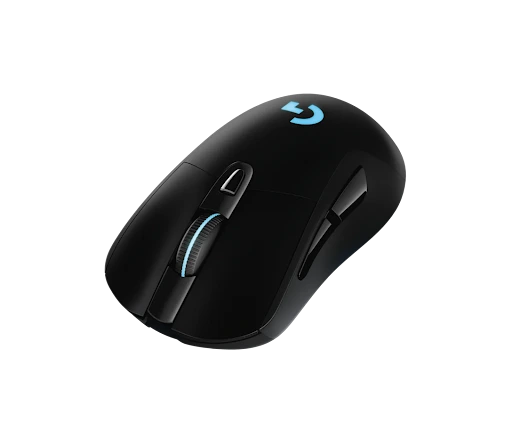
The Logitech G703 LIGHTSPEED is a wireless gaming mouse designed for right-handed users who prefer an ergonomic shape and a comfortable palm grip. The HERO 25K version features a sensor with up to 25,600 DPI, Logitech’s LIGHTSPEED wireless technology, six programmable buttons, and LIGHTSYNC RGB lighting.
It also supports Logitech’s POWERPLAY wireless charging system, which can keep the mouse charged while you use it with a compatible charging mouse pad.
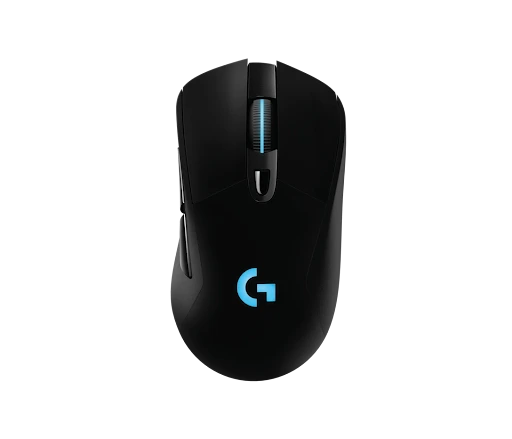
Image Source: https://www.logitechg.com/en-us/shop/p/g703-hero-wireless-gaming-mouse.910-005638
Logitech G703 LIGHTSPEED Specifications
| Specification | Details |
| Mouse type | Wireless gaming mouse |
| Sensor | Logitech HERO 25K |
| Maximum sensitivity | 25,600 DPI |
| Minimum sensitivity | 100 DPI |
| Maximum tracking speed | Over 400 IPS |
| Maximum acceleration | Over 40G |
| Polling rate | Up to 1,000Hz |
| Connectivity | LIGHTSPEED 2.4GHz wireless, wired USB |
| Buttons | 6 programmable buttons |
| Switch technology | Mechanical button tensioning system |
| Weight | 95g |
| Optional weight | 10g |
| Dimensions | 124 × 68 × 43mm |
| Battery life | Up to 35 hours with default RGB lighting; up to 60 hours without lighting |
| RGB lighting | LIGHTSYNC RGB |
| Charging port | Micro-USB |
| Wireless charging | POWERPLAY compatible |
| Software | Logitech G HUB |
| Hand orientation | Right-handed |
| Best for | FPS, MOBA, RPG, and everyday gaming |
Important: These specifications refer to the G703 HERO 25K version. The original G703 uses a different PMW3366 sensor and has a lower advertised DPI range. So, you should check the exact model number before purchasing.
Below, I have explained the specs and features of this mouse.
1. Ergonomic Design for Right-Handed Users
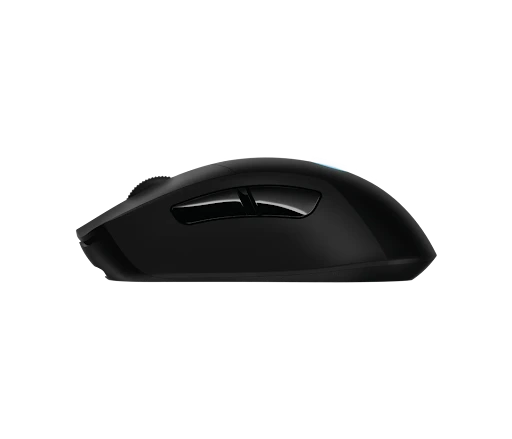
The G703 has a curved, asymmetrical design that supports the right hand. Unlike symmetrical gaming mice, its shape is angled to provide a more natural resting position for your thumb and fingers.
The pronounced hump supports the palm, while the rubberized side grips help maintain control during quick movements. This makes the G703 particularly appealing to palm-grip users who want a mouse that fills their hand.
However, if you prefer a claw-grip mouse, you should pick the Logitech G309 LIGHTSPEED.
2. Dimensions and Weight
It measures 124mm long, 68mm wide, and 43mm high. This gives it a relatively substantial profile compared with smaller competitive gaming mice.
Its 95g weight is reasonable for a wireless gaming mouse, although it is not particularly lightweight by modern competitive FPS standards. Logitech also includes an optional 10g weight, which allows you to increase the total weight if you prefer a heavier feel.
3. HERO 25K Sensor for Precise Tracking
The HERO 25K sensor is one of the strongest features of the G703.
It supports sensitivity settings from 100 to 25,600 DPI, with tracking speeds above 400 IPS and acceleration above 40G. These specifications provide enough tracking capability for fast FPS games, competitive shooters, and everyday desktop use.
The sensor also supports 1:1 tracking without smoothing, filtering, or acceleration under Logitech’s stated operating conditions. This means your physical mouse movement is translated into consistent cursor movement rather than being artificially adjusted by the sensor.
You do not need to use 25,600 DPI to benefit from it. Most gamers will find a much lower sensitivity more comfortable for aiming and controlling their movements.
4. LIGHTSPEED Wireless Connectivity
Logitech’s LIGHTSPEED technology provides a dedicated 2.4GHz wireless connection through the included USB receiver.
The main advantage is that you can play without a cable while retaining responsive input performance. This is particularly useful in competitive games where delayed movements or inconsistent connections can affect your experience.
The G703 also supports wired operation through its included charging cable. You can continue using the mouse while connected, which is convenient when the battery needs charging.
One limitation is that the G703 does not support Bluetooth. You need its LIGHTSPEED receiver for wireless operation, so it is less flexible than gaming mice that offer both 2.4GHz and Bluetooth connectivity.
5. Mechanical Button Tensioning System
The G703 uses Logitech’s mechanical button tensioning system for its primary left and right buttons.
This design uses metal springs to maintain consistent tension in the buttons, which helps reduce the force required to activate a click and provides a more consistent clicking experience.
For gaming, this matters when you repeatedly fire weapons, activate abilities, or perform other actions that require frequent clicks.
6. Six Programmable Buttons and G HUB
The G703 comes with 6 programmable buttons, including the primary clicks, scroll-wheel button, and additional side controls.
You can customize supported buttons through Logitech G HUB. For example, you can assign melee attacks, reload commands, push-to-talk controls, or other frequently used actions.
The software also allows you to adjust DPI settings, customize RGB lighting, and configure supported performance options. Onboard memory lets you save compatible profiles directly to the mouse.
Six buttons are enough for most FPS, MOBA, and general gaming requirements. However, players who regularly use numerous macros in MMO games may prefer a mouse with a larger number of side buttons.
7. LIGHTSYNC RGB Lighting
The G703 includes customizable LIGHTSYNC RGB lighting, similar to Logitech G502 X PLUS, which adds some visual personality to its design.
You can customize supported lighting effects and colors through Logitech G HUB. The lighting can also synchronize with compatible Logitech G devices and supported game effects.
RGB lighting does affect battery life. Logitech rates the HERO 25K version for up to 35 hours with default LIGHTSYNC lighting and up to 60 hours with lighting disabled.
If you prefer longer battery life over visual effects, turning off RGB is a sensible option.
8. POWERPLAY Wireless Charging Support
One feature that gives the G703 additional flexibility is its compatibility with Logitech POWERPLAY.
POWERPLAY is a separate wireless charging system that uses a compatible mouse pad to keep supported Logitech mice charged during use. Instead of regularly connecting a charging cable, you can use the mouse on the charging surface.
This is especially useful for people who want a permanently wireless desk setup.
However, the POWERPLAY system is sold separately, so it increases the overall cost. It is not necessary to enjoy the G703’s standard LIGHTSPEED wireless performance.
Performance Benchmarks of the Logitech G703 LIGHTSPEED
The G703 combines a capable optical sensor, responsive wireless connectivity, and a comfortable ergonomic design. Its specifications make it suitable for several gaming genres, but its weight and shape are important considerations if you primarily play competitive shooters.
Wireless Performance
The LIGHTSPEED connection provides a responsive wireless experience through the included USB receiver. With a maximum polling rate of 1,000Hz, the mouse reports its position up to 1,000 times per second.
That is sufficient for most gamers, including many competitive FPS players. However, newer gaming mice offer higher polling rates, such as 2,000Hz, 4,000Hz, and 8,000Hz.
The HERO 25K sensor also delivers accurate tracking, while the ergonomic shape provides a stable grip during extended gaming sessions.
According to RTINGS’ G703 review, the HERO version offers excellent click latency and sensor performance. RTINGS also highlights its comfortable shape and suitability for FPS and MMO gaming.
Battery Life
Battery life is another important consideration when choosing a wireless mouse.
The G703 HERO 25K version is rated for up to 35 hours of continuous gameplay with default LIGHTSYNC RGB lighting. Turning off the lighting increases the advertised runtime to up to 60 hours.
These figures are based on Logitech’s stated testing conditions. Actual battery life can vary depending on usage, battery age, and lighting settings.
The mouse charges through Micro-USB rather than USB-C. This is one of its more noticeable disadvantages compared with newer wireless gaming mice.
If you already own the POWERPLAY charging system, you can avoid much of the inconvenience associated with manually charging the mouse.
Gaming Performance
| Game or genre | Suitability | Why |
| Call of Duty and Warzone | Very good | Accurate tracking and LIGHTSPEED connectivity support fast combat |
| Valorant | Very good | Precise sensor performance suits controlled aiming |
| Counter-Strike 2 | Very good | Responsive wireless connection and consistent tracking |
| Apex Legends | Very good | HERO sensor handles fast target movements |
| Fortnite | Very good | Comfortable grip and programmable buttons support general gameplay |
| Overwatch 2 | Very good | Tracking performance suits frequent target switching |
| GTA V | Excellent | Ergonomic design works well for driving, shooting, and exploration |
| Minecraft PvP | Very good | Responsive tracking and clicks support combat |
| MOBA games | Excellent | Six programmable buttons provide useful shortcuts |
| MMO games | Good | Comfortable for long sessions, but limited compared with dedicated MMO mice |
| RPG and adventure games | Excellent | Ergonomic shape and accurate tracking suit extended gameplay |
| Casual and everyday use | Excellent | Comfortable shape and wireless connectivity work well beyond gaming |
These are practical suitability assessments based on the mouse’s specifications and design, not standardized benchmark scores for individual games.
The G703 is particularly appealing for players who spend long hours gaming and prefer an ergonomic mouse. However, its 95g weight may feel less convenient if you use a low sensitivity setting and frequently make large, fast movements.
Should You Buy the Logitech G703 LIGHTSPEED?
The G703 remains a capable wireless gaming mouse, but its value depends heavily on its current price. Its ergonomic shape, HERO 25K sensor, and POWERPLAY compatibility are attractive features.
| Your priority | Recommendation |
| Comfortable palm grip | Excellent choice |
| Competitive FPS gaming | Very good, although relatively heavy |
| Long gaming sessions | Excellent ergonomic design |
| Accurate sensor tracking | Excellent |
| Wireless performance | Very good |
| Lightweight gaming mouse | Consider a lighter alternative |
| Bluetooth connectivity | Look elsewhere |
| USB-C charging | Look for a newer model |
| RGB lighting | Good choice with LIGHTSYNC RGB |
| MMO gaming with many shortcuts | Consider a mouse with more programmable buttons |
Who Should Buy It?
The Logitech G703 LIGHTSPEED is worth considering if you prefer a larger, ergonomic mouse that supports your palm.
Its HERO 25K sensor and LIGHTSPEED connection make it capable of handling competitive shooters, while its six programmable buttons provide enough customization for most games.
It is also a good option if you already own a Logitech POWERPLAY or can find the mouse at a competitive price.
Who Should Skip It?
You should consider alternatives like the Logitech G PRO X SUPERLIGHT 2 if you want an ultralight mouse, Bluetooth connectivity, USB-C charging, or a polling rate above 1,000Hz.
The G703’s right-handed shape may also be uncomfortable for left-handed users or people who prefer symmetrical mice. If you use a fingertip grip, its pronounced hump and relatively substantial weight may not be ideal.
Final Thoughts
The Logitech G703 LIGHTSPEED remains a capable wireless gaming mouse, especially for players who prioritize comfort over an ultralight design.
Its HERO 25K sensor, responsive LIGHTSPEED connection, six programmable buttons, and ergonomic right-handed shape make it suitable for FPS, MOBA, and everyday gaming.
However, its 95g weight, Micro-USB charging port, lack of Bluetooth, and 1,000Hz polling rate make it feel older than several newer competitors.
You should consider buying it if you prefer its ergonomic shape and find it at a good price. If you want modern connectivity and a lightweight competitive mouse, newer options may offer better value.