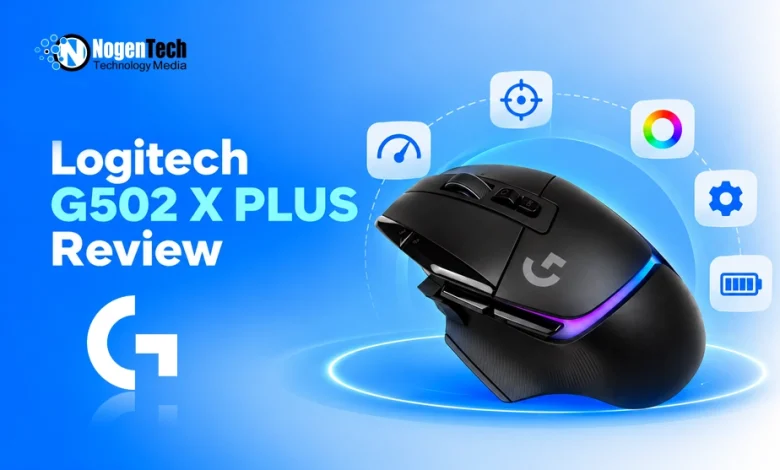
Do you want a gaming mouse that offers more than two side buttons, a comfortable ergonomic shape, and a scroll wheel that works for both gaming and everyday browsing?
The Logitech G502 X PLUS is designed for players who want extensive controls without giving up wireless connectivity or customizable RGB lighting.
These features make it particularly attractive for players who enjoy different game genres and want more functionality from a single mouse.
In this guide, I have explained the specifications and features of the Logitech G502 X PLUS along with its pricing to let you know whether it is affordable for you.
What Is the Logitech G502 X PLUS?
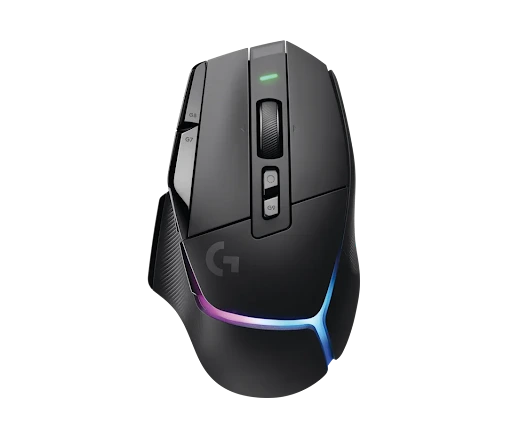
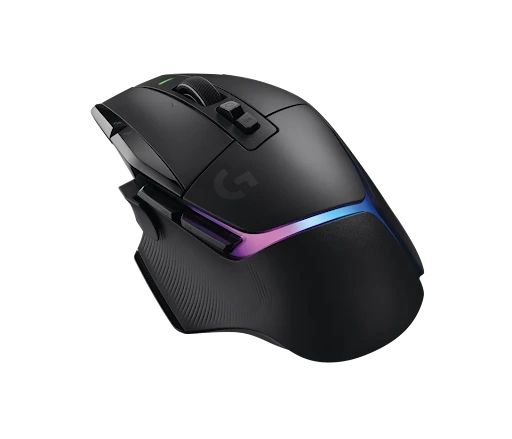
The Logitech G502 X PLUS is a right-handed wireless gaming mouse with customizable RGB lighting, a HERO optical sensor, and multiple programmable controls.
It is designed for gamers who prioritize:
- Versatility
- Ergonomic handling
- Customization over an ultra-lightweight design
The G502 X PLUS combines several features that make it more versatile than a basic gaming mouse. Its main strengths are programmable controls, a customizable scroll wheel, wireless performance, and an ergonomic shape.
What is the Price of the Logitech G502 X PLUS?
The price of the Logitech G502 X PLUS is $149.99, according to the official Logitech site. However, you have to check the pricing before making any purchase decision.
Logitech G502 X PLUS Specifications
| Specification | Details |
| Release year | 2022 |
| Weight | 106g |
| Dimensions | 131.4 × 79.2 × 41.1mm |
| Sensor | Logitech HERO 25K |
| Maximum DPI | 25,600 |
| Maximum tracking speed | Over 400 IPS |
| Maximum acceleration | Over 40G |
| Polling rate | 1,000Hz |
| Switches | LIGHTFORCE hybrid optical-mechanical |
| Buttons | 11 physical buttons, 13 programmable controls |
| Connectivity | LIGHTSPEED wireless, USB-C wired |
| Battery life | Up to 130 hours with RGB off; up to 37 hours with RGB on |
| RGB lighting | Eight-zone LIGHTSYNC RGB |
| Scroll wheel | Hyper-fast free-spin and ratcheted modes, with tilt controls |
| Onboard profiles | Up to 5 through Logitech G HUB |
| Charging | USB-C |
| Wireless charging | Compatible with POWERPLAY, sold separately |
| Software | Logitech G HUB |
| Best for | MMO, RPG, action games, and versatile PC gaming |
Specifications are based on Logitech’s published product documentation. Battery life varies with usage and settings. Below, I have explained the features and specs.
1. LIGHTSYNC RGB Lighting
Unlike the standard G502 X and G502 X LIGHTSPEED, the G502 X PLUS includes eight-zone LIGHTSYNC RGB lighting.
You can customize the lighting through Logitech G HUB, coordinate it with other compatible Logitech devices, and adjust effects to match your setup.
Logitech also includes active play detection to help conserve battery power by adjusting lighting when appropriate. Even so, RGB lighting has a noticeable effect on battery life. If you prefer a minimalist mouse or prioritize longer battery life, the lighting may be less important.
2. Dual-Mode Scroll Wheel
The scroll wheel supports two operating modes. Its ratcheted mode provides distinct steps for controlled scrolling, while its free-spin mode lets the wheel move rapidly through long pages or lists.
It also supports left and right tilt inputs, which can be assigned to additional commands in supported software.
This is useful beyond gaming. You can use the free-spin mode to navigate long documents, spreadsheets, and web pages, then switch to the ratcheted mode for more controlled scrolling during gameplay.
If you regularly switch between games and desktop work, the scroll wheel is one of the mouse’s most practical features.
3. HERO Sensor With Up to 25,600 DPI
The standard G502 X PLUS specifications list Logitech’s HERO sensor with sensitivity settings up to 25,600 DPI. Logitech also specifies tracking speeds above 400 IPS and acceleration above 40G.
These specifications are more than sufficient for competitive and casual gaming. The sensor can track quick movements without requiring you to use an unusually high sensitivity setting. Also, you can use other Logitech devices to declutter your desk space.
Most FPS players will be better served by finding a comfortable DPI and in-game sensitivity combination than by chasing the maximum number. The G502 X PLUS’s sensor is capable, but its weight and shape are more important considerations when deciding whether it suits your preferred games.
4. Thirteen Programmable Controls
One of the biggest reasons to consider the G502 X PLUS is its extensive control layout. Logitech lists 11 physical buttons and 13 programmable controls, including additional scroll-wheel tilt inputs.
You can configure supported actions and macros through Logitech G HUB. This allows you to assign commands that would otherwise require keyboard combinations or additional hand movement.
The extra controls are especially useful in games with inventory management, abilities, weapon switching, and frequent menu interactions. They are also convenient for productivity tasks such as browser navigation and application shortcuts on gaming laptops and computers.
However, the additional buttons require some adjustment. If you mainly play competitive shooters and only need left-click, right-click, and two side buttons, much of this functionality may go unused.
5. Ergonomic Design With a 106g Body
The G502 X PLUS has a right-handed ergonomic shape with a dedicated thumb-rest area. Its body is relatively wide and substantial, making it a better fit for players who prefer their hand to rest naturally on the mouse instead of gripping a small, symmetrical shell.
At 106 grams, it is not particularly lightweight by modern competitive FPS standards. Rapid flicks and repeated direction changes can require more effort than they would with a 50–60g mouse.
However, the extra weight is not automatically a disadvantage. If you prefer a substantial mouse with numerous controls, the G502 X PLUS offers a different experience from minimalist esports models.
6. LIGHTSPEED Wireless Connectivity
The G502 X PLUS uses Logitech’s LIGHTSPEED wireless technology through its included USB receiver. It also supports a wired connection through USB-C.
Logitech designed this generation’s wireless system for responsive gaming, so you do not need to choose a wired mouse simply to avoid a cable during play.
The mouse supports a maximum polling rate of 1,000Hz, which means it can report its position at intervals of approximately one millisecond. That is sufficient for most gaming setups, although some newer competitive mice offer higher polling rates.
The G502 X PLUS prioritizes its combination of controls, comfort, and wireless convenience rather than chasing the highest possible polling rate.
7. LIGHTFORCE Hybrid Switches
The G502 X PLUS uses LIGHTFORCE hybrid optical-mechanical switches. These combine optical actuation with mechanical-style feedback, which aims to provide responsive clicks while retaining a familiar tactile feel.
This design is useful in games where you repeatedly click to shoot, activate abilities, or interact with objects. The switches are also a defining feature of the G502 X generation.
They do not, however, provide the adjustable click-actuation and Rapid Trigger system found in the Logitech G PRO X2 SUPERSTRIKE. The G502 X PLUS uses conventional click controls rather than that specialized competitive feature set.
8. Battery Life
Logitech advertises up to 130 hours of battery life with RGB lighting off and up to 37 hours with RGB lighting on. Actual runtime depends on settings and usage.
If you use RGB lighting regularly, expect to charge the mouse more often than you would with the lighting disabled. USB-C charging makes this straightforward, and POWERPLAY compatibility offers an optional wireless charging solution.
The battery performance is reasonable for a feature-rich wireless mouse, but users who want maximum runtime should consider whether they need the RGB lighting enabled continuously.
Gaming Performance of the Logitech G502 X PLUS
The G502 X PLUS works across many game genres, but its strengths differ depending on what you play.
| Game | Suitability | Why |
| Call of Duty / Warzone | Very good | Accurate tracking and useful weapon-switching controls, although the weight may slow rapid flicks |
| Valorant | Good | Capable sensor and responsive clicks, but lighter mice may suit competitive aiming better |
| Counter-Strike 2 | Good | Precise tracking, with weight being the main compromise for fast aim adjustments |
| Apex Legends | Good | Programmable controls are useful, although the heavier body may not suit every player |
| Fortnite | Very good | Extra controls can help with building and assigned actions |
| Overwatch 2 | Very good | Additional buttons can handle abilities and communication commands |
| GTA V | Excellent | Versatile controls work well for driving, shooting, and general gameplay |
| Minecraft PvP | Good | Responsive clicks and tracking, although the mouse is heavier than many PvP-focused options |
| MMO games | Excellent | Numerous programmable controls help manage abilities and macros |
| MOBA games | Very good | Extra controls can simplify ability and item assignments |
| RPG and adventure games | Excellent | The ergonomic shape and customizable controls suit varied gameplay |
| Casual gaming | Excellent | Comfortable versatility for different games and everyday use |
For Valorant and CS2, players who prioritize fast flicks and low-weight handling may prefer the Logitech G PRO X SUPERLIGHT 2 or Razer Viper V2 Pro. For MMOs, RPGs, and games that benefit from extra controls, the G502 X PLUS has a clearer advantage.
Is Logitech G502 X PLUS Worth Buying?
The G502 X PLUS is worth considering if you want a wireless mouse with plenty of controls, a versatile scroll wheel, and customizable RGB lighting.
It is less suitable if your main priority is minimizing weight for competitive FPS gaming.
| Your Priority | Should You Buy It? | Reason |
| MMO gaming | Yes | Numerous programmable controls |
| RPG and adventure games | Yes | Versatile layout for different actions |
| GTA V and general gaming | Yes | Flexible controls and comfortable shape |
| Productivity and browsing | Yes | Free-spin scroll wheel and programmable commands |
| RGB gaming setup | Yes | Eight-zone LIGHTSYNC RGB |
| Competitive FPS | Maybe | Capable sensor, but relatively heavy |
| Ultra-lightweight gaming | No | 106g body is heavier than esports-focused alternatives |
| Bluetooth connectivity | No | Uses LIGHTSPEED wireless and USB-C, not Bluetooth |
| Long battery life with RGB | Maybe not | Up to 37 hours with lighting enabled |
| Budget gaming | Depends | Value depends on the current price |
Who Should Buy It?
Choose the G502 X PLUS if you play:
- Several genres
- Need extra programmable controls
- Prefer a substantial ergonomic mouse
It is particularly useful for MMO players, RPG fans, and gamers who want one device for both entertainment and desktop productivity.
Who Should Avoid It?
You should look elsewhere if you mainly play competitive FPS games and want the lightest possible mouse. You should also consider alternatives if you need:
- Bluetooth connectivity
- Want a simpler design
- Do not plan to use the extra controls
Pros and Cons of Logitech G502 X PLUS
| Pros | Cons |
| 13 programmable controls | Relatively heavy at 106g |
| LIGHTFORCE hybrid switches | No Bluetooth connectivity |
| HERO sensor with up to 25,600 DPI | RGB reduces battery life |
| Dual-mode scroll wheel with tilt controls | More buttons can take time to learn |
| LIGHTSPEED wireless connectivity | Maximum polling rate is 1,000Hz |
| Eight-zone LIGHTSYNC RGB | Not ideal for users seeking an ultra-light FPS mouse |
| USB-C charging | Right-handed shape may not suit everyone |
| POWERPLAY compatibility | Wireless charging system costs extra |
Final Thoughts
The Logitech G502 X PLUS remains a versatile wireless gaming mouse for players who value control, customization, and an ergonomic design.
Its programmable buttons, dual-mode scroll wheel, LIGHTFORCE switches, LIGHTSPEED connectivity, and RGB lighting make it suitable for MMO games, RPGs, GTA V, and everyday PC use.
Its 106g weight is the main trade-off. Competitive FPS players who prioritize rapid flicks may prefer a lighter mouse, while players who need extra controls will get more value from the G502 X PLUS.
If you want one mouse for a wide range of games and desktop tasks, it is worth considering at the right price.