You don’t need an expensive wireless gaming mouse to enjoy responsive controls and accurate tracking. Sometimes, a well-built wired mouse with the right features is all you need.
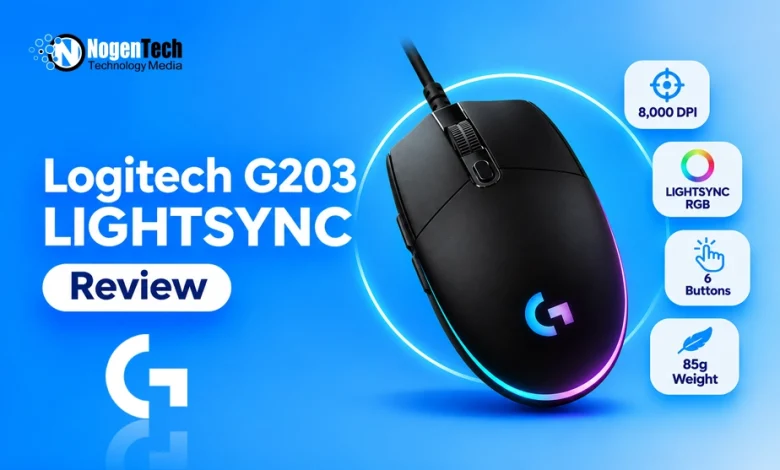
The Logitech G203 LIGHTSYNC targets exactly that market and offers a gaming-grade sensor, customizable RGB lighting, and six programmable buttons at a budget-friendly price.
Additionally, its compact design, non-removable cable, and 85g weight are worth considering. However, it lacks some features found in newer gaming mice, such as wireless connectivity and advanced sensor technology.
In this guide, we will see how the Logitech G203 LIGHTSYNC performs in everyday use and competitive gaming.
What Is the Logitech G203 LIGHTSYNC?
The Logitech G203 LIGHTSYNC is an entry-level wired gaming mouse designed for casual and competitive PC gaming. It features an optical sensor with adjustable sensitivity up to 8,000 DPI, six programmable buttons, a 1,000Hz polling rate, and customizable LIGHTSYNC RGB lighting.
Tom’s Hardware has also praised its compact, symmetrical-looking design, as it makes it particularly suitable for fingertip grip users and people with smaller hands. Logitech also includes a mechanical button tensioning system to provide consistent clicks during gaming.
Should You Buy the Logitech G203 LIGHTSYNC?
The G203 makes the most sense if you want a dependable wired gaming mouse without spending much. It provides the essential features most players need, but its compact shape and cable design may not suit everyone.
| Your priority | Recommendation |
| Budget gaming mouse | Excellent choice |
| Competitive FPS gaming | Very good |
| Small hands | Very good |
| Fingertip grip | Excellent |
| Palm grip with large hands | Consider a larger mouse |
| Wireless gaming | Look elsewhere |
| USB-C connectivity | Look elsewhere |
| RGB lighting | Excellent for its price category |
| MMO gaming with many shortcuts | Consider a dedicated MMO mouse |
| Simple everyday use | Excellent |
Gaming Performance of Logitech G203 LIGHTSYNC
The G203 performs particularly well in games where accurate tracking and quick clicks matter.
RTINGS describes it as an excellent FPS gaming mouse and highlights its exceptionally low click latency and consistent sensor performance. However, its somewhat heavy feel for its size and less flexible rubber cable are worth considering.
Here is how I would assess its suitability across different games:
| Game or genre | Suitability | Why |
| Call of Duty and Warzone | Good | Responsive clicks and accurate tracking support casual FPS gameplay |
| Valorant | Very good | Consistent tracking and low click latency suit controlled aiming |
| Counter-Strike 2 | Very good | 1,000Hz polling and responsive clicks provide dependable input |
| Apex Legends | Good | Sensor performance is suitable, although the cable can restrict movement |
| Fortnite | Very good | Six programmable buttons provide useful shortcuts |
| Overwatch 2 | Very good | Accurate tracking supports frequent target switching |
| GTA V | Excellent | Comfortable for general movement, driving, and shooting |
| Minecraft PvP | Very good | Responsive primary buttons support repeated clicking |
| MOBA games | Very good | Programmable buttons help with frequently used commands |
| MMO games | Good | G-Shift adds flexibility, but six physical buttons are limiting |
| RPG and adventure games | Excellent | Reliable tracking and programmable controls handle general gameplay |
| Casual and everyday use | Excellent | Simple design and accurate tracking work well for daily tasks |
These are practical suitability assessments based on the mouse’s hardware and design, not standardized benchmark scores for each game.
Logitech G203 LIGHTSYNC Specifications
| Specification | Details |
| Mouse type | Wired gaming mouse |
| Sensor | Optical gaming-grade sensor |
| Maximum sensitivity | 8,000 DPI |
| Minimum sensitivity | 200 DPI |
| Polling rate | 1,000Hz |
| Maximum report rate | 1ms |
| Tracking | Optical |
| Buttons | 6 programmable buttons |
| Switch technology | Mechanical spring button tensioning |
| Weight | 85g |
| Dimensions | 116.6 × 62.15 × 38.2mm |
| Connectivity | Wired USB-A |
| Cable length | 2.1m |
| RGB lighting | LIGHTSYNC RGB |
| Lighting customization | Approximately 16.8 million colors |
| Software | Logitech G HUB |
| Onboard memory | Yes |
| Hand orientation | Symmetrical body, side buttons on the left |
| Best for | FPS, casual gaming, and everyday use |
Below, I have described the features and specifications of the G203 LIGHTSYNC mouse according to the official Logitech product page.
1. Compact Design and Lightweight Construction
The Logitech G203 LIGHTSYNC has a compact design that measures 116.6mm long, 62.15mm wide, and 38.2mm high. At approximately 85g, it is reasonably lightweight, although some modern gaming mice weigh considerably less.
Its symmetrical-looking shape gives it a simple appearance, but the two additional thumb buttons are positioned on the left side. This makes it primarily suitable for right-handed users.
The mouse works particularly well with fingertip grip because of its relatively short length and compact body. Smaller-handed users may also find it comfortable with a claw or palm grip.
However, people with larger hands may struggle to get a comfortable palm or claw grip. RTINGS also points out that its compact dimensions are less accommodating for larger hands, although fingertip grip remains a practical option.
To help you find the perfect mouse, I have also created a dedicated guide on picking a Logitech mouse according to your hand size.
2. 8,000 DPI Optical Gaming Sensor
The G203 uses an optical gaming-grade sensor with adjustable sensitivity from 200 to 8,000 DPI.
While this is lower than the maximum sensitivity offered by premium gaming mice, 8,000 DPI is sufficient for most gaming situations. You can adjust the sensitivity depending on your preferred aiming style, screen resolution, and game.
For example, lower DPI settings can help with controlled aiming in tactical shooters, while higher settings can make cursor movement faster across gaming PCs or gaming laptops.
The sensor also delivers consistent tracking during both slow and fast movements. Its performance is particularly impressive for a budget mouse, which makes it suitable for players who want dependable tracking without paying for premium sensor specifications.
One thing worth mentioning is that Logitech does not publicly identify the exact sensor model in its current product specifications. I would not compare it directly with HERO sensors based only on the DPI figure.
3. 1,000Hz Polling Rate for Responsive Gaming
The G203 supports a polling rate of up to 1,000Hz, similar to the Logitech G703.
You don’t need an 8,000Hz mouse to enjoy competitive gaming. A 1,000Hz polling rate is still a practical standard for most players, including those who play FPS titles regularly.
The G203’s responsive performance is also supported by its low click latency. RTINGS highlights its exceptionally low click latency as one of the mouse’s strongest gaming features.
4. Mechanical Spring Button Tensioning
Logitech uses a metal spring button tensioning system for the G203’s primary left and right buttons.
This mechanism keeps the main buttons properly tensioned, which helps deliver consistent and crisp clicks. It also reduces unnecessary movement between the button and its mechanical switch.
For gaming, this is useful when you repeatedly click to fire weapons, perform attacks, or activate abilities. The buttons feel responsive without requiring you to press them excessively hard.
It is worth remembering that the G203 uses conventional mechanical switches rather than newer optical or hybrid switch technology. However, its clicking performance is still a strong point at this price level.
5. Six Programmable Buttons and G HUB Software
The G203 comes with six programmable buttons and gives you more control than a basic office mouse.
You get the:
- Standard left and right buttons
- Clickable scroll wheel
- DPI adjustment button
- Two thumb buttons
You can customize supported controls through Logitech G HUB.
For example, you can assign reload, melee, weapon-switching, or other frequently used commands to the side buttons. You can also configure shortcuts and macros for compatible applications.
The G203 supports G-Shift functionality, which allows you to create a secondary layer of commands using an assigned button. This gives you additional customization without requiring more physical buttons.
Its onboard memory also allows compatible settings to be saved directly to the mouse.
6. LIGHTSYNC RGB Lighting
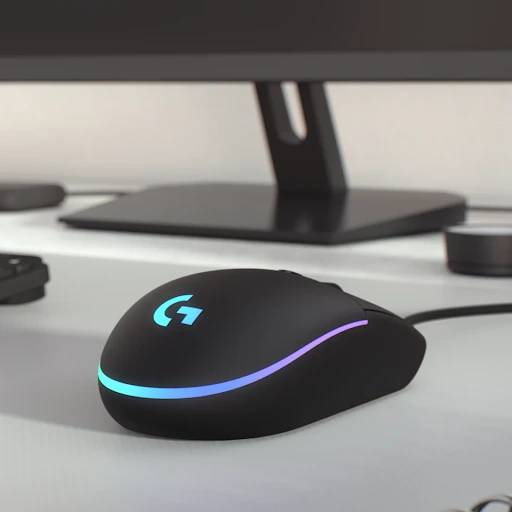
One feature that makes the G203 visually appealing is its LIGHTSYNC RGB lighting.
The mouse includes customizable lighting around the rear section and illuminated Logitech G branding. You can choose from different lighting effects, adjust colors, and create your own combinations through G HUB.
Logitech provides approximately 16.8 million color options, which allows you to match the mouse with your keyboard, headset, and other gaming accessories.
You can also use supported screen-sampling and audio-visualizer effects to make the lighting respond to on-screen content or sound.
RGB lighting does not improve tracking accuracy or gaming performance, but it gives the G203 a more attractive appearance than many basic budget mice.
7. Sensor Tracking and Accuracy
The G203’s optical sensor provides consistent tracking across different movement speeds. This is important for FPS games, where sudden movements and small aiming adjustments need to translate accurately onto the screen.
Its 8,000 DPI maximum is more than enough for most players. You can also adjust sensitivity in 50-DPI increments through compatible Logitech software, which gives you more control over your preferred settings.
The mouse feet glide smoothly across compatible surfaces, while its compact shape makes it easy to reposition during gameplay.
For a budget gaming mouse, its sensor performance is one of its strongest selling points.
Logitech G203 LIGHTSYNC Pros and Cons
| Pros | Cons |
| Affordable gaming mouse | Wired-only connectivity |
| Accurate and consistent optical tracking | Non-removable rubber cable |
| Responsive clicks with low latency | Compact shape may not suit larger hands |
| 1,000Hz polling rate | No tilt or free-spin scroll wheel |
| Six programmable buttons | No dedicated ergonomic thumb rest |
| Customizable LIGHTSYNC RGB | No wireless charging or Bluetooth |
| G-Shift and onboard memory support | 85g is not ultralight by modern standards |
Final Thoughts
The Logitech G203 LIGHTSYNC remains a solid budget gaming mouse for players who want reliable tracking, responsive clicks, and customizable RGB lighting without spending much.
Its 8,000 DPI sensor and 1,000Hz polling rate are sufficient for games such as Valorant, CS2, Fortnite, and Warzone. I particularly like its compact design and six programmable buttons for the price category.
However, the fixed rubber cable and small body are its biggest limitations. If you have smaller hands or prefer fingertip grip, the G203 is worth considering. If you need wireless connectivity or a more spacious ergonomic shape, look at other Logitech models instead.