AI can give you a complete article in seconds, but that doesn’t mean the article gives readers anything new and human.
If I simply ask AI to write an article on a topic, the result often covers the same general information that is already available across dozens of websites. Publishing that as it is doesn’t add much value for the reader.
That’s why you must collect and verify information from authoritative sources first, add what you’ve learned from your own experience, and then use AI to help shape the draft.
For me, humanizing AI content isn’t just about making the words sound natural; it’s about making the information genuinely yours.
How to Humanize AI Content: 8 Simple Ways
Humanizing AI content means editing AI-generated text so it reflects your natural voice, experience, examples, and understanding of the reader.
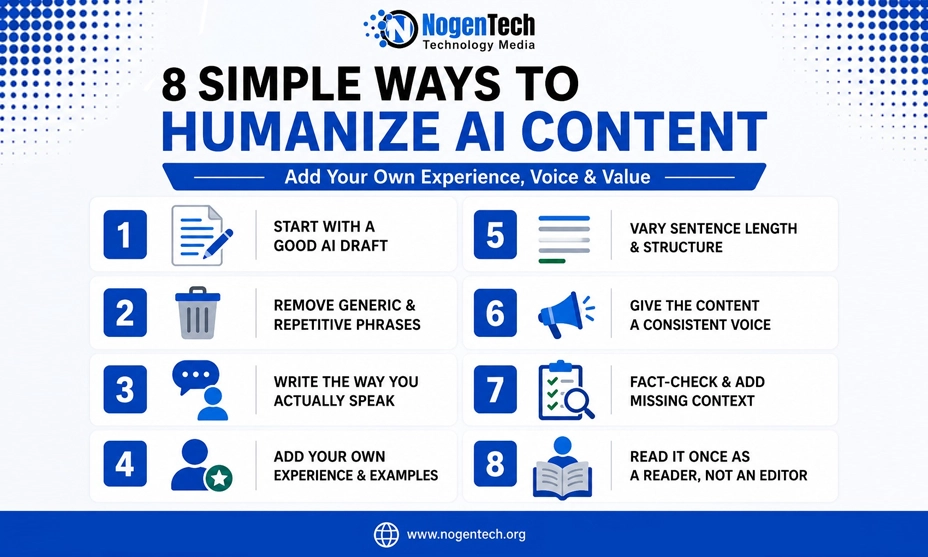
You don’t need a complicated editing process. These are the eight things you’d focus on when turning an AI draft into something more natural.
1. Start With a Good AI Draft
A good AI draft should start with your own information, not just a one-line prompt.
First, collect and verify information from authoritative sources and add your own experience, screenshots, or observations. Then give that material to AI with clear instructions.
Instead of simply asking:
Write an article about improving WiFi.
You’d use:
Using the information I’ve provided, write a practical guide for home users with slow WiFi. Keep the language conversational, don’t add unsupported claims, and focus on simple fixes they can try before contacting their ISP.
This gives a cleaner starting point whether you’re using ChatGPT or another AI tool. AI should only help you shape information rather than becoming the source of the article.
2. Remove Generic and Repetitive AI Phrases
This is normally the first thing you must clean up. AI tends to over-explain simple ideas, repeat conclusions, and add introductions that aren’t really needed.
For example:
Before: In today’s rapidly evolving digital landscape, having a strong WiFi connection is more important than ever.
Simply write:
After: A slow WiFi connection gets frustrating quickly.
Don’t follow a giant blacklist of supposed “AI words.” Simply just ask yourself: Would I naturally say it this way? If not, change it.
3. Write the Way You Actually Speak
AI writing can become unnecessarily formal. Something like “It is advisable to evaluate the generated content prior to publication.” This sounds much less natural than “I’d read the draft once before publishing it.”
For this, use contractions, familiar words, questions, and shorter sentences where they fit. That doesn’t mean deliberately adding grammar mistakes. The goal is to sound natural, not careless.
This follows common conversational writing guidelines, where simple language, contractions, and direct wording make content easier to read.
4. Add Your Own Experience and Examples
This probably makes the biggest difference when humanizing AI writing. AI can tell readers that an approach works. You can tell them what happened when you actually tried it.
Instead of:
AI tools can save writers time.
You could say:
I find AI most useful for getting past the blank page, but I still spend time replacing generic examples and checking the facts before publishing.
Screenshots, observations, original examples, comparisons, and lessons learned can all give readers something a generic AI response doesn’t.
That also fits with Google’s guidance around creating helpful, people-first content that demonstrates first-hand experience.
5. Vary Sentence Length and Structure
AI often produces sentences with a similar length and rhythm. Break that pattern by mixing short sentences with longer explanations where they’re actually needed.
Do the same with paragraphs. Not every paragraph needs three sentences, and not every section needs to be the same length. Once the point is clear, move on.
6. Give the Content a Consistent Voice
Humanized content should not only sound natural. It should sound like the person or brand publishing it.
If you start a guide in a conversational voice, the upcoming new section should not suddenly read like an academic paper.
When humanizing ChatGPT text, give it clearer instructions such as:
Rewrite this in a conversational first-person voice. Keep the meaning, remove filler, and explain it as if I’m showing the reader what I did myself.
After that, still review the result afterward because probably till now AI doesn’t always get the voice right on the first attempt.
7. Fact-Check and Add Missing Context
A natural-sounding sentence can still contain incorrect information.
Before publishing AI-assisted content, proofread anything that can change, especially prices, dates, statistics, software features, product specifications, names, and company claims.
ChatGPT is a good example of why fact-checking matters. Its features, interface, model options, and usage limits can change over time.
So you’d verify those details from the current product before including them in an article instead of relying on an older AI-generated answer.
That’s the kind of current detail you’d verify instead of trusting an AI model to remember correctly.
8. Read It Once as a Reader, Not an Editor
My last step is simple: I stop looking for “AI writing” and just read the article normally. If something feels repetitive, too formal, unnecessary, or difficult to say naturally, I change it.
Reading the content aloud helps too. Awkward sentences become surprisingly obvious once you actually hear them. Then I stop editing.
Can Free AI Humanizer Tools Help?
Yes, especially when you need a quick starting point.
A free AI humanizer tool can be useful for quickly rewriting sentences that still sound robotic or overly structured.
You’d use it as an editing aid rather than relying on the output as the final version. Give the rewritten text one last read, make sure the original meaning is intact, and adjust anything that doesn’t sound like you.
A humanizer can rewrite the words; it can’t replace your experience, fact-checking, or judgment.\
FAQs About Humanizing AI Content
How Do You Humanize AI-Generated Text?
Remove generic wording and repetition first. Then simplify unnatural sentences, add your own examples and experience, adjust the voice, verify important facts, and give the finished draft one manual read before publishing.
How Can I Humanize ChatGPT Text?
Give ChatGPT clear instructions about your audience, purpose, and writing style before generating the draft. Afterward, remove filler, replace generic examples with your own, check the information, and rewrite anything you wouldn’t naturally say yourself.
Can Grammarly Humanize AI Text?
Yes. Grammarly currently offers an AI Humanizer designed to make AI-generated or AI-assisted text sound more natural while preserving its meaning. I’d still manually review the result afterward, particularly when the article needs a specific personal or brand voice.
Can Humanized AI Content Still Be Detected as AI?
Yes. Humanizing AI content doesn’t guarantee a particular result from an AI detector.
That’s why I wouldn’t edit content simply to chase a detector score. I’d focus on whether the final version is accurate, natural, useful, and worth reading.
Final Thoughts on AI Content Humanization
Humanizing AI content doesn’t have to become another lengthy writing process. I also use AI to get the draft moving, then focus on the parts where my input matters most: removing generic writing, adding real experience, improving the voice, and checking the facts.
AI can help write the first draft, but you’d still make the final one yours.