Struggling with complex video editors? Fotor AI Video Generator claims to simplify everything.
Short videos are everywhere, but creating one that actually looks professional is still a challenge.
I’ve dealt with complicated editing tools and wasted hours just trying to make a simple clip, which is why I decided to try Fotor AI Video Generator.
I wanted to see if this AI could really turn text or images into clean, professional-looking videos without the usual effort.
So in this review, I’ll break down what it is, overall Fotor AI’s key features, how it works in real usage, its pricing, and whether it’s safe to help you decide if it’s worth using in 2026.
What is Fotor AI?
Start creating Verdict in seconds, and convert more of your visitors into leads.
Fotor is an all-in-one AI creative platform for photo editing, graphic design, AI image generation, and AI video creation with Text-to-Video, Image-to-Video, and AI tools.
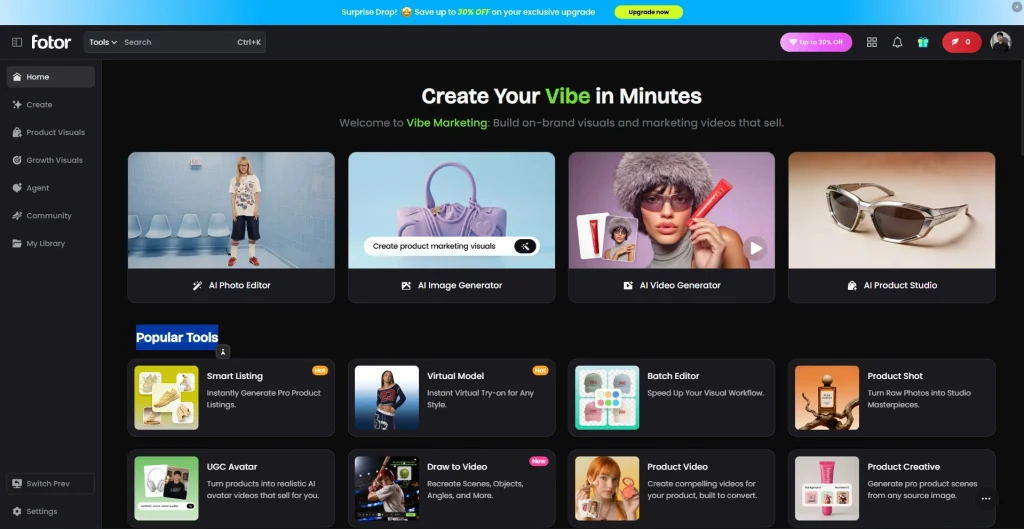
Its AI Video Generator turns text prompts and images into short videos using cloud-based automation. When I tested it, I focused on how practical it is for everyday users, especially beginners. Overall, it simplifies video creation by removing the need for complex editing tools or skills.
Key Features Making Fotor’s AI Video Generator User-Friendly
Start creating Verdict in seconds, and convert more of your visitors into leads.
Fotor AI Video Generator features go beyond text-to-video, offering AI-powered tools for video creation, editing, product marketing, virtual models, and content enhancement. Here are its key features.
- Creative Elements & Avatar Tools: Fotor AI provides elements and AI avatar tools to enhance videos with visuals, animations, and AI-generated presenters.
- Image-to-Video: Upload a photo, and Fotor animates it into a dynamic AI-generated video with motion effects. It’s useful for social media content, marketing visuals, and storytelling.
- Text-to-Image: You enter a text prompt, and Fotor generates AI images in different artistic and realistic styles. It’s ideal for creating concepts, illustrations, social media graphics, and marketing assets.
- Magic Sync: Magic Sync transfers motion and actions from a reference video to your generated content, making animations smoother and more consistent.
- Elements: Fotor provides built-in elements like graphics, stickers, icons, and design assets to customize AI-generated images and videos without starting from scratch.
- Video Transform: This tool transforms existing videos with AI-powered visual styles, effects, and enhancements while preserving the original content.
- AI Art Effects: Apply AI-powered artistic filters and creative effects to transform ordinary photos and videos into stylized visuals.
- BG Remover: Automatically removes image backgrounds with AI, making it easy to create transparent images, product photos, and marketing materials.
- AI Background: Replace or generate entirely new AI backgrounds for portraits, products, and creative visuals without manual editing.
- 1-Tap Enhance: Improve image quality with a single click by automatically adjusting sharpness, lighting, color, and overall clarity.
- AI Headshot: Generate professional AI headshots for business profiles, resumes, portfolios, and social media without a traditional photoshoot.
- Batch Editor: Edit multiple images simultaneously using AI, making large-scale photo processing faster and more efficient.
- Video Template: Choose from ready-made video templates to quickly create promotional videos, social media content, and marketing campaigns without manual video editing or design effort.
- AI Hairstyle: Experiment with different hairstyles and hair colors using AI before making real-life changes or creating virtual looks.
- Text-to-Speech: Convert written text into natural-sounding AI voiceovers for videos, presentations, advertisements, and other multimedia content.
- Video Extend: Extend the duration of AI-generated or existing videos by generating additional frames that blend naturally with the original clip.
- Video-to-Video: Transform existing videos into new styles, scenes, or visual effects using AI while maintaining the original motion.
- AI Photo Editor: Edit photos with AI-powered tools for retouching, enhancement, object removal, color correction, and other common editing tasks.
- AI Product Studio: Create professional product images, marketing assets, and branded visuals using AI-generated backgrounds, lighting, and compositions.
- Video Try-On: Generate AI videos that showcase virtual clothing, accessories, or products on digital models for eCommerce and fashion marketing.
- Link to Video Ad: Turn a product or webpage link into an AI-generated promotional video, helping businesses create ads with minimal effort.
- AI Model Generator: Create realistic virtual models for fashion, beauty, and product marketing without hiring photographers or human models.
- Smart Listing: Generate optimized eCommerce product listings with AI-written titles, descriptions, and visuals for online marketplaces.
- Product Creative: Generate promotional product scenes, lifestyle compositions, and advertising creatives from a single product image.
- Product Video: Create AI-powered product showcase videos designed for online stores, social media marketing, and digital advertising.
How to use Fotor AI Video Generator?
Start creating Verdict in seconds, and convert more of your visitors into leads.
Now, I will give you a step-by-step process on how you can use Fotor to generate an AI video:
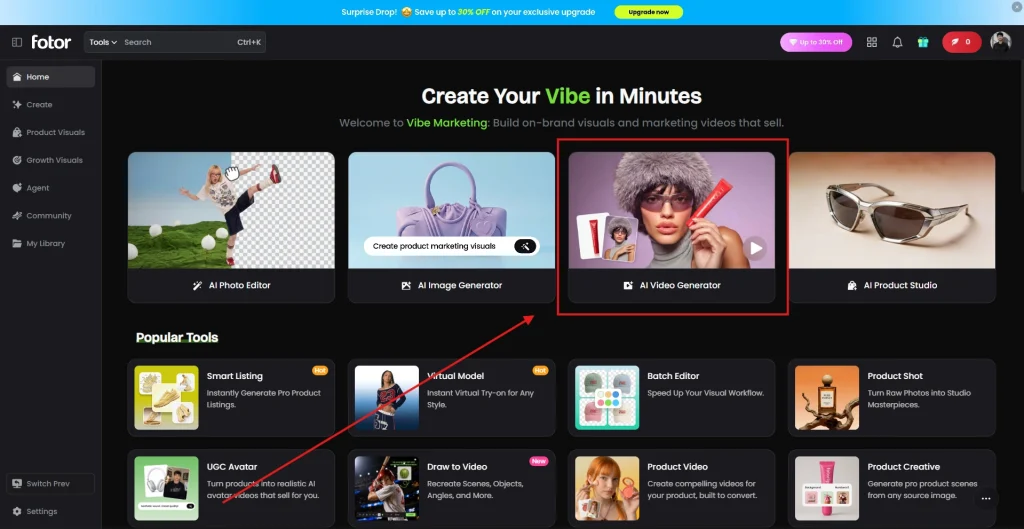
Step 1: Launch the AI Video Generator
From the Home dashboard, click AI Video Generator to open Fotor’s AI video workspace.
Step 2: Configure Your Video
Choose your preferred generation mode (Text/Image, First & Last Frames, or Video Transform), select an AI model, upload an image if needed, enter your prompt, and adjust the resolution, duration, and audio settings.
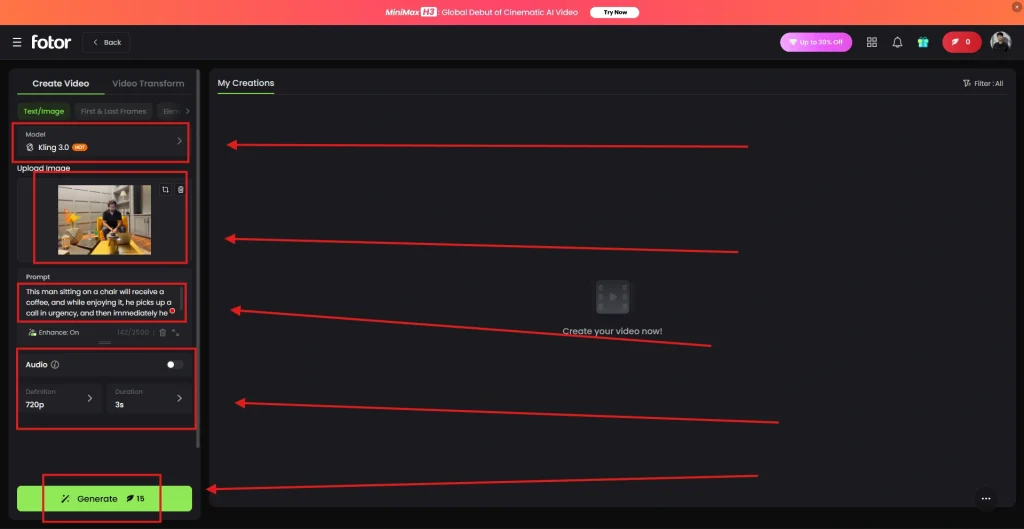
Step 3: Generate Your Video
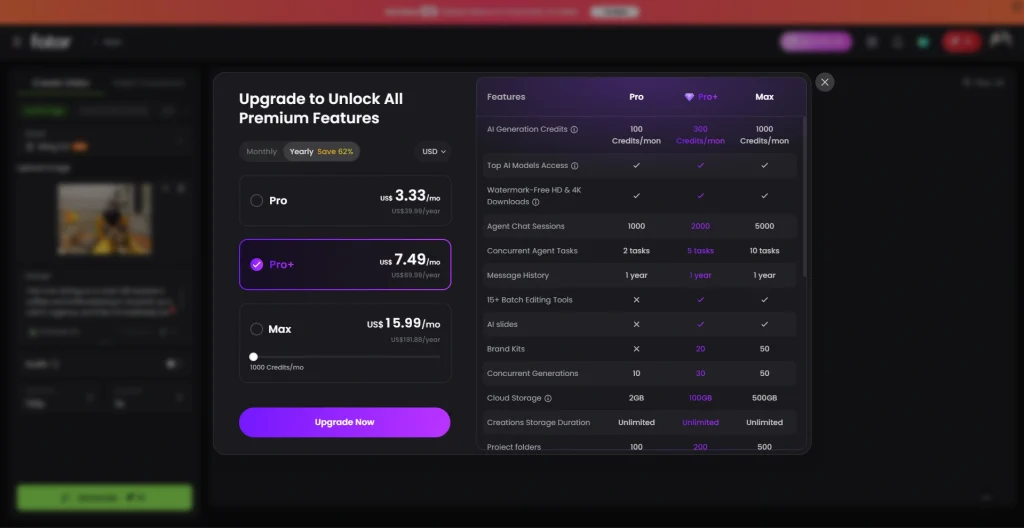
Click Generate to start creating your video. Fotor uses AI generation credits, so if you’ve reached your limit, you’ll need to upgrade your plan to continue generating videos.
While the Fotor AI image-to-video generator tool uses models like Seedance 2.0 and other heavy-duty models like Kling, a few of the latest models are still unavailable on it, such as Seedance 2.5. However, it still strikes a great balance between processing speed and ease of use for everyday creators.
Fotor AI Video Generator Pricing
Start creating Verdict in seconds, and convert more of your visitors into leads.
Fotor AI Video Generator offers a free plan plus Pro, Pro+, and Max plans with more AI credits, premium models, HD/4K exports, and cloud storage.
According to the current interface, Fotor offers three paid plans:
| Plan | Price (Yearly Billing) | AI Credits/Month | Best For |
|---|---|---|---|
| Free | $0 | Limited | Beginners |
| Pro | US$3.33/month | 100 | Casual creators |
| Pro+ | US$7.49/month | 300 | Content creators & marketers |
| Max | US$15.99/month | 1000 | Businesses & power users |
Which Fotor Plan Should You Choose?
- Free – Best for testing Fotor AI Video Generator and basic AI video creation.
- Pro – Ideal for individuals creating AI videos occasionally.
- Pro+ – Recommended for content creators, marketers, and social media managers.
- Max – Best for agencies, businesses, and users generating AI videos at scale.
Is the Fotor AI Video Generator Interface Easy to Use?
Start creating Verdict in seconds, and convert more of your visitors into leads.
Yes. Fotor AI Video Generator has a beginner-friendly interface with guided AI tools, simple controls, and cloud-based video generation.
The interface is organized into clear sections:
- Text/Image
- First & Last Frames
- Video Transform
- AI model selection
- Prompt editor
- Resolution settings
- Duration controls
- One-click generation
Even first-time users can generate videos in a few minutes.
Tips to Create High-Quality Videos
Start creating Verdict in seconds, and convert more of your visitors into leads.
To get the best results from Fotor, the quality of your input matters just as much as the tool itself. Here are some simple tips to improve your output:
- Write clear and detailed prompts instead of short or vague ideas. The more specific your text, the better the video result.
- Use high-quality images for image-to-video generation to avoid blurry or low-detail outputs.
- Choose the right style (cinematic, photography, illustration) based on your content goal.
- Keep video duration short for better visual consistency and smoother AI rendering.
- Match resolution to use case: 720p for social media, 1080p for higher-quality needs.
- Experiment with “Inspire Me” if you’re unsure; it often gives better prompt structure ideas.
These small adjustments can significantly improve the clarity, motion, and overall professionalism of your AI-generated videos.
Is Fotor Safe and Legit to Use?
Start creating Verdict in seconds, and convert more of your visitors into leads.
Many users searching for Fotor want to confirm its safety before uploading images or creating videos.
From experience, it is a legitimate, widely used AI editing platform, not a suspicious tool, and it works like a standard SaaS creative editor.
It uses cloud-based processing, meaning files are handled online instead of being downloaded, which reduces malware or installation risks.
However, like any AI tool, avoid uploading sensitive or private data if you’re unsure about usage rights.
Overall, Fotor AI Video Generator is safe for general creative use and reliable for beginners and content creators.
People Also Ask
Start creating Verdict in seconds, and convert more of your visitors into leads.
Is Fotor AI Video Generator free to use?
Yes. Fotor AI Video Generator offers a free plan with limited AI credits, while paid plans unlock premium AI models, HD exports, and higher limits.
Does Fotor AI Video Generator add a watermark?
Watermark availability depends on your plan. Premium subscriptions provide watermark-free HD and 4K downloads with additional AI generation benefits.
How much does Fotor cost?
Fotor offers both free and paid plans. Its pricing starts from 7$ monthly; however, it depends on features, export quality, and access to advanced AI tools.
Can Fotor turn images into videos?
Yes, the AI Image-to-Video feature lets you upload images and automatically convert them into short animated videos.
Can Fotor generate videos from text?
Yes. Text-to-Video converts written prompts into short AI-generated videos.
Does Fotor support Video-to-Video generation?
Yes. Video Transform and Video-to-Video let you restyle existing videos using AI.
Which AI models does Fotor support?
The current interface includes models such as Kling 3.0, with additional models available depending on your subscription.
Does Fotor require AI credits?
Yes. Every AI video generation uses AI Generation Credits, which vary by subscription plan.
Can I download videos without a watermark?
Premium plans include watermark-free HD and 4K downloads. Availability depends on your subscription.
Final Thoughts: Is Fotor AI Video Generator Worth It in 2026?
Start creating Verdict in seconds, and convert more of your visitors into leads.
After testing Fotor, I found it to be a solid AI video tool for beginners and quick content creation. It’s especially useful for turning simple text or images into short videos without editing skills.
While it doesn’t fully replace professional editing software, it does save time and simplifies the entire process.
In my opinion, it’s worth using if your goal is fast, easy, and decent-quality video creation for social media or marketing needs.