I invited a friend over for breakfast before we headed to the office together. As soon as he arrived, I noticed him quietly observing my house, from the outdoor space to the interiors. He didn’t say anything until we left.
Then he smiled and said, “Your house feels a little old school.”
Confused, I asked why.
He explained that we’re just a few months away from 2027, yet I hadn’t made any smart home tech upgrades. According to him, a smart home isn’t only about buying gadgets. It starts with preparing your home through:
- A stronger Wi-Fi network
- Better lighting planning
- Updated electrical systems
- Future-ready infrastructure
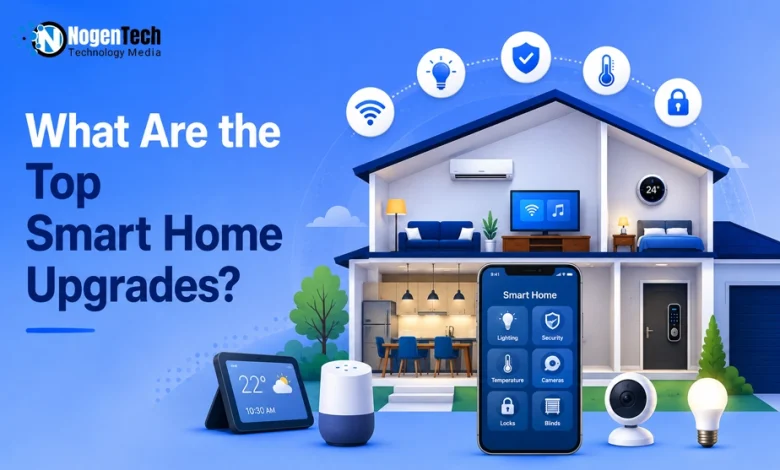
That’s when I realized smart living is about building the right foundation, not just adding technology. If you’re wondering what the top smart home upgrades are, here are the improvements worth making.
10 Improvements Worth Making Before Adding Smart Tech To Your Home
Whether you’re renovating your entire house or making small improvements, these upgrades can help you build a smarter, safer, and more energy-efficient home.
Here are the top smart home upgrades every homeowner should consider:
- Strengthen Your Home Wi-Fi Network
- Upgrade Your Electrical System
- Refresh Your Walls Before Installing Smart Devices
- Improve Your Home Lighting Design
- Upgrade Doors and Windows
- Improve Energy Efficiency First
- Create a Dedicated Smart Home Hub Area
- Prepare for Smart Home Security
- Choose Technology That Can Grow With You
- Focus on Lifestyle, Not Just Technology
1. Strengthen Your Home Wi-Fi Network
Start by checking whether every smart device in your home is connected and responds instantly. A buffering video doorbell or a slow smart speaker often points to weak Wi-Fi coverage, not a faulty device.
Before buying more smart products, test your network in garages, hallways, and outdoor spaces where signals usually weaken. Thick walls and large appliances can easily create dead zones.
At the same time, don’t assume the network is always at fault. I once had a laptop that wouldn’t connect even while sitting next to the modem, and the issue turned out to be the device itself.
So, identify the real problem first. If coverage is the culprit, reposition your router or install a mesh Wi-Fi system for a more reliable smart home.
2. Upgrade Your Electrical System
Installing smart devices becomes frustrating when you run out of outlets or discover your existing switches aren’t compatible. That’s why upgrading your electrical system early can save both time and money.
Consider adding:
- Extra power outlets in high-use areas
- USB charging ports for everyday convenience
- Smart-ready light switches for future automation
If you’re already renovating, ask your electrician about future-proof wiring. A little planning now can prevent expensive wall repairs later when you decide to add more smart home features.
3. Refresh Your Walls Before Installing Smart Devices
Many homeowners repaint their interiors before mounting smart thermostats, wall panels, cameras, or control hubs. It’s a simple upgrade that gives the home a fresh, modern appearance.
However, don’t rush the installation once the painting is finished. You must have a clear understanding of the paint cure time because freshly painted walls may feel dry within hours but can take several weeks to fully harden.
Installing wall-mounted smart devices too early may leave marks, weaken adhesive mounts, or damage the paint finish.
Planning your painting and smart home installation together helps you achieve a cleaner and more professional result.
4. Improve Your Home Lighting Design
While redesigning the corner I have shown you in my image, one thing became obvious: good lighting isn’t about making a room brighter; it’s about making every area serve its purpose.
The warm lamp works well for relaxing, but working on a laptop still depends on proper task lighting.

Instead of relying on a single light source, combine:
- Ambient lighting for overall brightness
- Task lighting where you read or work
- Accent lighting to highlight walls or décor
Planning the lighting layout first makes it much easier to automate different zones later without replacing every fixture.
5. Upgrade Doors and Windows
One detail that’s often ignored during renovations is how much the building itself affects smart devices. Even perfectly installed smart locks or sensors can struggle if doors don’t close properly or windows leave small gaps.
Before investing in automation, inspect:
- Door alignment
- Window seals
- Weather stripping
- Frame condition
These upgrades improve insulation while giving smart security devices a more reliable foundation.
6. Improve Energy Efficiency First
A modern-looking home doesn’t always mean an energy-efficient one. Even after updating interiors, unnoticed air leaks around windows and doors can force cooling systems to work harder throughout the day.
Start with:
- Sealing air leaks
- Adding insulation
- Upgrading old windows
These improvements reduce energy loss first, allowing smart thermostats to optimize comfort instead of constantly compensating for it. When you pair good insulation with smart tech designed for hot weather, keeping your home cool becomes both effortless and cost-effective.
7. Create a Dedicated Smart Home Hub Area
As you may notice in the image above, you’ll see the workspace stays clean because most accessories remain organized instead of scattered across the room. The same principle applies to smart homes.
Reserve one location for:
- Router and modem
- Smart home hub
- Charging station
- Backup power supply
Keeping everything together makes maintenance easier and prevents cable clutter as your smart home expands.
8. Prepare for Smart Home Security
Most people choose camera models before deciding where they’ll actually be installed. In reality, placement has a greater impact on security than buying a more expensive camera.
Before installation, map out:
- Main entrances
- Blind spots
- Outdoor lighting
- Wi-Fi coverage
A properly planned layout often delivers better results than simply adding more cameras. Plus, incorporating modern AI-powered security systems ensures your setup can accurately filter out false alarms and recognize actual security threats.
9. Choose Technology That Can Grow With You
Home interiors usually change every few years, but your smart home ecosystem shouldn’t need a complete rebuild each time.
Choosing devices that support Matter or multiple ecosystems lets you upgrade rooms gradually instead of replacing everything at once.
Future flexibility is often a better investment than buying the newest device available today.
10. Focus on Lifestyle, Not Just Technology
The room in the image isn’t filled with gadgets, yet it feels modern because it’s designed around how the space is actually used. That’s the goal every smart home should aim for.
Before adding new technology, ask whether it will:
- Save time
- Improve comfort
- Increase security
- Fit naturally into your daily routine
The smartest homes aren’t defined by the number of connected devices; they’re defined by how effortlessly those devices support everyday life.
Offloading repetitive chores to automated outdoor cleaning robots is a great example of tech that genuinely gives you time back.
What People Also Ask More
What is the most valuable smart home upgrade?
A reliable Wi-Fi network is one of the most valuable upgrades because nearly every smart device depends on a stable internet connection.
Should I renovate before installing smart home devices?
Yes. Completing renovations like painting, electrical improvements, and networking upgrades first makes installing smart devices much easier.
Do smart home upgrades increase property value?
Well-planned smart home improvements can make a property more attractive to buyers by improving convenience, security, and energy efficiency.
Why does paint cure time matter before installing smart devices?
Fresh paint needs time to fully harden. Waiting for the recommended paint cure time helps prevent wall damage when mounting smart thermostats, cameras, or control panels.
My Final Thoughts on Smart Home Renovation
The top smart home upgrades aren’t always the ones with the highest price tags. In many cases, improving your home’s Wi-Fi, electrical setup, lighting, or overall infrastructure creates a better experience than adding another smart device.
If you ask me, the best approach is to upgrade your home step by step instead of chasing every new trend.
Build a solid foundation first, then expand your ecosystem with platforms like Google Home, Amazon Alexa, or Apple Home whenever it makes sense. Once your core infrastructure is solid, picking out the top smart home gadgets becomes a fun, stress-free step.