ChatGPT’s New Computer History Feature Tracks Your Clicks and Keystrokes, Not Your Screen
OpenAI launched Computer History for ChatGPT's Mac app, tracking clicks and app switches to build a searchable activity timeline.

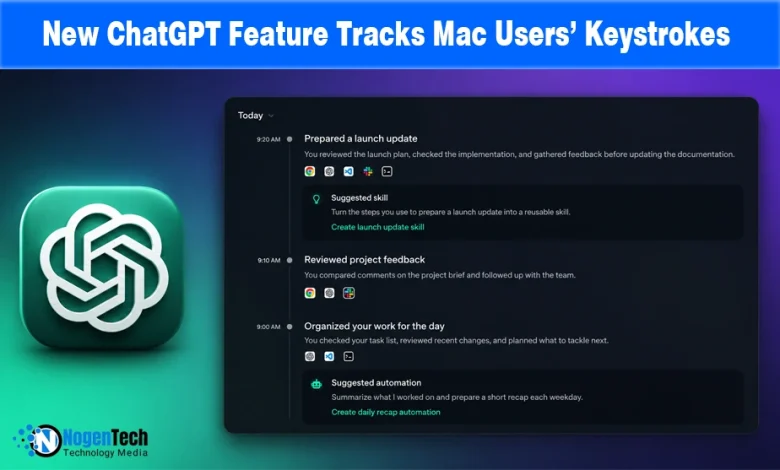
OpenAI rolled out Computer History on Thursday, a new opt-in feature for the ChatGPT desktop app on macOS that records clicks, typing, keyboard shortcuts, and app switches across a user’s chosen apps and websites.
It then turns that activity into a searchable timeline ChatGPT and Codex can reference. The feature replaces the OpenAI Chronicle feature, an earlier research preview that took periodic screenshots to understand what users were doing.
It’s available now to Pro, Business, and Enterprise ChatGPT subscribers in the US, though not yet in the European Economic Area, Switzerland, or the United Kingdom.
A Deliberate Retreat From Screenshots
OpenAI’s own documentation makes clear that Computer History is a shift in how the feature works, not just a new name. Chronicle used screenshots, while Computer History records interaction events and does not capture the screen or audio.
That difference matters for privacy. A screenshot could capture anything visible on the screen, including private messages or financial information, even when that content was unrelated to what the user was doing.
Interaction events instead record actions such as clicks, keystrokes, and app switches without saving what was visible on screen.
This allows OpenAI’s AI model to understand and summarize what happened without keeping a screenshot of the user’s activity.
What It Actually Lets ChatGPT Do
Yahoo’s reporting described the practical upside plainly: Users can ask ChatGPT what they were working on before a break, find a document by describing it rather than remembering its filename, or get a summary of their day’s work for a standup.
OpenAI’s documentation says that when the system detects a repeated workflow, it can suggest turning it into a reusable skill or task automation, allowing the AI assistant to learn from a user’s habits and handle the next occurrence automatically.
This goes beyond an everyday chatbot answering questions. Computer History creates a persistent record of what users did and how they did it, allowing ChatGPT to draw on that context across sessions instead of starting from scratch each time.
The Privacy Tradeoff OpenAI Is Asking Users to Accept
The main concern is how much trust this feature requires relative to what it delivers.
OpenAI’s own documentation is candid about its AI risks. The company says Computer History increases the risk of prompt injection because malicious instructions in a visited website or app could influence ChatGPT’s behavior.
It also confirms that the resulting memory files are not encrypted and are stored as plain text that other programs running under the same Mac account could potentially access.
This creates a different risk profile from Chronicle’s screenshots. The concern is that turning raw activity into structured and referenceable memories gives attackers a larger surface to manipulate an AI agent with ongoing context about a user’s work.
OpenAI’s safeguards include opt-in access, per-app exclusion controls, and a warning to disable the feature during conversations with other people without their consent.
These controls give users more control, but they only help if users understand the settings before enabling a feature that can track their activity across a Mac device.