How to Make Legacy Code Easier to Maintain with Functional Programming: 5 Safe Steps
Make legacy code easier to maintain by adding tests, finding hidden data changes, splitting large functions into pure functions, and separating calculations from operations that modify records.

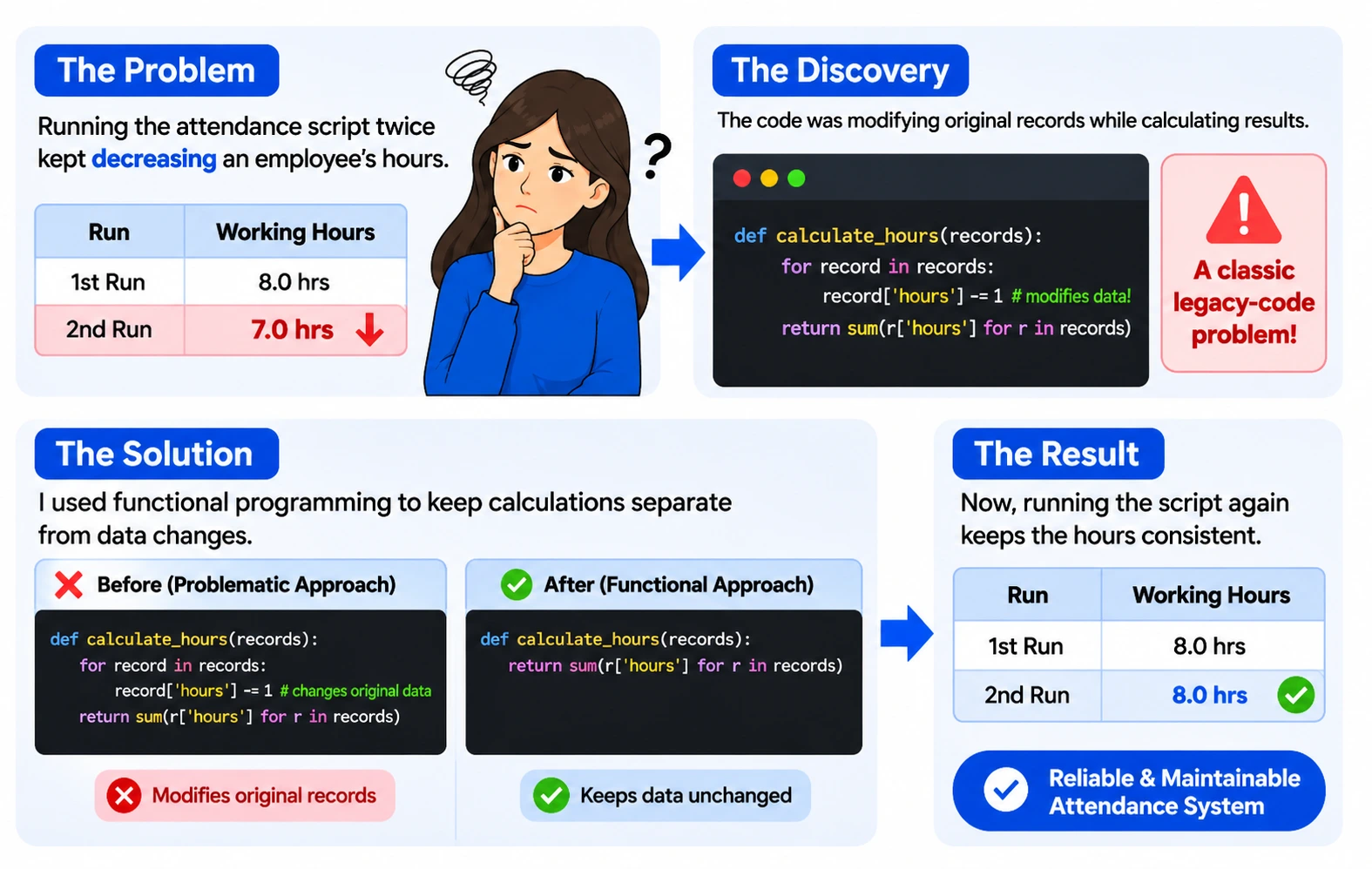
“Why do my employees’ working hours KEEP DECREASING every time I run the attendance script?”
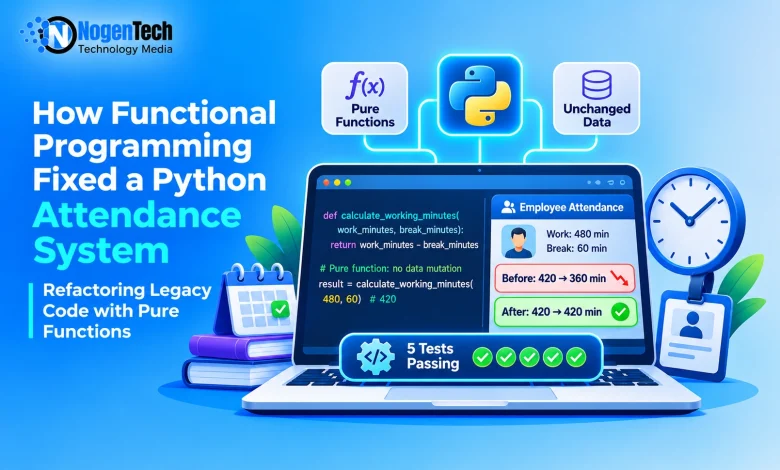
That message from a colleague sounded like a calculation bug. It wasn’t. While working on a small Python-based Employee Attendance Management System, I found that the script was changing the original attendance records every time it calculated working hours. Run it once, and an 8-hour day with a 60-minute break showed 420 minutes. Run it again, and it showed 360.
This is a classic legacy code problem: software that still does an important job, but nobody can change it without fear. I didn’t rebuild the system. I fixed it in five small steps using functional programming techniques like pure functions, and the same attendance record now gives the same result every time.
Code That Works, But Nobody Dares Touch
Legacy code is older software or code that is still being used but has become difficult to understand, test, or modify. It may rely on outdated technology, lack documentation, or contain changes that nobody fully understands.
In his book Working Effectively with Legacy Code, Michael Feathers explores the challenges developers face when making changes to existing code, particularly when automated tests are missing.
Think of an old house with confusing electrical wiring. You turn on the kitchen light, and somehow the bathroom light goes out.
However, legacy code is not automatically bad code. Older systems can still be reliable and perform important business tasks. The real problem begins when developers cannot confidently change them without risking something that already works.
That was exactly the situation with the Employee Attendance Management System.
Three Ways My Attendance Script Was Quietly Fragile
Working with legacy code becomes frustrating when a small change can produce an unexpected result. The Employee Attendance Management System had three common problems:
- Hidden changes: A function quietly modifies data outside itself, such as repeatedly deducting break time from an employee’s stored working hours.
- Do-everything functions: One function calculates working hours, deducts breaks, updates attendance records, and prints results. Fixing one part means dealing with several responsibilities.
- Missing tests: Without automated tests, developers have no quick way to check whether a change has affected existing attendance calculations or records.
Small issues like these can become more expensive over time, especially when website maintenance and its hidden costs are overlooked. The longer these problems remain unresolved, the harder they can be to fix.
The solution is not necessarily to replace old code. Developers first need to understand how the existing attendance system works and find a safer way to improve it.
Same Input, Same Answer: Why Pure Functions Fit?
Functional programming offers practical techniques for making code easier to understand, test, and change. You do not need to rewrite an application or switch to a functional programming language to use them.
A Function That Keeps Its Hands Off Your Data
A pure function works like a calculator. You give it some input, it returns an answer, and it does not secretly change anything outside itself.
For example, a function that calculates an employee’s net working hours should return the result after deducting the break time without changing the original attendance record.
Pure functions are easier to test because the same input produces the same output. Developers can check attendance calculations independently without setting up the entire employee management system.
Calculations Inside, Printing Outside
I also found Gary Bernhardt’s Functional Core, Imperative Shell approach useful. It provides a practical way to separate business calculations from operations that interact with the outside world.
The idea is straightforward: keep business calculations in a functional core and move outside operations, such as printing, saving files, or communicating with databases, to a separate shell.
The core handles decisions and calculations. The shell handles interactions with the outside world. This separation makes important business logic easier to test and maintain.
Although functional programming offers useful techniques, developers must first decide how much of the existing application actually needs to change.
Fix It, Rebuild It, or Upgrade It? Why I Chose to Fix
These three approaches are related, but they solve different problems.
| Approach | What it means | Best when |
| Refactoring | Improving existing code without changing its intended behavior | The application still works but is difficult to maintain |
| Rewriting | Building the application again, often with a new structure or technology | The existing system cannot reasonably support required changes |
| Modernizing | Updating technology, architecture, infrastructure, or the overall application | The system needs broader improvements, such as cloud migration or new capabilities |
For the employee attendance system, refactoring was the sensible choice. Replacing the entire application would have introduced unnecessary work and risk.
However, if an old application has serious security problems, outdated infrastructure, or limitations that prevent it from meeting business requirements, a wider modernization project may be necessary.
For businesses facing these challenges, exploring different application modernization service providers can help them understand the available options for updating older systems.
420, Then 360: How I Stopped the Shrinking Hours
The employee attendance management script I was working with was responsible for recording employees’ working hours and calculating their net working time after deducting breaks.
It had been performing its basic task, so the calculation logic had not been examined closely. However, while testing the script, I noticed something unusual: an employee’s total working hours kept decreasing whenever I ran the attendance script again.
Before changing anything, I recreated a simplified version on my laptop and ran it twice using the same attendance record.
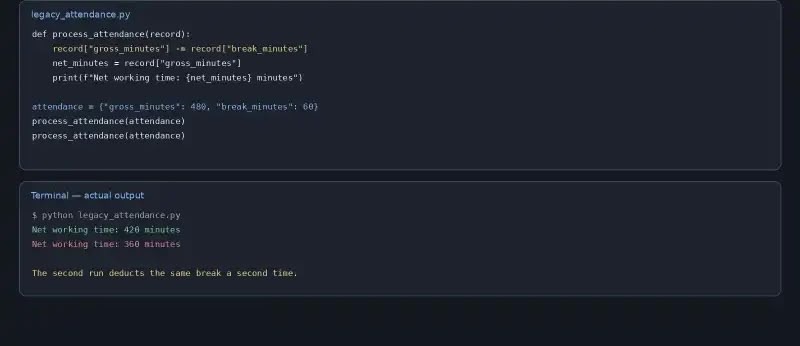
The first run showed 420 minutes (7 hours) of net working time, while the second showed only 360 minutes (6 hours). The problem was in the calculation logic, where the script directly subtracted the break duration from the original working minutes. When the code ran again, it deducted the same break a second time.
Here is the calculation behind those results, using an original attendance record of 480 minutes (8 hours) and a 60-minute break:
| Calculation | First run | Second run |
| Starting working time | 480 minutes | 420 minutes |
| Break deduction | -60 minutes | -60 minutes |
| Net working time | 420 minutes | 360 minutes |
A quick patch might have fixed the visible calculation problem, but I wanted to make the underlying code safer to work with. Here are the five steps I followed.
Step 1: Freeze the Evidence First
My first move was to put the script under version control. Having a proper revision control system in place meant I could track every change and return to an earlier version if something went wrong.
Next, I created a baseline regression test for the attendance calculation. Rather than assuming the existing system was working perfectly, I recorded what it produced under a known set of attendance records.
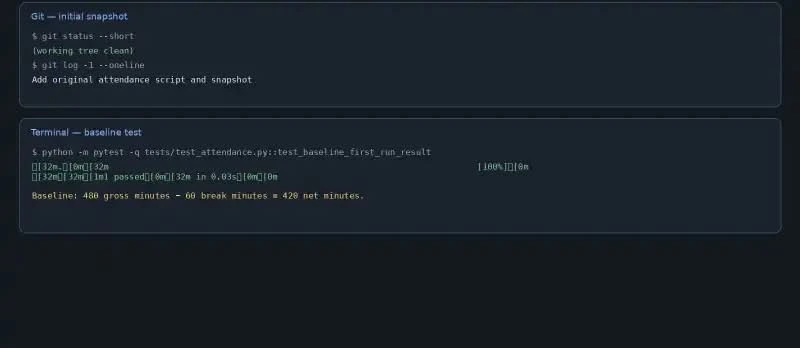
The original attendance script deducts the break time again on each run, reducing the employee’s recorded working minutes
The baseline test checked whether the system produced the expected result of seven working hours for this example. It is important to remember that a passing baseline test does not prove the existing system is free of bugs. It simply records the behavior that we want to preserve while making changes.
With this reference point in place, I could investigate the problems without risking the original attendance records.
Step 2: Hunt Down Every Silent Change
I examined the existing attendance function and identified everything it was changing while calculating employee working hours. I found three main problem areas:
- The original attendance records were being modified during calculations.
- The total working hours were being updated in a shared variable.
- The function calculated attendance and printed the results at the same time.
These responsibilities were mixed together in one function. I marked these operations before changing anything so I could separate attendance rules from data modification and output. Once I understood where the unwanted changes were happening, I could start separating the responsibilities.
Step 3: Give Each Rule Its Own Small Function
I separated the attendance calculations into smaller pure functions. Each function received the information it needed, calculated one result, and returned it without modifying the original attendance records.
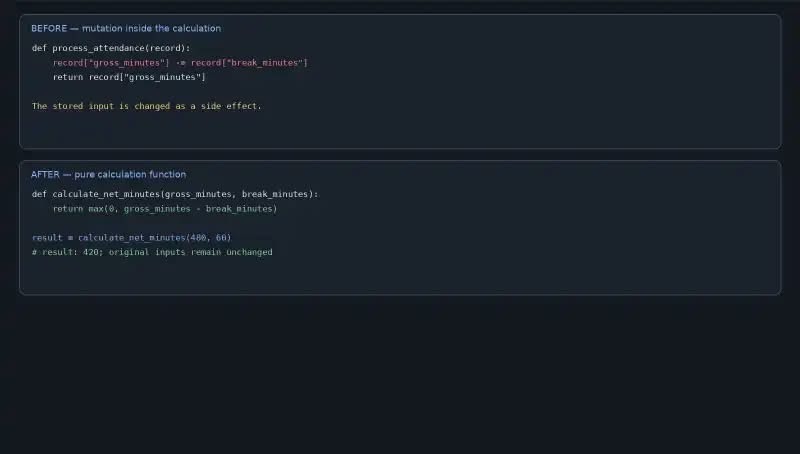
 def calculate_working_hours(check_in, check_out):

    total_minutes = (check_out - check_in).total_seconds() / 60

    return total_minutes / 60
This function receives check-in and check-out times and returns the calculated working hours. It does not modify the employee’s original attendance record.
The break deduction can also be handled separately:
 def calculate_net_hours(total_hours, break_hours):

    return total_hours - break_hours
Similarly, lateness and early departure calculations can be handled through separate functions.
The difference was easy to see. Previously, the attendance function changed existing records while calculating working hours. After refactoring, the calculation functions returned results without modifying the original data.
That was the behavior I wanted: the same attendance record should produce the same working-hours result whenever it is calculated.
Step 4: Five Tests on Guard Duty
A simple software testing checklist can help make sure important cases are not missed when changing existing code. They checked that:
- The new working-hours calculation matched the original baseline result.
- Running the calculation again with the same attendance record produced the same result.
- The original attendance record remained unchanged.
- An employee who checked in within the allowed 10-minute grace period was not incorrectly marked late.
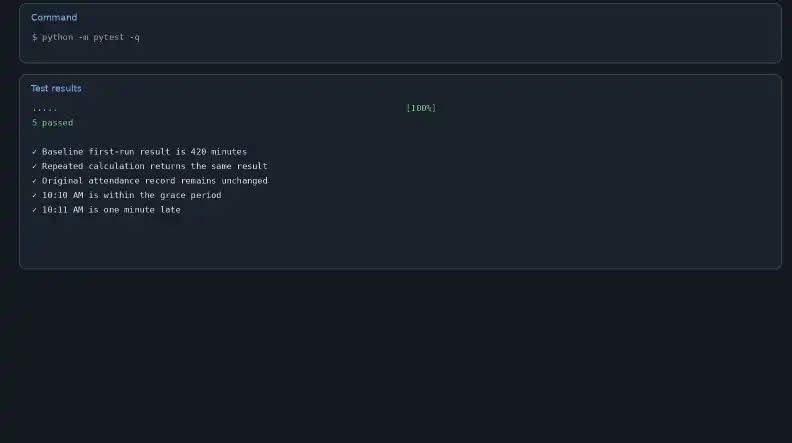
The terminal showed five passing tests in total: the original baseline test and four additional tests. The 10-minute grace period test was particularly important. If an employee’s official starting time is 10:00 AM, a check-in at 10:10 AM should not be marked late when the company allows a 10-minute grace period.
Pure functions made these checks easier because each attendance rule could be tested independently. I did not need to run the entire employee management system every time.
With the calculations protected by tests, the final step was to separate them from the operations that interacted with the user and attendance records.
Step 5: Push Printing and Saving to the Edge
Finally, I moved the printing and attendance-record updating operations outside the calculation functions. The pure functions handled the attendance calculations, while the outer part of the application handled reading employee records, saving results, and displaying attendance summaries.
I also saved each improvement as a separate Git commit. This allowed me to review individual changes and return to an earlier version if something went wrong.
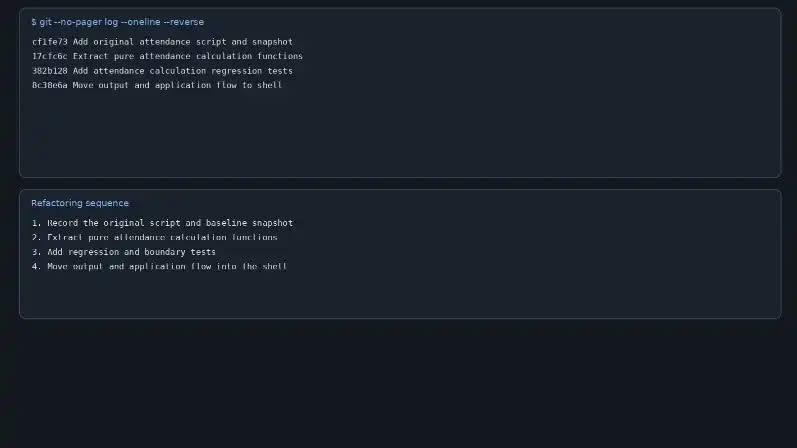
The attendance system had been relying on a function that performed several operations at once. Instead of replacing the entire system, I improved it through small, manageable changes. This made the code easier to understand, test, and maintain.
Same Script, Calmer Results
After refactoring the Employee Attendance Management System, I compared the original script with the improved version.
| Area | Original script | After refactoring |
| Working-hours calculation | Modified stored attendance records | Returns calculated results without changing records |
| Hidden changes | Repeated break deductions | No hidden changes in pure functions |
| Function responsibilities | One function handling multiple tasks | Smaller functions with separate responsibilities |
| Automated tests | 0 | 5 |
| Repeated calculation | 420 minutes, then 360 minutes | 420 minutes on every run |
The code did not become dramatically shorter. It became safer to understand, test, and change. The printing and attendance-record operations still interact with the outside world, but they are no longer mixed into the pure calculation functions.
That is the real goal of legacy code refactoring: fewer hidden effects, clearer responsibilities, and more confidence when making updates.
The comparison shows how functional programming improved the attendance system. But these techniques are not limited to one project. Let’s look at situations where they can be useful.
When Pure Functions Help, and When They Won't Be Enough
Functional programming techniques are particularly useful when:
- Calculations produce unexpected changes: Pure functions help keep working-hours calculations separate from modifications to employee attendance records.
- One function does too many things: Splitting a large attendance function into smaller functions makes each responsibility easier to understand.
- You want to improve code gradually: You can introduce functional techniques without replacing the entire employee management system.
These ideas can be applied in Python, JavaScript, Java, C#, PHP, and other programming languages. You do not need to convert an entire project to a functional programming language.
However, functional programming is not a universal solution. If an entire Employee Attendance Management System depends on outdated technology, has serious security issues, cannot handle a growing workforce, or struggles to integrate with modern payroll software, a few pure functions will not be enough.
The project may need broader modernization, architectural changes, database improvements, or even a complete rewrite.
It is also important not to force functional techniques into every part of an application. Some systems naturally rely on object-oriented programming, databases, employee sessions, and changing attendance records.
The goal is to make important business logic easier to understand and test, not to follow a programming style at any cost.
In other words, use functional programming where it makes the code clearer. Consider wider modernization when the underlying system itself is the problem.
Refactoring Traps to Dodge
These mistakes are easy to make when you are under pressure to fix a problem quickly:
- Rewriting everything at once: It creates unnecessary risk. Make small changes and test after each one.
- Mixing cleanup with new features: Adding features like leave management during refactoring makes it hard to find what caused a problem.
- Skipping the first test: Without recording the original behavior, you cannot tell what you accidentally changed.
The Small Toolkit Behind the Fix
Python for the code, pytest for automated tests, Git for tracking changes, and JupyterLab for testing small pieces of code. These tools support the process, but they cannot replace understanding how attendance records are processed and which business rules must remain unchanged.
What 420 Minutes Taught Me
The Employee Attendance Management System didn’t need a rewrite. It needed three things: no hidden changes, clear responsibilities, and tests to protect what already worked.
Functional programming made that possible. Pure functions stopped the script from changing attendance records, small functions made each rule easy to understand, and five passing tests gave me the confidence to keep improving the code. The result was simple but powerful: 420 minutes on every run, instead of 420 and then 360.
Frequently Asked Questions
How do you maintain legacy code?
Start by understanding what the existing code does. Add tests to record its current behavior, identify hidden changes, separate large functions into smaller responsibilities, and make improvements gradually. Version control helps you track and reverse changes when necessary.
How do you work effectively with legacy code?
Avoid changing several things at once. Read the code, follow how data moves through the application, identify important functions and dependencies, and write tests around important behavior before refactoring. Small, documented changes are usually safer than a complete rewrite.
Why is legacy code hard to maintain?
Legacy code often contains hidden side effects, tightly connected functions, outdated dependencies, and missing tests. In an attendance system, for example, repeatedly modifying stored working hours can produce incorrect records and make future changes difficult.
Do you need a functional programming language to use these techniques?
No. You can use pure functions, avoid unnecessary mutations, and separate side effects in languages such as Python, JavaScript, Java, C#, and PHP. You can introduce these practices gradually without changing your entire technology stack.