What is Object-Oriented Programming in Simple Words?
Object-Oriented Programming Explained for Beginners

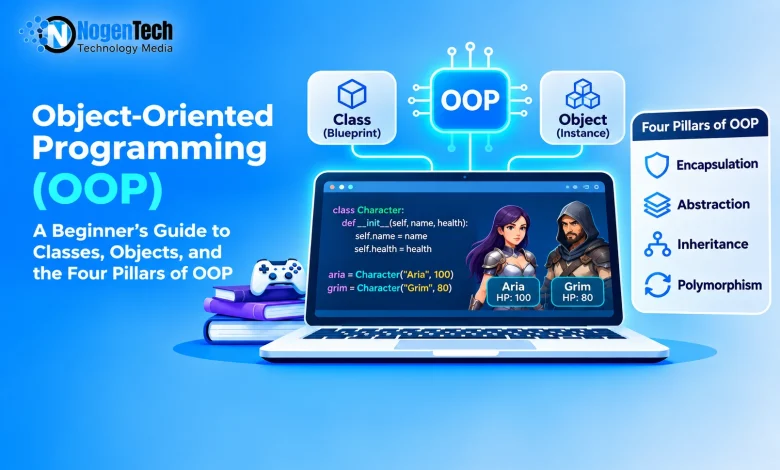
A few nights ago, I was reading about different stages of game development on NogenTech’s website, and one thought wouldn’t leave me alone. How does a game keep track of hundreds of characters, each with its own health, speed, and weapons, without the code turning into a giant mess? So I opened my laptop and started digging. The answer had a name I’d heard a hundred times but never really understood: object-oriented programming.
So, what exactly is object-oriented programming, how does it work, and why do developers use it? Let’s break it down without making it unnecessarily complicated.
What Is Object-Oriented Programming in Simple Words?
Start creating Verdict in seconds, and convert more of your visitors into leads.
Object-oriented programming (OOP) is a programming paradigm that organizes software around objects. These objects combine data (information) and methods (actions) into a single unit.
For example, think about a character in a video game. It has certain properties, such as name, Speed, Health points, and weapons. It can also perform different actions, including walking, jumping, attacking, and taking damage.
Instead of writing separate instructions for every character, OOP allows developers to group related information and actions inside objects.
In simple words, object-oriented programming helps developers build software by creating objects that contain their own data and behavior. But where do these objects come from?
That’s where two important OOP terms enter the picture: classes and objects.
Classes and Objects: Understanding the Basic Building Blocks
Start creating Verdict in seconds, and convert more of your visitors into leads.
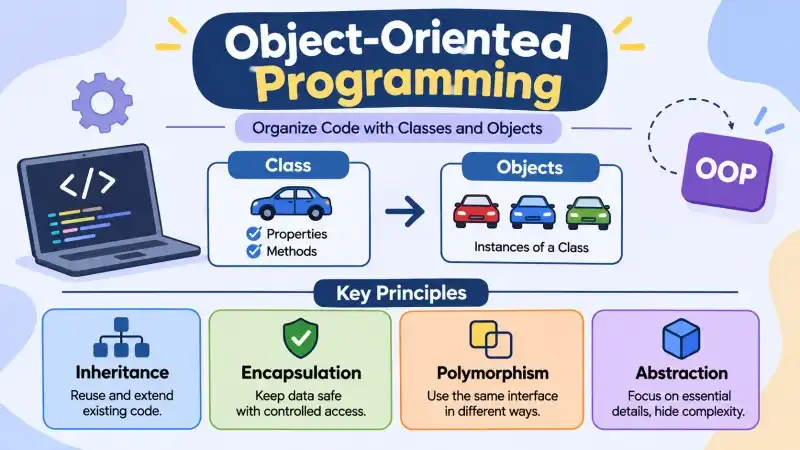
A class is a blueprint that defines the properties and behaviors an object can have. An object is an individual instance created from that blueprint.
Think of a cookie cutter. The cutter itself isn’t a cookie. It simply provides the shape you can use to make multiple cookies. You can decorate each cookie differently, but they all come from the same cutter.
A class works in a similar way. It defines the structure, while objects are the actual instances created from it.
For example, imagine creating a Character class for a game. It can define common properties such as a character’s name and health, along with methods for attacking or taking damage.
You can then create multiple characters from that same class. To see how it works in practice, let’s go back to our game.
Aria and Grim: Two Characters, One Blueprint
Imagine creating two characters:
- Aria starts with 100 health points.
- Grim starts with 80 health points.
Both characters come from the same Character class, but each object maintains its own health value. If Aria takes 15 damage, her health drops to 85. Grim’s health remains 80 because he hasn’t been attacked.
I was curious about whether I could use one class to create more than one object with different information. To test this, I created a small note-taking example. I used the same Note class to store two different messages. When I printed them, each object displayed its own text. Here’s the code I used:
 class Note:

def __init__(self, text):

self.text = text

note1 = Note("Study Python")

note2 = Note("Complete homework")

print(note1.text)

print(note2.text)

Study Python

Complete homework
That’s one of the useful things about OOP. You can define common behavior once and create as many independent objects as your application needs.
Why Do Developers Use Object-Oriented Programming?
Start creating Verdict in seconds, and convert more of your visitors into leads.
As applications grow, managing every piece of information and every operation separately can become difficult. Here are some of the main reasons developers use it:
1. Code Reusability
Developers can create a class once and use it to generate multiple objects. They can also reuse existing behavior through inheritance and composition instead of rewriting everything.
2. Better Code Organization
OOP groups related data and behavior together. This makes larger applications easier to divide into manageable parts.
3. Easier Maintenance
When code is organized into smaller components, developers can often update or test one part without changing the entire application.
Of course, Object-Oriented Programming isn’t the only style around. If you’ve ever wondered how it compares to the others, here’s how I finally got it straight in my head.
Object-Oriented vs. Procedural Programming
Start creating Verdict in seconds, and convert more of your visitors into leads.
Developers also use procedural programming, depending on the problem they’re solving. Here’s how I like to understand the difference: imagine three different kitchens.
- Procedural programming is like following a recipe card. You complete one instruction after another until the dish is ready.
- Object-oriented programming is like running a restaurant team. The chef, waiter, and cashier each have their own responsibilities and work together.
Here’s a more direct comparison:
| Feature | Procedural Programming | Object-Oriented Programming |
| Main focus | Instructions and procedures | Objects and their behavior |
| Code organization | Functions and procedures | Classes and objects |
| Common languages | C, Pascal | Java, C#, C++ |
Many modern languages support more than one programming style. Python, for example, supports object-oriented, procedural, and functional programming. Now that you know where OOP fits among the other styles, let’s open it up and look at the four principles behind it.
The Four Pillars of Object-Oriented Programming
Start creating Verdict in seconds, and convert more of your visitors into leads.
Object-oriented programming is commonly explained through four fundamental principles: encapsulation, abstraction, inheritance, and polymorphism. Each one solves a different problem when organizing software.
Quick Comparison of the Four Pillars
| Principle | What It Does | Simple Example |
| Encapsulation | Controls access to data | A wallet managing its gold |
| Abstraction | Hides implementation details | Using a TV remote |
| Inheritance | Reuses features from another class | Warrior and Mage inheriting from Character |
| Polymorphism | Allows different responses to the same operation | Different characters using special Moves |
1. Encapsulation:
Encapsulation means an object keeps its own data safe and only lets the outside world change it through approved doors.
I wanted to see how a class could keep related information and methods secure together. For this experiment, I created a small profile class with a username and a method to display it. It wasn’t a complicated program, but it helped me understand how data and related functionality can be organized inside one class.
 class Profile:

    def _init_(self):

        self._username = "student123"

  def show_username(self):

        print(self._username)

user = Profile()

user.show_username()
The important point is that the object controls how its data changes.
This idea is also useful in banking applications, where deposits and withdrawals should follow specific rules rather than allowing anyone to modify an account balance directly. Encapsulation protects the data but what about the complexity ? That’s where abstraction comes in.
2. Abstraction:
Abstraction means exposing the essential features of an object while hiding unnecessary implementation details.
For abstraction, I decided to try something familiar: printing a document. When I use a printer, I don’t need to understand every internal step it performs. I simply give it a command. I created a tiny Python example to represent this idea, where a method handles the printing action without showing any internal details.
<pre> class Printer:

    def print_page(self):

        print("Printing your document...")

printer = Printer()

printer.print_page()
Software works similarly.
When you press a character’s jump button in a game, you don’t need to calculate every detail of gravity, movement, and collision detection yourself. You simply use the jump action provided by the game. Abstraction hides the complicated parts then how classes share what they already have?
3. Inheritance:
Inheritance allows one class to derive properties and methods from another class.
I wanted to check how inheritance could save me from writing the same method again and again. I tried creating a small university course example in Python. I started with a general course class and then created a Programming Course class that inherited its information. This way, I didn’t have to write the same method again in the child class. Here’s what I tried:
 class Course:

    def show_name(self):

        print("Course: Computer Science")

class ProgrammingCourse(Course):

    pass

my_course = ProgrammingCourse()

my_course.show_name()

Output:

 Course: Computer Science
Both classes could add additional features. This reduces repetition and makes it easier to reuse existing code. However, inheritance should be used when the relationship between classes makes sense, not simply to avoid writing a few extra lines. I shares data but what if the class needs to respond in its own way?
4. Polymorphism:
Polymorphism means that different objects can respond to the same method or operation in different ways.
Polymorphism sounded a little confusing to me at first, so I tried understanding it with two familiar animals. I created separate classes for a cat and a dog, and gave both of them a method with the same name. The interesting part was that calling the same method produced different results depending on the object.
class Cat:

    def sound(self):

        print("Meow")

class Dog:

    def sound(self):

        print("Woof")

Cat().sound()

Dog().sound()

Output:

Meow

Woof
The command is the same, but each character responds differently. This makes applications more flexible because developers can work with different object types through a common interface without writing separate instructions for every possible type.
For a broader technical overview, the Wikipedia page on object-oriented programming covers the history and terminology. Knowing the four pillars is one thing, but seeing them work together makes everything click. Let’s build something.
How Does Object-Oriented Programming Work? A Step-by-Step Example
Start creating Verdict in seconds, and convert more of your visitors into leads.
Understanding OOP concepts is one thing, but seeing how they work together makes everything easier. Let’s imagine building a small character system for a video game.
Step 1: Identify the Objects
First, decide which things your application needs to represent.
To understand how object-oriented programming works in a practical situation, I decided to think about a small problem from student life: keeping track of assignments. I started by identifying the things my program would need to manage. These included assignment names, due dates, and completion status. I realized that each assignment could be represented as an object because it has its own information and actions. Once I knew the model, I needed a blueprint to build from.
Step 2: Create a Class
Next, create a class that acts as a blueprint.
After identifying the information I needed, I created a simple assignment class in Python. I wanted this class to act as a blueprint for my assignments. So, I added properties for the assignment name and its completion status. I also included a method that could mark an assignment as complete.
class Assignment:

    def __init__(self, name):

        self.name = name

        self.completed = False

    def mark complete(self):

        self. Completed = True
With the blueprint ready, I could finally create real objects.
Step 3: Create Objects From the Class
Now, create individual characters using the same blueprint.
Next, I created two assignment objects using the same class. One represented my Python homework, while the other represented my database assignment. I gave each object a different name and checked its completion status. This helped me understand how one class can create multiple objects with their own information.
python_task = Assignment("Python Homework")

database_task = Assignment("Database Assignment")

print(python_task.name)

print(database_task.name)

Output:

Python Homework

Database Assignment
Now that I knew how to create objects, my next question was: How could I make my code simpler, more flexible, and easier to manage? That’s where the four pillars of OOP come in.
Step 4: Add the Four OOP Principles
Once the basic class works, you can introduce the four pillars.
- Use encapsulation to control how character health changes.
- Use abstraction to hide complicated game operations behind simple methods.
- Use inheritance to create specialized characters such as warriors and mages.
- Use polymorphism to let different characters perform their own versions of a special move.
Each principle works well on its own, but the real power shows when objects start interacting.
Step 5: Make Objects Work Together
Finally, connect the objects. The same approach can be used in much larger systems, including online stores, banking applications, and business software. Once I understood the basic idea, I started noticing OOP in many types of applications.
Object-Oriented Programming Examples in Real Life
Start creating Verdict in seconds, and convert more of your visitors into leads.
Here are some common examples:
- 1. Online Shopping: An online store can use objects to represent customers, products, shopping carts, orders, and payments.
- 2. Banking Applications: Accounts, transactions, and cards can be modeled as objects. Encapsulation can help control how account information is accessed and updated.
- 3. Desktop and Mobile Applications: Buttons, windows, menus, and other interface components can use object-oriented structures to manage their properties and behavior.
OOP is also widely used in business software. Languages such as Java, Python, C++, and C# support object-oriented programming, making them useful choices for many types of applications. Of course, using OOP is not always smooth sailing.
Common Challenges of Object-Oriented Programming
Start creating Verdict in seconds, and convert more of your visitors into leads.
OOP offers several advantages, but it doesn’t mean every project becomes easier simply by using classes and objects. Beginners and experienced developers can face a few challenges.
- 1. Learning the Basic Concepts: Terms such as encapsulation, abstraction, inheritance, and polymorphism can feel confusing when you’re first introduced to them.
- 2. Too Many Classes: Creating a separate class for every small task can introduce unnecessary complexity. Sometimes a simple function is all you need.
- 3. Complicated Inheritance Structures: Deep inheritance hierarchies can make code difficult to understand. A change in a parent class may also affect several child classes.
The best way to deal with these problems is to keep your design simple and introduce additional classes only when they provide a clear benefit. These challenges lead to an obvious question.
Is Object-Oriented Programming Always the Best Choice?
Start creating Verdict in seconds, and convert more of your visitors into leads.
Not necessarily. OOP is a powerful programming approach, but it isn’t the right solution for every problem. Sometimes, using classes and objects adds more complexity than value.
So, when should you use it?
Consider OOP when:
Your software needs to represent entities with their own data and behavior.
- You want to organize code into reusable and manageable parts.
- Multiple developers need to work on separate components.
- Your application requires clearly defined relationships between different objects.
Avoid forcing OOP when:
- You’re writing a small script that performs a straightforward task.
- A few functions can solve the problem more clearly.
- Creating multiple classes would introduce unnecessary complexity.
For example, if you only need to rename 20 files, creating several classes for the task would probably be unnecessary.
The practical takeaway is simple: use object-oriented programming when organizing data and behavior into objects makes your application easier to understand, maintain, and expand. If OOP sounds worth learning, here’s where I’d begin.
So, Finally: How to Start Learning Object-Oriented Programming
Start creating Verdict in seconds, and convert more of your visitors into leads.
If you’re new to OOP, you don’t need to build a complicated application on your first day. Start with small examples and gradually introduce the concepts. Here’s how I’d approach learning it as a beginner.
- Choose a Beginner-Friendly Language: Python is a good starting point because its syntax is relatively easy to read. You can also explore OOP using Java, C++, or C#.
- Understand Classes and Objects First: Before jumping into the four pillars, learn how to create a class, define its attributes and methods, and create objects from it.
- Build Something Familiar: Try creating a simple class for a student, car, bank account, or game character. Think about what information it should store and what actions it should perform.
- Practice the Four Pillars Separately: Learn encapsulation, abstraction, inheritance, and polymorphism through small examples. You don’t need to understand everything at once.
- Experiment and Break Things: Try removing self from a Python method or changing an object’s properties. Read the error messages and understand why the code behaves that way. I made the same mistake when I first experimented with Python classes. That tiny missing word taught me more than simply reading another definition.
- Build a Small Project: Once the basics make sense, create a simple library system, student management application, or game-character project. Practical experience will help you connect all the concepts.