...
How-To GuidesInstagram

How to Download Instagram Videos? Complete Guide and Tools

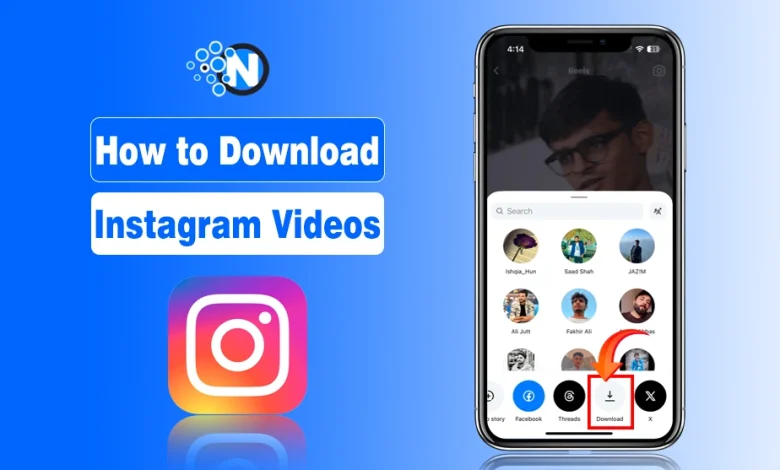
Go to the Instagram video you want to download > tap on the share button > swipe the options to the left > find and tap on "Download" option.

Instagram videos are a complete source of entertainment, amusement, and inspiration. I am also a social media geek and often use this platform. Some of the reels are even so heartfelt that I often download them directly to my smartphone. However, not all videos feature the direct downloading option. That’s when I started thinking about how to download Instagram videos.

While looking for the solution, I found many platforms and tools that allow you to download Instagram reels. Moreover, I saw many people looking for the same solution.

That’s why I have created this blog post to describe a complete step by step process to download engaging Instagram videos.

How to Download Instagram Videos? 2 Methods, Simple Steps

In the section below, I have provided comprehensive details on how to download Instagram videos. In this way, you can get the desired results without challenges.

1. Direct Method

Instagram has a direct downloading option for Instagram videos. Now, you can download the reels directly to your mobile from the app without any issues. The following are the key steps to follow in this regard.

  • Click on the app to launch it.
  • On your feed page, you will see multiple videos.
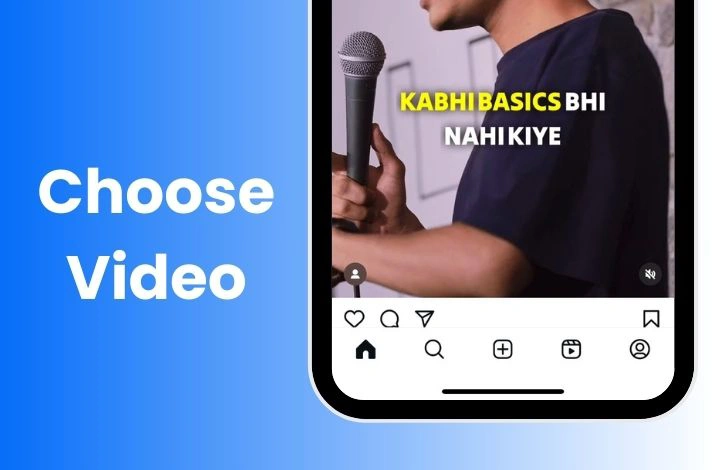
  • Go to the video you want to download.
choose video
  • Click on the share button (represented by an arrow)
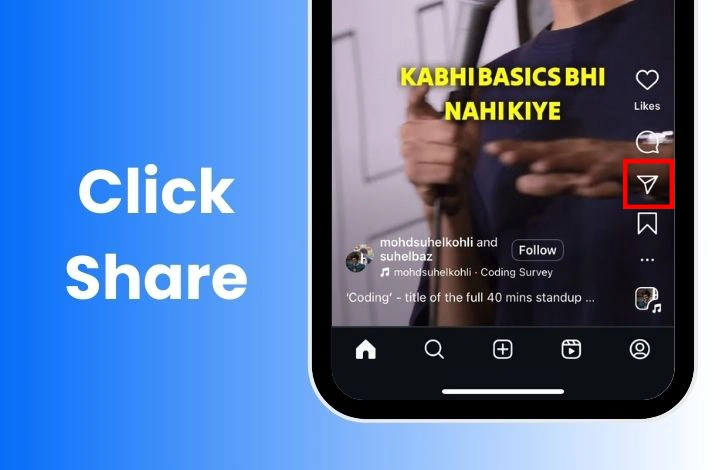
click share
  • Different options will appear. Swipe the options to the left to see the down arrow option.
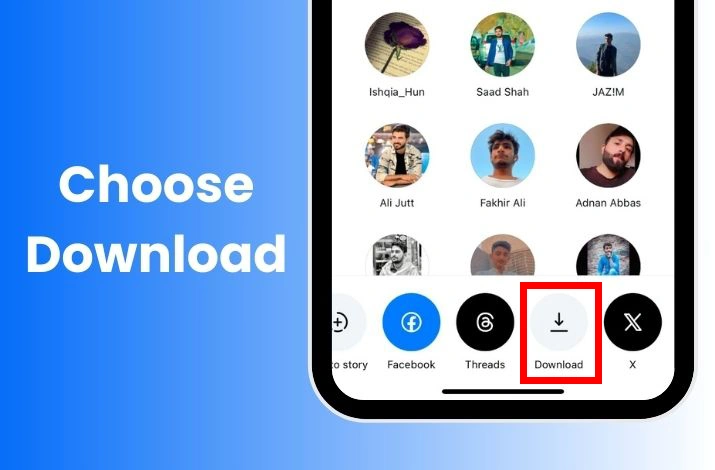
choose download
  • Tap on it to download the selected Instagram video.

Limitations of Direct Download Method

However, there are certain limitations associated with this direct method. The primary ones are the following:

  • Not all videos support the direct downloading option.
  • Some videos do not get downloaded with the audio or music.
  • When you download Instagram videos directly, Instagram adds the profile watermark.

2. How to Download Instagram Videos Without Watermark? (Indirect Method)

If you face any of the above limitations and still want to download Instagram videos, the indirect method will be the best option to go with. This includes the use of third party tools and platforms. 

A large number of anonymous Instagram viewers are present on the web that you can access and get your desired videos. The step by step details are below:

  • Open the Instagram app.
  • Click on the video you want to download.
  • Tap the share button present on the side.
Tap Share
  • Now, select the Copy Link option.
Copy Link
  • Open your dedicated browser and go to any Instagram video downloader platform.
  • I am using SnapInsta here.
  • Paste the link of the Instagram post or reel in the designated box.
Paste Link
  • Click on the download button.
Download Video
  • Follow the prompts and save the Instagram video on your mobile.

Limitations of the Indirect Method

  • There may be some privacy concerns about untrusted third-party Instagram video downloaders.
  • You cannot download videos from private Instagram accounts.
  • The video quality may not be optimal.

3 Best Instagram Video Downloaders

As I talked about third party platforms in the previous section, below are some of the best Instagram downloader tools that will help you save your favorite reels to your mobile.

1. SnapInsta – Instagram Story Viewer Tool

SnapInsta is the simplest and most accessible Instagram video downloader platform. It has a user friendly interface that allows you to download reels or videos, as well as posts and profile pictures. Just paste the link to the video and download it.

Snapinsta

2. Imginn – Anonymous Story Viewer

Another amazing third party tool that lets you explore Instagram profiles anonymously and download the reels, posts, and videos is Imginn. The interface of this platform is minimalist. Hence, everyone can access and use its features.

Imginn

3. Inflact – Social Media Marketing Toolkit

Inflact is a comprehensive platform that provides access to different built in tools and resources for Instagram marketing. It also features an Instagram video downloader where you have to paste the link of the reel. The downloaded videos are of high quality.

inflact

If you want to know more about Instagram story viewers, check my Mollygram vs InstaStoryViewer comparison article.

Final Thoughts

These are the details about how to download Instagram videos. I have explained all the tactics that you can opt for to have your hands on your desired files. Although a built in download option is present, there are some limitations that cause you to switch to third party platforms or tools.

You just have to copy the URL of the targeted reel and paste it into the third party platforms. Click on the download option and you can save them on your mobile. The only point to consider is that you should visit only trusted platforms. In this way, you can avoid unnecessary concerns.

Fawad Malik

Fawad Malik is a digital marketing professional with over 15 years of industry experience, specializing in SEO, SaaS, AI, content strategy, and online branding. He is the Founder and CEO of WebTech Solutions, a leading digital marketing agency committed to helping businesses grow through innovative digital strategies. Fawad shares insights on the latest trends, tools, guides and best practices in digital marketing to help marketers and online entrepreneurs worldwide. He tends to share the latest tech news, trends, and updates with the community built around NogenTech.

Related Articles

Back to top button