Thinking your iPhone is private by default? It might be more exposed than you realize.
Most iPhone users trust the device in their pocket, and that trust is well deserved. Still, everyday habits like granting unnecessary app permissions, using weak passwords, connecting to public Wi-Fi, or ignoring iPhone Privacy & Security settings can slowly create privacy risks.
The good news is that protecting your iPhone privacy doesn’t require technical expertise. A few simple changes can make a meaningful difference.
Moving forward, you will explore how to:
- Review essential iPhone privacy settings
- Limit access to your location, photos, microphone, and contacts
- Strengthen your iPhone privacy and security with practical habits
- Reduce everyday privacy risks without making your iPhone harder to use
Whether you’re using the latest version of iOS or an older iPhone, these tips will help keep your personal information more secure.
What Simple iPhone Privacy Habits Should You Start With?
Protecting your iPhone privacy doesn’t require complicated changes. The following habits will help you make the most of Apple’s Privacy & Security features while reducing everyday privacy risks.
- Review App Permissions to Protect Your iPhone Privacy
- Use Apple’s own privacy controls properly to strengthen your iPhone’s security.
- Keep private apps and information out of sight from unwanted eyes.
- Clean up old accounts and passwords that could expose your information.
How Can You Review App Permissions to Protect Your iPhone Privacy?
Reviewing app permissions in iPhone Privacy & Security helps prevent apps from accessing more data than they need.
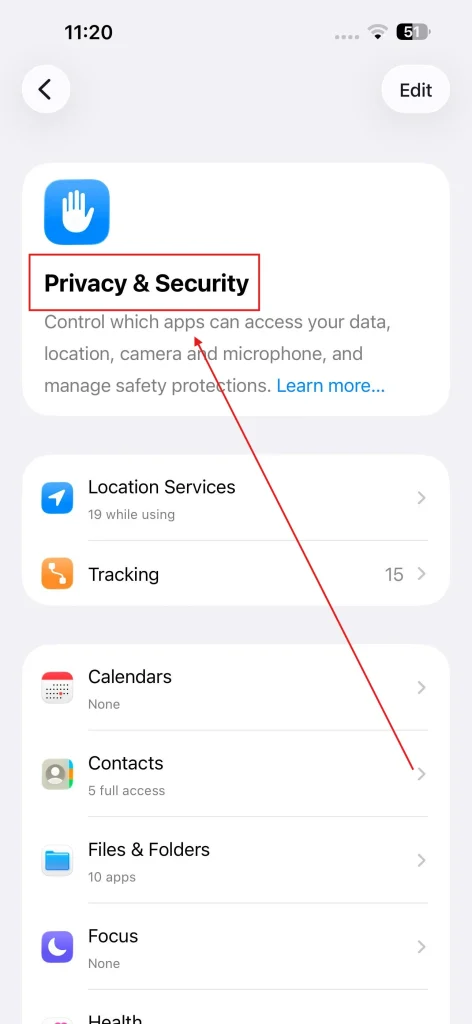
Limiting unnecessary access to your location, photos, camera, microphone, contacts, and calendar reduces data collection and improves your iPhone’s privacy.
Check these permissions:
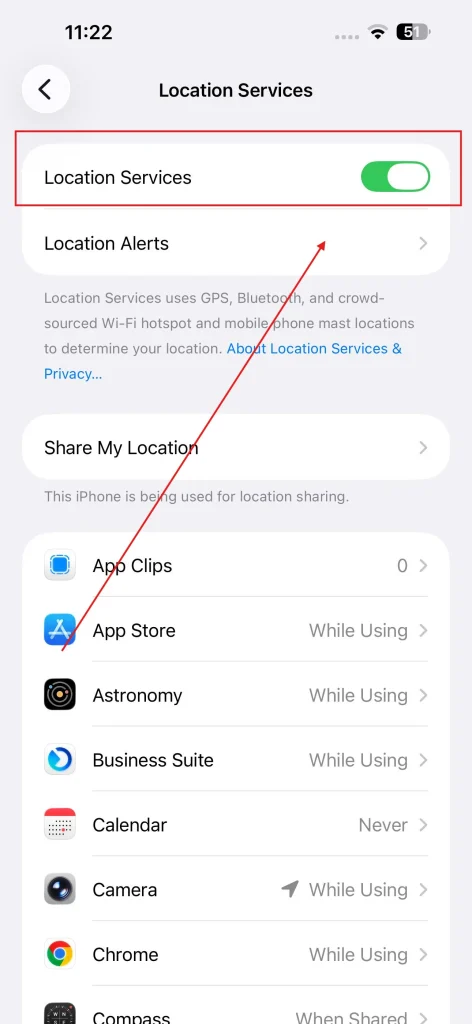
- Location Services: Choose While Using the App and disable Precise Location unless required.
- Photos: Allow Selected Photos instead of full library access.
- Camera and Microphone: Grant access only to apps that need them.
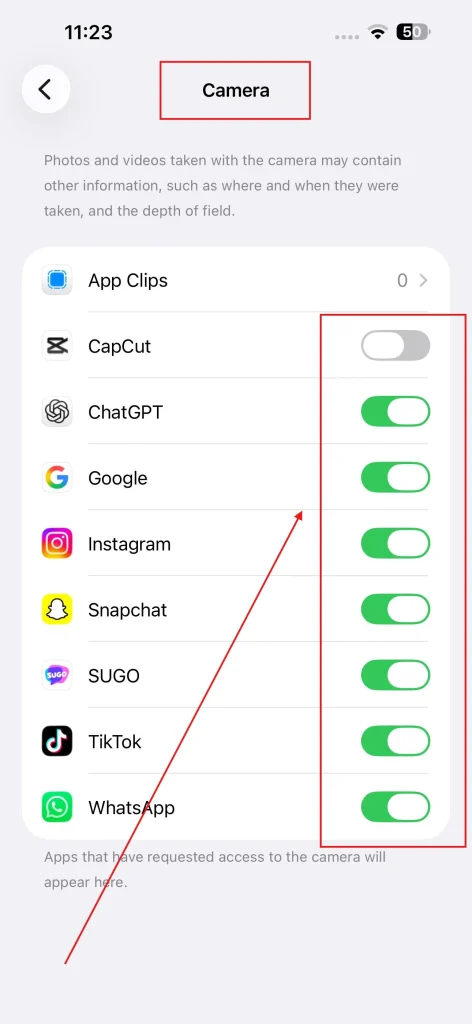
- Contacts and Calendars: Remove access from apps that don’t require your personal information.
Open Settings > Privacy & Security to review each permission category. If an app has more access than necessary, limit or revoke it. When browsing on public Wi-Fi, consider using a VPN to add an extra layer of privacy on untrusted networks.
Which Apple Privacy Features Should You Enable on Your iPhone?
Apple includes built-in iOS privacy features that limit data collection and protect your personal information, such as App Tracking Transparency, Safari Privacy, Mail Privacy Protection, and Passkeys.
Enable these features:
- App Tracking Transparency: Block apps from tracking your activity across apps and websites.
- Location Services: Grant access only when it’s needed.
- Safari Privacy: Block cross-site trackers and help prevent browser fingerprinting.
- Mail Privacy Protection: Hide your IP address and prevent email open tracking.
- Passkeys: Replace passwords with a more secure, phishing-resistant sign-in method.
Review these settings regularly and only approve permissions or prompts when they’re necessary.
How Can You Hide Private Apps and Information on Your iPhone?
Hiding private apps and limiting lock screen previews help protect your personal information from anyone who briefly accesses or sees your iPhone.
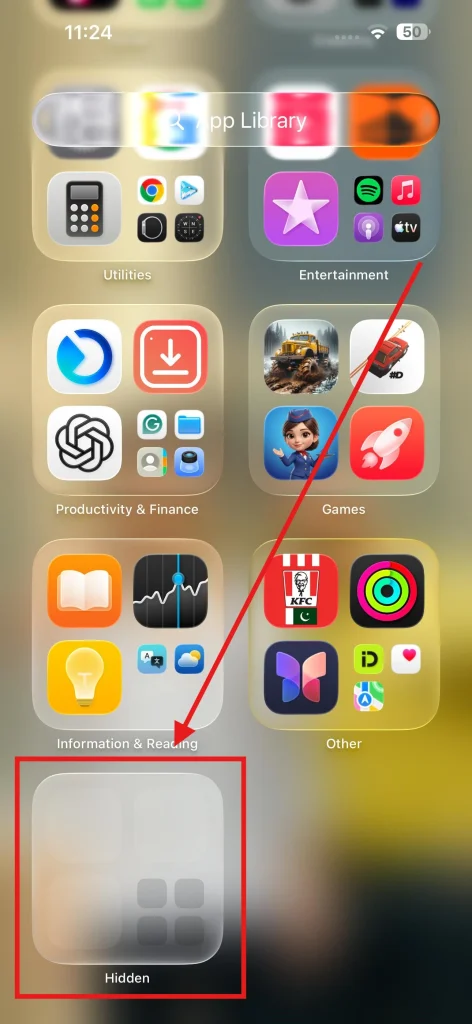
This adds an extra layer of privacy beyond iPhone Privacy & Security settings. Protect your private information by:
- Hiding sensitive apps to keep personal content off your Home Screen.
- Limiting lock screen notifications for sensitive messages, banking alerts, and emails or setting up an iPhone Focus Mode to automatically silence unwanted alerts and hide previews when you’re around others.
- Showing notification previews only when your iPhone is unlocked.
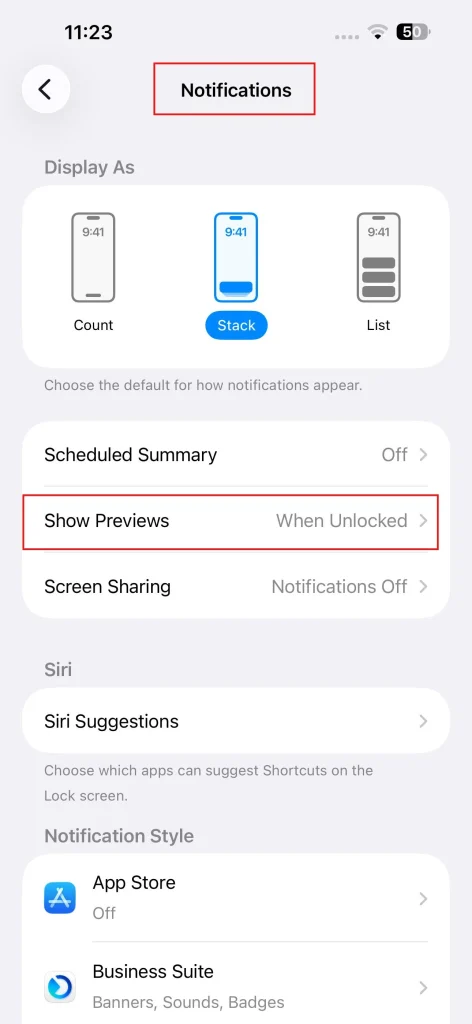
- Keeping personal and everyday apps separate for better privacy.
If you need step-by-step instructions, NogenTech has covered how to hide apps on an iPhone.
You can also change your iPhone name so your full name isn’t broadcast to nearby devices when using AirDrop or Wi-Fi hotspots. Combining these tweaks with private notification settings helps keep your personal information out of sight.
Combining hidden apps with private notification settings helps keep your personal information out of sight without affecting everyday use.
Why Should You Remove Old Accounts and Update Your Passwords?
Unused apps, old accounts, weak passwords, and inactive subscriptions can increase your privacy and security risks.
Regularly cleaning them up reduces unnecessary access to your personal data and strengthens your iPhone’s security. You must review and remove:
- Unused apps you no longer need.
- Old accounts you no longer use or recognize.
- Replace weak or reused passwords with strong passwords or Passkeys.
- Inactive subscriptions that still have access to your information.
Review your accounts every few months and remove anything you no longer use. Small maintenance habits like these reduce your digital footprint and help keep your personal information secure over time.
Why are these iPhone Privacy-Fixing Habits Important?
iPhone privacy-fixing habits are essential because they help protect your personal data, limit unnecessary app access, and reduce security risks.
Although Apple includes strong privacy features in iOS, regularly reviewing your settings and following good privacy practices ensures those protections remain effective.
Its key benefits include:
- Protecting your location, photos, contacts, and microphone from unnecessary access.
- Limiting app tracking and excessive data collection.
- Staying safer on public Wi-Fi networks using a VPN for iPhone.
- Reducing the risk of unauthorized account access.
- Getting the most out of Apple’s Privacy & Security features.
Privacy isn’t maintained by a single setting. Small habits like reviewing app permissions, updating iOS, and removing unused apps work together to keep your iPhone and personal information more secure.
Still Have Questions About iPhone Privacy?
Does Apple sell your personal data?
No. Apple states that it does not sell your personal data to third parties. Instead, it uses on-device processing, end-to-end encryption for supported services, and privacy-focused technologies to minimize data collection.
Is an iPhone more private than Android?
Both platforms offer strong security, but Apple’s iPhone is generally recognized for its stricter app privacy policies, tighter hardware and software integration, and features like App Tracking Transparency and Private Relay for eligible iCloud+ users.
Should I reset my iPhone’s Privacy & Security settings?
Resetting Privacy & Security settings restores app permissions to their default state. It’s useful if you’ve granted unnecessary permissions over time or want to start fresh, but you’ll need to approve permissions again as apps request them.
Does deleting an app remove all of its data?
Not always. Deleting an app removes it from your iPhone, but some data may remain in iCloud, backups, or the app developer’s servers. If you no longer use a service, consider deleting the associated account as well.
How often should I review my iPhone privacy settings?
A review every two to three months is enough for most users. You should also check your settings after installing new apps or following a major iOS update.
Does updating iOS improve privacy?
Yes. In addition to fixing security vulnerabilities, iOS updates often introduce new privacy features, improve existing protections, and patch bugs that could expose personal information.
Can websites track me even if app tracking is disabled?
Yes. Disabling App Tracking Transparency prevents apps from tracking you across other apps and websites, but websites can still collect data through cookies and browser technologies. Using Safari’s privacy features helps reduce this tracking.
Is Face ID safe for protecting personal information?
Yes. Face ID securely stores your facial data in the Secure Enclave on your iPhone rather than on Apple’s servers. It provides a secure way to unlock your device, authenticate purchases, and access sensitive apps.
Final Thoughts: Your iPhone Is Only as Private as Your Habits
Your iPhone already includes powerful Privacy & Security features, but they’re only effective when you use them consistently.
Reviewing iPhone privacy settings, limiting unnecessary app permissions, enabling Apple’s built-in protections, and keeping your accounts secure can go a long way toward protecting your personal information.
In my opinion, the best privacy habit isn’t installing more apps or changing dozens of settings; it’s paying attention to how your iPhone handles your data.
A few minutes spent reviewing your privacy settings every few months can make a meaningful difference without changing the way you use your device.