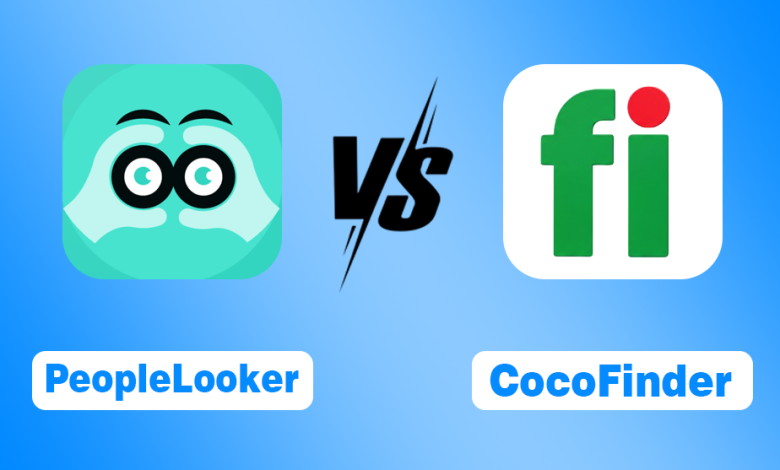
If you’ve been reading my recent reviews, you already know I’ve spent time using both CocoFinder and PeopleLooker individually. I looked at how each platform works, the information they provide, their pricing, and whether they’re actually worth using.
Now it’s time to compare them side by side.
Both platforms help you find people, identify unknown callers, and search public records, but after using and researching them, I found some meaningful differences in:
- Features and search tools
- Pricing and overall value
- Privacy and security
- Accuracy and reliability
- The types of users each platform is best suited for
Rather than making you jump between two separate reviews, I’ve brought everything together in this comparison. It’s based on my research and designed to give you a clear, unbiased breakdown so you can decide which platform best fits your needs.
Let’s get into it.
Before We Compare, Here's What They Do
If you haven’t read my individual reviews, here’s a quick overview before we dive into the comparison.
After testing both platforms, I found that they actually do the same basic job: help you search U.S. public records, but they take slightly different approaches.
- CocoFinder is built more around reverse phone lookup and directory-style searches, making it a good fit for identifying unknown callers.
- PeopleLooker goes a bit further by adding tools like username search, B2B search, and unclaimed money search, so it feels more like an all-in-one public records research platform.
One thing they have in common is that they’re designed for personal and informational use only. Neither platform is FCRA-compliant, so you can’t use their reports for employment, tenant screening, credit, or insurance decisions.
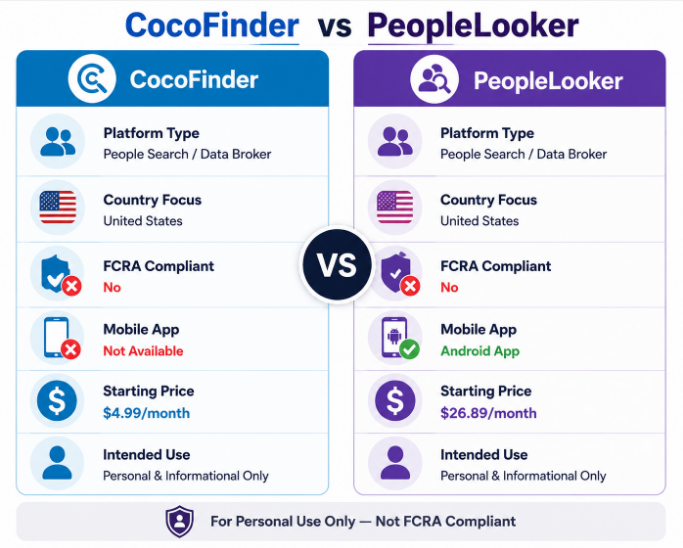
Here’s a quick side-by-side overview before we compare them feature by feature.
| Factor | CocoFinder | PeopleLooker |
| Platform Type | People Search / Data Broker | People Search / Public Records |
| Country Focus | United States | United States |
| FCRA Compliant | No | No |
| Mobile App | Not Available | Android App Available |
| Starting Price | $4.99/month | $26.89/month |
| Intended Use | Personal & Informational Only | Personal & Informational Only |
Now, let’s compare them feature by feature.
CocoFinder vs PeopleLooker: Which Has Better Features?
CocoFinder is better for phone lookups and directory-style searches, while PeopleLooker offers more tools for online and background research.
I compared both platforms and found that they cover the same core features, including people search, reverse phone lookup, email lookup, check phone number, address lookup, and background checks. The main differences come from their extra tools.
CocoFinder stands out with its People Directory and White Pages, which I found useful for basic contact searches with limited details. PeopleLooker goes further with username search, social media discovery, B2B search, and unclaimed money search.
PeopleLooker also offers an Android app, while CocoFinder does not appear to have a dedicated mobile app.
| Feature | CocoFinder | PeopleLooker |
| Core Search Tools* | Yes | Yes |
| People Directory | Yes | No |
| White Pages | Yes | No |
| Username Search | No | Yes |
| B2B Search | No | Yes |
| Social Media Discovery | No | Yes |
| Mobile App | No | Yes (Android) |
PeopleLooker vs CocoFinder Pricing: Here's What Surprised Me
CocoFinder starts at $4.99 per month, making it a much more budget-friendly option. PeopleLooker starts at $26.89 per month, or $21.51 per month with a three-month subscription, but it also includes a broader set of search tools.
Neither platform is completely free. You can start a search without paying, but you’ll need a subscription to access full reports.
Here’s how their pricing compares:
| Plan | CocoFinder | PeopleLooker |
| Monthly Price | $4.99/month | $26.89/month |
| Multi-Month Option | Not Available | $21.51/month (3-month plan) |
| Report Limits | Unlimited Phone Lookups | Up to 100 Reports/Month |
| Free Full Reports | No | No |
| Free Search Preview | Yes | Yes |
If keeping costs low is your priority, I’d choose CocoFinder. If you need more search tools and don’t mind paying extra, PeopleLooker may be the better value.
When I Checked How Safe Both Platforms Are, Here's What I Found
Both platforms are safe to use, but PeopleLooker provides more information about its security practices.
From my research, both use secure websites and standard account protection for personal use. The main difference is transparency.
- PeopleLooker publicly lists SOC 2 compliance, CCPA compliance, secure encryption, and secure payment processing.
- CocoFinder also encourages users to use its official website, but it doesn’t provide the same level of documented security information.
Based on what I found, I’d feel comfortable using either platform, but PeopleLooker has a slight edge because it’s more transparent about how it protects user data. If you want to see what information about you is publicly accessible across other platforms, you can also use digital footprint checkers.
Does Either Platform Notify the Person You’re Searching?
No. Neither CocoFinder nor PeopleLooker notifies someone when you search for them, so your searches remain private on both platforms.
When I tested both services, I found that the person whose records you’re viewing isn’t alerted or informed in any way. Whether you’re identifying an unknown caller, verifying someone you met online, or researching a business contact, your search stays confidential.
In this area, there’s no meaningful difference between the two; they both offer the same level of search privacy.
How Accurate Are CocoFinder and PeopleLooker Results Really?
From what I found, neither platform is consistently more accurate than the other. Both are only as accurate as the public records they rely on.
After comparing both, I noticed they pull information from many of the same sources, including government, court, property, and other publicly available records. That means the quality of the results depends on how recently those records were updated.
In my experience, long-term information like property records and address history tends to be more reliable, while recently changed details, such as a new phone number or address, can take time to appear on either platform.
My advice? If you’re making an important personal, legal, or financial decision, always verify the information through official sources instead of relying on either platform alone.
PeopleLooker vs CocoFinder: Which Has the Better Opt-Out Process?
Both platforms let you remove your information for free, but I found CocoFinder’s opt-out process slightly easier.
After comparing both, I noticed that CocoFinder only requires submitting a single opt-out request. PeopleLooker follows a similar process but adds a profile verification step, and you’ll need to submit separate requests if you have multiple listings.
One thing both platforms have in common is that opting out isn’t always permanent. If new public records become available, your information may be indexed again, so it’s worth checking back occasionally.
Here’s how the opt-out process compares:
| Factor | CocoFinder | PeopleLooker |
| Opt-Out Available | Yes | Yes |
| Cost to Opt Out | Free | Free |
| Process | Single form submission | Per-profile request + verification |
| Re-appearance Risk | Possible | Possible (new records) |
| Processing Time | Not specified | A few days |
If simplicity matters most, I’d give CocoFinder the edge. But regardless of which platform you’re removing your data from, it’s a good idea to check periodically to make sure your information hasn’t been re-listed.
People Also Ask About CocoFinder vs PeopleLooker
Is CocoFinder better than PeopleLooker?
It depends. CocoFinder is better for affordable reverse phone lookups, while PeopleLooker is better if you need more advanced search tools.
Which platform is more accurate?
Neither. Both rely on publicly available records, so their accuracy depends on how up to date those records are.
Does PeopleLooker show text messages?
No. PeopleLooker can’t access private text messages and only displays publicly available information.
Can CocoFinder or PeopleLooker be used for background checks?
No. Neither platform is FCRA-compliant, so their reports can’t be used for employment, tenant screening, credit, or insurance decisions.
Can I search someone without them knowing?
Yes. Neither CocoFinder nor PeopleLooker notifies the person you’re searching for.
How do I cancel a PeopleLooker subscription?
Cancel it through your account settings or by contacting PeopleLooker support before your next billing date.
So Which One Should You Actually Choose? Here's My Final Call
If you’re looking for an affordable people search tool focused on reverse phone lookups and basic public records, I’d choose CocoFinder. If you need more advanced search tools and don’t mind paying more, PeopleLooker is the better option.
After comparing both platforms, I found that neither is objectively better; they’re designed for different types of users. CocoFinder stands out for its low price and simplicity, while PeopleLooker justifies its higher cost with a broader set of search tools.
I’d recommend CocoFinder if you:
- Want the most affordable option
- Mainly use reverse phone lookup or basic people searches
- Prefer unlimited phone lookups
- Want access to a People Directory and White Pages
I’d recommend PeopleLooker if you:
- Need username, social media, or B2B searches
- Want features like unclaimed money search
- Prefer using a mobile app
- Value its documented security and compliance practices
For most casual users, I’d recommend CocoFinder because it covers the essentials at a much lower price. But if your research goes beyond basic people searches, PeopleLooker offers enough extra functionality to justify the higher subscription cost.