
Data Modeling? Types, Techniques, Tools & Examples
Learn how data modeling turns messy, duplicate records into a clean, reliable structure—walk through the main types, techniques, tools, and real examples so your tables stay accurate without quiet bugs slipping through.

One customer, two different email addresses, and no way to tell which one is right. This is what happened once, and that tiny database mistake is what finally made data modeling click for me.
The table looked perfectly fine. I updated one record, forgot another, and nothing crashed. No error, no warning, just quietly wrong data. The problem was not my code. It was that I never planned how the data should be organized.
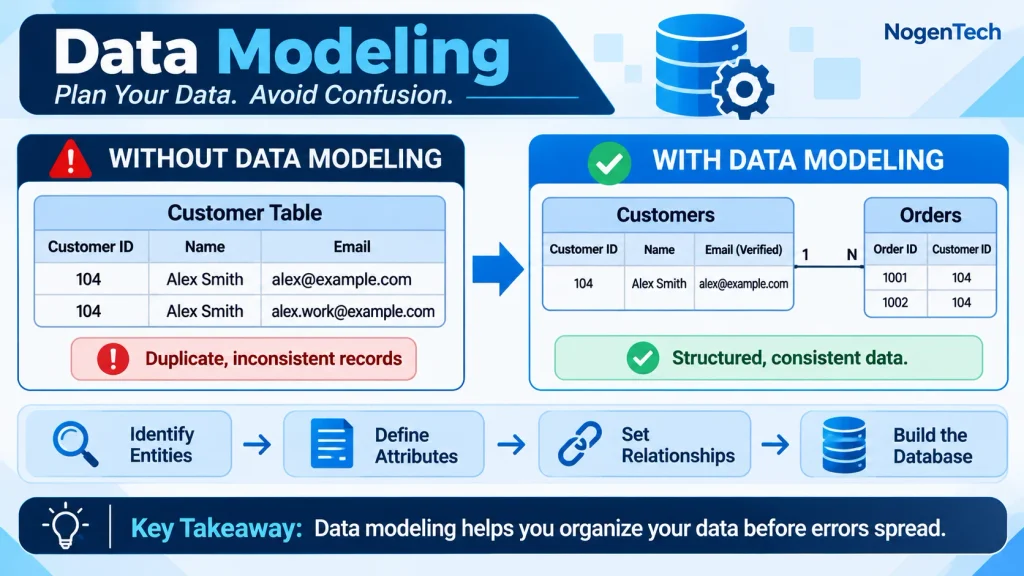
That planning step is called data modeling, and once you see how it prevents silent mismatches like split customer records, its core rules make a lot more sense.
Before I walk you through the project where I hit and fixed that issue, let’s break down what data modeling actually is and how it works in practice.
What Is Data Modeling? (And Why It’s Like a Blueprint for Your Data)
Data modeling is the process of planning how data will be organized, connected, and protected before you build a database. The result, called a data model, describes what information a system stores, how the pieces relate to each other, and which rules keep the data accurate.
Think of it as a floor plan. You would not start building a house and decide where the walls go later. A data model is the floor plan for your data. It does not store anything itself. It simply makes sure everyone builds from the same picture.
Why Data Modeling Matters Before Your Data Gets Messy
Without a model, the same fact often ends up stored in several places, and those copies slowly drift apart. Queries get slower, changes get riskier, and developers and business teams end up with different ideas of what the data means.
With a model, each fact lives in one place, rules like “every order needs a customer” are written down, and everyone works from one shared diagram. This matters even more for analytics and AI, because those systems are only as reliable as the data behind them.
It does cost time upfront, and a tiny project may not need every formal step. But fixing a design on paper is far cheaper than fixing it after the database is live.
But how does a data model actually keep information organized? It starts with a few basic elements that define what the database stores, how records connect, and which rules keep everything consistent. Understanding these building blocks makes the different types of data models much easier to follow.
The Building Blocks of a Data Model
| Element | What It Means | Online Store Example |
| Entity | A thing you need to track | Customer, Product, Order |
| Attribute | A detail about an entity | Name, email, price |
| Relationship | How entities connect | A customer places many orders |
| Cardinality | How many items sit on each side | One-to-many |
| Primary key | A unique ID for each row | customer_id |
| Foreign key | A link to another table’s key | customer_id inside orders |
| Constraint | A rule that protects the data | Email cannot be empty |
| Normalization | Storing each fact only once | Email lives only in customers |
Types of Data Models: Conceptual, Logical, and Physical
Data models are usually built in three stages, moving from a high-level idea to a technical design. Wikipedia’s overview of data modeling describes the same conceptual, logical, and physical progression.
| Feature | Conceptual | Logical | Physical |
| Purpose | Define business concepts | Define the data structure in detail | Define how data is stored |
| Audience | Business stakeholders, analysts | Data architects, analysts | Database administrators, developers |
| Detail level | Low | Medium | High |
| Includes | Entities and relationships | Attributes, primary and foreign keys | Tables, columns, data types, indexes |
| Tied to a database? | No | No | Yes |
| Example | “A customer places an order” | Customer has customer_id, name, email | A CREATE TABLE statement for MySQL |
In practice, you start with the conceptual model to agree on what the business needs, add detail in the logical model, and finish with the physical model once you know which database you will use. Some agile teams skip the logical stage, but the core idea stays the same: go from broad to specific.
Data Modeling Techniques Explained
The three types above describe how detailed a model is. Techniques describe the style of structure it uses.
| Technique | How It Organizes Data | Best For |
| Entity-relationship (ER) | Draws entities, attributes, and relationships as a diagram | Planning and explaining relational databases |
| Relational | Stores data in tables linked by keys | Everyday apps like orders, accounts, and bookings |
| Dimensional (star or snowflake) | Fact tables surrounded by dimension tables | Reporting and analytics |
| Hierarchical | Parent and child records in a tree | Strictly nested data, like folders or org charts |
| Network | Records linked in a web | Complex many-to-many links in older systems |
| Object-oriented | Objects that carry both data and behavior | Object-oriented software design |
The two you will meet most often are relational and dimensional. Relational models favor accuracy for apps that constantly add and update records.
Dimensional models favor fast reading for reports, which is why they are common in data warehouses, increasingly on cloud computing platforms.
In a star schema, one fact table connects directly to several dimension tables. A snowflake schema splits those dimension tables into further related tables.
How to Build a Data Model Without Overcomplicating It
- Understand the requirements. Ask what the business needs and which questions the data must answer.
- Identify the entities. List the main things to track, such as customers, products, and orders.
- Define the attributes. Decide which details each entity needs.
- Set the relationships. Decide how entities connect and whether each link is one-to-one, one-to-many, or many-to-many.
- Choose keys and normalize. Give each entity a primary key, add foreign keys for the links, and remove duplicated data.
- Review and build. Check the model with the people who will use it, create the physical version, and test it with sample data.
Those steps make more sense when you see them applied to an actual database. To put them into practice, I built a small online store database in Python, first using a flat table and then restructuring it into separate, related tables. The difference showed me why planning the data structure matters.
How I Fixed a Duplicate-Email Bug by Modeling a Small Store
Reading about normalization is one thing. Watching it fix a real bug is another. So I built a tiny online store database twice, once badly and once with a proper model. I used Python’s built-in sqlite3 module, so there was nothing to install.
Step 1: I Started With One Flat Table
My first version stored everything in a single orders table, including the customer’s name and email on every row:
 import sqlite3

flat = sqlite3.connect(":memory:")

flat.execute("CREATE TABLE orders (order_id INTEGER, customer_name TEXT, customer_email TEXT, product TEXT, price REAL)")

flat.executemany("INSERT INTO orders VALUES (?,?,?,?,?)", [

    (1, "Ali", "ali@example.com", "Keyboard", 25.0),

    (2, "Ali", "ali@example.com", "Mouse", 10.0),

    (3, "Sara", "sara@example.com", "Monitor", 120.0),

])

# Ali changes his email, but only one row gets updated

flat.execute("UPDATE orders SET customer_email = 'ali.new@example.com' WHERE order_id = 1")

print(flat.execute("SELECT DISTINCT customer_name, customer_email FROM orders WHERE customer_name='Ali'").fetchall())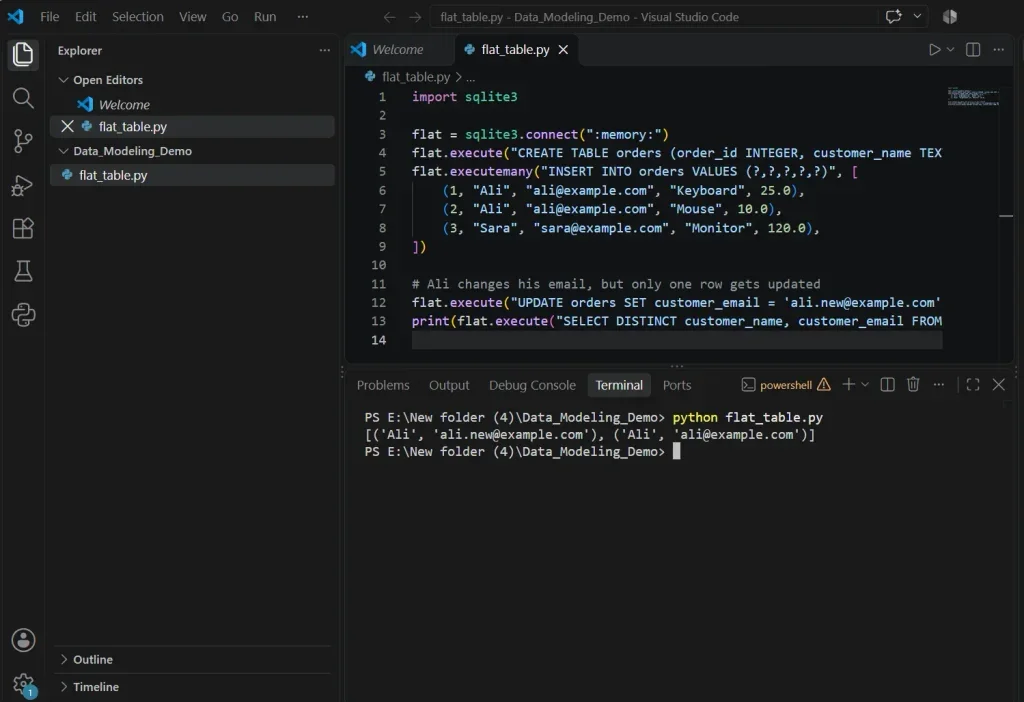
The output was [(‘Ali’, ‘ali.new@example.com’), (‘Ali’, ‘ali@example.com’)]. Ali now had two emails because his email was copied onto every order row, and I only updated one copy. Nothing in the database told me anything was wrong.
Step 2: I Sketched the Model Before Touching the Code
Instead of patching the table, I stepped back and drew the model. I used dbdiagram.io, a browser tool where you type simple code and it draws the ER diagram for you. Its relationship syntax uses > for many-to-one links, which is exactly what orders pointing to customers and products are.
Table customers {

  customer_id integer [pk]

  name varchar

  email varchar

}

Table products {

  product_id integer [pk]

  name varchar

  price decimal

}

Table orders {

  order_id integer [pk]

  customer_id integer [ref: > customers.customer_id]

  product_id integer [ref: > products.product_id]

}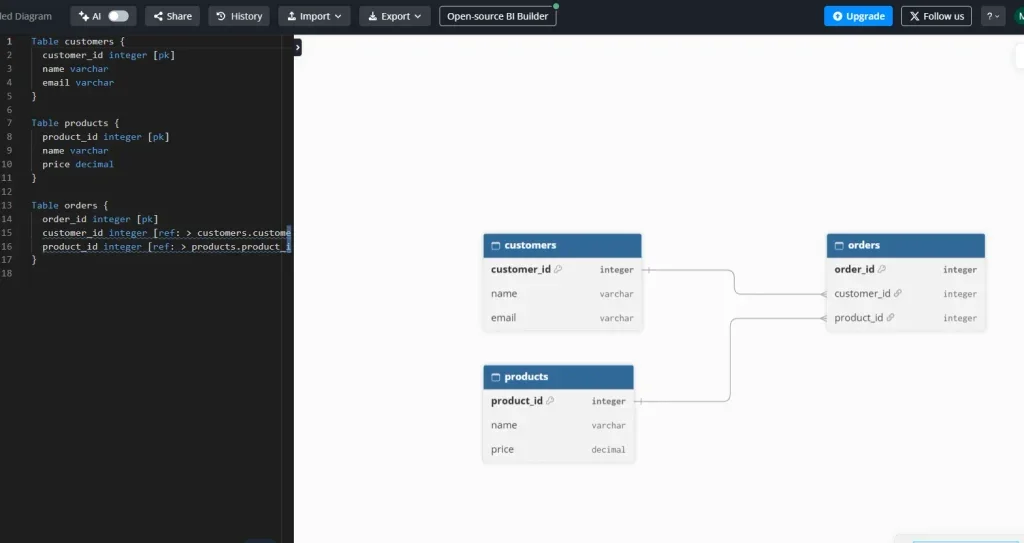
Seeing three boxes and two arrows made the fix obvious. Customer details belong in one table, product details in another, and orders should only point to them.
Step 3: I Built the Three Tables and Ran the Same Update
 db = sqlite3.connect(":memory:")

db.executescript("""

CREATE TABLE customers (customer_id INTEGER PRIMARY KEY, name TEXT, email TEXT);

CREATE TABLE products (product_id INTEGER PRIMARY KEY, name TEXT, price REAL);

CREATE TABLE orders (

    order_id INTEGER PRIMARY KEY,

    customer_id INTEGER REFERENCES customers(customer_id),

    product_id INTEGER REFERENCES products(product_id)

);

INSERT INTO customers VALUES (1, 'Ali','ali@example.com'),(2, 'Sara','sara@example.com');

INSERT INTO products VALUES (1, 'Keyboard',25.0),(2, 'Mouse',10.0),(3, 'Monitor',120.0);

INSERT INTO orders VALUES (1,1,1),(2,1,2),(3,2,3);

""")

db.execute("UPDATE customers SET email='ali.new@example.com' WHERE customer_id=1")

print(db.execute("""SELECT c.name, c.email, p.name FROM orders o

JOIN customers c ON c.customer_id=o.customer_id

JOIN products p ON p.product_id=o.product_id WHERE c.name='Ali'""").fetchall())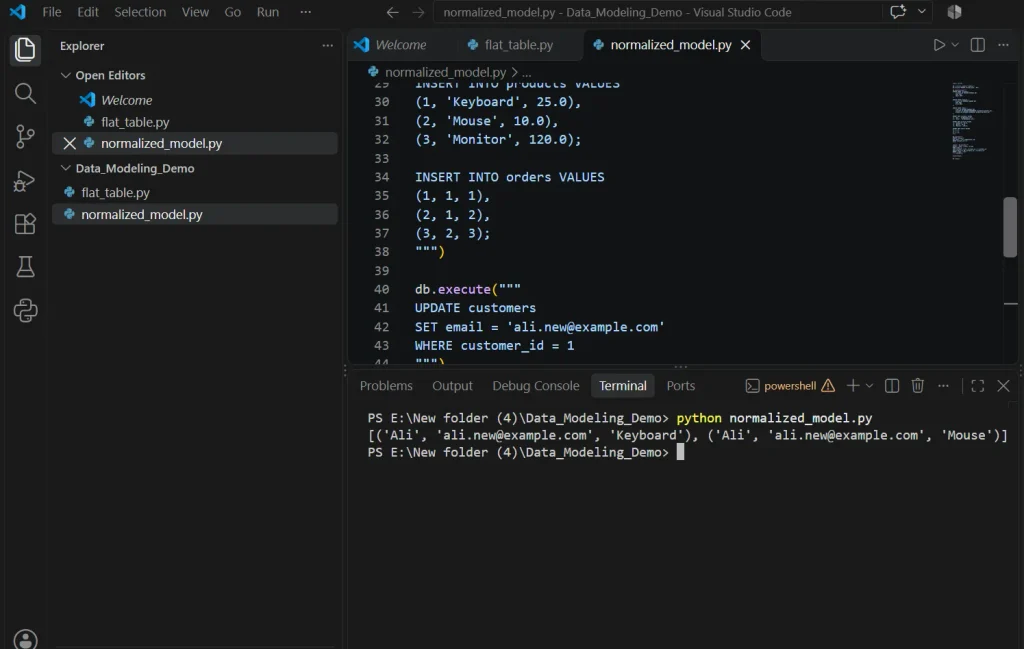
This time the output was [(‘Ali’, ‘ali.new@example.com’, ‘Keyboard’), (‘Ali’, ‘ali.new@example.com’, ‘Mouse’)]. One update, one place, correct everywhere. SQLite only enforces foreign keys when you switch on PRAGMA foreign_keys = ON, so I kept the demo simple, but the structure is what fixed the problem.
What I Learned
- The bug was a design problem, not a coding problem. No amount of careful UPDATE statements can fix data that is stored in the wrong place.
- Drawing first made the SQL easy. Once the diagram showed three entities and two relationships, writing the tables was almost mechanical.
- Storing each fact once is the whole point. That is what normalization means, and it is why the second version stayed consistent.
Building this small database taught me that a good model does not always require complicated software. I only needed Python and a simple diagramming tool to understand the relationships. Larger projects, however, often need more specialized tools for collaboration, documentation, and database management.
Data Modeling Tools Worth Using
The right tool depends on your team size, budget, and database type. Here are the ones worth knowing:
- dbdiagram.io: The quick browser tool I used above. It is great for fast ER diagrams from simple code.
- SqlDBM: A browser-based tool built for team collaboration, and a good example of SaaS software applied to database design.
- Oracle SQL Developer Data Modeler: A free desktop tool that covers logical, relational, and physical modeling.
- erwin Data Modeler and ER/Studio: Enterprise tools for large teams that need governance, documentation, and version control.
- Hackolade: A modeling tool designed for NoSQL and JSON-based databases such as MongoDB.
When choosing, check which databases the tool supports, whether it can generate a database from your model and rebuild a model from an existing one, how well it handles team collaboration, and whether the price fits your project.
For a longer side-by-side comparison, DataCamp’s roundup of data modeling tools is a good next read. Prices and features change often, so check each vendor’s current plans.
Choosing the right tool makes modeling easier, but it does not automatically guarantee a good design. Even with the best software, a few common mistakes can lead to duplicated records, confusing relationships, and difficulties when maintaining legacy code.
Mistakes That Trip People Up (Even With Good Tools)
| Mistake | Why It Hurts | Fix |
| Jumping straight into tables | You find missing entities after the database is live | Sketch entities and relationships first |
| Storing the same fact in many places | Copies drift apart, like Ali’s two emails | Normalize so each fact lives in one place |
| Skipping keys | Rows cannot be identified or linked reliably | Give every table a primary key and use foreign keys for links |
| Over-modeling a small project | You spend more time on diagrams than on the app | Match the level of detail to the size of the project |
| Never updating the model | The diagram and the real database slowly disagree | Update the model whenever the database changes |
Even the best modeling tools cannot save a messy design if these basics are overlooked, so treat your model as a living plan, keep each fact in one clear place, and catch structural flaws before bad data compounds.
Common Data Modeling FAQs
1. What is denormalization in data modeling?
Denormalization is the process of intentionally combining tables or duplicating selected data to make queries faster. It is often used in reporting systems and data warehouses, where quick data retrieval matters more than avoiding every duplicate.
2. What is a data dictionary?
A data dictionary is a document that describes the data used in a database. It lists details such as table names, column names, data types, meanings, and constraints, helping developers understand and maintain the database.
3. What is schema drift?
Schema drift happens when the actual database structure changes but its documented data model is not updated. Over time, this creates confusion because developers may rely on outdated information about tables, columns, or relationships.
4. What is a surrogate key in data modeling?
A surrogate key is an automatically generated identifier used to uniquely identify a record. Unlike a natural key, such as an email address, it has no business meaning. For example, a customer table may use customer_id instead of an email address as its primary key.