How Does a Compiler Work? A Beginner-Friendly Guide
A compiler translates source code into a form a computer can execute. Understand the six stages of compilation, explore common compiler types, and follow a practical C program compilation using GCC.

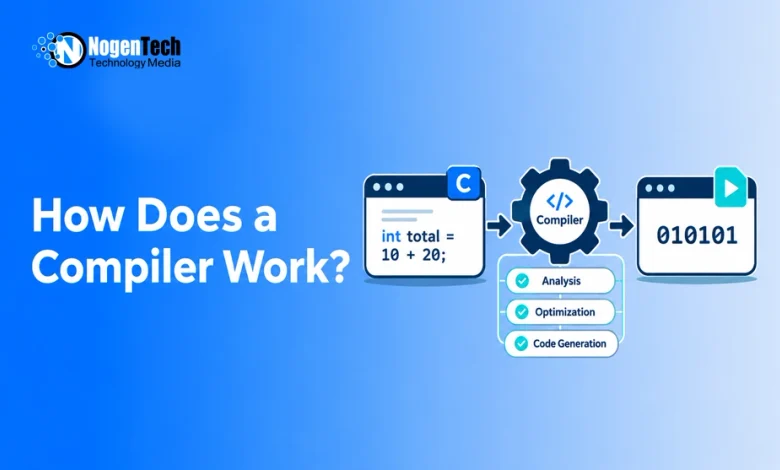
Your C program looks like a collection of readable instructions. But your processor doesn’t understand int total = 10 + 20; in the same way you do. Something has to translate those instructions into a form the processor can execute. That’s where a compiler comes in.
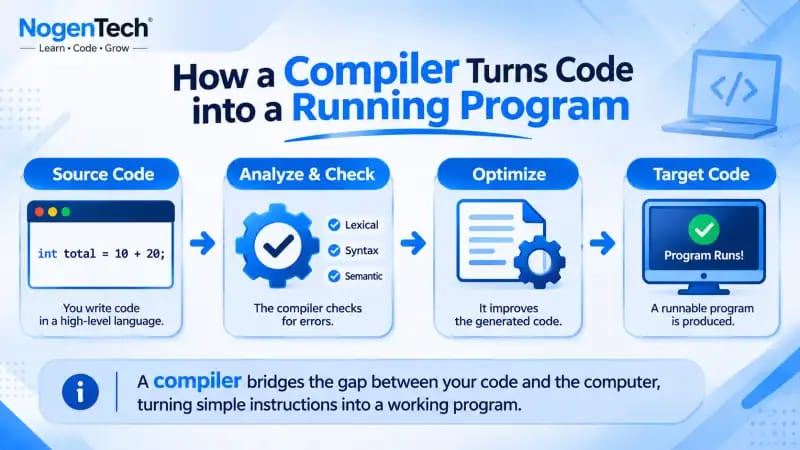
So, how does a compiler turn C code into executable instructions? Let’s first understand what a compiler is and why programmers need one.
What Is a Compiler and Why Do Programmers Need One?
A compiler is a software program that translates source code written in one programming language into another form, usually a lower-level language such as assembly language, object code, or machine code.
Programmers use high-level languages such as C and C++ because abstractions like functions in C or object-oriented programming features in C++ make complex logic easier to write. However, processors cannot execute classes, objects, or variables directly; they only understand low-level machine instructions.
A compiler bridges this gap by analyzing the source code, checking its structure and meaning, and generating suitable target code. For example, consider this simple C statement:
int total = 10 + 20;A programmer can understand that it declares an integer variable named total and assigns it the result of adding 10 and 20.
The compiler processes this statement and generates an appropriate representation for the target system. Depending on the compiler and its configuration, that output may be intermediate code, assembly language, an object file, or machine code.
The 6 Stages of Compilation: A Step-by-Step Journey
A compiler does not usually translate an entire program in one simple step. Instead, it processes the source code through several stages, with each stage handling a particular task. The typical compilation pipeline looks like this:
Source Code → Lexical Analysis → Syntax Analysis → Semantic Analysis → Intermediate Code Generation → Code Optimization → Code Generation → Target Code
Here’s a quick overview:
| Stage | Main purpose |
| Lexical Analysis | Converts source code into tokens. |
| Syntax Analysis | Checks whether tokens follow the language’s grammar. |
| Semantic Analysis | Checks the meaning and correctness of statements. |
| Intermediate Code Generation | Creates an intermediate representation (IR). |
| Code Optimization | Improves efficiency without changing the intended behavior. |
| Code Generation | Produces code for the target platform. |
Let’s examine what happens at each stage.
1. How Does Lexical Analysis Turn Source Code into Tokens?
Lexical analysis is the first major phase of compilation. It examines the source code character by character and groups meaningful sequences into smaller units called tokens.
A component known as a lexical analyzer, or lexer, performs this task. For example, consider this statement:
int result = a + b;The lexer identifies the following tokens:
| Token | Type |
| int | Keyword |
| result | Identifier |
| = | Assignment operator |
| a | Identifier |
| + | Arithmetic operator |
| b | Identifier |
| ; | Punctuation or separator |
These tokens are passed to the next stage for further analysis. The lexer can also identify invalid characters or malformed tokens and report lexical errors.
2. How Does Syntax Analysis Check Whether Code Follows Language Rules?
After tokenization, the compiler checks whether the tokens follow the grammar rules of the programming language. This stage is called syntax analysis or parsing. A component called a parser examines how tokens are arranged and determines whether the program follows the expected structure.
Consider this valid C statement:
int number = 10;Now compare it with:
int number = ;The second statement contains a syntax error because the assignment operator has no expression after it.
During parsing, the compiler commonly builds a parse tree or an abstract syntax tree (AST). These structures represent the organization of the program and make later analysis easier.
3. What Happens During Semantic Analysis?
A program can follow the grammar rules of a programming language and still contain errors related to meaning. Semantic analysis checks whether the statements make sense according to the language’s rules.
For example:
 int age = 25;

age = "hello";
Although the statements have a recognizable structure, assigning a string value to an integer variable creates a type-related problem in C. Semantic analysis can identify issues such as:
- Undeclared variables
- Incompatible data types
- Invalid function calls
- Incorrect use of operators
- Type mismatches
- Scope-related problems
The compiler also checks information about variables, functions, and their types to make sure different parts of the program are being used correctly. Once the code is verified, the compiler needs a form that is easy to optimize and not tied to any one language.
4. Why Does a Compiler Generate Intermediate Code?
After analyzing the source program, a compiler may convert it into an intermediate representation (IR). Intermediate code sits between the original programming language and the final target code.
It provides a common representation that the compiler can analyze and optimize without working directly with either the original source syntax or processor-specific instructions. For example, this expression:
total = price + tax;Could be represented in a simplified intermediate form as:
 t1 = price + tax

total = t1
This is an illustrative representation; actual intermediate formats vary between compiler implementations. Using an intermediate representation also makes it easier to support multiple programming languages and target architectures within the same compiler infrastructure.
5. How Does Code Optimization Make Programs More Efficient?
Code optimization automatically improves the efficiency of the generated machine code without changing what the program does. Unlike refactoring legacy code, where developers manually restructure source code to make it cleaner and easier to maintain, compiler optimization happens behind the scenes to make the final executable faster or smaller. Consider this example:
int result = 10 * 5;A compiler may calculate the constant expression during compilation and replace it with:
int result = 50;This technique is known as constant folding. Other common compiler optimization techniques include:
- Dead code elimination: Removes code that does not affect the program’s result.
- Constant propagation: Replaces variables with known constant values where appropriate.
- Common subexpression elimination: Avoids repeatedly calculating the same expression.
- Loop optimization: Improves the way certain loop operations are performed.
- Strength reduction: Replaces expensive operations with simpler alternatives when appropriate.
- Register allocation: Makes effective use of the processor’s available registers.
Not every compiler performs every optimization. The techniques used depend on the compiler, target architecture, and selected optimization settings. For example, developers can explore GCC optimization options to understand how different optimization levels affect generated code.
6. How Does Code Generation Produce Target Instructions?
Code generation converts the compiler’s processed representation into code for the target platform. Depending on the compiler, the output may include:
- Assembly language
- Object code
- Machine instructions
- Bytecode
- Another target representation
The generated instructions must be suitable for the intended processor or runtime environment. For example, a compiler targeting an x86-64 processor generates instructions appropriate for that architecture, while a compiler targeting ARM may produce a different instruction sequence.
This is why the same source program may need to be compiled separately for different platforms. Now that we know what each stage does, let’s see how these stages are organized inside a real compiler.
How a Compiler Works: Understanding Its Three Main Stages
The six compilation stages describe individual tasks, while compiler architecture explains how those tasks are organized. Many modern compiler systems divide their architecture into three major parts: the front end, middle end, and back end.
This modular design allows a single compiler infrastructure to support vastly different paradigms from procedural languages like C to functional programming languages by swapping out the front end while reusing the optimization and code-generation stages.
Front End: Understanding the Source Program
The front end handles the language-specific parts of compilation. It generally performs lexical analysis, syntax analysis, and semantic analysis before producing an initial intermediate representation.
Its main responsibility is to understand the source code and represent its meaning in a form that later stages can process.
Middle End: Optimizing the Intermediate Representation
The middle end works mainly with the intermediate representation.
It performs transformations and optimizations that are not necessarily tied to a particular processor. For example, it may simplify expressions, remove unnecessary operations, and improve the structure of the intermediate code.
Back End: Generating Code for the Target Processor
The back end focuses on producing code for the target platform.
It may perform:
- Machine-specific optimization
- Instruction selection
- Register allocation
- Final code generation
This separation makes it easier for compiler systems to support multiple programming languages and hardware targets. Different language front ends can potentially share the same optimization infrastructure and target-specific back ends.
Common Compiler Classifications and Their Uses
Compilers can be classified in different ways, depending on where they run, when they generate code, and how they process or translate programs. These classifications describe different aspects of compiler design rather than mutually exclusive categories.
| Classification | How it works | Typical use |
| Native Compiler | Runs on a platform and generates code for the same platform. | Building desktop applications for the system on which the compiler runs. |
| Cross Compiler | Runs on one platform but generates code for a different target platform. | Developing software for embedded devices, ARM processors, and other systems with limited development resources. |
| Source-to-Source Compiler (Transpiler) | Translates code from one high-level language or language version into another. | Converting TypeScript into JavaScript or translating newer language features into older syntax. |
| JIT Compiler | Compiles code into machine instructions while a program is running. | Improving the performance of frequently executed code in runtime environments such as the Java Virtual Machine. |
| AOT Compiler | Generates target code before the program starts running. | Building applications that are compiled ahead of execution rather than during runtime. |
| Single-Pass Compiler | Processes source code in one main pass. | Language implementations where a simpler compilation process and lower processing overhead are priorities. |
| Multi-Pass Compiler | Processes a program through multiple passes, with each pass handling particular analysis or transformations. | Complex compiler systems that perform advanced analysis and optimization. |
What is a bootstrap compiler?
Bootstrapping is a compiler-development technique in which a compiler is built using an existing compiler or an earlier version of itself. A compiler written in the same language that it compiles is commonly called a self-hosting compiler.
For example, developers may use an existing compiler to build an initial version of a new compiler. That version can then be used to compile later versions of itself.
One important distinction: These classifications are not mutually exclusive. They describe different aspects of compilation. For example, a compiler can be both native and AOT, while another can be cross-compiling and use multiple passes.
The same distinction applies to modern language implementations. Java source code, for example, is commonly compiled into bytecode, which the Java Virtual Machine can interpret or compile further using JIT techniques. Python implementations can also use compilation and bytecode internally.
Compiler, Assembler, and Linker: How They Work Together to Build Software
A compiler, assembler, and linker are connected in a software build process, but they perform different tasks.
- Compiler: Translates high-level source code into a lower-level representation, such as assembly code or object code.
- Assembler: Converts assembly-language instructions into machine code, usually producing an object file.
- Linker: Combines object files and required libraries, resolves external references, and produces an executable or another linked output.
If a function is declared but never defined in any linked file or library, the linker reports an undefined-reference error.
A simplified build process for a C program looks like this:
Source Code → Preprocessor → Compiler → Assembler → Linker → Executable File
The loader then places the executable into memory so the operating system can begin running it.
These steps may be handled through a single development command, even though several different tools are involved. Reading about this is useful, but following a small program makes it clearer.
Practical Example: How to Compile and Run a C Program Using GCC
Seeing how preprocessing, compiling, and linking fit into a broader software development workflow makes debugging build errors much easier. Let’s walk through a hands-on example using a basic C program and GCC.
Step 1: Write a Simple C Program
Create a file named hello.c and add the following code:

hello.c into an executable binary using the GCC compiler in the terminal. #include <stdio.h>
int main() {
int first = 10;
int second = 20;
int result = first + second;
printf("The result is: %d\n", result);
return 0;
}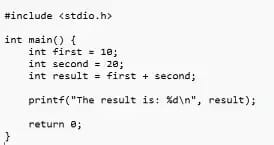
hello.c) adding two integer variables and printing the result.The program declares two integer variables, adds their values, and displays the result.
Step 2: Compile the Source Code with GCC
Open a terminal in the directory containing hello.c and run:
gcc hello.c -o hello
hello.c into an executable binary using the GCC compiler in the terminal.Here is what the command means:
- gcc calls the GNU Compiler Collection’s C compiler driver.
- hello.c is the input source file.
- -o hello specifies the name of the generated executable.
If compilation succeeds, GCC creates an executable named hello on typical Linux systems. On Windows, the executable may be named hello.exe, depending on the GCC toolchain.
Step 3: Execute the Compiled Program
On Linux or macOS, run:
./helloOn Windows, run:
.\hello.exeThe expected output is:
The result is: 30
./hello.exe program in the terminal and displaying the output The result is: 30.Step 4: See the Assembly Code Generated by the Compiler
We can also ask GCC to generate assembly output:
gcc -S hello.c -o hello.sThis creates an assembly source file named hello.s.
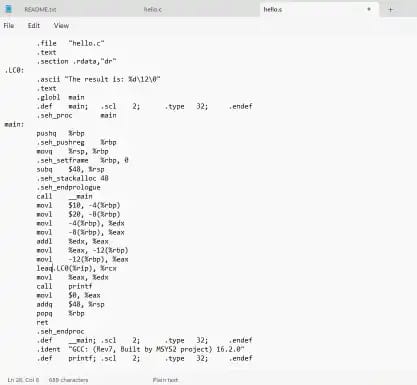
hello.s) translated from the C source file by GCC.The assembly instructions will depend on your processor architecture and compiler settings.
Step 5: Generate an Object File Without Linking
To create an object file without linking it into a complete executable, run:
gcc -c hello.c -o hello.oThe output is an object file named hello.o.

hello.c into an unlinked object file (hello.o) using the gcc -c flag and verifying its creation.An object file contains machine-code-related information and other data needed by the linker. It is not necessarily a complete, independently runnable program.
What Can We Learn from This Compilation Experiment?
This experiment demonstrates the relationship between source code, assembly output, object files, and executables.
It also highlights the difference between compiling a source file and linking a complete executable. A typical build can involve several tools working together, even when a single GCC command starts the process.
Strengths and Limitations of Compiled Languages
Compilers offer several benefits, but they also introduce some development considerations.
Advantages:
- Efficient execution: Native machine code can often execute efficiently because much of the translation happens before runtime.
- Early error detection: Compilers can identify many syntax, type, and other statically detectable problems before execution.
- Code optimization: They can improve generated code by removing unnecessary operations and simplifying instructions.
- Cross-platform development: Cross-compilers make it possible to develop applications for different processor architectures.
Limitations:
- Platform dependency: Native executables generally need to match the target operating system and processor architecture.
- Rebuilding: Developers may need to rebuild an application after making source-code changes.
Key Compiler Technologies Behind Today’s Programming Languages
Modern compiler systems do much more than translate source code. They also provide infrastructure for optimization, portability, and hardware-specific code generation.
LLVM: A Reusable Compiler Infrastructure
LLVM is a compiler infrastructure project that provides reusable tools and libraries for building compiler systems.
It supports intermediate representations and optimization techniques that can be used by different language front ends and target back ends.
GCC: A Widely Used Compiler Collection
The GNU Compiler Collection (GCC) is one of the most widely used compiler collections, supporting languages such as C and C++.
It offers various optimization options and supports multiple target architectures, allowing developers to compile programs for different platforms.
Alongside LLVM, GCC demonstrates how modern compiler technologies handle code optimization, support different programming languages, and generate machine code for different hardware architectures.
Frequently Asked Questions About Compilers
1. Does Every Programming Language Require a Compiler?
No, not every programming language requires a traditional compiler. Some languages use interpreters, while others combine compilation and interpretation to execute programs.
2. Can a Compiler Detect All Programming Errors?
No, a compiler cannot detect every programming error. It can identify issues such as syntax and certain semantic errors, but logical mistakes and some runtime errors may only become apparent when the program executes.
3. Is Compiled Code Always Faster Than Interpreted Code?
Not necessarily. Compiled code often runs faster because it can be translated into machine code before execution. However, actual performance depends on the language, compiler optimizations, runtime environment, and program design.
4. What Is Incremental Compilation?
Incremental compilation is a process in which a compiler recompiles only the parts of a program affected by recent changes instead of rebuilding the entire project. This can reduce compilation time, especially in large software projects.
5. Can Different Compilers Produce Different Machine Code From the Same Source Code?
Yes, different compilers can generate different machine code from the same source code. Their optimization techniques, compilation settings, and target architectures can affect the resulting output, even when the program behaves the same way.